


Most law firms lose potential clients before a human ever responds. Someone fills out a contact form at 9 PM, and by the time the office opens the next morning, that lead has already called two other firms. Marketing automation for law firms solves this exact problem, it keeps your firm responsive, organized, and in front of prospects without adding more hours to your day.
At Client Factory, we build client acquisition systems for law firms, and automation sits at the core of nearly every strategy we implement. We’ve tested, configured, and run campaigns through dozens of platforms, so we know which tools actually move the needle on lead nurturing, intake, and follow-up, and which ones just look good in a demo. That hands-on experience is what shaped this list.
Below, we break down the six best marketing automation tools for law firms in 2026, covering what each one does well, where it falls short, and which type of firm it fits best. Whether you’re a solo practitioner trying to stop leads from slipping through the cracks or a mid-size firm ready to scale intake, you’ll find a platform here that matches your needs.
1. Client Factory
Client Factory is a full-service client acquisition agency that specializes in law firms and service businesses. Rather than giving you a software platform to manage yourself, Client Factory builds and runs your entire acquisition system for you, from ad campaigns and landing pages to automated follow-up sequences and intake workflows.

What it automates for law firms
The automation covers the full lead-to-client pipeline. When someone fills out a form, a sequence fires immediately: SMS and email follow-ups go out, appointment booking is triggered, and the lead gets routed to the right team member. This is marketing automation for law firms handled at the system level, not just the tool level. Client Factory connects paid traffic from Google, Facebook, and YouTube to backend nurturing so no lead sits unanswered regardless of when it comes in.
Most firms lose clients because follow-up is slow or inconsistent. Client Factory removes that problem by automating the entire response process from the first touch.
Best fit and best use cases
This service fits law firms that want a done-for-you model and have no interest in managing software themselves. The strongest results come from personal injury, family law, criminal defense, and immigration practices. It also works well for firms already running paid ads that aren’t converting those leads at the rate they should be.
Setup, integrations, and time to launch
Client Factory’s team handles every part of the build, including CRM configuration, funnel setup, and ad account integration. You don’t need to connect tools yourself or train staff on new software. Most firms are fully operational within two to three weeks of starting onboarding.
Limits and trade-offs to know
Because this is a managed service, you don’t get direct hands-on access to adjust workflows or campaigns on your own. Firms that want full internal control over every setting will find this model restrictive. It’s designed for owners who prioritize outcomes over operational involvement.
Pricing approach
Client Factory works on custom pricing tied to your firm’s specific goals and ad spend. There’s no public rate card, but you can request a free funnel audit to evaluate your current setup before committing to anything.
2. Lawmatics
Lawmatics is a legal-specific CRM and marketing automation platform built exclusively for law firms. It handles the intake and follow-up process inside a single system designed around how legal practices actually operate.
What it automates for law firms
The platform automates client intake forms, lead follow-up sequences, appointment reminders, and document collection. When a new lead comes in, Lawmatics triggers email and SMS workflows automatically, keeping prospects engaged without any manual effort. It’s one of the more focused approaches to marketing automation for law firms available today.
Lawmatics keeps your intake process moving even when your staff is unavailable, which reduces the risk of losing a lead to a faster competitor.
Best fit and best use cases
Lawmatics works best for small to mid-size firms that want a purpose-built tool rather than a generic CRM requiring heavy customization. It performs particularly well for practices in these areas:
- Family law
- Estate planning and probate
- Immigration
Setup, integrations, and time to launch
The platform connects with Clio Manage, QuickBooks, and Google Calendar. Most firms get fully operational within one to two weeks, though building complete automation sequences takes additional configuration time depending on your firm’s complexity.
Limits and trade-offs to know
Lawmatics carries limited paid advertising integration, so firms running active ad campaigns may find the reporting shallow. It’s strong on intake but less capable on the traffic generation and conversion side.
Pricing approach
Subscription plans at Lawmatics are tiered by firm size and features. Rates vary by tier, and you can request a demo to review full pricing details before committing.
3. HubSpot
HubSpot is a general-purpose CRM and marketing platform that law firms adapt for contact management, lead nurturing, and intake follow-up. It wasn’t built for legal practices, but its flexible automation engine makes it workable for firms willing to invest time in configuration.
What it automates for law firms
HubSpot automates email sequences, contact segmentation, lead scoring, and task routing. When a prospect submits a form, HubSpot triggers a multi-step follow-up workflow with no manual input required. For firms building marketing automation for law firms around inbound leads, the Workflows tool is the centerpiece of that system.
HubSpot gives you deep automation capability, but you’ll spend real time configuring it before it fits a legal intake process.
Best fit and best use cases
This platform suits mid-size to larger firms that have a dedicated marketing resource in-house. It performs well for practices running content-driven inbound strategies alongside paid advertising.
Setup, integrations, and time to launch
HubSpot connects with Google Ads, Gmail, Outlook, and Zoom, among many others. Most firms complete basic setup in two to four weeks, with more complex workflows taking additional time depending on your intake structure.
Limits and trade-offs to know
The platform includes no legal-specific intake features natively. Configuring it for a law firm workflow requires custom builds, which adds setup time and demands some technical skill from your team.
Pricing approach
HubSpot offers a free tier with limited features. Paid tiers (Starter, Professional, Enterprise) scale by contact volume and feature access, so costs increase as your firm’s database and automation needs grow.
4. Clio Grow
Clio Grow is the client intake and CRM component of the Clio legal software suite. It pairs naturally with Clio Manage, making it a practical choice for firms already inside the Clio ecosystem.
What it automates for law firms
Clio Grow automates intake questionnaires, follow-up emails, appointment scheduling, and e-signature collection. When a prospective client submits an inquiry, the platform kicks off a structured intake workflow that moves the contact toward a consultation without staff manually chasing them. For firms evaluating marketing automation for law firms, Clio Grow handles the intake layer effectively.
The tightest value Clio Grow offers is the direct handoff from intake to matter management inside a single connected system.
Best fit and best use cases
This platform suits small to mid-size firms already using Clio Manage who want intake automation without adding a separate tool to their stack. Estate planning, family law, and general practice firms tend to get the most out of it given their structured, repeatable intake needs.
Setup, integrations, and time to launch
Clio Grow connects directly with Clio Manage, Outlook, and Google Calendar. Firms already on Clio can expect a setup window of roughly one week since the core configuration carries over from existing account settings.
Limits and trade-offs to know
The platform offers limited automation depth outside of intake. Advanced lead nurturing sequences and multi-channel follow-up require a separate tool layered on top.
Pricing approach
Clio Grow is priced per user per month and is available as a standalone product or bundled with Clio Manage. You can review current tiers directly on Clio’s website.
5. LeadDocket
LeadDocket is a lead management and intake platform built specifically for law firms and legal marketing agencies. It focuses on tracking where leads come from and automating the follow-up process so your team can spend time on consultations rather than chasing contacts.

What it automates for law firms
LeadDocket automates lead capture, SMS and email follow-up, appointment scheduling, and intake workflows. When a new lead arrives from any source, the platform triggers a response sequence immediately and logs every interaction for your team to review.
LeadDocket’s strength is its lead source tracking, which shows you exactly which marketing channels are producing clients, not just clicks.
Best fit and best use cases
This platform works best for high-volume personal injury and mass tort firms that handle large numbers of inbound leads from multiple paid channels at once. For firms running marketing automation for law firms at scale, LeadDocket’s reporting layer gives you a clear view of which campaigns are actually converting.
Setup, integrations, and time to launch
LeadDocket connects with Google Ads, call tracking platforms, and major legal CRMs. Most firms complete initial setup in one to two weeks with support from the LeadDocket team included.
Limits and trade-offs to know
The platform is narrowly focused on intake and lead tracking, so it doesn’t replace a broader CRM or handle post-retention client communication. Firms that need full-lifecycle automation will need a second tool running alongside it.
Pricing approach
LeadDocket uses custom pricing based on firm size and lead volume. You can request a demo to get a specific quote for your practice.
6. Salesforce Account Engagement
Salesforce Account Engagement (formerly Pardot) is an enterprise-grade marketing automation platform built for B2B organizations. Law firms typically adopt it when they need deep CRM integration with Salesforce’s core platform and want sophisticated automation across large contact databases.
What it automates for law firms
Account Engagement automates email nurturing campaigns, lead scoring, form submissions, and prospect tracking. When a contact interacts with your website or marketing content, the platform logs that activity and triggers follow-up sequences automatically. For firms exploring marketing automation for law firms at the enterprise level, the scoring and grading system helps your team prioritize the leads most likely to convert.
The lead scoring feature alone can reshape how your intake team allocates time each day.
Best fit and best use cases
This platform fits large law firms or multi-practice groups already running Salesforce CRM at the organizational level. You’ll get the most from it when a dedicated marketing team manages campaigns and maintains the system.
Setup, integrations, and time to launch
Account Engagement connects natively with Salesforce CRM and Google Ads. Expect a setup window of four to eight weeks given the platform’s configuration depth and the custom mapping your team will need to complete.
Limits and trade-offs to know
The platform carries no legal-specific features, and its configuration complexity demands real technical resources to set up correctly. Smaller firms will find it difficult to justify both the cost and the maintenance burden.
Pricing approach
Salesforce Account Engagement starts at $1,250 per month for the Growth tier, making it a significant investment suited only to firms with established marketing budgets and dedicated staff to manage it.
Next Steps
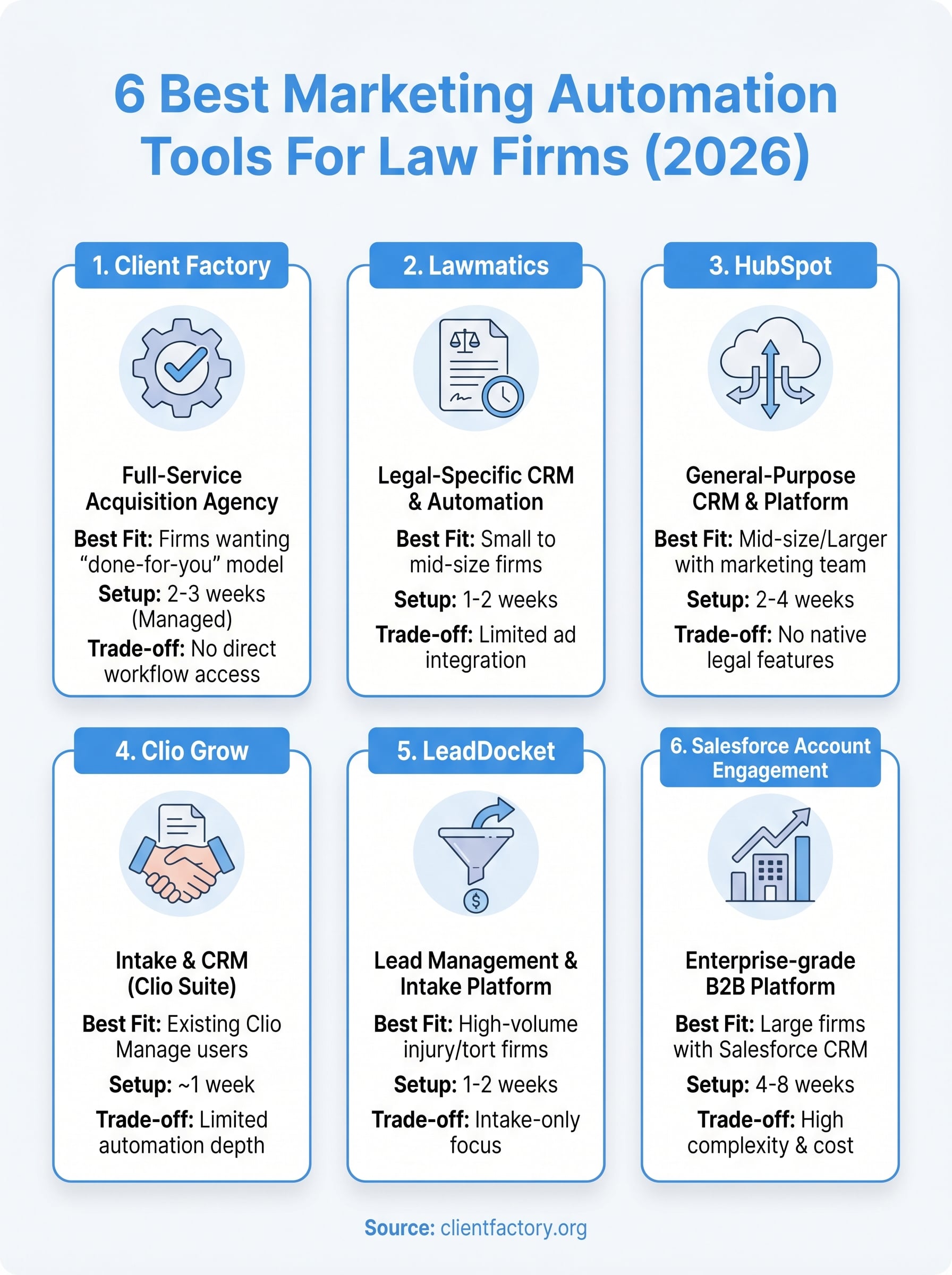
Every firm on this list solves a different piece of the client acquisition puzzle. Lawmatics and Clio Grow handle intake. LeadDocket tracks lead sources. HubSpot and Salesforce Account Engagement give you broader automation at the cost of configuration work. Client Factory handles everything from ad traffic to booked consultations, without putting the technical burden on your team.
Choosing the right approach to marketing automation for law firms comes down to one question: do you want to manage a tool, or do you want to manage outcomes? If your priority is a predictable stream of qualified clients rather than a software dashboard, a done-for-you model removes the guesswork entirely.
Your next move is straightforward. Book a free funnel audit and let our team show you exactly where your current intake process is losing clients and what it would take to fix it.
