

LinkedIn gives you something no other ad platform can: the ability to target people based on their actual job title, company, and seniority level. That makes LinkedIn Ads audience targeting one of the most powerful tools available for reaching decision-makers in specific industries, especially if you’re selling B2B services.
But powerful doesn’t mean simple. LinkedIn offers dozens of targeting criteria, layered logic operators, and audience expansion settings that can either sharpen your campaigns or drain your budget fast. The difference between a high-performing campaign and an expensive flop often comes down to how precisely you’ve built your audience.
At Client Factory, we manage paid advertising across multiple platforms for service businesses and law firms, and we’ve seen firsthand how the right LinkedIn targeting setup can turn a modest ad spend into a steady flow of qualified leads. This guide breaks down every targeting option available to you, walks through the AND/OR logic that controls how criteria combine, and shares the best practices we rely on to keep audience sizes optimized and cost-per-lead under control.
What LinkedIn uses to build ad audiences
LinkedIn pulls audience data directly from member profiles, which means the targeting criteria you work with reflects what professionals actively self-report about their careers. That’s a real advantage over platforms that infer job role from browsing behavior. When you set up LinkedIn Ads audience targeting, you’re choosing from six main data categories, and understanding what each one covers helps you decide which combination will get your ads in front of the right people.
Professional attributes
Professional attributes let you target based on what someone does and how experienced they are in their career. These are the most commonly used criteria in B2B campaigns because they describe a person’s actual role in an organization. You can target by job title, job function, seniority, years of experience, and member skills.
- Job title: Matches people based on the current title listed on their profile (e.g., "General Counsel" or "VP of Operations")
- Job function: Broader than title, this targets by department (e.g., Legal, Finance, IT, Marketing)
- Seniority: Filters by level, such as Director, VP, C-Suite, or Entry
- Years of experience: Useful for excluding junior roles or reaching tenured decision-makers specifically
- Member skills: Based on skills listed on profiles, such as "Business Development" or "Contract Negotiation"
Job title targeting is the most precise professional filter on LinkedIn, but it can reduce audience size significantly. Pair it with job function or seniority to recover reach without losing relevance.
Company attributes
Company-level targeting lets you define the type of organization you want to reach, not just the person inside it. You can filter by company name (ideal for account-based marketing), company industry, company size, company revenue, and company growth rate.
These filters work especially well when you know the profile of your ideal client. If you serve mid-size professional services firms, you can layer company size (51-200 employees) with industry (Legal Services or Accounting) to eliminate unqualified impressions before a single dollar is spent.
Interests, groups, and demographics
LinkedIn also lets you target based on member interests and the LinkedIn Groups people have joined. Interests are inferred from the content members engage with on the platform, covering categories like Leadership and Management, Business Strategy, and Technology. Groups targeting connects you to niche professional communities organized around a specific topic or industry.
Demographics include age and gender, though LinkedIn recommends using these sparingly to avoid narrowing your audience unnecessarily. They’re more useful for excluding certain segments than for building precise positive targeting layers.
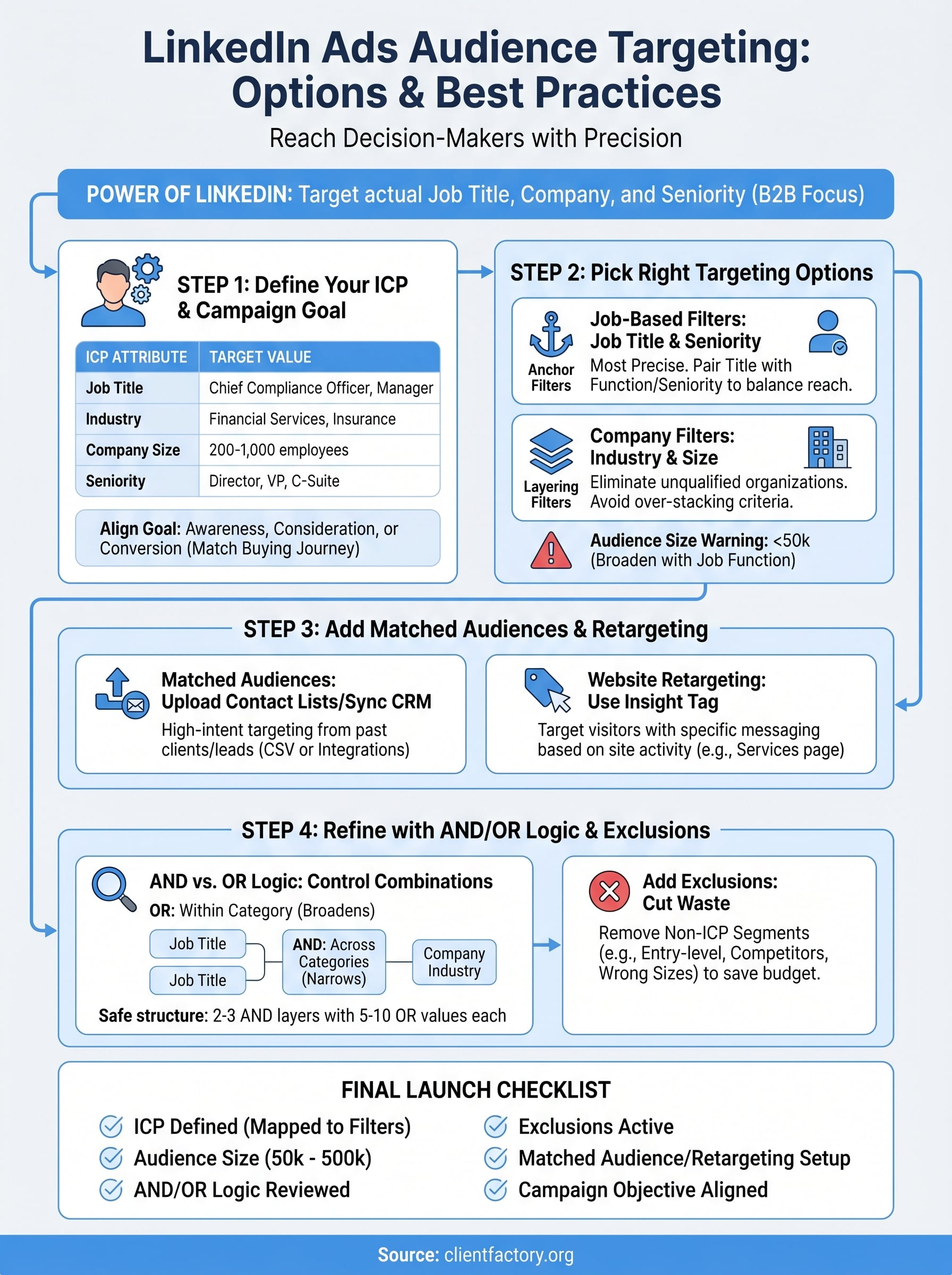
Step 1. Define your ICP and campaign goal
Before you touch a single targeting setting, you need to know who you’re trying to reach and what you want them to do. Skipping this step is the fastest way to waste budget on technically correct but strategically useless targeting. Your ideal client profile (ICP) and campaign goal are the two inputs that every other targeting decision should flow from.
Build your ICP first
Your ICP answers the question: what does my best client look like professionally? Think through the job title they hold, the industry their company operates in, the size of their organization, and how much authority they have over purchasing decisions. A law firm targeting corporate compliance officers, for example, would map an ICP like this:
| Attribute | Target Value |
|---|---|
| Job title | Chief Compliance Officer, Compliance Manager |
| Industry | Financial Services, Insurance |
| Company size | 200-1,000 employees |
| Seniority | Director, VP, C-Suite |
The more specific your ICP, the easier it is to choose LinkedIn targeting criteria that map directly to real audience segments without guessing.
Align your goal to a campaign objective
LinkedIn’s campaign objectives control how the platform optimizes ad delivery, and they fall into three stages: awareness, consideration, and conversions. Your goal should match where your audience currently sits in their buying journey. If they’ve never encountered your brand, start with awareness. If you’re targeting warm leads who’ve already visited your site, move directly to a conversion objective.
Picking the wrong objective means your linkedin ads audience targeting optimizes for the wrong action entirely. A conversion-stage offer shown to a cold audience with an awareness objective wastes both impressions and money. Map your goal first, then build your audience around it.
Step 2. Pick the right targeting options
Once your ICP is defined, translate each attribute into the corresponding LinkedIn targeting filter. The goal is to match your ICP criteria directly to the options available in LinkedIn’s Campaign Manager without overloading the audience with too many restrictive layers at once. A clean, focused setup outperforms a complex one nearly every time.
Start with job-based filters
Job title and seniority are your anchor filters because they define who sees your ad at the individual level. Start by entering the job titles from your ICP, then add seniority as a secondary filter to catch relevant people whose titles don’t match exactly but whose level does. This combination keeps your linkedin ads audience targeting precise without collapsing your audience size to the point where delivery suffers.
If your audience drops below 50,000 members, LinkedIn will warn you. Swap job titles for job function plus seniority to broaden reach while keeping role relevance intact.
Here’s a quick mapping template to translate your ICP into filters:
| ICP Attribute | LinkedIn Filter to Use |
|---|---|
| Job title | Job Title (Professional Attributes) |
| Department | Job Function |
| Decision-making level | Seniority |
| Years in role | Years of Experience |
| Specific expertise | Member Skills |
Layer in company filters
After setting your job-based filters, add company-level criteria to eliminate organizations that don’t fit your service. Company industry and company size are the two most reliable additions. If you serve mid-size legal or financial firms, combine industry with a size range like 51-500 employees to immediately cut out enterprise accounts and solo practitioners who fall outside your scope.
Avoid stacking more than three to four targeting criteria in a single audience group. Adding more filters compounds restrictions and can shrink your audience below the threshold needed for effective delivery.
Step 3. Add matched audiences and retargeting
Matched audiences let you bring your own data into LinkedIn’s targeting system, which means your linkedin ads audience targeting no longer has to rely solely on profile attributes. You can upload contact lists, connect your CRM, or sync your website visitors to build audiences from people who have already had some contact with your business. This layer is where cold targeting ends and high-intent audience building begins.
Upload your contact list or sync your CRM
LinkedIn accepts contact uploads as a CSV file containing email addresses, which it then matches against member profiles. The match rate typically falls between 50-70%, so upload a list large enough that your usable audience stays above the 300-member minimum required for matched audiences. You can also connect directly to platforms like HubSpot or Salesforce through LinkedIn’s native integrations to keep the list updated automatically.
Use this template when formatting your CSV upload:
| Column Name | Format | Example |
|---|---|---|
| Lowercase, plain text | jane.doe@company.com | |
| First Name | Optional | Jane |
| Last Name | Optional | Doe |
| Company Name | Optional | Acme Legal Group |
A matched audience built from past clients or warm leads will almost always outperform a cold profile-based audience on cost-per-lead.
Set up website retargeting
Website retargeting requires the LinkedIn Insight Tag installed on your site, which fires a cookie when visitors land on your pages. Once you have at least 300 matched visitors, you can create a retargeting audience scoped to specific URLs, such as a services page or pricing page, and serve those visitors a different ad than someone seeing your brand for the first time. This keeps your messaging aligned with where each person actually stands in their decision process.
Step 4. Refine with AND/OR logic and exclusions
LinkedIn’s AND/OR logic controls how your targeting criteria combine, and getting it wrong can either collapse your audience or open it to people who have no reason to buy from you. Every audience group you build in Campaign Manager applies OR logic within a single targeting category and AND logic between different categories. That distinction shapes your entire linkedin ads audience targeting setup.
Use AND logic to narrow, OR logic to expand
Within a single targeting category, such as job title, LinkedIn applies OR logic by default, meaning a member only needs to match one of the titles you enter to qualify. Across different categories, LinkedIn applies AND logic, meaning a member must satisfy every category you add. Use this to your advantage by loading multiple values inside a single category (OR broadens reach) and stacking different categories against each other (AND tightens focus).
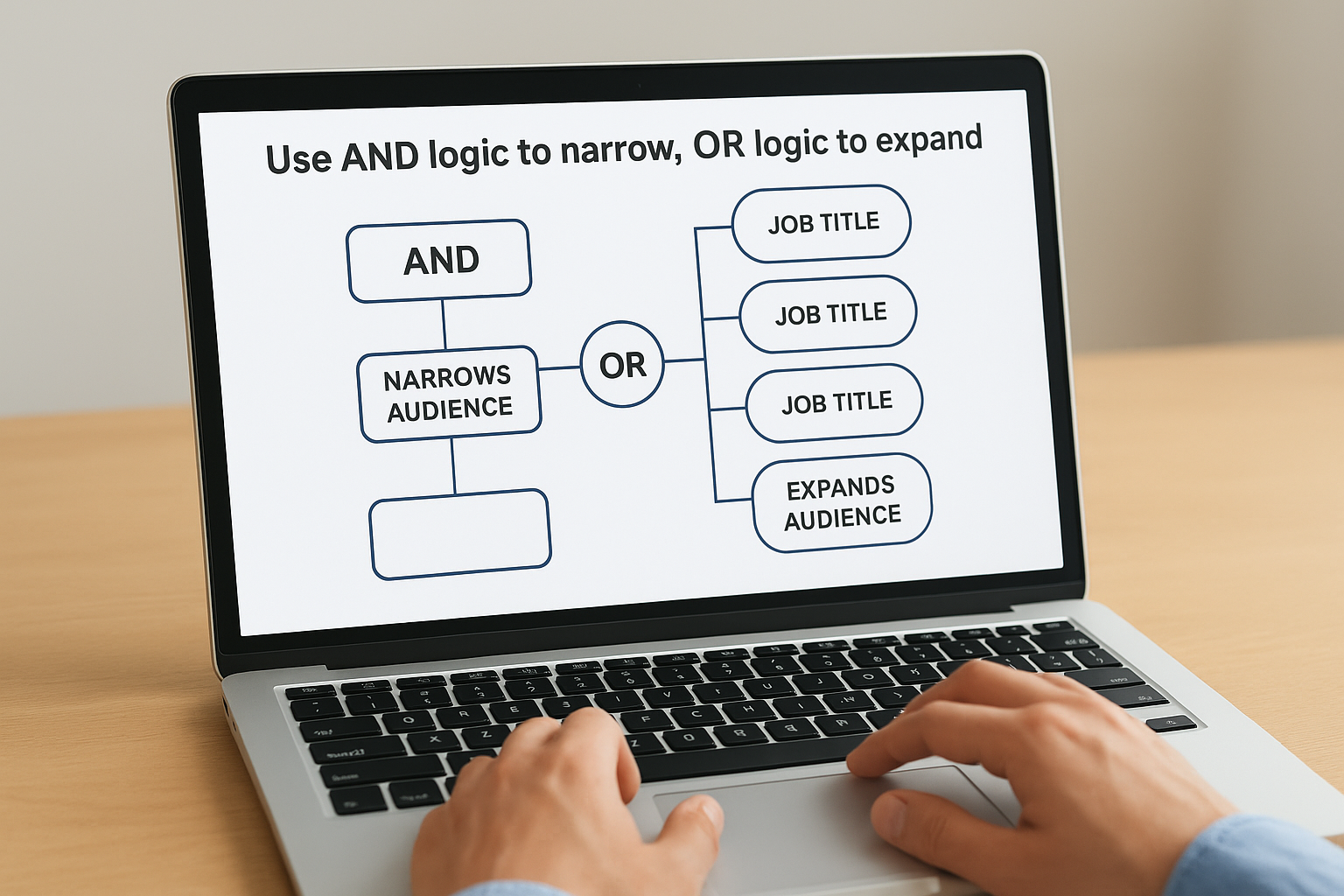
The safest structure for most B2B campaigns is two to three AND layers with five to ten OR values inside each one.
Here is a simple logic map to guide your setup:
| Logic Type | Where It Applies | Effect |
|---|---|---|
| OR | Within a category (e.g., multiple job titles) | Broadens audience |
| AND | Across different categories | Narrows audience |
Add exclusions to cut waste
Exclusions remove segments that would otherwise consume budget without converting. The most common exclusions to add are company size ranges that fall outside your ICP, seniority levels like Entry or Training, and specific company names if you want to block competitors or existing clients from seeing your ads. You apply exclusions in the same Campaign Manager panel as your targeting filters, under the "Exclude" toggle for each category. Start with at least two exclusion layers on every campaign before you launch.
Final launch checklist
Before you push your campaign live, run through this checklist to confirm your linkedin ads audience targeting is set up correctly and your budget is protected from day one.
- ICP defined: Job titles, seniority, industry, and company size mapped to specific LinkedIn filters
- Audience size: Between 50,000 and 500,000 members for most campaign types
- AND/OR logic reviewed: Multiple values within each category, two to three categories stacked across groups
- Exclusions active: Entry-level seniority, out-of-scope company sizes, and competitor accounts removed
- Matched audience uploaded: Contact list or CRM sync confirmed with at least 300 matched members
- Insight Tag firing: Website retargeting audiences verified through LinkedIn’s tag manager
- Campaign objective aligned: Awareness, consideration, or conversion selected to match your audience’s buying stage
Your targeting setup determines everything that follows. If you want a second set of eyes on your funnel before you spend a dollar, book a free conversion audit and we will review it with you.
