

TikTok has over 1.5 billion monthly active users, and the advertising platform gives you surprisingly granular control over who sees your ads. But here’s the problem: most advertisers either go too broad and burn budget, or go too narrow and starve their campaigns of data. Getting TikTok ads audience targeting right is the difference between profitable scaling and expensive guesswork.
At Client Factory, we manage paid advertising campaigns across multiple platforms for service businesses and law firms. TikTok’s targeting dimensions work differently from Meta or Google, and understanding those differences matters before you spend a dollar.
This guide breaks down every targeting dimension available in TikTok Ads Manager, demographics, interests, behaviors, custom audiences, and lookalikes, along with practical best practices for each. Whether you’re launching your first TikTok campaign or trying to improve ROAS on existing ones, you’ll walk away with a clear framework for building audiences that actually convert into leads and clients.
What you can target on TikTok and what you cannot
TikTok Ads Manager gives you several targeting dimensions, but a few important ones that exist on other platforms are missing or restricted. Before you build your first TikTok ads audience targeting strategy, you need a clear map of what’s available and what’s off the table.
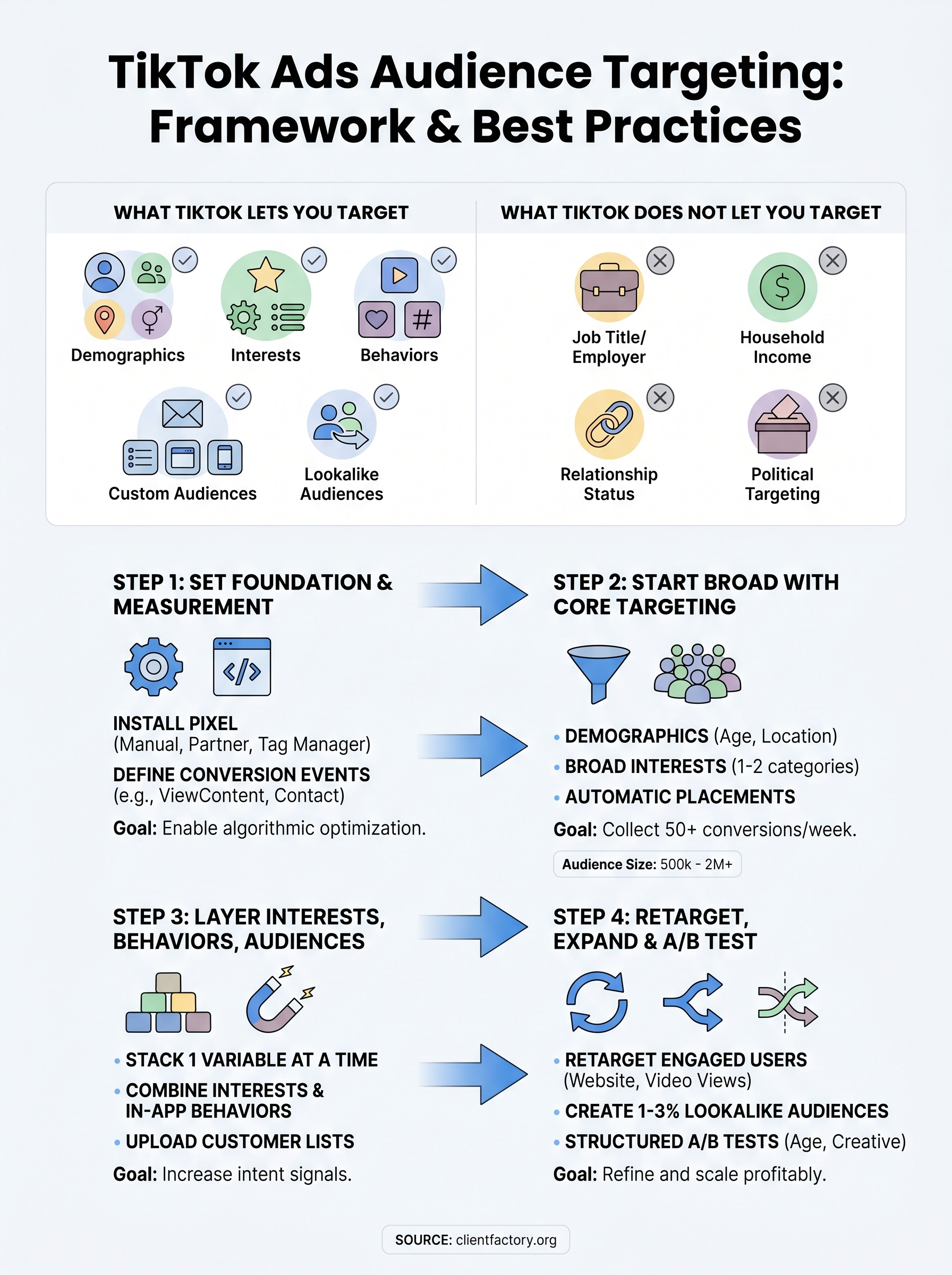
What TikTok does let you target
Five main categories make up TikTok’s targeting system. Demographics cover age groups (13-17, 18-24, 25-34, 35-44, 45-54, 55+), gender, location down to the city level, and language. Device targeting lets you filter by device type, operating system, carrier, and connection type, which is useful if your offer depends on a specific mobile experience.
| Targeting Dimension | Options Available |
|---|---|
| Demographics | Age, gender, location, language |
| Interests | 24+ broad categories with sub-categories |
| Behaviors | Video interactions, creator follows, hashtag engagement |
| Custom Audiences | Customer lists, website visitors, app activity, engagement |
| Lookalike Audiences | Based on any custom audience you upload or create |
TikTok’s behavioral targeting is based entirely on in-app activity, which makes the intent signals more reliable than you might expect from a short-video platform.
What TikTok does not let you target
Several options you’d find on Meta or Google do not exist on TikTok. You cannot target by job title, industry, or employer the way LinkedIn does. TikTok also does not offer keyword-level search intent targeting, household income brackets, or relationship status filters. Political targeting is restricted platform-wide.
For service businesses and law firms, this creates a real constraint. You cannot directly filter for signals like "small business owner" or "recently separated." Instead, you build those audiences through interest stacking, behavioral signals, and custom audience uploads, which the following steps walk through in detail.
Step 1. Set goals, pixel, and events
Before you touch any TikTok ads audience targeting settings, you need your measurement foundation in place. Without a properly installed TikTok Pixel and defined events, the algorithm has no signal to optimize toward, which means your targeting decisions are guesswork rather than data.
Install the TikTok Pixel
Install the pixel through TikTok Ads Manager by navigating to Assets > Events > Web Events. Choose one of these three installation methods:

- Manual code – paste the base code directly into your site’s
<head>tag - Partner integration – connect through Shopify, WordPress, or Google Tag Manager natively
- Tag manager – deploy via an existing container without modifying site code
For service businesses, place the pixel on every page of your website, including your contact, thank-you, and booking confirmation pages.
Define your conversion events
Once the pixel fires, set up standard events for the actions that matter most to your business. For law firms and service businesses, these typically are:
- ViewContent – someone visits a key service page
- Contact – someone submits a lead form
- CompleteRegistration – someone books a consultation
Without conversion events firing correctly, TikTok cannot optimize your campaign for the outcomes that matter to your business.
Map each event in Ads Manager under Web Events > Manage, and verify they fire correctly using the TikTok Pixel Helper Chrome extension before launching any campaign.
Step 2. Start broad with core targeting
When you launch your first TikTok ads audience targeting campaign, resist the urge to layer on every filter available. TikTok’s algorithm needs at least 50 conversion events per week to exit the learning phase, and a hyper-narrow audience prevents that. Start broad and let the machine learning find what converts.
Set your demographic foundation
Your demographic settings form the baseline of every campaign. For service businesses, age and location are the only non-negotiable filters at launch. A law firm in Dallas should target ages 25-54 in Texas, not the entire country. Apply gender targeting only when your offer clearly skews one direction based on prior data.
An audience size of 500,000 to 2 million gives TikTok enough room to optimize without spreading spend across irrelevant users.
Use automatic placement and broad interests
Set ad placements to Automatic so TikTok distributes delivery across its full inventory. Pair this with one or two broad interest categories rather than stacking five narrow ones. A practical starting template for a service business looks like this:
- Placement: Automatic
- Age: 25-54
- Location: Target state or metro area
- Interests: 1-2 broad categories relevant to your service
- Daily budget: Enough to generate at least 5 conversions per day
Step 3. Layer interests, behaviors, and audiences
Once your broad campaign collects two to three weeks of conversion data, you can begin adding specificity to your TikTok ads audience targeting. Layering works best when you add one variable at a time so you can isolate what’s actually driving better results, rather than changing everything at once and losing track of what moved the needle.
Target by interests and behaviors
TikTok’s interest categories cover 24+ verticals, but behavioral signals give you sharper intent. Behaviors track what users do inside TikTok: videos they watch, accounts they follow, and hashtags they engage with. For a law firm, combining "Legal Services" as an interest with behaviors like watching legal or finance-related content creates a more qualified audience pool than either filter alone.

Stacking more than three interest categories in one ad group dilutes your signal and makes it harder to identify which layer is driving conversions.
Build and stack custom audiences
Custom audiences let you move beyond guessing. Upload your existing client email list under Assets > Audiences > Upload Customer File to build a seed list. From there, create a website custom audience from pixel visitors, an engagement audience from users who interacted with your TikTok profile, and a video audience from users who watched 75% or more of your ads. Run each as a separate ad group so performance data stays clean.
Step 4. Retarget, expand, and A/B test
After two to three weeks of data collection, your pixel events and custom audiences are populated enough to start retargeting and testing at scale. This is where your TikTok ads audience targeting strategy shifts from building reach to converting the users who already know your business.
Build your retargeting layers
Retargeting on TikTok works by serving ads to users who completed a specific action inside or outside the app. Create separate ad groups for each of these retargeting pools to keep your performance data clean and comparable:
- Website visitors in the last 30 days (exclude users who already converted)
- Video viewers who watched 75%+ of your ads in the last 14 days
- Profile engagers from the last 30 days
Retargeting audiences are typically small, so set a lower daily budget and accept higher CPMs in exchange for the warmer intent signal.
Expand and run structured A/B tests
Once your retargeting campaigns are running, build 1-3% lookalike audiences from your strongest custom audience seed, whether that’s your converted client list or your highest-value website visitors. Then test one variable at a time: age range, interest category, or ad creative. Structure each test as a separate ad group with identical budgets and a minimum seven-day run before drawing any conclusions from the data.
Wrap up and refine your targeting
TikTok ads audience targeting is not a one-time setup. You set your pixel, launch broad, layer in interests and behaviors, then shift into retargeting and lookalike expansion. Each phase feeds the next, and each week of data makes your decisions more precise and less expensive. The biggest mistake most advertisers make is pulling levers too early, before the algorithm has enough signal to tell them anything meaningful.
Treat your audience settings as a living document, not a launch checklist. Review performance by audience segment every two weeks, cut what underperforms, and reinvest into what converts. If your cost per lead is climbing, start by checking your audience overlap and frequency, not just your creative. Small adjustments compound quickly when you apply them to the right data.
If you want a second set of eyes on your current funnel and targeting setup, book a free conversion audit and we will walk through it with you.
