

Most businesses using HubSpot are sitting on a goldmine of untapped conversions. They’ve got the platform, the traffic, and the tools, but their forms underperform, their landing pages leak leads, and their workflows need serious tuning. That’s where HubSpot conversion rate optimization comes in. Done right, it turns your existing HubSpot setup into a machine that converts more visitors into qualified leads without spending another dollar on ads.
At Client Factory, we build and optimize client acquisition funnels for service businesses and law firms every day. We’ve seen firsthand how small, data-driven changes inside HubSpot, a smarter CTA here, a restructured landing page there, can double conversion rates in weeks. The platform gives you powerful tools, but knowing which levers to pull (and when) is what actually moves the needle on your ROI.
This guide breaks down exactly how to optimize your HubSpot ecosystem for more leads. You’ll get actionable strategies for landing pages, forms, CTAs, email workflows, and A/B testing, all specific to HubSpot’s toolset. Whether you’re running HubSpot Free or Enterprise, you’ll walk away with a clear plan to audit what you have and fix what’s broken. Let’s get into it.
What HubSpot conversion rate optimization means
Conversion rate optimization is the process of increasing the percentage of visitors who take a specific action on your site, whether that’s submitting a form, booking a call, or downloading a resource. HubSpot conversion rate optimization goes further than generic CRO advice because it’s tied to a platform that connects your marketing, sales, and service data in one place. That integration matters because you’re not testing button colors in isolation; you’re optimizing a connected system where every change ripples through your entire pipeline, from the first click to the closed deal.
CRO is a discipline, not a one-time fix
Most people treat conversion rate optimization as a quick project. They tweak a headline, swap a CTA, and call it done. But real CRO is an ongoing discipline built on a cycle of measurement, hypothesis, testing, and iteration. Inside HubSpot, that cycle gets faster because your analytics, forms, landing pages, and contact records all live in the same system. That means you spend less time stitching together data from five different tools and more time acting on what the data actually tells you.
The platform you use doesn’t determine your conversion rate. The decisions you make with the data inside it do.
What counts as a conversion in HubSpot
A conversion in HubSpot is any meaningful action a contact takes that moves them closer to becoming a client. That definition is broader than most people realize. HubSpot tracks conversions at the form level by default, counting a submission each time a contact completes any form connected to your portal. But you should also define conversions for other actions depending on where someone sits in your funnel.
Here are common conversion types you should track inside HubSpot:
| Conversion Type | What It Tracks |
|---|---|
| Form submission | Contact, quote request, or lead magnet forms |
| Meeting booking | HubSpot Meetings links on pages or in emails |
| CTA click | Native HubSpot CTAs or custom event tracking |
| Email link click | Links pointing to a conversion page |
| Workflow enrollment | Contact triggers a lead nurturing sequence |
| Deal creation | Lead moves to a sales opportunity |
Knowing which of these you’re optimizing for at each funnel stage is what separates a scattered effort from a focused one. Without that clarity, you end up improving metrics that don’t connect to revenue.
Why HubSpot gives you a structural advantage
HubSpot’s architecture gives you something most standalone CRO tools can’t match: a direct line from marketing activity to closed revenue. When a visitor submits a form, HubSpot creates or updates a contact record, logs the traffic source, triggers relevant workflows, and ties that contact to a deal in your pipeline. That means you can trace a conversion backward to the exact ad, page, or email that generated it, and forward to whether that lead actually became a paying client.
That closed-loop visibility is what makes HubSpot a strong foundation for serious conversion work. Other analytics tools show you bounce rates and session data. HubSpot shows you which landing page variants produced contacts that eventually closed, which is the metric that actually reflects the business value of your optimization work. Generic traffic numbers feel satisfying until you realize they don’t pay the bills. Revenue does.
When you commit to HubSpot conversion rate optimization as a system rather than a collection of isolated tweaks, you stop guessing and start making decisions grounded in real pipeline data. That shift in mindset, from chasing vanity metrics to tracking outcomes, is what separates the businesses that grow from the ones that spin their wheels.
Step 1. Define your conversions and funnel stages
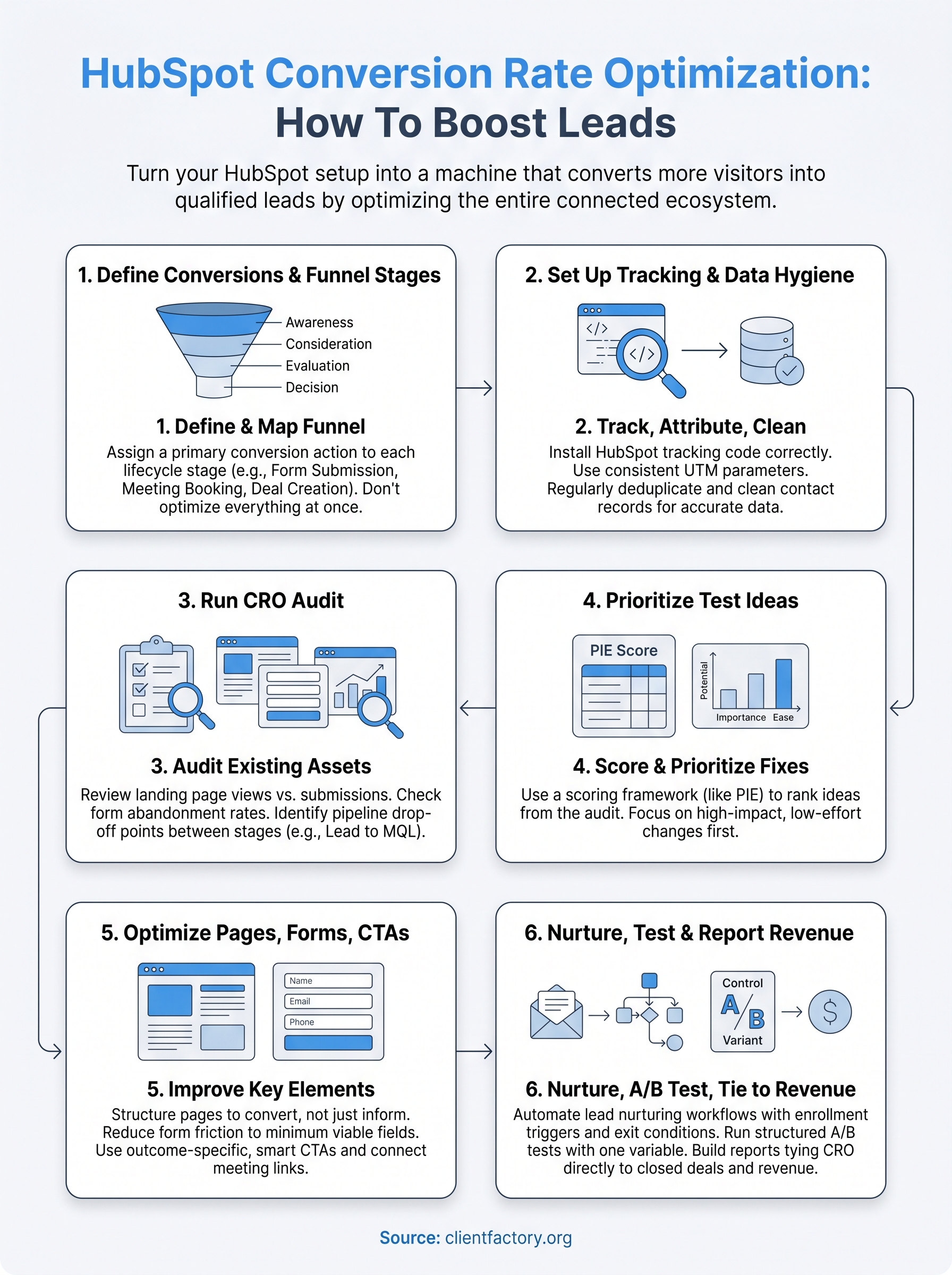
Before you run a single test or touch a single form, you need to know what a conversion means at each stage of your funnel. This is the foundation of every effective hubspot conversion rate optimization effort. Without this clarity, you’ll end up optimizing pages that don’t matter or chasing metrics that have no connection to revenue. Define your conversions first, and everything that follows becomes far more focused and measurable.
Map your funnel stages before you touch anything
Your funnel has multiple stages, and each one requires its own conversion definition. HubSpot’s default lifecycle stages (Subscriber, Lead, Marketing Qualified Lead, Sales Qualified Lead, Opportunity, Customer) give you a ready-made framework to build on. The goal is to map a specific, trackable action to each stage so you know exactly what success looks like at every point in the buyer’s journey. For service businesses and law firms, this mapping work often reveals that a stage is either missing a clear trigger or has no measurable action tied to it at all.

Here’s a practical template you can adapt directly inside your HubSpot portal:
| Funnel Stage | HubSpot Lifecycle Stage | Primary Conversion | HubSpot Tool |
|---|---|---|---|
| Awareness | Subscriber | Blog or resource opt-in | Embedded form |
| Consideration | Lead | Contact or inquiry form | Landing page form |
| Evaluation | MQL | Free consultation request | Meetings link |
| Decision | SQL | Proposal sent or call booked | Deal + workflow |
| Closed | Customer | Contract signed | Deal stage update |
Trying to optimize every stage at once spreads your effort thin. Start with the stage where your biggest volume of leads drops off, and work outward from there.
Assign a primary conversion to each stage
Once your stages are mapped, pick one primary conversion per stage and resist the urge to track every possible action simultaneously. If your consideration stage generates plenty of form fills but those leads never advance to MQL, the problem isn’t traffic volume; it’s lead quality or follow-up timing. Defining one clear conversion per stage makes it immediately obvious where to look when a number drops and what to fix first.
Inside HubSpot, use contact properties and lifecycle stage enrollment triggers to automate how contacts move between stages. Set up a workflow that updates a contact’s lifecycle stage the moment they complete your defined conversion action. This keeps your funnel data clean, your pipeline reports accurate, and your team focused on the right opportunities at the right time.
Step 2. Set up tracking, attribution, and data hygiene
Good data is the backbone of any successful hubspot conversion rate optimization effort. If your tracking is broken or your contact records are a mess, every decision you make downstream is built on faulty assumptions. Before you start running tests or rewriting landing pages, spend time getting your tracking setup correct and your contact data clean. This unglamorous work is what separates teams that make confident decisions from teams that spend hours arguing about whose numbers are right.
Install the HubSpot tracking code correctly
The HubSpot tracking code needs to fire on every page of your site, not just your landing pages. Log into HubSpot, go to Settings > Tracking and Analytics > Tracking Code, and copy the snippet. Paste it in the <head> section of every page, or use Google Tag Manager to deploy it sitewide if you’re already managing scripts through there. Once it’s live, verify it using HubSpot’s built-in checker and confirm these three things:
- The code fires on all pages, including thank-you pages and your blog
- Form submissions are logged and tied to the correct contact records
- Traffic sources populate correctly inside contact analytics views
Set up UTM parameters for every campaign
Without consistent UTM parameters, HubSpot cannot attribute conversions to the right source. Every paid ad, email campaign, and social post that sends traffic to your site needs a UTM string. Use the same naming convention across your whole team so your attribution reports stay usable over time. Here’s a simple UTM template to standardize across campaigns:
https://yoursite.com/landing-page
?utm_source=google
&utm_medium=cpc
&utm_campaign=law-firm-leads-q2
&utm_content=headline-variant-a
Inconsistent UTM naming is one of the most common reasons HubSpot attribution data falls apart. Build a shared naming document and treat it as non-negotiable for anyone running campaigns.
Deduplicate and clean your contact records
Dirty contact data inflates your conversion counts and warps your funnel reports. Run a deduplication check using HubSpot’s Contacts > Actions > Manage Duplicates tool at least once a month. Also audit your required form fields to confirm contacts are entering real information rather than placeholder values. A contact record with "test@test.com" as the email address is not a lead; it is noise that corrupts every report you run off that data.
Step 3. Run a CRO audit inside HubSpot
A CRO audit gives you a clear picture of what your current setup is doing wrong before you start changing things. Skipping this step means you fix the loudest problem instead of the most costly one. Your hubspot conversion rate optimization work should always begin with an honest assessment of what exists, not what you assume exists.
Audit your landing pages and forms
Start inside HubSpot by navigating to Marketing > Landing Pages and sorting by views. Look at every page that receives meaningful traffic and pull three numbers for each: total views, form submissions, and submission rate. If a page gets consistent traffic but submits below 10%, that page has a conversion problem worth investigating immediately. If a high-traffic page has zero form activity, your form may not be loading correctly or your CTA is buried too far down.

Run the same check on your forms by going to Marketing > Forms and reviewing the submissions column. HubSpot shows you a breakdown of views versus submissions for each form, which makes it easy to spot underperformers. Look specifically for forms with high abandonment by checking whether contacts start filling them out but never complete the submission. That pattern usually points to too many fields, a confusing layout, or a form that loads slowly on mobile devices.
A landing page with a 3% conversion rate is not a traffic problem. It is a page problem, and the audit is where you prove that with data.
Review your pipeline drop-off points
Pull your funnel report by going to Reports > Reports and building a funnel report tied to your lifecycle stages. This view shows you the percentage of contacts that move from each stage to the next, and it makes your biggest drop-off point obvious. For most service businesses, the sharpest drop happens between Lead and MQL, which usually signals a weak follow-up sequence or a qualification gap in how leads are handled after they convert.
Check your deal pipeline in the same audit pass. Look at average time-in-stage for every deal stage and flag any stage where deals consistently stall. Long stall times are not a sales personality issue; they reflect a process gap that a workflow or better sales enablement content can fix. Document every problem you find in a single spreadsheet with columns for the asset, the current metric, and the expected benchmark so you enter the next step with a prioritized list, not a vague sense of what is broken.
Step 4. Pick test ideas and prioritize what to fix first
Your audit from Step 3 likely produced more problems than you can fix at once. That’s completely normal, and it’s exactly why prioritization matters more than enthusiasm here. The mistake most teams make is jumping straight to the most visible issue without evaluating the effort required against the potential revenue impact. A structured prioritization process keeps your hubspot conversion rate optimization work focused on changes that actually move your pipeline, not just the ones that feel urgent or easy to talk about in a team meeting.
Use a scoring framework to rank your ideas
Scoring your test ideas before you act on any of them forces you to make deliberate trade-offs between high-effort changes and quick wins. The most common framework used for this is PIE: Potential, Importance, and Ease. Score each test idea on a scale of 1 to 5 for each criterion, then average the three scores to get a final priority number. The highest-scoring ideas go to the top of your test queue, and everything else waits its turn.
Here’s a working template you can copy directly into a spreadsheet:
| Test Idea | Potential (1-5) | Importance (1-5) | Ease (1-5) | PIE Score |
|---|---|---|---|---|
| Shorten contact form to 3 fields | 5 | 5 | 4 | 4.7 |
| Rewrite landing page headline | 4 | 5 | 4 | 4.3 |
| Replace PDF CTA with meeting link | 5 | 4 | 3 | 4.0 |
| Add social proof above the fold | 4 | 4 | 3 | 3.7 |
| Test two-step form vs. single form | 3 | 3 | 2 | 2.7 |
Score every idea before acting on any of them. One hour of prioritization saves weeks of wasted testing effort.
Pull test ideas directly from your audit findings
Your audit already did the heavy lifting here. Every underperforming page, abandoned form, or stalled deal stage you documented in Step 3 is a ready-made test candidate. Turn each audit finding into a hypothesis using this format: "If we [change], then [metric] will improve because [reason]." That structure keeps your test ideas specific and gives you a built-in success condition before you launch anything.
For example: "If we reduce the contact form from seven fields to three, then our submission rate will increase because fewer required fields lower the friction for visitors who are still evaluating whether to reach out." That’s a testable, measurable hypothesis tied to a page you already know has a documented problem, which means you’re solving something real rather than guessing.
Step 5. Improve landing pages and key website pages
Your landing pages are where your hubspot conversion rate optimization work becomes visible to real visitors, and they’re where most businesses lose leads they should be closing. The audit you ran in Step 3 already flagged which pages underperform. Now your job is to fix them using a consistent framework so you improve the right elements in the right order, not just the ones that look obvious from a quick scroll.
Structure your page to convert, not just inform
Every high-converting landing page follows a structure that reduces friction and guides visitors toward one specific action. When you build or rebuild a page inside HubSpot’s landing page editor, treat each section as a job that must earn the visitor’s attention before asking for anything in return. Your headline should state the outcome the visitor gets, not a description of your service. Your body copy should address the most common objection, and your form should appear above the fold on desktop.

Use this section-by-section structure as your page template:
| Page Section | What It Must Do | Example |
|---|---|---|
| Headline | State the outcome, not the service | "Get More Clients From Your Website" |
| Subheadline | Qualify who it’s for | "Built for law firms ready to scale" |
| Body copy | Address the top objection | "No long-term contracts. Cancel anytime." |
| Social proof | Build trust before the ask | Client logos, a stat, or a short quote |
| Form/CTA | One clear action above the fold | "Book your free 30-minute audit" |
| Supporting content | Reduce remaining hesitation | Short FAQ or process overview |
Visitors decide within a few seconds whether to stay or leave, so your headline carries more weight than every other element on the page combined.
Fix the elements that kill submissions
Once your structure is correct, focus on the specific page elements that most directly drive or kill your submission rate. Mobile layout is the first thing to check inside HubSpot’s preview tool. If your form stacks awkwardly or your CTA button disappears below the fold on a phone screen, you’re losing a substantial portion of your traffic before they even read your headline. Page load speed is the second priority. A slow page tanks both your conversion rate and your Google search ranking simultaneously, so compress images and remove any scripts that load before your core content renders.
After fixing structure and speed, remove every piece of content on the page that doesn’t directly support the one action you want the visitor to take. Navigation menus, unrelated links, and secondary offers all compete for attention and reduce the likelihood that your visitor completes your primary conversion.
Step 6. Optimize CTAs, forms, and meeting booking
Your CTAs, forms, and meeting booking links are the final gates between an interested visitor and a captured lead. Even with strong landing pages and clean tracking in place, weak form design or a vague CTA kills conversions at the last step. This is one of the highest-leverage areas of hubspot conversion rate optimization because small, specific changes here deliver measurable results fast.
Write CTAs that convert on specificity
Generic CTAs like "Submit" or "Learn More" give visitors no reason to click because they don’t tell anyone what happens next. Replace every generic CTA label inside HubSpot with outcome-specific language that completes the phrase "I want to…" from the visitor’s perspective. "Book My Free Audit" outperforms "Contact Us" consistently because it names the action and the value in one phrase.
Inside HubSpot’s CTA tool, create smart CTAs that display different versions based on a visitor’s lifecycle stage. A first-time visitor should see an offer that lowers the barrier to entry, like a free resource. A returning contact who is already in your pipeline should see a direct call to book a call. Smart CTAs let you deliver the right ask to the right person without rebuilding your pages.
Reduce form friction to the minimum viable ask
Every field you add to a form reduces your submission rate. Your goal is to collect only the information you need to qualify and follow up with a lead, nothing more. For most service businesses, that means three fields at the top of the funnel: name, email, and phone number. Save detailed qualification questions for the follow-up call, not the intake form.
The fastest way to increase your form submission rate is to remove a field, not add a better headline.
Use HubSpot’s progressive profiling feature on embedded forms so returning contacts see new fields instead of ones HubSpot already has on file. This approach lets you gather richer data over time without front-loading your form with friction that pushes first-time visitors away.
Connect your Meetings tool to every high-intent touchpoint
Your HubSpot Meetings link should appear on every page where a visitor has already shown intent: your contact page, your service pages, and inside your email nurture sequences. Place the booking link as a direct button, not buried in a paragraph of text. When a contact books through HubSpot Meetings, the appointment logs automatically to their contact record, giving your sales team full context before the call even starts.
Step 7. Use workflows to increase lead-to-client rate
Most leads that don’t convert into clients don’t disappear because they lost interest. They disappear because no one followed up with the right message at the right time. HubSpot workflows solve that problem by automating your nurture sequences and moving contacts through your pipeline based on actions they actually take, not on a fixed calendar your team manages manually. This is where hubspot conversion rate optimization stops being just a page-level exercise and becomes a full-funnel system.
Build a lead nurturing sequence that moves contacts forward
Your nurture sequence should start the moment a new contact submits a form. The first email in your sequence sets the tone, so send it within five minutes of the form submission using a workflow trigger tied directly to that form. In your first email, confirm what the contact requested, deliver the promised resource or next step, and include one clear call to action that pushes them toward a booking or consultation, nothing else.
Structure your first nurture sequence around three jobs: confirm, educate, and convert. Email one confirms the contact’s action and delivers immediate value. Emails two and three share relevant proof, such as a short case study or a specific result you’ve achieved for a similar client. Email four presents a direct offer with a HubSpot Meetings link. Keep each email short, under 150 words, and test your subject lines using HubSpot’s built-in A/B tool on sends over 1,000 contacts.
A nurture sequence that does not have a direct offer in it is just a newsletter. Build every sequence to end with a specific action you want the contact to take.
Set enrollment triggers and exit conditions correctly
Enrollment triggers determine which contacts enter your workflow, and getting them wrong wastes every email that follows. Inside HubSpot’s workflow builder, set your enrollment trigger to a specific form submission or a lifecycle stage change, not a broad contact property that captures too wide an audience. Narrow enrollment criteria mean every contact in your sequence is actually a fit for the offer you’re making.
Exit conditions are equally important and often skipped entirely. Set an exit condition that removes a contact from the nurture sequence the moment they book a meeting or advance to SQL in your pipeline. Without that exit, contacts receive follow-up emails after they’ve already converted, which damages trust and clutters your contact activity logs with irrelevant data. Inside HubSpot, add the exit condition under workflow settings before you publish the sequence.
Step 8. Run A/B tests and keep your results credible
A/B testing is the engine that turns guesses into decisions, but most teams run tests incorrectly and walk away with false confidence in changes that never actually worked. Solid hubspot conversion rate optimization requires tests that are structured correctly from the start, not salvaged after the fact. HubSpot’s native A/B testing is available for landing pages and marketing emails, and using it well means following a short set of non-negotiable rules before you ever hit publish on a variant.
Choose one variable per test
Testing multiple changes at the same time makes it impossible to know which change produced the result. Isolate exactly one variable per test, whether that’s your headline, your CTA label, your form length, or your hero image. When you run a multivariate test without a large enough sample to support it, your data becomes noise rather than insight. Pick the single element your audit identified as the most likely conversion blocker, build two versions that differ only in that element, and leave everything else identical.

Use this template to document each test before you launch it:
| Field | Details |
|---|---|
| Test name | Contact page form length – July |
| Hypothesis | Reducing fields from 6 to 3 will increase submission rate |
| Variable tested | Number of form fields |
| Control | 6-field form (current) |
| Variant | 3-field form (name, email, phone) |
| Primary metric | Form submission rate |
| Minimum sample size | 500 visitors per variant |
| Test duration | Minimum 2 weeks |
Running a test for three days and declaring a winner is the fastest way to make expensive decisions based on statistical noise.
Know when your test result is real
Statistical significance tells you whether the difference you observed is real or just random variation. HubSpot displays a confidence indicator inside the A/B test results view, but you should also verify your sample size before you stop a test. Aim for 95% confidence before acting on any result, and never end a test early just because one variant is leading in the first few days. Early leads flip constantly until both variants accumulate enough data to reflect actual visitor behavior rather than a spike caused by day-of-week traffic patterns.
Once a test reaches significance with an adequate sample, apply the winning variant, document your result in the same spreadsheet where you logged the hypothesis, and move immediately to your next prioritized test from the PIE score list you built in Step 4.
Step 9. Build reporting that ties CRO to revenue
Most CRO reporting stops at conversion rate, which tells you almost nothing about whether your optimization work is generating actual revenue. The final step in your hubspot conversion rate optimization system is building reports that connect every landing page test, form change, and workflow improvement directly to closed deals and client revenue. Without that connection, you’re measuring activity instead of outcomes, and activity doesn’t pay the bills.
Build a custom funnel report in HubSpot
HubSpot’s Report Builder lets you create funnel reports that track contact movement across every lifecycle stage you defined in Step 1. Go to Reports > Reports > Create Report, select "Funnel" as your report type, and map each stage from Subscriber through Customer. Set the date range to match your test cycles so you can see whether conversion rate changes at the top of the funnel actually produce more customers at the bottom.
A CRO report that doesn’t end with "Customers" as its final stage is measuring effort, not results.
Use these five metrics as the core of your revenue-tied reporting dashboard:
| Metric | Where to Find It in HubSpot | What It Tells You |
|---|---|---|
| Landing page submission rate | Marketing > Landing Pages | Top-of-funnel CRO performance |
| Lead-to-MQL rate | Funnel report by lifecycle stage | Nurture sequence effectiveness |
| MQL-to-SQL rate | Funnel report by lifecycle stage | Lead quality and sales handoff |
| SQL-to-Customer rate | Deal pipeline report | Closing rate from qualified leads |
| Revenue by original source | Contacts > Reports > Attribution | Which channels produce paying clients |
Track attribution back to the source
Attribution reporting closes the loop between your optimization work and the revenue it drives. Inside HubSpot, go to Reports > Attribution and select "First touch" or "Last touch" depending on whether you want to credit the channel that first brought a contact in or the one that pushed them to convert. For service businesses with longer sales cycles, multi-touch attribution gives a more accurate picture because most clients interact with multiple pages and emails before signing.
Run this attribution report monthly and filter by contacts who reached the "Customer" lifecycle stage during that period. That filter strips out all the noise from leads who never converted and shows you exactly which pages, CTAs, and campaigns produced real revenue. Use those findings to decide where to focus your next round of testing, and your optimization work compounds with every cycle you complete.
Wrap-up and next steps
HubSpot conversion rate optimization is not a single tactic; it’s a repeating system. You define your conversions, clean your data, audit what exists, prioritize your fixes, and run structured tests that connect directly to closed revenue. Each step in this guide builds on the one before it, so the compounding effect grows every time you complete a cycle.
Start with the audit in Step 3. That single exercise will surface more actionable opportunities than most teams find in a full quarter of scattered testing. Pick your top-priority fix from the PIE scoring table in Step 4 and run your first test within the next two weeks.
If you want a faster start, we can review your current funnel and show you exactly where your biggest conversion gaps are. Book a free conversion audit call and walk away with a clear, prioritized action plan built around your specific HubSpot setup.
