


More than half of all web traffic now comes from mobile devices, yet most landing pages still look and feel like shrunken desktop sites. If your mobile landing page design isn’t built for how people actually browse on their phones, you’re bleeding conversions. Thumb-friendly layouts, fast load times, and streamlined forms aren’t nice-to-haves anymore. They’re the baseline for pages that actually convert.
At Client Factory, we build and optimize client acquisition funnels for service businesses and law firms every day. That means we spend a lot of time testing what works on mobile, and ripping out what doesn’t. We’ve seen firsthand how a single design change on a mobile page can double form submissions or cut bounce rates in half. The gap between a mediocre mobile experience and a great one is where real revenue hides.
So we pulled together 15 mobile landing page examples that are getting it right in 2026. For each one, we break down what makes the design effective, why it converts, and what you can steal for your own pages. Whether you’re building from scratch or auditing an existing funnel, these examples will give you a concrete playbook, not vague design theory, to make your mobile pages work harder.
Let’s get into it.
1. Client Factory: service business lead-gen page
Client Factory’s mobile landing page design is built for one specific outcome: getting a qualified lead to take action before they leave the page. The layout opens with a direct, outcome-focused headline that speaks to the reader’s actual problem, not a generic tagline about company values or mission. A single prominent CTA button sits right below the headline, so there’s no ambiguity about what to do next.
What you see above the fold
The above-the-fold section strips out everything that doesn’t earn its place on the screen. You see a short, specific headline (something like “Get More Clients for Your Law Firm” rather than “We Grow Businesses”), a brief supporting line that reinforces the promise, and a high-contrast CTA button in a color that stands apart from the background. There’s no navigation menu cluttering the top bar, and no secondary offers competing for your attention. The visual hierarchy points directly at the button.
When the only option above the fold is to convert, more visitors convert.
Conversion triggers to copy
Below the fold, Client Factory leans on social proof and specificity to build trust fast. Short testimonials from real clients appear, each paired with a name and business type so the proof feels tangible rather than fabricated. The copy calls out specific results rather than vague promises, which signals credibility without requiring a wall of text. A secondary CTA button reappears after the testimonials to catch anyone who scrolled past the first one.
Mobile UX and speed notes
The form is short by design: name, phone number, and one qualifying question. On mobile, that means fewer fields to tap through and a faster path to submission. The page loads in under two seconds on a standard mobile connection, which matters because Google’s research shows that each added second of load time measurably increases bounce rate. There’s no heavy video autoplay and no pop-ups blocking the main content area.
Where this pattern fits
This layout works best for service businesses and professional firms that sell high-consideration services, meaning the buyer needs to speak with someone before committing. If your business depends on booked calls, consultations, or inbound quote requests, this stripped-down, trust-first structure gives you a strong starting point. You can adapt the headline copy and proof points to match your specific industry without rebuilding the entire page architecture from the ground up.
2. Uber: schedule a ride mobile page
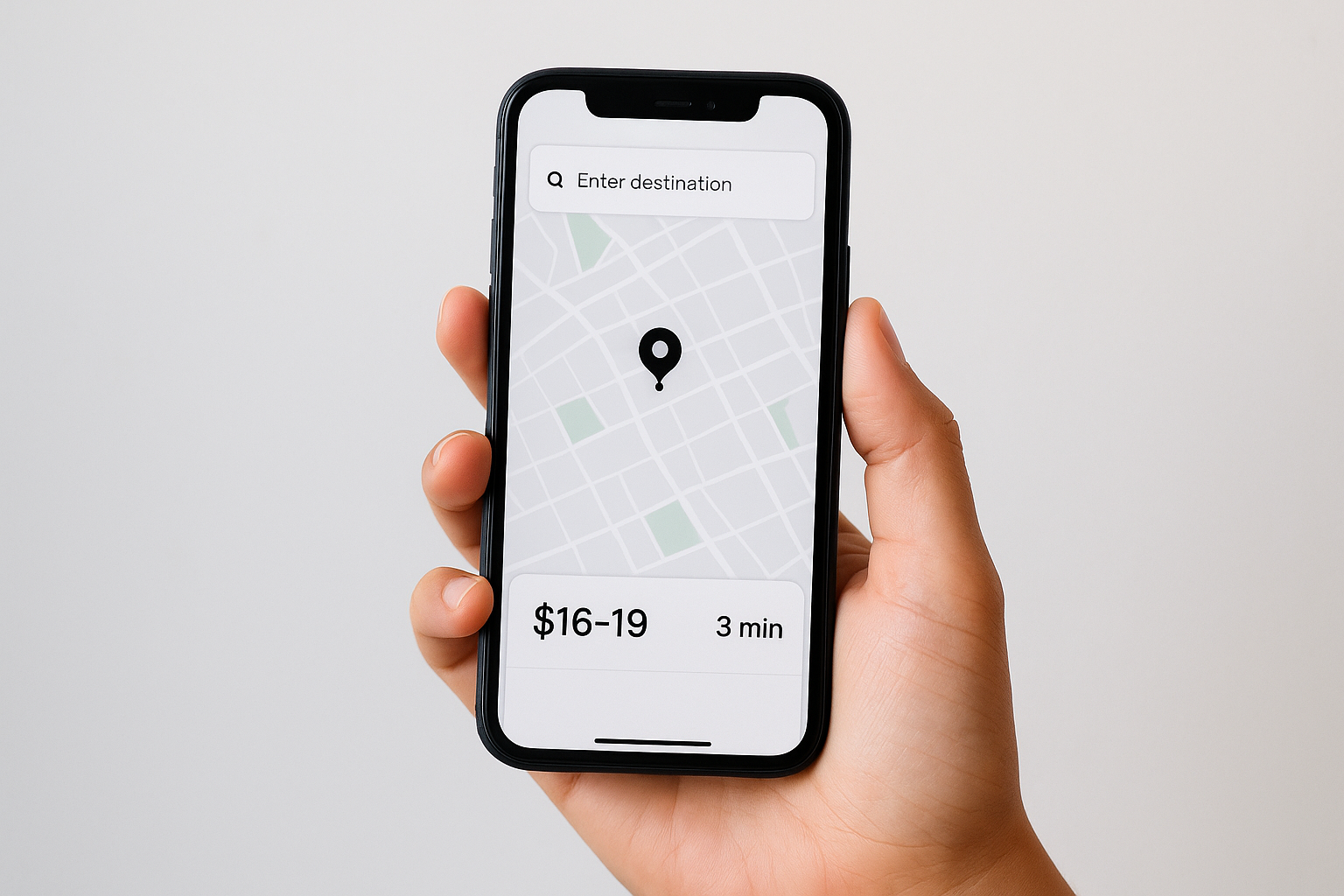
Uber’s mobile landing page design for ride scheduling is a lesson in radical simplicity. The page doesn’t try to explain what Uber is or pitch you on its features. It assumes you already know the product and focuses entirely on getting you to take the next step as fast as possible.
What you see above the fold
The first screen shows a map interface with a destination input field front and center. There’s no hero image, no introductory copy, and no distractions. The entire above-the-fold experience is the product itself, which immediately signals to the visitor that they’re in the right place and one tap away from their goal.
When your product is the proof, lead with the product, not a description of it.
Conversion triggers to copy
Uber uses price estimates and time-to-pickup as its main conversion levers. Showing a fare range before the user commits removes a major objection, and displaying driver availability in real time creates urgency without manufacturing it artificially. Both pieces of information are accurate and immediate, which builds trust faster than any testimonial could.
Mobile UX and speed notes
The page loads almost instantly because it prioritizes functional elements over decorative ones. Input fields are large enough to tap accurately, and the keyboard triggers automatically when the destination field appears. Uber also pre-fills location data when permissions allow, cutting the number of required inputs to almost zero.
Where this pattern fits
This approach works best when your product or service has an interactive component that you can surface directly on the page. App-based services, booking tools, and calculators all benefit from letting visitors engage with the actual functionality rather than reading about it first.
3. Shopify: free trial email-first signup page
Shopify’s mobile landing page design for its free trial strips the signup process down to a single email field front and center. The page bets that the Shopify brand carries enough recognition that you don’t need a long sales pitch before committing your email address. That bet pays off because the friction to start is nearly zero.
What you see above the fold
The above-the-fold layout is almost impossibly clean. A short headline communicates the core offer, and directly below it sits one input field asking only for your email. The CTA button is right there, requiring just one tap to move forward. Shopify deliberately removes navigation links and secondary information so your eye has nowhere to go but the input field.
Conversion triggers to copy
Shopify reinforces the offer with risk-reduction copy placed right below the button: no credit card required, cancel anytime. These two short lines dissolve the most common objections before you even think to raise them. The copy stays short because brevity communicates confidence.
If you need three paragraphs to convince someone to try your product for free, your offer isn’t strong enough.
Mobile UX and speed notes
The email field triggers the correct keyboard type on mobile automatically, which sounds minor but removes a small but real moment of friction. The page is also extremely lightweight, meaning it loads fast even on a slow connection. Shopify keeps image use minimal and relies on typography and whitespace to carry the design.
Where this pattern fits
This email-first structure works best when your brand already carries recognition or your offer is strong enough to stand alone. If you’re running paid traffic to a free trial or free tool offer, starting with a single email field beats a multi-step form almost every time.
4. Canva: start designing CTA-first page
Canva’s mobile landing page design takes a CTA-first approach that puts action before explanation. Rather than walking you through a product tour, Canva opens with an invitation to start creating immediately. The underlying logic is straightforward: the best way to sell a design tool is to get you designing, not reading about designing.
What you see above the fold
The above-the-fold area shows a bold, outcome-focused headline paired immediately with a large, high-contrast “Start designing” button. Canva places this button above any supporting copy, which flips the traditional hero layout. You don’t need to scroll to find the next step because the action step is the first thing you see, which removes the moment of hesitation that kills mobile conversions.
Conversion triggers to copy
Canva backs up the initial CTA with a short list of use cases directly below the fold, each linking to a specific template category. This structure lets you self-select your goal, which personalizes the experience without requiring a quiz or multi-step flow. The page also positions the free tier prominently, dissolving cost as an objection before you reach any pricing information.
Letting visitors self-select their use case is one of the most underused conversion tactics on mobile.
Mobile UX and speed notes
Canva keeps image weight low by relying on text and flat graphics rather than large photographs. The CTA button spans nearly the full screen width, making it easy to tap accurately, and the page avoids nested menus or secondary navigation entirely.
Where this pattern fits
This CTA-first structure suits SaaS tools and creative platforms where the product value is immediately demonstrable. If your offer lets someone accomplish a goal within minutes, lead with the action rather than the explanation.
5. Glints: clean recruiting sign-up page
Glints, a Southeast Asian talent and career platform, takes a no-clutter approach to its recruiting sign-up page. The mobile landing page design makes it immediately clear who the page is for and what happens next, which removes the confusion that typically causes job seekers and recruiters to bounce before they ever engage.
What you see above the fold
The first screen presents a clean headline that speaks directly to the visitor’s goal, whether that’s finding a job or finding talent. Below it, a short role-selector prompt splits the experience into two paths: job seeker or employer. This single choice replaces a long-form page with a focused, relevant flow from the very first tap.
Giving visitors one decision instead of ten is one of the most reliable ways to increase sign-up rates on mobile.
Conversion triggers to copy
Glints supports the sign-up prompt with specific platform stats, such as the number of active job listings or registered companies, placed directly below the CTA. These numbers act as social proof without requiring testimonials, which keeps the page short while still building credibility fast.
Mobile UX and speed notes
The page uses large tap targets for both the job seeker and employer options, making the selection easy regardless of screen size. Form fields appear only after the initial choice, so you never feel overwhelmed by a long list of required inputs upfront.
Where this pattern fits
This two-path structure works well for platforms that serve more than one user type. If your service targets both buyers and sellers, or clients and candidates, splitting the experience at the entry point keeps each audience on a relevant, personalized track without building two separate pages.
6. Promo: lightweight video-first landing page
Promo builds video marketing tools, and their mobile landing page design reflects that by leading with a video rather than a static hero image. The page makes a calculated bet: if you can show a visitor what their output could look like in the first few seconds, you eliminate the need to explain it through long-form copy.
What you see above the fold
The first screen displays a short, auto-playing video with the sound off by default, which respects the mobile browsing norm of silent autoplay. Below the video, a clear headline and CTA button sit close together so the path to signup requires minimal scrolling.
Showing the product in motion does more conversion work than three paragraphs of feature copy ever will.
Conversion triggers to copy
Promo places pricing tiers and a free option within easy reach below the fold, which removes the cost objection before it becomes a barrier. The page also includes short, specific use-case labels like social media ads and product videos, letting you quickly confirm you’re in the right place.
Mobile UX and speed notes
Despite the video element, Promo keeps the page fast by using compressed video files and deferring any non-essential assets until after the initial load. The CTA button stays large and fixed near the bottom of the screen on mobile, so you can act on it without scrolling back up.
Where this pattern fits
This video-first structure works best for creative and media tools where seeing the output immediately answers the question “what does this actually do?” If your product produces a visible result, showing that result on the landing page beats describing it every time.
7. Helix: quiz-driven personalization page
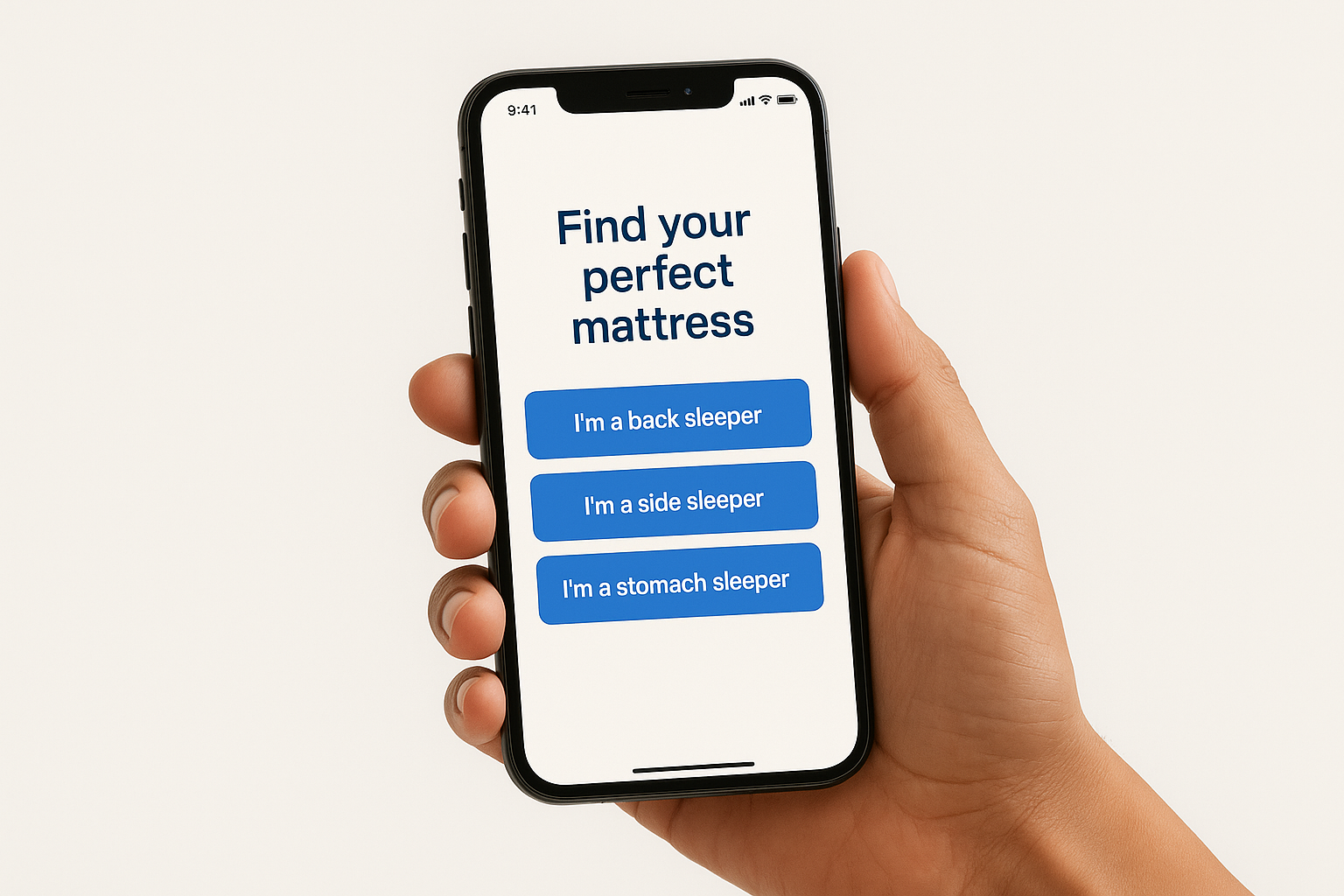
Helix sells mattresses, and buying one involves real personal decisions around firmness, sleep position, and body type. Instead of showing you a product catalog and expecting you to figure it out, Helix’s mobile landing page design opens with a short quiz that matches you to the right mattress before you ever see a price tag. That sequence change alone is responsible for a significant lift in purchase intent.
What you see above the fold
The first screen presents a single question rather than a hero image or product grid. The headline frames the quiz as a benefit to you, something like “Find your perfect mattress,” and the answer options appear as large, easy-to-tap buttons that fill most of the screen. There’s nothing else competing for your attention because Helix removes all navigation and secondary links entirely.
Conversion triggers to copy
Each question moves you one step closer to a personal recommendation, which creates a sense of progress that keeps you engaged through the full flow. By the time Helix presents a product, you feel like it was chosen for you specifically, which lowers resistance to purchase far more effectively than a standard product description would.
Personalization doesn’t just improve relevance. It makes visitors feel heard, and that feeling converts.
Mobile UX and speed notes
The quiz uses large buttons instead of text inputs, so you never have to type on a small keyboard. Each screen loads one question at a time, keeping the interface clean and preventing decision fatigue mid-flow.
Where this pattern fits
Quiz-driven pages work well for any product or service where fit matters, including insurance, health services, and software subscriptions. If your offering has multiple tiers or variations, a short quiz helps visitors self-select the right option rather than bounce from an overwhelming product page.
8. Boostability: autofill form above the fold
Boostability, an SEO services company, builds its mobile landing page design around a short form placed directly above the fold. Rather than burying the form below a long introduction, they front-load the conversion element so that visitors immediately see what they’re expected to do. That structural choice removes the need to scroll before taking action.
What you see above the fold
The opening screen shows a concise headline that names a specific pain point, followed by a compact form with two to three pre-labeled fields. Boostability bets that visitors arriving from paid search already understand their problem and don’t need a full-page pitch before sharing their contact details. The form sits front and center with no competing visual elements pulling your eye elsewhere.
Placing a form above the fold signals to the visitor that the action step is the entire point of the page.
Conversion triggers to copy
Boostability pairs the form with short credibility signals, such as client count or years in operation, placed directly beside it. This proximity means trust and action share the same screen, so you don’t have to scroll to find a reason to fill out the form.
Mobile UX and speed notes
The form fields are sized for easy tapping and support browser autofill, which lets returning visitors complete the form in seconds without typing. The page keeps its load weight low by avoiding large background images and decorative assets.
Where this pattern fits
This structure works well for SEO, marketing, and B2B service companies where visitors arrive from targeted paid campaigns with a clear problem already in mind. If your audience knows what they want, leading with the form beats leading with a sales narrative.
9. ClaimCompass: complex offer made simple
ClaimCompass helps air passengers claim compensation for delayed or canceled flights under EU law, which is exactly the kind of offer that could collapse under its own complexity. Their mobile landing page design sidesteps that problem by translating a legally dense process into a single, clear action that takes under a minute to start.
What you see above the fold
The first screen leads with a direct headline that names the outcome, not the legal process behind it. You see a flight search input field immediately below, asking only for your departure and arrival airports plus your flight date. That’s it. The form removes the legal complexity entirely from the first interaction, so you never have to understand EU Regulation 261/2004 to take the first step.
Hiding the complexity of your process from the user is not dishonest. It’s good design.
Conversion triggers to copy
ClaimCompass uses a “no win, no fee” statement placed directly below the CTA, which dissolves the single biggest objection someone might raise before submitting. They also display the maximum compensation amount in a prominent position, giving visitors a concrete number to anchor their interest before they commit any personal information.
Mobile UX and speed notes
The flight search inputs use pre-built dropdown selectors rather than free-text fields, which prevents typing errors and speeds up completion on a small screen. The page stays lightweight and fast, loading the essential form elements first before pulling in any supplementary content.
Where this pattern fits
This approach works well for legal, financial, and insurance services where the underlying process is complicated but the visitor’s goal is simple. If your offer involves a complex back-end but a clear outcome, lead with the outcome and let your process stay behind the scenes.
10. Country Chic Paint: sticky CTA bar ecommerce page
Country Chic Paint sells furniture and chalk-style paint to a DIY home decor audience, and their mobile landing page design solves one of ecommerce’s biggest mobile problems: the CTA disappearing as visitors scroll through product details. They fix it by pinning a “Shop Now” bar to the bottom of the screen so the purchase option is always one tap away.

What you see above the fold
The opening screen shows a warm, lifestyle-oriented product photo paired with a short headline that speaks to the creative outcome rather than the paint formula. Below that, a brief product description gives you just enough context to confirm you’re looking at the right product. The sticky CTA bar at the bottom of the screen is visible from the moment the page loads, so you never have to hunt for the next step.
A CTA that follows the visitor down the page removes the single biggest reason mobile shoppers abandon a product page before buying.
Conversion triggers to copy
Country Chic uses color swatch selectors placed prominently on the page, letting you make the key product decision without leaving the screen. Customer photos showing real finished projects appear below the product details, which build purchase confidence faster than polished brand photography alone.
Mobile UX and speed notes
The sticky bar stays thin and unobtrusive, so it doesn’t block the product content below it. Page images load in a compressed, fast-rendering format to keep scroll performance smooth even on older devices.
Where this pattern fits
This sticky CTA structure works well for ecommerce pages with detailed product descriptions where visitors need to read before buying but shouldn’t lose the purchase button in the process.
11. Good Eggs: offer-first local delivery page
Good Eggs delivers organic groceries and meal kits to local customers, and their mobile landing page design opens with the offer rather than the brand story. The first thing you see is a discount or free delivery incentive, which answers the question “why should I try this?” before you even think to ask it.
What you see above the fold
The top of the page leads with a specific, concrete offer such as a dollar amount off your first order, placed in a visually prominent position. Below it, a short headline confirms what the service does and who it serves. This sequence puts the value exchange first, which removes the main barrier to trying a new delivery service before you have any reason to trust the brand.
When your strongest conversion argument is a concrete offer, put it at the top of the page, not buried three scrolls down.
Conversion triggers to copy
Good Eggs backs the initial offer with brief credibility signals such as local sourcing claims and delivery speed guarantees placed close to the sign-up field. These short supporting lines give you a reason to trust the offer without requiring a long read.
Mobile UX and speed notes
The sign-up form stays compact and fast to complete, asking only for your zip code or email to get started. The page uses clean typography and minimal imagery, which keeps load times short and keeps the visual focus squarely on the offer itself.
Where this pattern fits
This offer-first structure works well for local delivery and subscription services where the main conversion barrier is trial hesitation. If you’re running a first-order discount or free trial campaign, lead with the offer and let the product details come second.
12. GoBoat: experience-led photo storytelling page
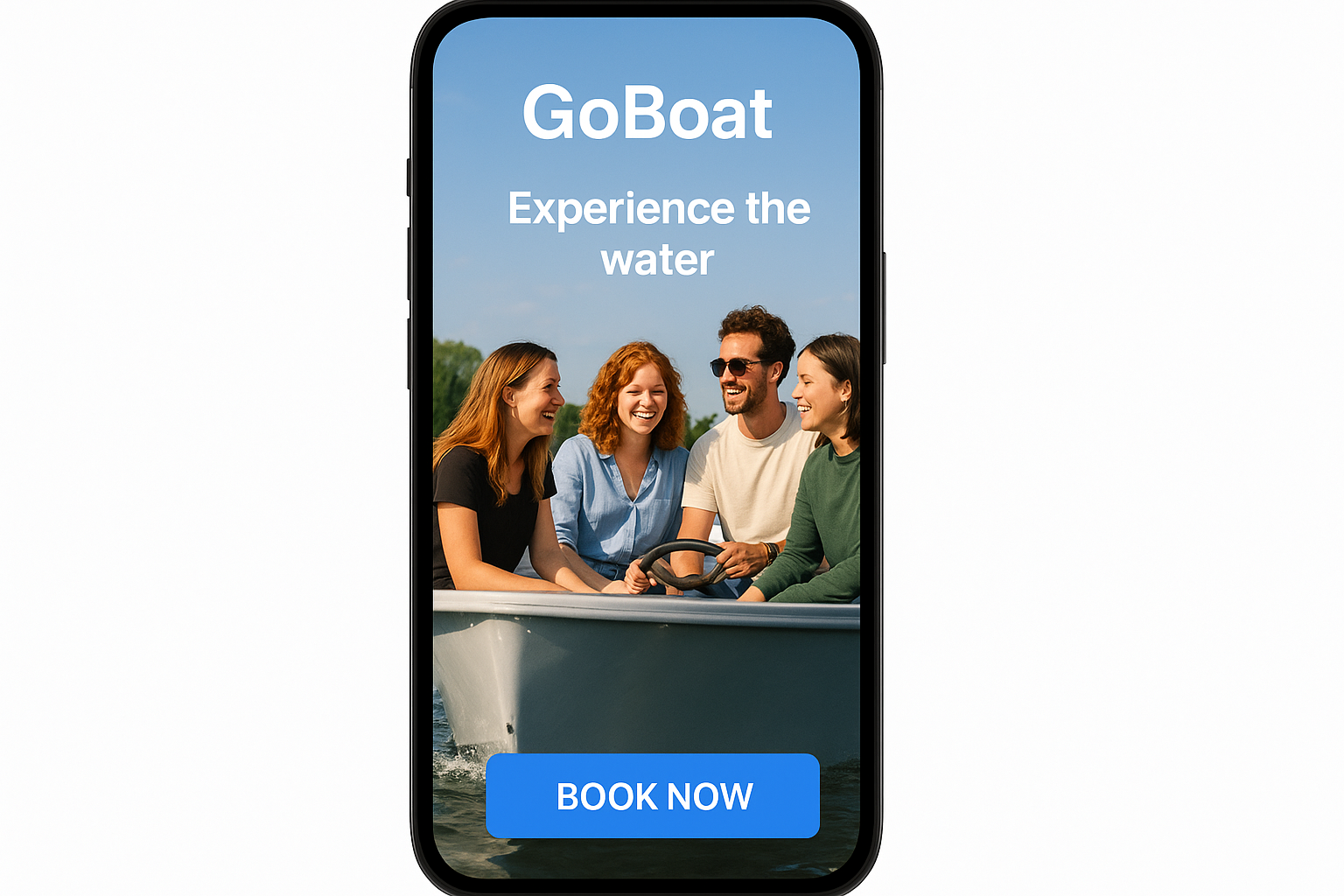
GoBoat rents self-drive electric boats to groups looking for a social outing on the water. Their mobile landing page design leans heavily on high-quality photography to sell the experience before a single word of copy does the heavy lifting. The page answers “what does this feel like?” visually, which is exactly the right question to lead with for an experience-based product.
What you see above the fold
The first screen fills your phone with a large, immersive lifestyle photo showing real people enjoying the boats on open water. A short, atmosphere-setting headline overlays the image, and a high-contrast CTA button anchors the bottom of the screen. The design skips product specs entirely at the top and leads with the emotional outcome instead.
When you sell an experience, the photo is the product description.
Conversion triggers to copy
GoBoat uses short descriptive copy blocks paired with additional photos as you scroll, building a visual narrative that makes the experience feel tangible. Group-size and occasion labels like birthdays, corporate outings, and date nights appear near the booking CTA, which helps you quickly confirm the experience matches what you’re planning.
Mobile UX and speed notes
GoBoat compresses its images aggressively so the visual-heavy page still loads fast on a typical mobile connection. The booking button stays large and consistently accessible throughout the scroll, so you never lose the path to conversion while moving through the photo story.
Where this pattern fits
This structure works best for experience businesses, hospitality brands, and tourism operators where the emotional appeal of the activity sells the offer better than any feature list could.
13. The New York Times: pricing-first subscription page
The New York Times takes an unusual approach to its subscription page by putting pricing options front and center rather than leading with editorial highlights or feature lists. Their mobile landing page design trusts that visitors already understand the product and treats the pricing decision as the real conversion moment worth optimizing around.
What you see above the fold
The first screen presents two or three clearly labeled subscription tiers with their prices displayed in large, readable type. There’s no lengthy intro about journalistic integrity or award-winning coverage. The Times leads with the offer itself, which signals confidence that the brand reputation does the persuasion work before anyone lands on the page.
When your brand is the proof, skip the pitch and show the price.
Conversion triggers to copy
The Times uses a highlighted “best value” label on its recommended tier to guide the decision without forcing it. Short bullet points beneath each tier list specific access benefits like games, cooking, or news-only, so you can quickly match your preference to a plan without reading long descriptions.
Mobile UX and speed notes
The pricing cards stack vertically on mobile rather than sitting side by side, which keeps each option fully readable without horizontal scrolling. The CTA buttons are full-width and clearly differentiated by tier, so your thumb lands on the right option without accidentally selecting the wrong plan.
Where this pattern fits
This pricing-first structure works well for subscription products and media brands where visitors arrive already familiar with the offering. If your conversion barrier is the pricing decision itself rather than product awareness, surface the options immediately instead of making visitors scroll past introductory content to reach them.
14. BeReal: ultra-minimal app download page
BeReal built its identity around authenticity and simplicity, and its mobile landing page design reflects that philosophy completely. The page strips away every element that doesn’t directly support one outcome: getting you to download the app as fast as possible.
What you see above the fold
The opening screen shows almost nothing. A single app icon, a short brand name, and one “Download” CTA button occupy the first view. There’s no feature list, no social proof carousel, and no introductory video. BeReal trusts that the cultural awareness around its brand does the selling before you ever land on the page.
When your brand has strong cultural awareness, a minimal page isn’t lazy. It’s strategically precise.
Conversion triggers to copy
BeReal keeps conversion copy to a single short sentence that communicates the core product idea. Below the button, app store ratings appear as the only credibility signal on the page. That’s it. No testimonials, no press mentions, no benefit bullets. The restraint itself communicates confidence in the product without requiring a word of explanation.
Mobile UX and speed notes
The page loads in under one second because there’s almost nothing to load. The download button links directly to the appropriate app store listing based on device detection, removing the extra step of choosing between iOS and Android manually. That small automation eliminates a real decision point that slows conversions.
Where this pattern fits
This ultra-minimal structure works when your app or product already carries brand recognition strong enough to support a one-tap page. If your audience arrives already curious or pre-sold on what you offer, reducing the page to a single clear action removes every possible reason to hesitate before converting.
15. Square: jargon-free product explanation page
Square sells payment processing and business software to small business owners who are not technical and don’t want to become technical. Their mobile landing page design earns conversions by explaining a product that could easily get tangled in technical language using plain, direct copy that any business owner can understand in under thirty seconds.
What you see above the fold
The first screen opens with a simple, outcome-focused headline that names what Square does for your business rather than describing how its technology works. Below the headline, a short supporting line reinforces the business benefit, and a single CTA button invites you to get started without asking you to read a product manual first.
When your product can confuse people, your landing page copy is your first customer service rep.
Conversion triggers to copy
Square pairs its plain language with short feature callouts that translate technical capabilities into business outcomes. Instead of “API integrations,” you see “works with the tools you already use.” Every line of copy answers a real business owner’s question rather than checking a feature-spec box.
Mobile UX and speed notes
The page keeps its layout minimal and its images functional, using product screenshots rather than abstract graphics. Load times stay fast because Square avoids decorative assets that add weight without adding clarity. Form fields are large and clearly labeled, and the signup flow asks for only the information Square needs to get you started.
Where this pattern fits
This jargon-free structure works well for fintech, SaaS, and B2B tools where plain-language copy outperforms technical descriptions with a non-technical audience. If your product solves a practical problem, explain the solution in plain terms and let the simplicity itself build confidence.
Next steps for your mobile landing page
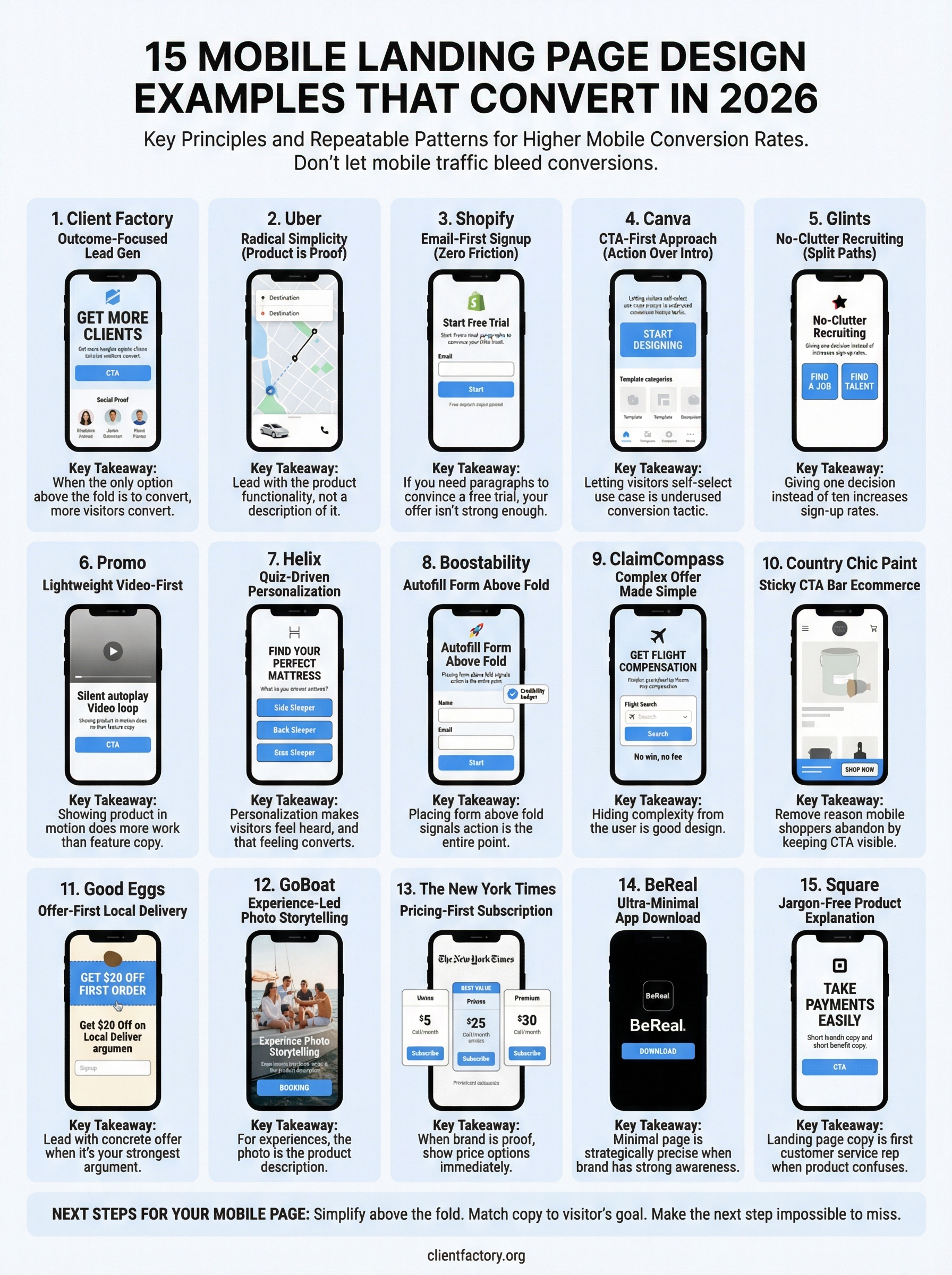
Every example in this list solves a real problem: too much friction, too little clarity, or a conversion path that disappears the moment a visitor starts scrolling. The patterns are repeatable. Strip out competing elements above the fold, match your copy to your visitor’s goal, and make the next step impossible to miss on a small screen. That’s the core of every effective mobile landing page design in this list, and it applies to your industry too.
You don’t need to rebuild everything at once. Pick the one pattern that fits your audience best, apply it to your highest-traffic page, and measure what changes. Small structural adjustments to a single page can produce significant conversion lifts without a full redesign. If you want a second set of eyes on what’s costing you leads right now, book a free funnel audit and we’ll show you exactly where to start.
