

Most of your website visitors leave without converting. That’s not a guess, it’s a pattern we see repeatedly when auditing funnels for service businesses and law firms at Client Factory. The good news? Those visitors already showed interest. They clicked. They browsed. They just didn’t take the next step. Google Ads remarketing gives you a direct way to bring them back, and this google ads remarketing guide breaks down exactly how to do it.
Remarketing campaigns consistently deliver some of the highest ROI in paid advertising because you’re not starting from scratch. You’re re-engaging people who already know you exist. But setting them up the wrong way, wrong tags, poorly segmented audiences, generic messaging, burns budget fast and produces little to show for it.
In this guide, we’ll walk through the full setup process from installing your remarketing tag to building segmented audiences, then cover the strategic decisions that actually move the needle on conversions. Whether you’re launching your first remarketing campaign or fixing one that’s underperforming, you’ll walk away with a clear, step-by-step framework and the ROI-focused tactics we use with our own clients every day.
What Google Ads remarketing is and how it works
Google Ads remarketing is a targeting method that shows your ads specifically to people who have already visited your website or interacted with your app. Instead of broadcasting to a cold audience that has never heard of you, remarketing focuses your ad spend on visitors who have already demonstrated purchase or conversion intent. That distinction is what makes it so effective for service businesses and law firms, where the cost per click can be high and you need every dollar working toward an actual lead.
How the tracking mechanism works
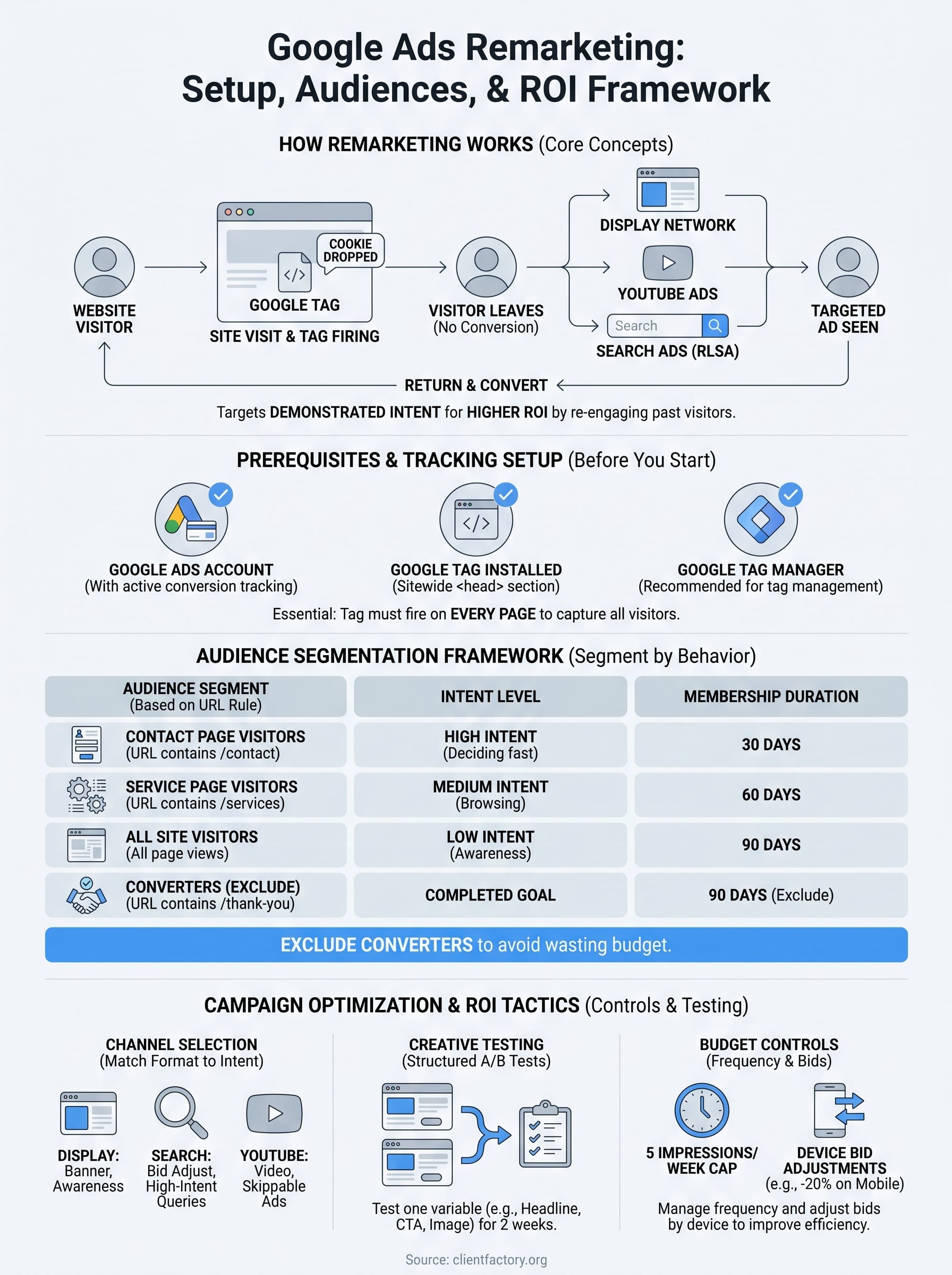
The whole system runs on a small piece of JavaScript called the Google tag (previously known as the global site tag). When you place this tag on your website, it drops a cookie in a visitor’s browser the moment they land on a page. Google then reads that cookie across its network and serves your ads to that specific person. No personally identifiable information is collected; Google’s system works with anonymized, aggregated cookie data to match users to your audience lists without exposing individual identities.

Here is how that sequence works in practice:
- A visitor lands on your law firm’s contact page or services page.
- The Google tag fires and drops a cookie in that visitor’s browser.
- The visitor leaves without filling out your form or calling.
- Google identifies that cookie across its Display Network, YouTube, Gmail, and Search.
- Your remarketing ad appears to that visitor as they browse other websites or watch videos.
The cookie window you set determines how long a user stays on your audience list, which directly controls how long you have to re-engage them before they drop off.
The Google Ads remarketing network: where your ads appear
Your remarketing ads can run across several different Google properties, and each one reaches past visitors in a different context. Display Network remarketing places banner and image ads on millions of websites and apps that partner with Google. Search remarketing (called RLSA, or Remarketing Lists for Search Ads) adjusts your bids or ad copy when past visitors search on Google. YouTube remarketing shows video ads to people who visited your site while they watch content on YouTube, and Gmail remarketing places sponsored messages directly in the promotions tab of a user’s inbox.
Choosing the right channel is a strategic decision, not a default setting. A display banner competes visually with editorial content and works best for awareness and staying top-of-mind. An RLSA search ad captures someone who is actively searching again, which makes it ideal for high-intent service queries. Knowing which channel fits your conversion goal is one of the core decisions this google ads remarketing guide will help you make with a clear framework.
Why remarketing outperforms cold traffic campaigns
Standard prospecting campaigns target people based on demographics, interests, or keywords, meaning you are paying to reach users with no prior connection to your business. Remarketing flips that model by targeting based on demonstrated behavior. A visitor who spent four minutes on your services page and scrolled through your case results has already self-qualified as a potential client. They are not a stranger; they are a warm lead who simply needs a reason to return.
Data from Google’s own research consistently shows that remarketing campaigns produce higher click-through rates and lower cost-per-conversion than equivalent cold-traffic campaigns. For service businesses where a single signed client can be worth thousands of dollars, even a modest improvement in conversion rate from returning visitors has an outsized impact on your bottom line. That leverage is exactly why remarketing should sit at the center of your paid media strategy, not at the edges of it.
Prerequisites and tracking setup
Before you build a single remarketing audience, you need two things confirmed: a Google Ads account with conversion tracking active and the Google tag installed across your entire website. Skipping either step means your audience lists will not populate, and you will have nothing to target when you launch campaigns. This section walks you through both requirements so everything is ready before you touch any audience settings.
What you need before you start
Three prerequisites gate everything else in this process. Confirm each item on this list before moving forward, because missing even one creates gaps in your data that are hard to diagnose later:
- A Google Ads account with billing set up and at least one campaign created (a paused campaign counts)
- Website admin access or a developer who can add JavaScript to your site’s
<head>section - Google Tag Manager installed on your site (optional but strongly recommended so you can deploy and update tags without editing raw page code each time)
Having Google Tag Manager in place saves significant time as your tracking needs grow. You can manage multiple tags from one interface and push updates without a developer touching page code on every change.
Install the Google tag on your website
In your Google Ads account, navigate to Tools > Audience Manager > Your data sources, then click "Set up the Google tag." Google generates a unique snippet tied to your account ID. Paste this code into the <head> section of every page on your site, directly before the closing </head> tag:
<!-- Google tag (gtag.js) -->
<script async src="https://www.googletagmanager.com/gtag/js?id=AW-CONVERSION_ID"></script>
<script>
  window.dataLayer = window.dataLayer || [];
  function gtag(){dataLayer.push(arguments);}
  gtag('js', new Date());
  gtag('config', 'AW-CONVERSION_ID');
</script>
Replace AW-CONVERSION_ID with your actual conversion ID from your Google Ads account settings. If you use Google Tag Manager, select the Google Ads Remarketing tag template and enter your conversion ID there instead of editing page code directly.
Installing the tag sitewide, not just on your homepage, is essential because visitors land on many different pages and you need to capture every entry point for your audience lists.
Verify the tag is firing correctly
Install the Google Tag Assistant Chrome extension from Google to confirm the tag fires on each page without errors. Open any page on your site, activate the extension, and look for a green Google Ads tag in the results panel. A yellow or red status points to a configuration problem you need to resolve immediately.
Run verification on at least five different page types, including your homepage, service pages, and contact page. Tag errors on high-traffic pages strip audience data from your most valuable visitors before you ever get a chance to remarket to them.
Step 1. Create high-intent remarketing audiences
With your Google tag verified and firing, go to Google Ads > Tools > Audience Manager and click the blue "+" button to create your first audience. Audiences built around specific visitor behavior consistently outperform broad site-visitor lists because they let you match your ad message to exactly what someone did on your site.
Segment by behavior, not just page visited
Most accounts create one audience called "All website visitors" and stop there. That approach lumps a visitor who spent 30 seconds on your homepage together with someone who read your services page, checked your pricing, and then visited your contact form. Those two visitors need different messages and should receive different bids because their intent levels are completely different.

Build at least four distinct audiences using this google ads remarketing guide framework:
| Audience Name | URL Rule | Membership Duration |
|---|---|---|
| Contact Page Visitors | URL contains /contact | 30 days |
| Service Page Visitors | URL contains /services | 60 days |
| All Site Visitors | All visitors | 90 days |
| Converters (Exclude) | URL contains /thank-you | 90 days |
The Converters audience exists specifically so you can exclude people who already submitted a form from your remarketing campaigns. Targeting converted leads with acquisition ads wastes budget and creates a poor experience for someone who is already your client.
Always create your exclusion audiences at the same time you build your targeting audiences, before any campaign goes live.
Set membership duration by intent level
Membership duration controls how many days a visitor stays on your list after their last visit. High-intent visitors, those who hit your contact or pricing page, act fast or not at all, so a 30-day window reflects their actual decision timeline. General site visitors who browsed your homepage or blog may take longer to reconsider, which makes a 90-day window appropriate for that group.
Set the duration in the "Membership duration" field when you create each audience. In most service business markets, extending general audiences beyond 90 days adds very little return because visitor intent fades quickly. Start conservative and expand the duration only if your data shows conversions happening late in the window.
Confirm your list is populating
After saving each audience, return to Audience Manager and check the "Size" column after 24 to 48 hours. Google requires a minimum of 1,000 active users on a list before it will serve Display remarketing ads, and at least 100 active users for Search (RLSA). If your lists are not reaching those thresholds, your traffic volume may be too low to run remarketing profitably without a longer data collection period first.
Step 2. Launch remarketing campaigns by channel
With your audiences built, you can now create campaigns that match each channel’s strengths to your specific conversion goal. Channel selection drives creative format, bid strategy, and audience threshold requirements, so treating each one as a separate campaign gives you clean data and the ability to optimize independently. In Google Ads, click "+ New Campaign" and select the objective that matches your outcome, typically "Leads" for service businesses and law firms.
Display Network remarketing campaigns
Display campaigns reach past visitors while they browse websites across Google’s network. In campaign setup, set the campaign type to "Display" and choose "Standard display campaign." Under the Audiences section, select "Remarketing" and add the high-intent segments you created in Step 1, such as your Contact Page Visitors or Service Page Visitors lists.
Use the table below to match audience segment to creative format:
| Audience Segment | Recommended Creative | Ad Size Priority |
|---|---|---|
| Contact Page Visitors | Direct offer, call-to-action | 300×250, 728×90 |
| Service Page Visitors | Social proof, testimonial | 300×600, 336×280 |
| All Site Visitors | Brand awareness, differentiator | Responsive display |
Upload at least three creative variations per ad group so Google can rotate and identify which message resonates. Responsive display ads work well as a starting format because Google automatically assembles combinations from your headlines, descriptions, and images.
Apply your Converters exclusion audience at the campaign level from day one so you never serve acquisition ads to people who already submitted a form.
Search remarketing with RLSA
RLSA campaigns let you adjust bids or serve unique ad copy specifically when past visitors search relevant terms on Google. Create a new Search campaign, add your remarketing audiences under the "Audiences" tab, and set the targeting setting to "Observation" rather than "Targeting" so your ads still reach new users but you can apply a bid adjustment to returning visitors.
A practical starting point is a +20% bid adjustment on your Contact Page Visitors audience for high-intent service keywords. This pushes your ad higher in results when a warm lead searches again, which increases your chance of capturing them at the exact moment they are ready to act.
YouTube remarketing campaigns
YouTube remarketing shows skippable in-stream or non-skippable bumper ads to past visitors while they watch content. Select "Video" as your campaign type, add your remarketing audiences, and keep your video ad under 30 seconds. Lead with your strongest proof point in the first five seconds because viewers can skip after that, and those first five seconds determine whether your message lands.
Step 3. Improve ROI with controls and testing
Running remarketing campaigns without controls is like leaving your ad spend on autopilot with no guardrails. Two specific levers, frequency caps and bid adjustments, directly determine how efficiently your budget converts returning visitors into leads. Add systematic testing on top of those controls and you create a feedback loop that improves performance over time rather than plateauing after launch.
Set frequency caps and bid adjustments
Frequency caps limit how many times a single user sees your ad within a given period, which protects your budget and prevents ad fatigue from eroding your brand perception. In your Display campaign settings, navigate to "Additional settings" > "Frequency management" and set a cap of 5 impressions per user per week as your starting baseline. Reduce that number if your cost-per-conversion climbs after the first week without a corresponding improvement in click-through rate.
Showing your ad too many times to the same person raises costs without raising conversions, so treat frequency as an active budget control, not a default setting you configure once and forget.
Apply bid adjustments by device to concentrate spend where your visitors actually convert. In your campaign’s "Devices" tab, review your conversion data by device type and apply a negative adjustment on devices that show a high click rate but a low conversion rate.
| Device | Bid Adjustment Scenario |
|---|---|
| Desktop | Baseline (0%) if conversions are balanced |
| Mobile | -20% to -40% if form completions are low |
| Tablet | -15% if traffic volume is low |
Run structured A/B tests on your ad creative
Testing ad creative is the fastest way to identify which message and visual combination drives the most return visits and actual lead submissions. Follow this simple testing structure used throughout this google ads remarketing guide: change one variable at a time so you know exactly what caused a performance shift rather than guessing across multiple changes.
Start with headline testing. Write two headlines for the same ad group, one focused on an outcome such as "Get More Clients This Month" and one focused on a pain point such as "Still Losing Leads to Competitors?" Run both for two full weeks before reading results, because shorter windows produce unreliable data in smaller remarketing audiences.
Once you identify a winning headline, move to testing your call-to-action text or primary image. Log each test result so you build a record of what resonates with your specific audience over time.
Wrap-up and next steps
This google ads remarketing guide covered every layer of a working remarketing system: tag installation, behavioral audience segmentation, channel-specific campaign setup, and the controls that protect your budget from waste. You now have a clear framework to bring back high-intent visitors who left without converting, and the testing structure to make those campaigns stronger over time.
The biggest mistake most accounts make is treating remarketing as a set-it-and-forget-it tactic. Your audiences need regular review, your frequency caps need adjustment as campaigns mature, and your creative needs fresh tests every few weeks to avoid stagnation. Apply what you learned here consistently and you will see measurable improvement in your cost-per-lead.
If you want a second set of eyes on your current funnel before you launch, book a free conversion audit and we will identify exactly where your setup is leaving leads on the table.
