

Most small businesses don’t have a lead problem, they have a systems problem. Without the right tools in place, you end up chasing prospects manually, losing track of who’s interested, and watching potential revenue slip through the cracks. The right lead generation software for small business changes that equation entirely, putting prospecting, capture, and follow-up on autopilot so you can focus on closing deals.
But here’s where it gets tricky: there are hundreds of tools out there, each claiming to be the one that’ll fill your pipeline overnight. Some are built for enterprise teams with enterprise budgets. Others look affordable but lack the features that actually move the needle. Sorting through all of it wastes time you don’t have, especially when your priority is growing your client base, not evaluating software.
At Client Factory, we build client acquisition systems for service businesses and law firms every day. We’ve tested, integrated, and optimized dozens of these platforms across real campaigns with real ad spend. That hands-on experience is exactly what shaped this list. We picked 12 tools that genuinely deliver for small businesses, based on ease of use, pricing, automation capabilities, and how well they fit into a broader marketing funnel.
Below, you’ll find a breakdown of each platform, what it does best, who it’s built for, and where it falls short. Whether you’re just starting to build out your lead gen stack or replacing a tool that isn’t cutting it, this guide will help you make a confident choice.
1. Client Factory
Client Factory is not just a software platform. It is a full-service client acquisition system built specifically for service businesses and law firms. While most tools on this list hand you technology and leave you to figure out the strategy, Client Factory combines done-for-you campaign management with AI-powered automation to handle prospecting, nurturing, and conversion from end to end.
How Client Factory works
Client Factory builds custom client acquisition funnels tailored to your business and target audience. The process starts with a conversion audit to identify where your current marketing is leaking leads, then moves into building out paid ad campaigns on Google, Facebook, and YouTube, paired with optimized landing pages and automated follow-up sequences.

An AI conversational agent named Susan handles inbound inquiries in real time, so no lead sits unanswered while you are busy running your business. Every piece of the system, from ad copy to landing page to follow-up messaging, is built around your specific audience and offer.
When your follow-up is instant and personalized, conversion rates climb significantly, and that mechanic sits at the core of how Client Factory is structured.
Who Client Factory fits best
This solution works best for service businesses and law firms that want results without managing a marketing team in-house. If you have tried running ads yourself and seen weak returns, or you are paying for lead generation software for small business but still not seeing pipeline growth, Client Factory is built for exactly your situation.
The U.S.-based team handles strategy, execution, and ongoing optimization, so your job is to close the leads, not chase them.
Pros and cons to know
- Pros: Full-funnel management, AI-powered lead response, deep experience in service and legal industries, performance-first approach, dedicated U.S.-based team
- Cons: Not a self-serve software tool, requires onboarding collaboration, works best for businesses with a real marketing budget to invest
Client Factory pricing
Client Factory offers a free funnel audit as the entry point, which shows you exactly where your client acquisition is breaking down before you commit to anything. Paid engagement is scoped to your business goals, ad spend, and campaign complexity, so pricing reflects your actual needs rather than a generic subscription tier.
To get started, visit clientfactory.org and request your free audit.
2. HubSpot Marketing Hub
HubSpot Marketing Hub is one of the most widely used lead generation software for small business platforms available today. It brings email marketing, landing pages, forms, live chat, and CRM into one connected system, so you can capture and manage leads without bouncing between five different tools.
How HubSpot Marketing Hub works
HubSpot centralizes your marketing activity into a single dashboard. You build landing pages and opt-in forms to capture leads, then trigger automated email sequences and workflows to move them through your funnel. The built-in CRM logs every interaction automatically, giving your sales team full context before they ever pick up the phone.

When your marketing data and contact records live in the same platform, the gap between "interested lead" and "booked call" gets much shorter.
Who HubSpot Marketing Hub fits best
HubSpot works best for small businesses that want an all-in-one system without needing a developer to connect separate tools. It also suits teams that are building their first structured marketing process and need step-by-step workflows to get up and running without a steep learning curve.
Pros and cons to know
- Pros: Clean interface, strong CRM integration, reliable automation, large knowledge base and support community
- Cons: Free plan comes with notable feature restrictions, and paid tiers scale up in cost quickly as your contact list grows
HubSpot Marketing Hub pricing
HubSpot offers a free tier that covers basic forms, email, and CRM access. The Starter plan begins at $20/month, while the Professional plan jumps to $890/month, which can strain smaller marketing budgets fast.
3. Zoho CRM
Zoho CRM is a flexible, budget-conscious platform that covers contact management, pipeline tracking, and basic marketing automation within a single system. For small businesses looking for lead generation software for small business that doesn’t require a large upfront investment, Zoho is one of the most accessible options on the market.
How Zoho CRM works
Zoho CRM captures leads through web forms, email integrations, and social media connectors, then routes them into a structured pipeline where you can track every stage of the sales process. Built-in workflow automation lets you assign follow-up tasks, send triggered emails, and score leads based on behavior, so your team focuses time on the contacts most likely to convert.
When lead scoring is tied directly to pipeline stage, your sales team stops guessing who to call next.
Who Zoho CRM fits best
Zoho works best for small businesses and solo operators who want CRM and basic lead management in one place without paying for tools they won’t use. It is particularly well-suited for teams already using other Zoho products like Zoho Mail or Zoho Campaigns, since the native integrations reduce setup friction considerably.
Pros and cons to know
- Pros: Affordable pricing tiers, strong native integrations across the Zoho ecosystem, customizable pipelines
- Cons: The interface can feel cluttered for new users, and advanced automation features require higher-tier plans
Zoho CRM pricing
Zoho CRM offers a free plan for up to three users, which covers core CRM functions. Paid plans start at $14 per user per month on the Standard tier, with Professional available at $23 per user per month when billed annually.
4. Pipedrive with LeadBooster
Pipedrive is a sales-focused CRM that becomes considerably more powerful when you add its LeadBooster add-on. Together, they give small businesses a structured way to capture and convert leads through chatbots, live chat, web forms, and a prospect database, all feeding directly into a visual sales pipeline.
How Pipedrive with LeadBooster works
Pipedrive’s core strength is pipeline visibility. You see exactly where every deal sits at any moment, and LeadBooster layers in lead capture tools that sit on your website and push contacts into that pipeline automatically. The chatbot feature qualifies visitors in real time by asking pre-set questions, so by the time a lead reaches your inbox, you already have context on what they need.

When your chatbot qualifies leads before your team ever sees them, you cut down on wasted sales conversations significantly.
Who Pipedrive with LeadBooster fits best
This combination works well for small sales teams that want a clean visual pipeline without the complexity of a full marketing platform. It is particularly strong for businesses already driving website traffic that need a smarter way to convert those visitors into pipeline-ready contacts.
A second use case worth noting: teams moving away from spreadsheet-based tracking will find Pipedrive’s drag-and-drop deal management a fast upgrade with minimal onboarding friction.
Pros and cons to know
The platform is genuinely easy to adopt, but the add-on pricing structure adds up quickly for lean budgets.
- Pros: Intuitive pipeline interface, solid chatbot and form tools, strong mobile app
- Cons: LeadBooster costs extra on top of the base plan, and native email marketing features are limited
Pipedrive with LeadBooster pricing
Pipedrive’s Essential plan starts at $14 per user per month. LeadBooster is an add-on starting at $32.50 per month, making this a reasonable entry point for lead generation software for small business on a structured budget.
5. GoHighLevel
GoHighLevel is an all-in-one marketing and sales platform designed to replace a stack of separate tools with a single system. It covers CRM, email and SMS marketing, landing page building, pipeline management, and appointment scheduling, making it one of the more feature-dense options in lead generation software for small business today.
How GoHighLevel works
GoHighLevel lets you build complete marketing funnels from within one dashboard, including landing pages, automated follow-up sequences, and booking calendars. When a lead fills out a form or clicks an ad, the platform captures their details and immediately triggers a customized email or SMS sequence to keep them engaged. The pipeline view shows exactly where each contact sits in your sales process, so nothing slips through.
When your follow-up runs through email and SMS simultaneously, the chances of actually reaching a lead before they lose interest go up considerably.
Who GoHighLevel fits best
GoHighLevel fits small businesses and marketing agencies that want to consolidate tools and stop paying for five separate subscriptions. It is particularly strong for service businesses that rely on booked appointments as their primary conversion goal, since the built-in scheduling and reminder automation handles that process end to end.
Pros and cons to know
- Pros: Replaces multiple tools, strong SMS and email automation, white-label option for agencies
- Cons: The interface has a steep learning curve, and the feature volume can feel overwhelming if you only need a few core functions
GoHighLevel pricing
GoHighLevel starts at $97 per month for the Starter plan, with the Agency Unlimited plan available at $297 per month for teams managing multiple client accounts.
6. Unbounce
Unbounce is a dedicated landing page builder that focuses specifically on converting paid traffic into leads. Unlike full CRM platforms, Unbounce does one job and does it well, making it a focused option in the lead generation software for small business category for teams that want better results from their ad spend.
How Unbounce works
Unbounce gives you a drag-and-drop editor to build high-converting landing pages without writing a line of code. Its Smart Traffic feature uses AI to automatically route visitors to the page variant most likely to convert based on their attributes, which means your pages optimize themselves over time. You connect your forms to your CRM or email tool, and leads flow directly into your existing follow-up system without any manual transfers.

When your landing page adapts to each visitor automatically, you get more conversions from the same ad spend without increasing your budget.
Who Unbounce fits best
Unbounce fits small businesses running paid ad campaigns on Google or Meta who want to send traffic to dedicated pages rather than a generic homepage. It works especially well when you already have a CRM in place and need a reliable front-end capture tool to feed qualified leads into it.
Pros and cons to know
- Pros: Fast page building, AI-powered traffic optimization, solid A/B testing capabilities
- Cons: Not a standalone system, requires integration with other tools for follow-up and lead management
Unbounce pricing
Unbounce starts at $99 per month on the Build plan, covering up to 500 conversions. The Experiment plan at $149/month unlocks unlimited A/B testing, and the Optimize plan runs $249/month for full Smart Traffic access.
7. OptinMonster
OptinMonster is a conversion-focused lead capture tool built specifically to turn website visitors into subscribers and leads. Rather than managing your entire sales pipeline, it specializes in one critical job: getting people to opt in before they leave your site.
How OptinMonster works
OptinMonster adds pop-ups, floating bars, slide-in forms, and full-screen overlays to your existing website without requiring a developer. Its Exit-Intent technology detects when a visitor is about to close the tab and triggers a targeted offer at exactly that moment. You connect the forms to your email platform or CRM, and captured leads flow straight into your existing follow-up sequence.
When you catch a visitor right before they leave and present a specific offer, your list grows from traffic you were already paying for.
Who OptinMonster fits best
OptinMonster works best for small businesses with an existing website and steady traffic who want to extract more leads from that traffic without spending more on ads. It is a strong fit if you already use an email platform like Mailchimp or ActiveCampaign and need a smarter front-end capture layer to feed it more contacts consistently.
Pros and cons to know
- Pros: Easy setup, strong behavioral targeting options, wide integrations with email and CRM tools
- Cons: Does not handle follow-up or nurturing on its own, and the value drops quickly without a backend email system in place
OptinMonster pricing
OptinMonster positions itself as accessible lead generation software for small business with plans starting at $9 per month on the Basic tier. The Plus plan runs $19/month, while the Pro plan, which includes Exit-Intent and advanced targeting, starts at $29/month, all billed annually.
8. Intercom
Intercom is a customer messaging platform that doubles as a lead generation tool by turning your website into a live conversation channel. Rather than waiting for visitors to fill out a form, Intercom lets you engage them in real time through chat widgets, automated bots, and targeted messages based on what they are doing on your site.
How Intercom works
Intercom places a messenger widget on your website that triggers automated conversations based on visitor behavior. You set rules to determine when a message appears, for example, when someone spends 30 seconds on your pricing page, and the bot kicks off a qualifying sequence to capture their information. Collected contacts feed into Intercom’s built-in inbox and CRM, where your team can pick up the conversation or let automation handle the next steps.
When your chat experience is triggered by specific behavior rather than just page load, the quality of leads you capture improves noticeably.
Who Intercom fits best
Intercom fits SaaS companies and service businesses that get meaningful website traffic and want to convert that traffic through conversation rather than static forms. If you run a business where the buying decision depends on answering specific questions, Intercom shortens that process by bringing those answers directly into the browsing experience.
Pros and cons to know
- Pros: Strong behavioral targeting, clean inbox experience, solid bot-building tools for lead qualification
- Cons: Pricing scales fast as your contact volume grows, making it one of the more expensive options in lead generation software for small business at scale
Intercom pricing
Intercom’s Essential plan starts at $29 per month per seat, but costs increase quickly when you add automation features and larger contact limits through their tiered add-on structure.
9. Mailchimp
Mailchimp is one of the most recognizable email marketing platforms in the small business space, and it has expanded well beyond basic newsletters. Today it includes landing pages, signup forms, audience segmentation, and automation, making it a practical starting point for businesses that want lead generation software for small business without a steep learning curve or a large initial investment.
How Mailchimp works
Mailchimp lets you capture leads through embedded forms, pop-ups, and dedicated landing pages, then automatically adds those contacts to segmented lists based on their source or behavior. You build email sequences through a visual automation builder that triggers messages based on sign-up date, tag, or specific actions like clicking a link or opening a previous email.
When your email sequences respond to specific contact behaviors, your outreach feels timely rather than generic, which keeps more leads engaged through the funnel.
Who Mailchimp fits best
Mailchimp fits small businesses and solo operators that are just building out their email list and need a simple, guided experience to get started. It is a particularly strong option if your primary lead nurturing channel is email and you do not yet need the advanced CRM or multi-channel automation that more complex platforms offer.
Pros and cons to know
- Pros: Generous free tier, beginner-friendly interface, solid template library, wide third-party integrations
- Cons: Automation capabilities are limited compared to dedicated platforms, and pricing climbs quickly once your contact list grows past the free threshold
Mailchimp pricing
Mailchimp’s free plan covers up to 500 contacts and 1,000 monthly email sends. The Essentials plan starts at $13 per month, with the Standard plan at $20/month for more robust automation and segmentation tools.
10. ActiveCampaign
ActiveCampaign is an email marketing and automation platform that goes deeper than most tools in its category. It combines CRM functionality, multi-channel automation, and lead scoring into a single system, making it a strong contender for small businesses that want more control over how they nurture and convert leads over time.
How ActiveCampaign works
ActiveCampaign captures leads through signup forms and landing pages, then routes them into automated sequences that respond to specific behaviors like email opens, link clicks, and site visits. You build workflows visually using a drag-and-drop editor, and the platform’s lead scoring engine adjusts each contact’s score automatically based on how they engage, so your sales team always knows who to prioritize.
When your automation responds to what a lead actually does rather than just when they signed up, your follow-up feels relevant instead of random.
Who ActiveCampaign fits best
ActiveCampaign fits small businesses that have outgrown basic email tools and need more sophisticated segmentation and automation without moving to an enterprise platform. It works particularly well for service businesses that run longer sales cycles and need to stay in front of leads across multiple touchpoints before they are ready to buy.
Pros and cons to know
- Pros: Powerful automation builder, strong lead scoring, reliable CRM integration, broad third-party app connections
- Cons: The learning curve is real for new users, and the interface can feel dense until you build familiarity with how workflows are structured
ActiveCampaign pricing
ActiveCampaign positions itself as accessible lead generation software for small business, with the Starter plan beginning at $15 per month for up to 1,000 contacts. The Plus plan starts at $49/month and unlocks CRM features and advanced automation capabilities.
11. Apollo
Apollo is a sales intelligence and engagement platform that gives you direct access to a database of over 275 million contacts, complete with verified email addresses and phone numbers. For small businesses focused on outbound prospecting, it functions as a targeted lead generation software for small business that replaces hours of manual research with a searchable, filterable contact database you can act on immediately.
How Apollo works
Apollo lets you search and filter contacts by job title, industry, company size, location, and dozens of other attributes to build targeted prospect lists. Once you identify the right people, you can push them into automated email sequences directly within the platform, track opens and replies, and move interested contacts into your CRM for follow-up.
When you can build a prospect list and launch an outreach sequence in the same tool, your team moves from research to conversation significantly faster.
Who Apollo fits best
Apollo works best for small businesses focused on outbound sales, particularly those selling B2B services where reaching the right decision-maker directly matters more than waiting for inbound traffic to convert. It is a strong fit if your team spends too much time manually researching prospects across LinkedIn or other sources and needs a faster way to build qualified contact lists.
Pros and cons to know
- Pros: Massive contact database, built-in email sequencing, solid filtering tools, integrates with major CRMs
- Cons: Data accuracy varies by contact, and email deliverability requires careful setup to avoid spam filters
Apollo pricing
Apollo offers a free plan with limited credits that covers basic prospecting. Paid plans start at $49 per user per month on the Basic tier, with Professional available at $79 per user per month billed annually.
12. Hunter
Hunter is an email finding and verification tool that helps you locate and confirm professional email addresses for outbound prospecting. As lead generation software for small business, it handles a specific but critical step in the outbound sales process: getting accurate contact information so your emails actually reach the right people instead of bouncing into the void.
How Hunter works
Hunter lets you search for email addresses by domain or by name, so if you know what company you want to reach, you can pull verified contacts in seconds. Its Email Verifier checks each address for validity before you send, which protects your sender reputation and keeps your bounce rate low. You can also install the Chrome extension to find emails directly while browsing LinkedIn or company websites, cutting research time considerably.
When your prospect list contains verified addresses from the start, you spend less time managing bounces and more time generating actual responses.
Who Hunter fits best
Hunter works best for small businesses doing targeted outbound outreach who need reliable email contacts without paying for a full sales intelligence platform. It fits teams that already have a list of target companies and simply need a fast, accurate way to find the right contact within each organization before launching a campaign.
Pros and cons to know
- Pros: Clean interface, high accuracy on email verification, useful free tier, Chrome extension speeds up prospecting
- Cons: Limited to email finding, so you will need separate tools for sequencing, CRM, and follow-up automation
Hunter pricing
Hunter offers a free plan with 25 monthly searches. Paid plans start at $34 per month on the Starter tier, with the Growth plan at $104/month for higher search volumes and team access.
Next steps for picking the right tool
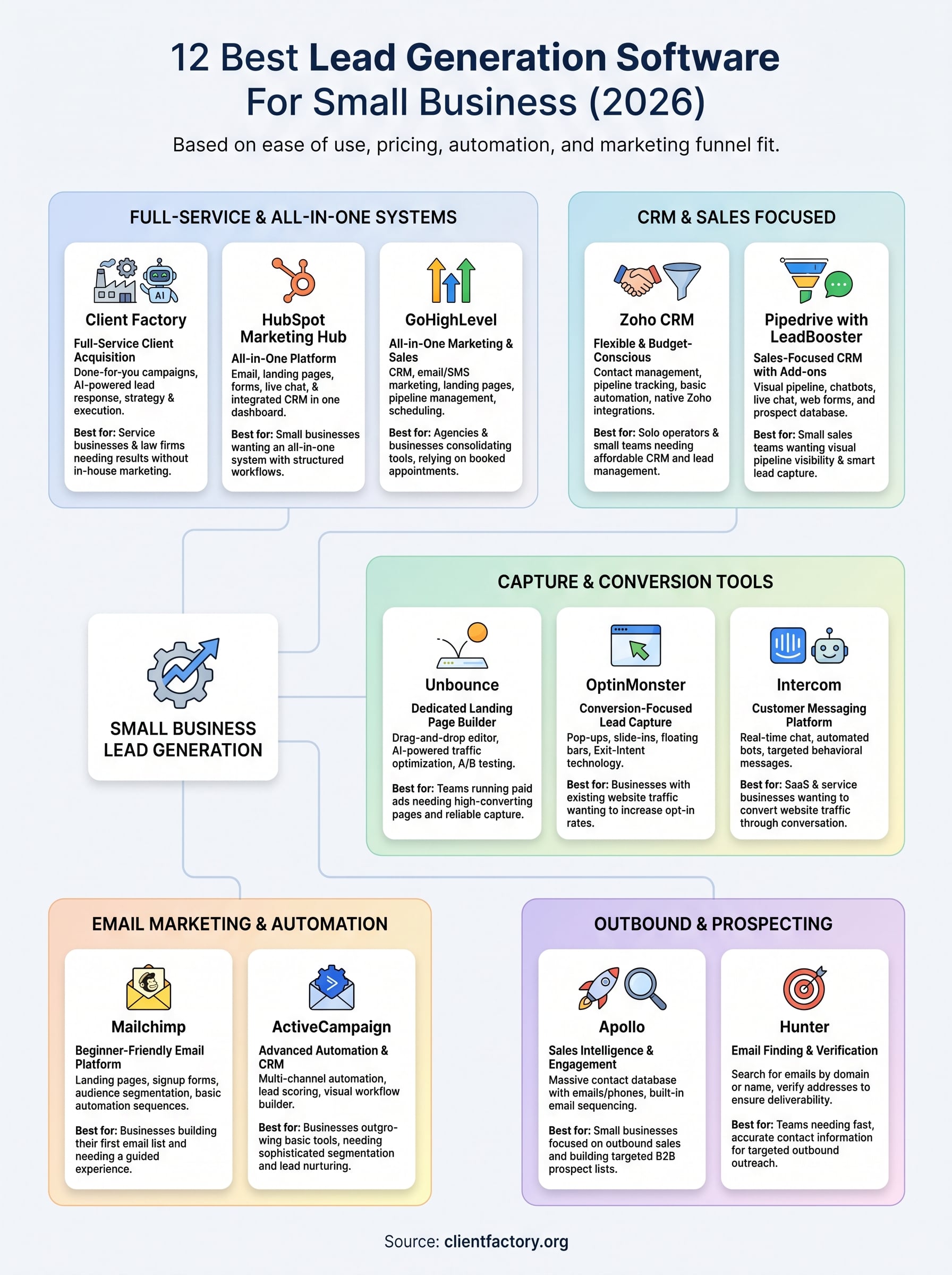
Choosing the right lead generation software for small business comes down to one question: where is your biggest gap right now? If you need better outbound prospecting, Apollo or Hunter solve that. If you want to capture more leads from existing traffic, OptinMonster or Unbounce fit the bill. If you need a full system that handles ads, landing pages, and automated follow-up, a platform like GoHighLevel or ActiveCampaign gets you closer to that.
That said, software alone does not generate clients. Strategy, targeting, and follow-up systems determine whether your tools produce revenue or just collect data. If you want expert guidance on how to build a client acquisition system that actually converts, start with a free funnel audit. The audit shows you exactly where your current process is losing leads and what to fix first.
