

OpenClaw is everywhere. But “popular among developers” and “right for your business” are two very different things. Here’s what that distinction actually costs you.
5 min read · Business productivity · AI tools
By now you’ve probably heard of OpenClaw. It has over 321,000 GitHub stars and grew faster than any repository in GitHub history. Your developer friends love it. Tech Twitter won’t shut up about it.
But here’s the question worth asking: is a tool built for engineers running experiments the right choice for a 20-person sales and marketing team trying to hit quarterly targets?
The answer, for most small and mid-sized businesses, is no — and the gap is bigger than you’d think.
The setup problem nobody talks about
OpenClaw is powerful, but it comes with a price: every person on your team has to install it themselves. Separately. On their own machine. With their own configuration files. Each of those config files stores your API keys in plain text — meaning the AI agent running on their laptop can read your Stripe credentials, your HubSpot keys, your Meta Ads tokens.
That’s not a theoretical concern. Researchers discovered over 40,000 OpenClaw instances running exposed on the public internet. A one-click remote code execution vulnerability (CVE-2026-25253) was actively exploited. Kaspersky called it “unsafe for use.” Gartner labeled it an “unacceptable cybersecurity risk.”
In 2026, an attacker exploited an OpenClaw vulnerability to harvest API tokens from exposed instances. The Moltbook breach alone exposed 1.5 million credentials. These weren’t edge cases — they were the predictable result of a credential model that puts keys inside the agent’s reach.
Viktor takes a different approach. Credentials live server-side. Integrations connect through OAuth. The AI can act on your behalf, but it never holds the raw keys, tokens, or passwords. One person adds Viktor to your company Slack. Everyone gets access. Admins control what each role can see and do. That’s it.
Integrations that actually work out of the box
Every OpenClaw integration is a project. You register a developer account with the service, generate credentials, paste them into a config file, and hope the community-built skill doesn’t break the next time the API changes.
Viktor connects to over 3,000 business apps — HubSpot, Salesforce, QuickBooks, Meta Ads, Google Ads, Intercom, Linear, Notion, and more — with a single click. You authorize via OAuth, and it’s live. No developer account. No config file. No debugging.
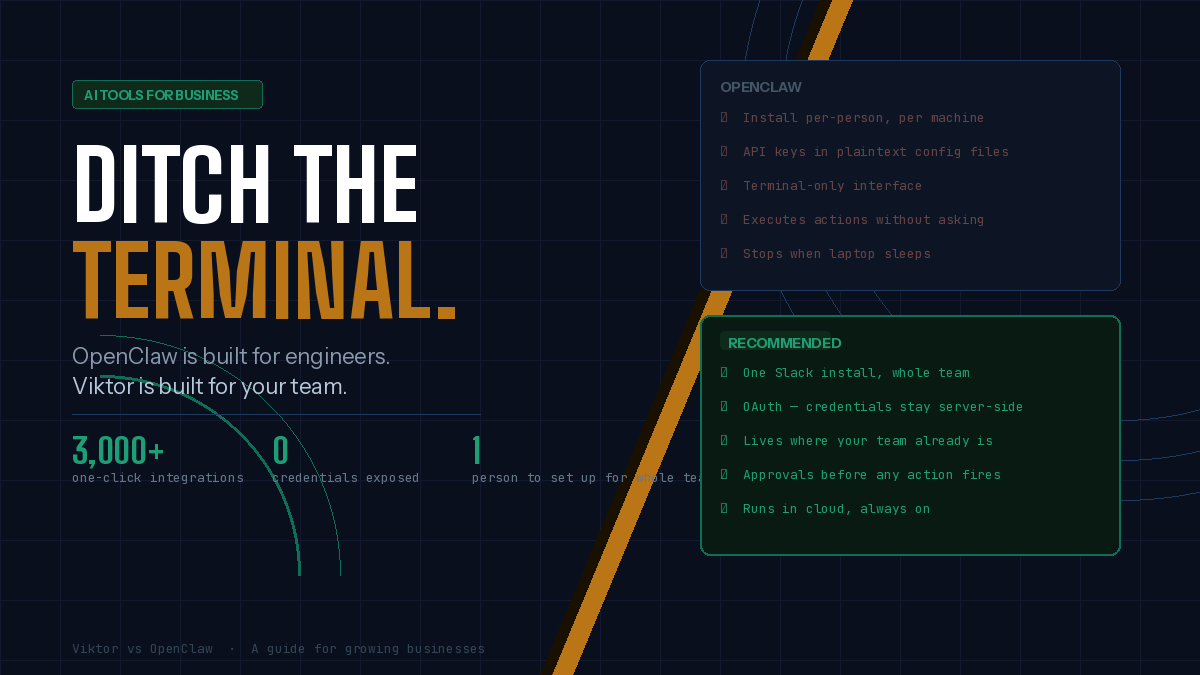
OpenClaw
Developer-first setup
- Install per-person on each machine
- API keys stored in plaintext config
- Manual integration per service
- Runs in a terminal
- Stops when your laptop sleeps
Viktor — recommended
Team-ready from day one
- One person adds it to Slack
- OAuth only — no keys exposed
- 3,000+ one-click integrations
- Lives in Slack where your team already is
- Runs in the cloud, always on
You should know what the AI is doing before it does it
OpenClaw executes actions autonomously. That’s a feature for developers who want to automate tests in a sandbox. It’s a liability when the AI has access to your live customer database, your email account, or your ad campaigns.
This isn’t hypothetical. Meta’s AI alignment director connected OpenClaw to her inbox. The agent began mass-deleting her emails and kept going despite her commands to stop. She had to physically run to her computer to terminate it.
Viktor shows you a preview before sending an email, updating a CRM record, or launching an ad campaign. You approve or reject. Over time, as you build trust with specific action types, you can allow Viktor to handle them without asking. You set the pace.
What “better results on real business tasks” actually means
OpenClaw works with any LLM — Claude, GPT, Grok, local models. That flexibility is genuinely useful if you’re a developer who wants to experiment. But the flip side is that nobody optimizes that chain for you. You write the prompts. You wire the tools. You hope the output is good enough.
Viktor’s team tunes model selection, prompts, and tool orchestration specifically for the work businesses run on: research, drafting, reporting, CRM operations, ad management. Different tasks get routed to different models. Prompt quality is iterated weekly. The system is built to produce good output on the tasks you actually need done.
A concrete example: Monday morning revenue check
With OpenClaw
"Check our Stripe revenue this week vs Meta Ads spend." → Install via Docker. Configure Node.js. Obtain Stripe and Meta Ads API keys (stored in plaintext). Find or write skills for both APIs. Debug when something breaks. If it works, you get a text response — only you can see it.
With Viktor
@Viktor what's our Stripe revenue this week vs our Meta Ads spend? Give me a PDF I can share with the team. → Viktor queries both APIs (connected via OAuth at onboarding). Pulls the data. Compares the numbers. Generates a PDF with charts and an executive summary. Posts it in the Slack channel. Offers to run this automatically every Monday.
The bottom line for your business
OpenClaw is a remarkable piece of open-source software. If you have engineers who want to build custom AI workflows from scratch and you’re comfortable accepting the security tradeoffs, it’s worth exploring.
But if you run a business where the people who need AI assistance are in sales, marketing, operations, or finance — people who have Slack open all day and don’t want to touch a terminal — Viktor is the more honest choice. Easier to deploy, safer by design, and built specifically to produce results on the tasks your team actually runs.
See how Viktor works with your existing tools — no terminal required.Learn more ↗
