

You’re driving traffic to your page. People are clicking. But the conversions? Not there. If that sounds familiar, the problem probably isn’t your offer or your ad spend, it’s your page. Knowing how to design a landing page that converts is the difference between burning budget and building a pipeline of qualified leads. And most businesses get it wrong by focusing on aesthetics over function.
At Client Factory, we’ve spent over 30 years building and optimizing landing pages for service businesses and law firms. We’ve seen what works, what flops, and what looks great but generates zero leads. The patterns are clear: high-converting pages follow specific, repeatable principles, and ignoring even one can tank your results.
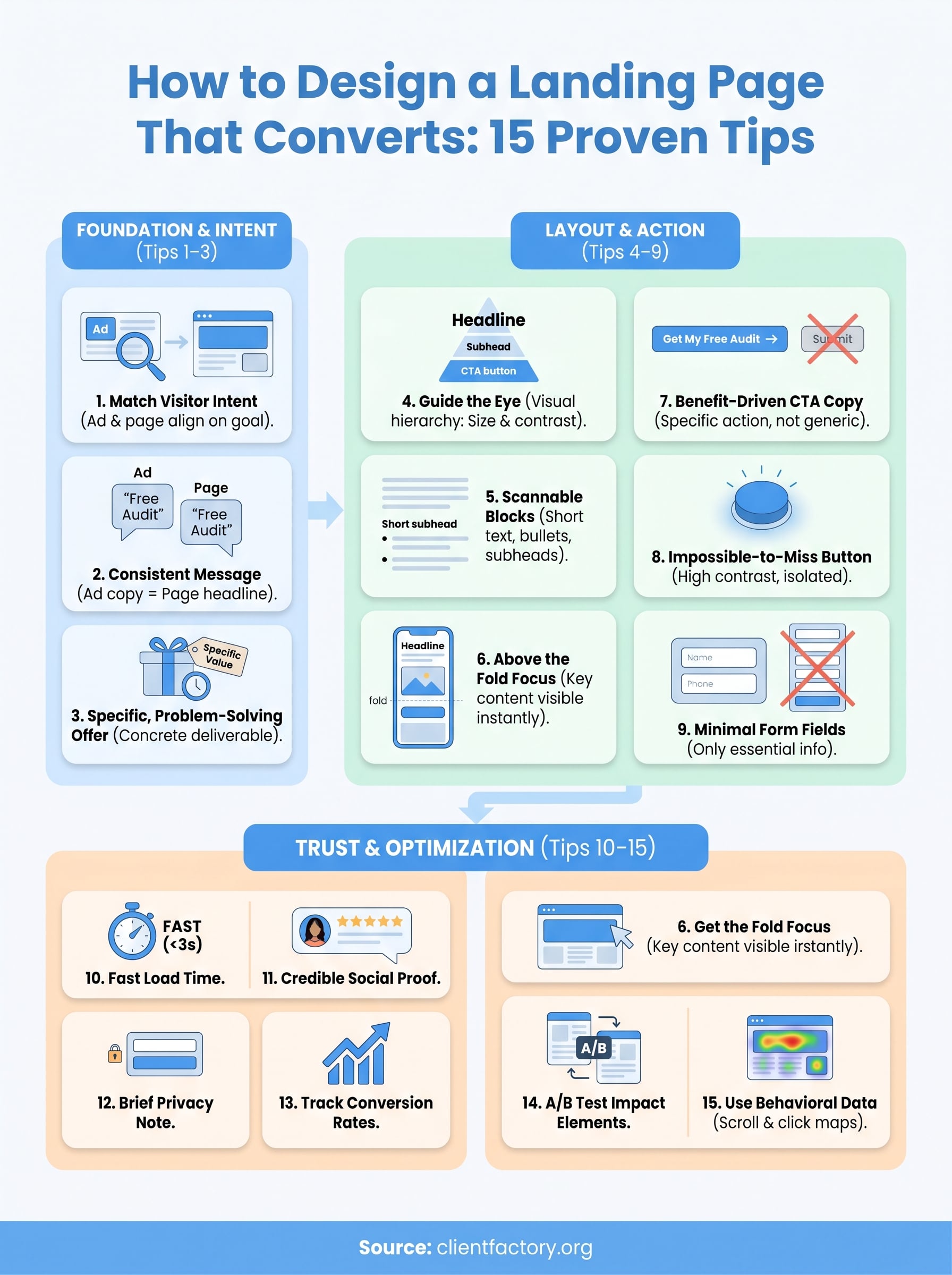
This guide breaks down 15 proven tips you can apply right now to turn your landing page into a client acquisition tool. We’ll cover everything from headline structure and visual hierarchy to CTA placement and trust signals, backed by real conversion data, not theory. Whether you’re building from scratch or fixing a page that’s underperforming, you’ll walk away with a concrete action plan to start converting more of the traffic you’re already paying for.
What a landing page that converts does differently
Most landing pages fail because they try to do too much. They link to five other pages, present three different offers, and bury the most important information under a wall of text. A page that actually converts does the opposite: it narrows the visitor’s focus to a single, clear action and removes everything that gets in the way of that action.
It serves one goal only
A high-converting landing page has one job: get the visitor to take the next step. That might be filling out a form, calling your office, or booking a consultation. What it is not doing is asking visitors to also follow you on social media, read your blog, or explore your pricing page. Every additional option you add reduces the likelihood that a visitor completes the primary action. When you understand how to design a landing page that converts, this principle is the first one you lock in.
The best-performing landing pages repeat a single CTA two to three times down the page, rather than scattering multiple competing links that pull visitors in different directions.
Here is what that looks like in practice across common page types:
| Page type | Primary goal | What to remove |
|---|---|---|
| Lead gen page | Form submission | Nav links, secondary CTAs, unrelated offers |
| Consultation booking | Calendar booking | Blog links, social icons, product pages |
| Free audit offer | Email capture | Testimonial pages, about links, footer menus |
It matches what the visitor expected
When someone clicks an ad that says "Free SEO audit for law firms," they expect to land on a page about a free SEO audit for law firms. If they hit a generic homepage instead, most will bounce within seconds. This concept is called message match, and it is one of the most underused levers in conversion rate optimization. Your headline, image, and offer need to reflect the exact language the visitor saw before they clicked.
Mismatching at this point signals to the visitor that they are in the wrong place. You lose trust instantly, and no amount of great design below the fold will recover it. If you are running multiple ad campaigns targeting different audiences, you need separate landing pages for each one, with copy and visuals tailored to each segment.
It removes every reason to leave
A converting landing page anticipates objections and addresses them before the visitor can talk themselves out of converting. If your offer costs money, you acknowledge it and justify the value. If your form asks for a phone number, you explain why and promise no spam calls. Every piece of friction, whether it is a confusing form, a slow load time, or a generic stock photo, gives the visitor a reason to click away.
High-performing pages also eliminate visual noise: no cluttered sidebars, no auto-play videos, no flashing banners. The visual experience should guide the visitor’s eye from the headline to the supporting details to the CTA in a natural, uninterrupted flow. Think of it as a path with no dead ends and no detours. Everything on the page exists to move the visitor one step forward, not sideways or off the page entirely.
Tips 1–3: Nail intent, message match, and your offer
The first three tips cover the foundation of any high-converting page. Get these wrong and nothing else you add will fix your conversion rate. Get them right and you give every other design element on the page a real chance to perform.
Tip 1: Match your page to the visitor’s intent
Every visitor arrives with a specific goal in mind. Your page needs to reflect that goal immediately, in the headline, in the subheadline, and in the visual above the fold. If someone searched "personal injury lawyer free consultation" and landed on a generic law firm homepage, they will leave inside of five seconds. Understanding how to design a landing page that converts starts here: your page must confirm to the visitor within three seconds that they are in exactly the right place.

Use this check before you publish any page:
- What did the visitor click or search to get here?
- Does your headline use the same language as the ad or search result?
- Does your above-the-fold content answer their most pressing question directly?
If you cannot answer yes to all three, rewrite the headline before you change anything else.
Tip 2: Keep your message consistent from click to page
Message match means the language, tone, and offer on your page mirror what the visitor saw before they clicked. If your ad promised "a free 30-minute strategy call," your page headline should say exactly that, not "Schedule a Discovery Session" or "Connect With Our Team." Small wording shifts break trust faster than you think, because the visitor’s brain is actively checking whether they landed in the right place.
Run every ad next to its corresponding landing page. If the headline, offer, and visual don’t feel like a continuation of the same conversation, rewrite until they do.
Each ad campaign you run targeting a different audience segment needs its own dedicated landing page. One page trying to serve multiple audiences will convert none of them well.
Tip 3: Lead with an offer that solves a specific problem
Your offer is the reason someone converts, so it needs to be concrete, specific, and tied directly to what your visitor wants. "Get a free consultation" is weaker than "Get a free 20-minute audit of your firm’s lead generation funnel." The more specific your offer, the more it signals that you understand the visitor’s exact situation rather than casting a wide net.
Use this template to sharpen any offer before it goes live:
[Action] + [Specific deliverable] + [For your audience] + [Time or result]
Example: "Book a free 20-minute funnel audit for law firms and find out exactly where you’re losing clients."
Tips 4–6: Build a layout people can scan fast
Most visitors don’t read landing pages, they scan them. Research from Google on user behavior shows that visitors form a judgment about a page in under two seconds. If your layout buries the key information or forces someone to hunt for what they need, they leave. A well-structured page guides the eye naturally from the headline down to the CTA without requiring any effort from the visitor.
Tip 4: Use visual hierarchy to guide the eye
Visual hierarchy means organizing your page elements by importance, so the visitor’s eye moves in the direction you want. Your headline should be the largest element on the page, followed by a supporting subheadline, then social proof or key benefits, then the CTA. When you understand how to design a landing page that converts, you know that size, contrast, and whitespace are your primary tools for directing attention.

Use a single accent color for your CTA button and apply it consistently so the eye always knows where to look next.
Here is how to rank your page elements by visual weight:
- Headline – largest text, highest contrast
- Subheadline – explains or supports the headline directly
- Key benefits or proof point – brief and scannable
- CTA button – high contrast, surrounded by whitespace
- Supporting details – smaller text, secondary position on the page
Tip 5: Write in short, scannable blocks
Long paragraphs are conversion killers. Visitors scanning your page will skip large walls of text and move straight to anything that looks like a quick answer. Keep every paragraph to three sentences or fewer, use bullet points to break down benefits, and add subheadings so visitors can jump to what matters most to them. Short blocks also signal clarity, which builds trust faster than a dense explanation ever will.
Break your copy into these formats:
- Three-sentence max paragraphs for any explanation or context
- Bullet points for listing benefits, features, or steps
- Bold text to highlight the one phrase per paragraph that must land
Tip 6: Place your strongest content above the fold
Above the fold means everything a visitor sees before they scroll. Your headline, subheadline, a supporting visual, and your primary CTA all need to fit in this space. Visitors who don’t see a clear reason to stay within the first two seconds will not scroll down to find one. Test your above-the-fold layout on mobile first, since most traffic today arrives from phones where screen space is limited and every pixel counts.
Tips 7–9: Make your CTA and form impossible to miss
Your call-to-action and your form are the conversion point on your page. Every other element, your headline, your proof, your benefits, exists to bring the visitor to this moment. When you understand how to design a landing page that converts, you treat your CTA and form not as an afterthought but as the primary design priority from the very start.
Tip 7: Write CTA copy that tells people exactly what they get
Generic button text kills conversions. Buttons that say "Submit" or "Click Here" give the visitor no reason to act because they describe the motion without describing the reward. Replace vague labels with specific, benefit-driven language that tells the visitor exactly what happens the moment they click.
The best CTA buttons complete this sentence for the visitor: "I want to ___."
Use this template to rewrite any weak CTA before you publish:
| Weak CTA | Strong CTA |
|---|---|
| Submit | Get My Free Audit |
| Click Here | Book My Strategy Call |
| Learn More | Send Me the Guide |
| Contact Us | Talk to a Specialist Today |
Keep your button copy to five words or fewer so it registers instantly on a scan and stays fully readable on a small phone screen.
Tip 8: Make your button visually impossible to ignore
Your CTA button needs to stand apart from every other element on the page. Use a color that contrasts sharply with your background, surround it with whitespace so nothing competes for attention, and size it large enough to tap comfortably on a mobile screen. Repeating the button two to three times down the page, once above the fold, once in the middle, and once near the bottom, ensures that visitors who scroll can always act without hunting for where to click.
Avoid placing navigation links, social icons, or secondary offers near your button. Every competing link beside your CTA is a potential exit, and exits cost you real conversions.
Tip 9: Cut your form down to the absolute minimum
Every field you add to a form lowers your completion rate. Ask only for what you need to move the conversation forward. If your sales process starts with a phone call, collect a name and phone number, nothing more. Long forms signal a high level of commitment before you have earned that trust from the visitor.
Here is a lean form structure for a consultation landing page:
| Field | Include? | Reason |
|---|---|---|
| First name | Yes | Personalizes follow-up communication |
| Phone number | Yes | Enables the direct sales call |
| Email address | Optional | Useful if calls go unanswered |
| Company name | No | Adds friction, collect it on the call |
| Message box | No | Slows submission with minimal benefit |
Shorter forms convert more visitors because they reduce the perceived cost of taking action. If you need additional information, gather it during the follow-up call, not before the visitor has committed to anything.
Tips 10–12: Reduce friction and increase trust fast
Even a well-structured page with a clear CTA will fail to convert if it makes visitors feel uncertain or forces them to wait. Friction and distrust are silent conversion killers. They rarely show up in your analytics as an obvious problem, but they quietly push visitors off the page before they ever reach your form. Understanding how to design a landing page that converts means closing every gap between "I’m interested" and "I’m clicking that button."
Tip 10: Speed up your page load time
Page speed is a conversion factor, not just a technical metric. Google’s research shows that as page load time increases from one second to three seconds, the probability of a bounce increases by 32%. If your page takes more than three seconds to load on mobile, you are losing a significant share of visitors before they read a single word. Compress every image, remove unnecessary scripts, and use a fast hosting provider.
Run your page through Google’s PageSpeed Insights tool to get a prioritized list of specific fixes ranked by their impact on load time.
Use these four quick wins to cut load time before you run any tests:
- Compress images to under 150KB using a format like WebP
- Remove unused plugins or scripts that add load time without adding value
- Enable browser caching so returning visitors load your page faster
- Use a content delivery network (CDN) to serve your page from a server close to the visitor
Tip 11: Add social proof that makes your claim believable
Visitors don’t automatically believe what you say about yourself. Social proof transfers credibility from your satisfied clients to new visitors, doing the trust-building work that your copy alone cannot do. Place a short testimonial from a real client directly above or below your CTA, and include the person’s full name, role, and a photo where possible. Generic quotes with no attribution convert poorly because they feel manufactured, so push for specific, outcome-based testimonials that name a real result.
Tip 12: Add a brief privacy note near your form
Your form is the conversion point, and most visitors hesitate before submitting their contact details because they don’t know what happens to that information. A single line of text directly below your submit button removes that hesitation. Keep it short, specific, and honest.
Use this template:
"We respect your privacy. Your information is never sold or shared. We’ll only use it to follow up about your request."
Placing this note directly below the submit button keeps it visible at the exact moment the visitor is deciding whether to click, which is the only moment it actually matters.
Tips 13–15: Measure, test, and keep improving
A page that converts well today can still perform better next month if you track the right data and act on what it tells you. Knowing how to design a landing page that converts is not a one-time task; it is a continuous process of identifying what works, testing what could work better, and cutting what pulls your numbers down. The pages that consistently generate the most leads are the ones that get updated based on real visitor behavior, not guesswork.
Tip 13: Track conversion rate and form completion rate
Conversion rate is the percentage of visitors who complete your primary action, and it is the single most important number on your page. Set up Google Analytics 4 to fire a conversion event every time a visitor submits your form or reaches your thank-you page. Form completion rate tells you how many visitors started your form versus how many finished it, which pinpoints drop-off at the exact moment it happens.
Pull these two metrics weekly and compare them across traffic sources. If your organic visitors convert at 6% but your paid visitors convert at 1.5%, your page’s message likely doesn’t match what your ads promised to those visitors.
A 5% improvement in your form completion rate often has a bigger revenue impact than doubling your ad budget, because you are converting traffic you already paid for.
Tip 14: Run A/B tests on your highest-impact elements
A/B testing means showing two versions of your page to different visitors and measuring which one converts more. Start with your headline, since it carries the highest leverage on whether visitors stay. Then test your CTA button text, your hero image, and the length of your form. Change one element at a time so you know exactly what moved the needle.
Split traffic evenly between your two versions using your analytics platform. Run each test until you collect at least 100 conversions per variant before calling a winner, or your data will not be statistically reliable enough to act on.
Tip 15: Use scroll and click data to find where visitors drop off
Scroll depth data tells you how far down your page most visitors read before leaving. If 70% of your visitors never scroll past the first screen, your above-the-fold section is failing to pull them further down the page. Click maps reveal which elements visitors interact with, including elements you never intended them to click, like decorative images or styled text that looks like a button.
Audit this behavioral data every two weeks and use it to reposition your strongest content higher, tighten your above-the-fold copy, and remove any element that attracts clicks but leads nowhere useful.
Next steps you can take this week
You now have a complete framework for how to design a landing page that converts. The fastest way to turn this guide into results is to pick one page you’re already running and audit it against the 15 tips in order. Start with intent and message match, since fixing those two alone can lift your conversion rate before you change a single design element.
This week, run your page through Google PageSpeed Insights, pull your form completion rate in Google Analytics 4, and rewrite your CTA button text using the template in Tip 7. Three focused changes will move the numbers faster than a full redesign built on guesswork.
If you want a second set of eyes on your current funnel, book a free conversion audit with the Client Factory team. We’ll tell you exactly where your page is losing leads and what to fix first.
