

A well-designed landing page can be the difference between a visitor bouncing and a visitor becoming a lead. But starting from a blank canvas in Figma every single time? That eats hours you could spend on strategy, copy, or testing. A good Figma landing page UI kit gives you pre-built components and layouts that cut your design time dramatically, without sacrificing quality.
At Client Factory, we build and optimize landing pages for service businesses and law firms every day. Speed matters, but so does conversion-ready design. We’ve seen firsthand how the right starting template can accelerate the path from concept to a page that actually generates clients. Pre-built UI kits aren’t a shortcut, they’re a smarter starting point.
This article breaks down five Figma UI kit options worth considering, what each one does well, and how to pick the right fit for your next landing page build.
1. Landify Landing Page UI Kit v2
Landify v2 is one of the most downloaded Figma landing page UI kit options in the Figma Community. It offers a wide library of pre-built sections and components designed specifically for building landing pages fast, without starting from scratch every time.
What you get in the kit
The kit includes over 130 UI blocks covering common landing page sections: heroes, features, pricing tables, testimonials, FAQs, and footers. Each block is built with auto layout and reusable components, so resizing and swapping content stays clean. You also get a base design system with typography styles and color variables already set up.
Best use cases and ideal teams
Landify v2 works best for product and SaaS landing pages, where you need a modern, structured layout with clear sections. Freelance designers and small in-house teams will get the most out of it, since the component library is organized enough to speed up solo work but simple enough that it doesn’t require heavy onboarding.
If your team builds landing pages repeatedly for similar clients, Landify v2 gives you a reusable foundation that cuts per-project setup time significantly.
Strengths, gaps, and what to watch for
The component consistency across blocks is a genuine strength here. Sections look cohesive without extra effort. The gap is customization depth: if your brand has a strong visual identity, you’ll spend time overriding default styles. The color system is limited, so teams with complex brand guidelines may hit friction early.
Pricing and licensing notes
Landify v2 is free to use through the Figma Community under a standard community license. You can duplicate it directly into your workspace at no cost. Commercial use is generally permitted, but always review the license terms on the Figma Community page before using it in client deliverables.
2. Untitled UI Landing Page Examples
Untitled UI is one of the most thorough design systems available in Figma. Its landing page examples work as a companion resource to a standalone figma landing page ui kit, giving you full-page layouts built directly on Untitled UI’s component library.
What you get in the kit
The kit is built on top of the Untitled UI design system, so every element follows a consistent component structure. You get access to:
- Multiple full landing page layouts
- Pre-configured spacing and typography tokens
- Light and dark color mode support
Best use cases and ideal teams
This option suits design teams already using Untitled UI as their core system. If your team manages multiple product surfaces, having landing pages draw from the same component library keeps your design system unified without extra reconciliation work.
Untitled UI’s landing pages make the most sense when consistency across the entire product matters more than grabbing a standalone kit.
Strengths, gaps, and what to watch for
The layout quality is high and sections look polished without heavy modification. New users face a steep learning curve, though, since navigating the larger system takes real time before you can move at full speed.
Pricing and licensing notes
Untitled UI offers a free community version covering core components. A paid Pro plan unlocks the full library. Always check the licensing details on their site before using it in commercial client work.
3. LP Vitryna Landing Page UI Kit Free Version
LP Vitryna is a focused figma landing page ui kit built for designers who want clean, minimal layouts without a bloated component library. The free version keeps things intentionally lean, which is both its appeal and its constraint depending on your project scope.
What you get in the kit
The free version includes a set of pre-built landing page sections with a minimal visual style. You get heroes, feature blocks, and basic footer layouts, each built with organized layers that are easy to navigate and modify quickly.
Best use cases and ideal teams
LP Vitryna fits well for freelancers and solo designers building landing pages for small service businesses or startups. If you need a clean starting point fast, without digging through dozens of components, this kit delivers.
The minimal scope makes it ideal when speed matters more than component depth.
Strengths, gaps, and what to watch for
The clean layout structure makes customization straightforward. The gap is content variety: you get fewer section types compared to larger kits, so complex page structures may require you to build additional blocks from scratch.
Pricing and licensing notes
The free version is available through the Figma Community at no cost. Review the license details before using it in client projects to confirm commercial use terms.
4. Landing Page UI Kit
The Landing Page UI Kit on Figma Community is a straightforward figma landing page ui kit built around speed and simplicity. It gives designers a ready-to-use block library without requiring deep familiarity with a larger design system.
What you get in the kit
This kit includes a focused set of landing page sections covering the most common page structures: hero areas, service or feature blocks, call-to-action rows, and footers. Each section uses consistent spacing and type styles, making it easy to assemble a complete page by stacking blocks in sequence.
Best use cases and ideal teams
The kit suits freelancers and agency designers who need to turn around landing page designs quickly without extensive setup time. It works particularly well for client service work where the goal is a clean, presentable layout fast.
This kit removes friction for designers who want usable output within a single working session.
Strengths, gaps, and what to watch for
The limited but well-organized block set keeps the file approachable. However, if your project needs a large variety of section types, you may need to build supplementary blocks yourself.
Pricing and licensing notes
The kit is available free through the Figma Community. Confirm commercial use permissions in the license details before delivering it in client work.
5. Free 13 Landing Pages Collection for UI UX Design
The Free 13 Landing Pages Collection is exactly what its name says: a set of 13 complete, ready-to-use landing page layouts available through the Figma Community at no cost. It stands apart from component-focused kits because it delivers full pages rather than individual blocks.
What you get in the kit
This figma landing page ui kit gives you 13 distinct landing page designs covering a range of industries and purposes. Each page is fully assembled, so you can open a layout and start adapting it immediately without building sections from scratch.
Best use cases and ideal teams
This collection works best for designers who need a finished reference point fast. If you’re pitching a concept to a client or need a strong visual starting point, having 13 complete pages to draw from saves significant time.
Variety is the core advantage here: 13 layouts give you more starting options than most single-kit alternatives.
Strengths, gaps, and what to watch for
The range of page styles is the clear strength. The gap is component structure: pages may lack the organized design system that component-based kits provide, so adapting them for repeatable use takes more manual effort.
Pricing and licensing notes
The collection is free on the Figma Community. Verify commercial use terms in the license details before delivering it in client projects.
Where to Go From Here
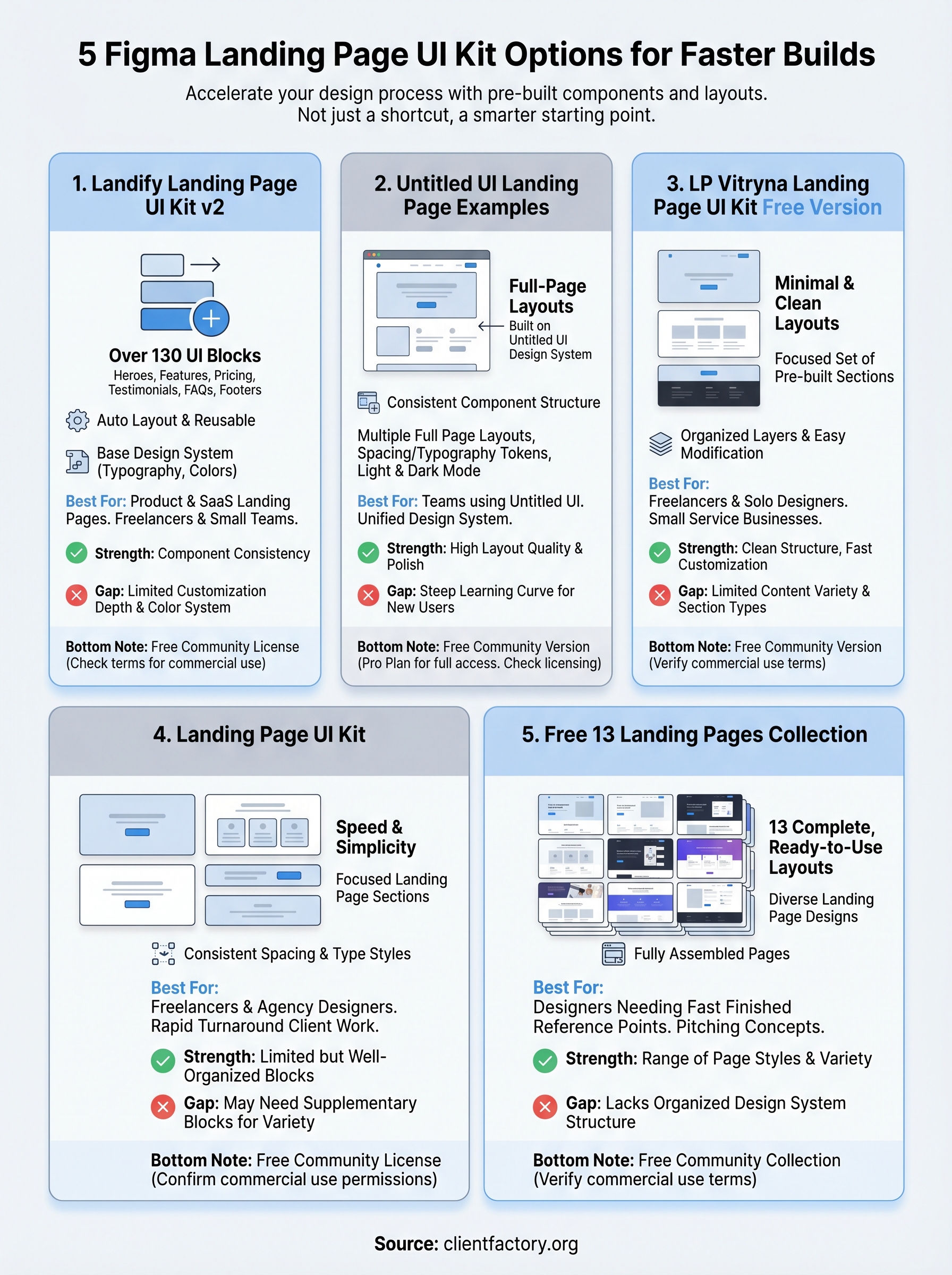
Picking the right figma landing page ui kit comes down to what your project actually needs. If you want depth and component coverage, Landify v2 or Untitled UI gives you the most to work with. If you need fast output with minimal setup, LP Vitryna or the Landing Page UI Kit gets you moving quickly. And if variety across complete layouts is your priority, the 13-page collection covers that ground well. Start with what matches your team’s workflow, not the most feature-rich option.
But a great design is only half the job. Converting visitors into leads requires more than clean sections and solid typography. Your page structure needs to match how your audience thinks, what they need to see, and what drives them to take action. Traffic without conversion means you’re leaving clients on the table. If your landing pages aren’t generating enough inquiries, book a free funnel audit and find out exactly where the drop-off is happening.
