

Your website traffic means nothing if you can’t capture visitor information and turn those visitors into actual leads. That’s where WordPress lead generation plugins come in, they give you the tools to collect emails, build contact lists, and start conversations with potential clients before they bounce.
But here’s the challenge: there are hundreds of these plugins available, and picking the wrong one can mean slow load times, clunky forms, and missed opportunities. Not exactly what you need when you’re trying to grow your business.
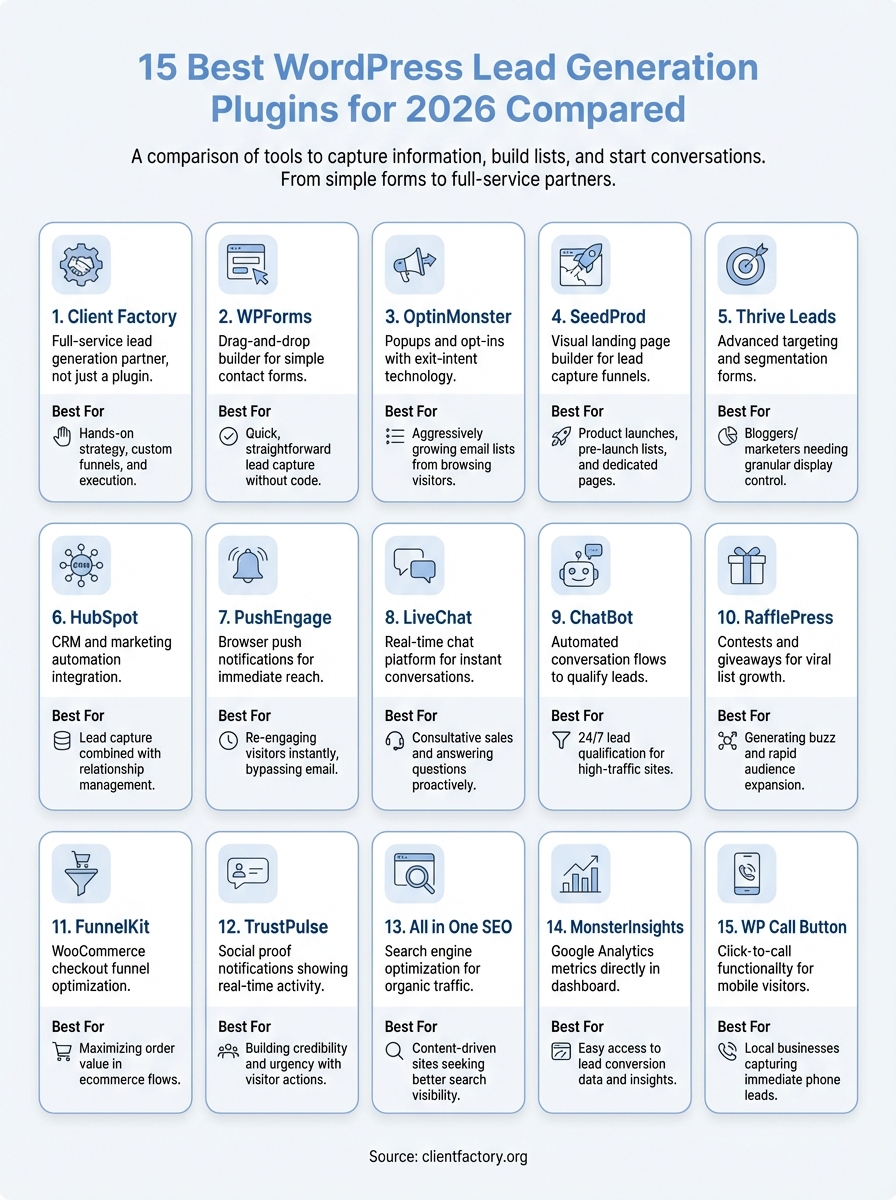
At Client Factory, we build and optimize client acquisition funnels every day. We’ve tested and implemented countless lead capture tools across dozens of campaigns, so we know which plugins actually deliver results and which ones are just bloated promises. In this guide, we’re breaking down the 15 best WordPress lead generation plugins for 2026, comparing features, pricing, ease of use, and real-world performance so you can make an informed decision without the trial-and-error headache.
1. Client Factory
Client Factory isn’t a traditional WordPress plugin, it’s a full-service lead generation partner that designs, implements, and optimizes your entire client acquisition funnel. Instead of just installing software and hoping for results, you get a dedicated team that builds custom WordPress-based lead capture systems tailored to your business goals. This approach removes the guesswork from choosing and configuring wordpress lead generation plugins because the team handles strategy, implementation, and ongoing optimization for you.
What it does
Client Factory builds custom lead generation funnels directly on your WordPress site using a strategic combination of proven plugins, custom code, and conversion-focused design. The team creates complete acquisition systems that include contact forms, landing pages, email automation, chat integrations, and conversion tracking all working together. You don’t get a one-size-fits-all solution, you get a funnel engineered specifically for your target audience and business model.
Best for
This service works best for service businesses and law firms that need more than just software. If you want someone to handle the entire lead generation strategy, from plugin selection to funnel optimization, Client Factory delivers that hands-on approach. You’re not just buying tools, you’re getting expertise and execution that turns your WordPress site into a client acquisition machine.
“The team combines over 30 years of experience with a performance-first mindset to ensure your marketing investment delivers measurable results.”
Key capabilities
Client Factory’s WordPress implementations include conversion-optimized contact forms, multi-step lead capture sequences, integrated CRM connections, and detailed analytics tracking. The team handles technical integration between your WordPress site and tools like email marketing platforms, payment processors, and scheduling systems. They also perform conversion audits to identify what’s breaking in your current setup and fix it with proven plugins and custom configurations.
How it fits into a WordPress lead gen stack
Instead of being another plugin in your stack, Client Factory acts as the architect and builder of your entire WordPress lead generation system. The team selects the right plugins for your specific needs, configures them for maximum conversion, and ensures everything integrates smoothly. This eliminates plugin conflicts, performance issues, and the technical headaches that come from piecing together your own solution. You get a fully managed system that just works.
Pricing
Client Factory uses custom pricing based on your business size, lead generation goals, and the complexity of your funnel requirements. Contact the team directly for a free funnel audit and strategy consultation where they’ll assess your current WordPress setup and provide specific recommendations. This approach ensures you only pay for what you actually need, not for bundled features you’ll never use.
2. WPForms
WPForms delivers drag-and-drop form building that transforms how you capture leads on WordPress. The plugin gives you pre-built templates for contact forms, newsletter signups, and lead capture forms that you can customize without writing code. You can deploy conversion-focused forms in minutes instead of hours, making it one of the most popular wordpress lead generation plugins for businesses that need speed and simplicity.

What it does
WPForms creates contact forms and lead capture tools directly inside your WordPress dashboard using a visual builder. You drag fields like name, email, phone, and custom questions onto a canvas, then embed the form anywhere on your site with a shortcut code. The plugin handles form submissions, spam filtering, and email notifications automatically so leads reach you immediately after someone fills out a form.
Best for
This plugin works best for businesses that need straightforward lead capture without complex automation sequences. If you want simple contact forms, quote request forms, or email signup boxes that just work, WPForms handles that requirement efficiently. The interface makes it accessible for non-technical users who need to create and manage forms without developer help.
Key capabilities
You get spam protection through reCAPTCHA, conditional logic that shows or hides fields based on user responses, and file upload fields for document submission. The plugin includes form abandonment tracking that captures partial submissions when visitors start filling out a form but don’t complete it. You can also create multi-page forms that break long lead capture forms into digestible steps.
“Form abandonment tracking helps you recover leads from visitors who started the conversion process but didn’t finish.”
Integrations and compatibility
WPForms connects with email marketing platforms like Mailchimp, Constant Contact, and AWeber to automatically add new leads to your lists. The plugin integrates with payment processors including PayPal and Stripe for payment forms, and it works with CRM systems like Salesforce and HubSpot to sync lead data. You can also connect forms to Zapier for extended automation capabilities.
Pricing
The basic plan starts at $49.50 per year for a single site with essential form features and email marketing integrations. The Plus plan costs $99.50 annually and adds payment integrations along with form templates. Pro plans run $199.50 per year with advanced features like user registration forms and post submission capabilities, while the Elite plan at $299.50 includes priority support and additional integrations.
3. OptinMonster
OptinMonster specializes in popup and opt-in forms that capture leads at critical moments during a visitor’s journey on your WordPress site. The plugin gives you exit-intent technology that detects when someone is about to leave your site and displays a targeted offer to capture their email before they bounce. You can create lightbox popups, floating bars, slide-ins, and inline forms that appear based on specific visitor behaviors and conditions.

What it does
The plugin captures email addresses and contact information through strategically timed popups and opt-in forms that trigger based on user behavior. OptinMonster monitors visitor actions like scroll depth, time on page, and exit intent to display conversion-optimized campaigns at the right moment. You build campaigns using the visual editor, set trigger conditions, and deploy them across your WordPress site without coding.
Best for
OptinMonster works best for content websites, ecommerce stores, and blogs that need to grow their email lists aggressively. If you want to capture leads from visitors who are browsing but not taking action, the exit-intent and behavior-based triggers give you that additional conversion opportunity. The plugin excels when you need multiple campaign types running simultaneously across different pages.
Key capabilities
You get A/B testing built directly into the platform so you can test headlines, images, and offers to optimize conversion rates. The plugin includes over 75 pre-built templates designed specifically for lead generation, and the drag-and-drop builder lets you customize every element. OptinMonster also provides detailed analytics showing impressions, conversions, and conversion rates for each campaign you run.
“Exit-intent technology can recover up to 35% of abandoning visitors by showing them a targeted offer at the exact moment they’re about to leave.”
Targeting and testing options
The plugin offers page-level targeting that shows specific campaigns only on certain pages or posts, and you can use geolocation targeting to display different offers based on visitor location. You can trigger campaigns based on referral source, device type, and even returning versus new visitors. The MonsterLinks feature turns any link into a campaign trigger, giving you control over exactly when and where your opt-in forms appear.
Pricing
Basic plans start at $9 per month when billed annually, covering one site with essential popup features and templates. The Plus plan costs $19 monthly and adds exit-intent technology along with advanced targeting rules. Pro plans run $29 per month with A/B testing and priority support, while Growth plans at $49 monthly include everything plus e-commerce integrations and advanced analytics.
4. SeedProd
SeedProd transforms your WordPress site into a lead generation powerhouse through a complete landing page builder designed specifically for capturing contacts. The plugin gives you visual page construction tools that create conversion-focused landing pages, coming soon pages, and maintenance mode pages without requiring any coding knowledge. You can build entire lead capture funnels directly inside WordPress using templates optimized specifically for email list growth and contact collection.

What it does
SeedProd creates high-converting landing pages using a drag-and-drop interface that works independently from your WordPress theme. You build pages by adding blocks for headlines, forms, images, countdown timers, and social proof elements onto a blank canvas. The plugin integrates with email marketing services to automatically add captured leads to your lists, and it includes built-in form fields that collect names, emails, and custom information you define.
Best for
This plugin works best for businesses launching new products, building pre-launch email lists, or running focused lead generation campaigns that need dedicated landing pages. If you want complete design control without theme limitations, SeedProd delivers that independence. The tool excels when you need multiple landing pages for different offers or audience segments.
Key capabilities
You get mobile-responsive templates specifically designed for lead capture, and the block-based builder includes countdown timers that create urgency around limited-time offers. SeedProd provides subscriber management directly in your WordPress dashboard, and you can track conversion metrics for each landing page. The plugin also includes duplicate page functionality that speeds up creating variations for A/B testing.
“Landing pages built with dedicated builders typically convert 2-3x better than standard WordPress pages because they eliminate distractions and focus entirely on the conversion goal.”
Landing page and theme builder considerations
SeedProd bypasses your WordPress theme entirely when displaying landing pages, which means faster load times and no theme conflicts affecting your lead capture pages. This independence gives you complete creative freedom but also means you need to build navigation and footer elements manually if you want them. The theme builder component lets you design custom WordPress themes without code, extending the plugin beyond just landing pages.
Pricing
Basic plans start at $39.50 annually for a single site with essential landing page features and email integrations. The Plus plan costs $99.50 yearly and adds WooCommerce integration along with subscriber management. Pro plans run $199.50 per year with advanced blocks and priority support, while the Elite plan at $239.50 includes agency features and white-label options.
5. Thrive Leads
Thrive Leads gives you advanced targeting and segmentation capabilities that go beyond basic popup builders. This plugin creates opt-in forms, popups, sticky ribbons, and slide-ins that appear based on detailed visitor behavior rules you configure. You can segment your email list building by showing different lead magnets to visitors based on categories they browse, posts they read, or actions they take on your WordPress site.
What it does
The plugin builds multiple opt-in form types including lightboxes, two-step opt-ins, slide-ins, content locks, and scroll mats that trigger at specific points during visitor engagement. Thrive Leads tracks visitor behavior across your site and displays personalized lead capture forms based on that activity. You create campaigns with the visual editor, set display rules, and deploy them across pages, posts, or custom post types.
Best for
Thrive Leads works best for bloggers, course creators, and content marketers who publish regularly and need sophisticated list segmentation. If you want to offer different lead magnets to different audience segments based on the content they consume, this plugin handles that targeting complexity effectively. The tool excels when you need granular control over when and where opt-in forms appear.
Key capabilities
You get SmartLinks technology that automatically hides opt-in forms from people who already subscribed, preventing opt-in fatigue and improving user experience. The plugin includes A/B testing for forms, headlines, and triggers to optimize conversion rates continuously. Thrive Leads provides detailed reporting dashboards showing conversion rates for each form type, placement, and trigger condition you configure.
“SmartLinks prevent subscribers from seeing the same opt-in forms repeatedly, which can increase overall site engagement by 20-30% while maintaining lead generation performance.”
Performance and site speed considerations
Thrive Leads loads assets conditionally, meaning it only loads scripts and styles on pages where you actually display opt-in forms. This approach minimizes performance impact compared to wordpress lead generation plugins that load globally. The plugin uses lightweight code and optimized animations to keep page speed fast, though running multiple simultaneous campaigns with complex triggers can still affect load times on high-traffic sites.
Pricing
Thrive Leads costs $99 per year for up to 25 WordPress sites with all features included. The subscription includes regular updates, priority support, and access to the Thrive Suite members area. You can also purchase it as part of Thrive Suite membership at $299 annually, which bundles the plugin with other Thrive conversion tools.
6. HubSpot
HubSpot brings enterprise-level CRM and marketing automation directly into your WordPress dashboard through its official plugin. This platform gives you forms, popups, live chat, and email marketing tools that automatically sync with a free CRM system where you track every lead interaction. You get complete visibility into your lead generation funnel because HubSpot captures contact information and monitors every touchpoint from first visit to closed deal.
What it does
The HubSpot plugin creates contact forms, popups, and live chat widgets that capture leads directly on your WordPress site while automatically adding them to your CRM database. You build forms using the visual editor, embed them anywhere on your site, and watch as lead data flows into organized contact records with full activity history. The plugin tracks page views, form submissions, and email opens to give you complete lead intelligence.
Best for
HubSpot works best for businesses that need both lead capture and relationship management in one unified system. If you want to track leads beyond the initial contact and nurture them through automated email sequences, this plugin delivers that complete marketing infrastructure. The tool excels when you need team collaboration features like lead assignment and deal pipeline tracking.
Key capabilities
You get unlimited contact storage in the free CRM, marketing email tools that send up to 2,000 emails monthly, and meeting scheduling links that book appointments directly from your WordPress site. The plugin includes live chat functionality with chatbots that qualify leads before routing them to your team, and you can create targeted popups based on visitor behavior and page views.
“The free CRM alone saves businesses $50-100 monthly compared to paying for standalone contact management systems.”
CRM and automation considerations
HubSpot’s WordPress integration requires you to manage contacts and automation workflows inside the HubSpot platform interface, not your WordPress dashboard. This means you need to switch between systems for campaign management and lead nurturing. The free tier limits automation capabilities, so complex drip campaigns and advanced segmentation require paid subscriptions. Data lives on HubSpot’s servers rather than your WordPress database, which affects portability if you ever migrate away from the platform.
Pricing
The basic plan starts completely free with essential CRM features, forms, and 2,000 marketing emails monthly. Starter plans begin at $20 per month for expanded email limits and basic automation features. Professional plans run $890 monthly with advanced automation and A/B testing, while Enterprise plans start at $3,600 per month with custom objects and predictive lead scoring.
7. PushEngage
PushEngage captures leads through browser push notifications that reach visitors even after they leave your WordPress site. This plugin converts anonymous browsers into identifiable subscribers by prompting them to opt in for notifications, giving you a direct communication channel that bypasses email altogether. You build your notification list automatically as visitors browse your site, creating a lead capture method that requires no form fills or email addresses.
What it does
The plugin displays opt-in prompts that ask visitors to allow browser notifications from your site, then captures those permissions as subscriber records you can message later. PushEngage sends targeted notifications with headlines, images, and links that bring subscribers back to specific pages on your WordPress site. You create notification campaigns, schedule delivery times, and track click-through rates to measure lead engagement beyond the initial capture.
Best for
PushEngage works best for publishers, ecommerce stores, and content sites that publish frequently and need immediate lead engagement. If you want to re-engage visitors who leave without converting, push notifications give you that direct contact method without waiting for them to check email. The tool excels when you need instant delivery of time-sensitive offers or content updates.
Key capabilities
You get automated drip campaigns that send welcome sequences to new subscribers, and triggered notifications based on cart abandonment, price drops, or inventory updates. The plugin includes goal tracking that measures which notifications drive specific conversions like purchases or form submissions. PushEngage also provides A/B testing for notification copy and delivery timing to optimize click-through rates continuously.
“Browser push notifications typically achieve 7-10% click-through rates compared to 2-3% for email campaigns, making them a powerful addition to wordpress lead generation plugins.”
Segmentation and automation considerations
PushEngage segments subscribers automatically based on pages viewed, categories browsed, and actions taken on your site. You can create dynamic segments that update in real-time as subscriber behavior changes, ensuring targeted messaging reaches the right audience. The automation workflows trigger notifications based on specific conditions like visitor return frequency or days since last visit, though complex multi-step sequences require higher-tier plans.
Pricing
Free plans support up to 2,500 subscribers with basic notification features and limited segmentation. Business plans start at $29 monthly for 5,000 subscribers with advanced targeting and automation. Premium plans run $49 per month for 10,000 subscribers with A/B testing and priority support, while custom enterprise pricing handles larger subscriber volumes.
8. LiveChat
LiveChat transforms your WordPress site into an instant conversation platform that captures leads through real-time chat interactions. This plugin connects visitors with your team immediately when they have questions or need assistance, converting browsing sessions into active conversations that you can nurture into qualified leads. You capture contact information naturally during chat conversations instead of relying on static forms that visitors might ignore.
What it does
The plugin adds a chat widget to your WordPress site that visitors can click to start conversations with your team. LiveChat captures visitor names, email addresses, and custom details during the conversation flow while automatically creating contact records for every interaction. You monitor active chats from the desktop app or mobile interface, and the system stores complete chat transcripts with contact information for future follow-up.
Best for
LiveChat works best for service businesses and consultative sales teams that need to answer questions before prospects convert. If your leads typically research extensively before making contact, having immediate chat availability gives you that critical engagement opportunity during their decision-making process. The tool excels when you have team members available to respond quickly during business hours.
Key capabilities
You get pre-chat surveys that collect email addresses and specific questions before conversations start, ensuring you capture lead information even if visitors disconnect early. The plugin includes canned responses for common questions, chat ratings that measure conversation quality, and file sharing capabilities that let you send documents directly through the chat interface. LiveChat also provides visitor tracking that shows pages viewed and time spent before someone initiates a chat.
“Websites with live chat convert 3-5x more visitors into leads compared to sites relying solely on contact forms because they eliminate the waiting period between inquiry and response.”
Lead capture and routing considerations
LiveChat routes incoming chats based on team member availability and expertise using skills-based routing rules you configure. The system distributes conversations evenly across available agents or assigns chats based on visitor source and page location. You can set up automated greetings that trigger after specific time delays or scroll depths to proactively start conversations with visitors who might not initiate chat themselves.
Pricing
Starter plans begin at $20 per agent monthly with basic chat features and limited chat history. Team plans cost $41 per agent with advanced routing and analytics. Business plans run $59 per agent monthly with work scheduling and staffing predictions, while Enterprise plans at custom pricing include dedicated account management and advanced security features.
9. ChatBot
ChatBot delivers automated conversation flows that qualify and capture leads on your WordPress site without requiring human agents to be available around the clock. This plugin creates intelligent chat sequences that ask qualifying questions, collect contact information, and route serious prospects to your sales team only when they meet specific criteria. You build conversation paths using a visual story builder that branches based on visitor responses, creating personalized interactions that feel natural while capturing lead data automatically.
What it does
The plugin creates multi-step chat conversations that engage visitors, gather information like names and emails, and qualify leads based on their responses to questions you configure. ChatBot works independently from live chat systems, running 24/7 automated conversations that handle initial lead qualification before any human intervention. You design conversation flows that adapt based on visitor answers, ensuring each interaction captures the specific information you need to evaluate lead quality.
Best for
ChatBot works best for businesses with high website traffic that need to qualify leads before sales team involvement. If you want to filter out tire-kickers and only engage seriously interested prospects, automated qualification conversations give you that screening capability at scale. The tool excels when you have defined qualification criteria that determine which leads deserve immediate attention.
Key capabilities
You get conditional logic that branches conversations based on visitor responses, and the system integrates with email marketing platforms to automatically add qualified leads to nurture sequences. The plugin includes lead scoring based on conversation responses, analytics showing where visitors drop off in chat flows, and template libraries for common lead qualification scenarios. ChatBot also captures partial conversations when visitors exit mid-flow, preserving lead information even from incomplete interactions.
“Automated chatbots can qualify up to 80% of website visitors without human involvement, freeing your team to focus only on leads ready to convert.”
Handoff, training, and guardrails
ChatBot transfers conversations to human agents seamlessly when visitors request live assistance or when specific trigger phrases appear in responses. You configure handoff rules that route qualified leads to available team members based on expertise areas or product categories. The system includes safety features that prevent bots from answering questions outside their programmed knowledge, redirecting complex inquiries to humans instead of providing incorrect information.
Pricing
Starter plans begin at $52 monthly for 1,000 chats with basic conversation flows and integrations. Team plans cost $142 per month for 5,000 chats with advanced analytics. Business plans run $424 monthly for 25,000 chats with priority support and custom integrations, while Enterprise pricing handles unlimited conversations with dedicated infrastructure.
10. RafflePress
RafflePress turns contests and giveaways into powerful lead generation machines on your WordPress site. This plugin creates viral contests that incentivize visitors to share your giveaway with their networks in exchange for additional entry opportunities, multiplying your reach exponentially. You build contest landing pages that capture emails, track entries, and manage winner selection automatically while growing your contact list through the natural sharing behavior of participants.
What it does
The plugin creates contest campaigns that collect email addresses and social media follows as entry requirements, then awards bonus entries when participants share your contest or complete additional actions. RafflePress builds dedicated landing pages for each giveaway using templates designed specifically for maximum entry conversion. You track entries in real-time, verify actions, and select winners randomly or based on criteria you define.
Best for
RafflePress works best for ecommerce stores, product launches, and brands that want to build email lists quickly through incentivized participation. If you need to generate buzz around a new product or grow your audience rapidly, contest-driven lead capture gives you that viral growth potential. The tool excels when you have prizes valuable enough to motivate sharing and participation.
Key capabilities
You get viral sharing mechanics that award bonus entries for social media shares, referral link clicks, and friend invitations. The plugin includes entry verification that confirms actions like follows and subscribes actually occurred, preventing fake entries. RafflePress provides success tracking that shows entry sources and viral coefficient, helping you understand which sharing channels drive the most participation.
“Well-executed viral contests can generate 10-20x more leads than standard opt-in forms because participants become active promoters who recruit additional entrants.”
Fraud prevention and compliance considerations
RafflePress includes duplicate entry detection that prevents the same person from entering multiple times using different email addresses. The plugin logs IP addresses and browser fingerprints to identify suspicious entry patterns, though determined fraudsters can still circumvent basic protections. You need to configure GDPR compliance settings manually to ensure contest entries meet data protection requirements in regulated regions.
Pricing
Basic plans start at $39.50 annually for single-site contests with essential features and 1,000 entries. Plus plans cost $79.50 yearly for 10,000 entries with advanced actions and retargeting pixels. Pro plans run $159.50 per year for unlimited entries with fraud detection and priority support, while Elite plans at $319.50 include white-label options and agency features.
11. FunnelKit
FunnelKit specializes in WooCommerce funnel optimization that turns standard checkout pages into conversion-focused sequences designed to capture more leads and sales. This plugin rebuilds your entire purchase flow with upsells, order bumps, and lead capture steps that maximize revenue per visitor. You create multi-step funnels that collect email addresses before purchase, offer relevant add-ons during checkout, and present post-purchase offers that increase customer lifetime value.
What it does
The plugin replaces your default WooCommerce checkout with customizable funnel pages that guide customers through optimized buying sequences. FunnelKit builds landing pages, checkout forms, thank you pages, and upsell flows that work together as complete sales funnels. You capture lead information at multiple touchpoints throughout the purchase journey, not just during the initial checkout form.
Best for
FunnelKit works best for WooCommerce store owners who need to optimize their sales process beyond basic product listings. If you want to capture leads during the buying process and increase average order values through strategic offers, this plugin delivers that ecommerce-specific functionality. The tool excels when you need complete control over your checkout and post-purchase experience.
Key capabilities
You get one-click upsells that present additional offers after purchase completion, and order bumps that add complementary products directly on the checkout page. The plugin includes A/B testing for funnel steps, dynamic checkout field customization, and cart abandonment recovery that captures emails from visitors who add products but don’t complete purchase. FunnelKit also provides funnel analytics showing conversion rates at each step.
“Optimized checkout funnels typically increase conversion rates by 15-25% compared to standard WooCommerce checkout pages because they eliminate distractions and reduce friction.”
Checkout and funnel optimization considerations
FunnelKit requires WooCommerce as your foundation, which means it only works for product-based businesses selling through WordPress. The plugin adds complexity to your checkout process that can confuse customers if not implemented carefully. You need to test funnel sequences thoroughly to ensure technical compatibility with your payment gateway and shipping methods before launching to live traffic.
Pricing
Starter plans begin at $69.50 annually for one site with basic funnel features. Plus plans cost $129.50 yearly with advanced analytics and unlimited funnels. Pro plans run $199.50 per year with priority support and agency features, while the Max plan at $299.50 includes white-label options.
12. TrustPulse
TrustPulse adds social proof notifications to your WordPress site that display recent visitor actions like purchases, signups, and form submissions in real-time. These small notification bubbles appear in the corner of your site showing messages like “Sarah from Austin just signed up” or “12 people viewed this page in the last hour,” creating urgency and credibility that pushes hesitant visitors toward conversion. You leverage the psychological principle that people trust actions others have taken, turning anonymous traffic into social validation that drives more leads.

What it does
The plugin tracks visitor activity and conversions on your WordPress site, then displays those actions as notification popups to other visitors browsing your pages. TrustPulse shows real-time or recent activity including form submissions, purchases, downloads, and page views to create the impression of an active, trusted site. You customize notification appearance, timing, and which actions trigger displays without affecting your site’s performance.
Best for
TrustPulse works best for businesses with steady traffic and regular conversions that need to maximize the persuasive impact of existing activity. If you already capture leads but want to increase conversion rates by showing proof that others trust your business, these notifications deliver that social validation layer. The tool excels when you have consistent activity to display rather than sporadic conversions.
Key capabilities
You get customizable notification templates that match your brand design, and display rules that control which pages show notifications and how frequently they appear. The plugin includes analytics tracking notification views and the conversion lift they generate. TrustPulse also provides activity capture from multiple sources including form plugins, WooCommerce, and custom events you define.
“Social proof notifications can increase conversion rates by 10-15% because they reduce purchase anxiety by showing that real people actively use your products or services.”
Trust and UX considerations
TrustPulse notifications can feel manipulative if overused or if they display fake activity, which damages credibility instead of building it. You need genuine conversion activity to make notifications authentic and trustworthy. The popups appear repeatedly during browsing sessions, which some visitors find distracting or annoying if frequency settings are too aggressive.
Pricing
Basic plans start at $5 monthly for 500 sessions with essential notification features. Plus plans cost $10 per month for 2,500 sessions with advanced targeting. Pro plans run $17 monthly for 10,000 sessions with priority support, while Growth plans at $39 handle 50,000 sessions with custom branding options.
13. All in One SEO
All in One SEO optimizes your WordPress site for search engine visibility that drives organic traffic to your lead capture pages. This plugin handles technical SEO requirements like XML sitemaps, meta descriptions, and schema markup while giving you content optimization tools that help your landing pages and lead magnets rank higher in search results. You improve the discoverability of your lead generation content without needing to understand complex SEO mechanics.
What it does
The plugin analyzes your content as you write and provides actionable recommendations to improve search rankings for target keywords. All in One SEO generates optimized meta titles and descriptions, creates XML sitemaps automatically, and adds schema markup that helps search engines understand your content structure. You control exactly how your pages appear in search results, ensuring your lead generation landing pages display compelling previews that drive clicks.
Best for
All in One SEO works best for content-driven businesses that use blog posts, guides, and resources to attract leads through organic search traffic. If you publish educational content that targets buyer intent keywords, this plugin handles the technical optimization that gets those pages ranking. The tool excels when your lead generation strategy relies on search visibility rather than paid advertising alone.
Key capabilities
You get keyword tracking and analysis built directly into your WordPress editor, showing search volume and competition data as you write. The plugin includes social media preview controls, breadcrumb navigation for improved site structure, and local SEO features for businesses targeting geographic markets. All in One SEO also provides redirect management that preserves link equity when you reorganize your site structure.
“Properly optimized lead generation pages can rank within the top 10 search results for target keywords, delivering consistent organic traffic that converts without ongoing ad spend.”
Lead gen SEO priorities to focus on
Focus on optimizing your landing page titles and meta descriptions to match the exact search intent behind your target keywords. You need compelling previews that convince searchers your page delivers the solution they need. Implement schema markup for FAQ sections on lead capture pages to earn featured snippet positions that increase visibility. Also optimize your site’s internal linking structure to funnel authority toward your highest-converting lead generation pages.
Pricing
The basic plan starts completely free with core SEO features and optimization recommendations. Pro plans begin at $49.50 annually for advanced features like video and news sitemaps. Elite plans run $99.50 per year with priority support and additional site licenses, while Agency plans at $199.50 cover unlimited sites with white-label options.
14. MonsterInsights
MonsterInsights connects your WordPress site to Google Analytics and displays critical lead generation metrics directly inside your dashboard. This plugin eliminates the need to log into Google Analytics separately by bringing conversion tracking data into WordPress where you manage your content and campaigns. You track form submissions, button clicks, file downloads, and custom events that indicate lead generation activity without writing tracking code manually.
What it does
The plugin installs Google Analytics tracking on your WordPress site automatically and configures event tracking for lead generation actions like form submissions and email signups. MonsterInsights displays analytics reports inside your WordPress dashboard showing traffic sources, visitor behavior, and conversion events that help you understand which pages and campaigns generate the most leads. You see exactly which wordpress lead generation plugins and pages drive results without interpreting complex Analytics interfaces.
Best for
MonsterInsights works best for businesses that need analytics insights without technical expertise in Google Analytics setup and configuration. If you want to track lead generation performance but find the native Analytics interface overwhelming, this plugin simplifies data access with pre-built reports focused on metrics that matter for conversion optimization.
Key capabilities
You get enhanced ecommerce tracking for WooCommerce stores, custom dimension tracking for user roles and post types, and form conversion tracking that works with major form plugins. The plugin includes popular posts widgets, real-time statistics, and affiliate link tracking that shows which outbound clicks drive the most engagement.
“MonsterInsights cuts Analytics implementation time from hours to minutes by handling tracking code placement and event configuration automatically.”
Tracking setup for lead generation
Configure form tracking by enabling the forms addon that automatically detects and tracks submissions from WPForms, Contact Form 7, and other major form plugins. Set up custom event tracking for specific lead capture actions like PDF downloads or consultation requests. Monitor goal completions in the Conversions report to see which traffic sources deliver qualified leads rather than just website visits.
Pricing
The basic plan starts completely free with essential Analytics features and dashboard reports. Plus plans begin at $99.50 annually with form tracking and popular posts functionality. Pro plans run $199.50 per year with ecommerce tracking and custom dimensions, while Agency plans at $399.50 cover unlimited sites with priority support.
15. WP Call Button
WP Call Button adds click-to-call functionality that converts mobile visitors into phone leads instantly. This plugin displays a floating call button on your WordPress site that mobile users can tap to initiate immediate phone calls to your business. You capture leads at the exact moment they’re ready to talk, eliminating the friction of filling out contact forms when visitors prefer direct conversation.
What it does
The plugin creates a persistent call button that appears on mobile devices, displaying your phone number and allowing one-tap dialing directly from the browser. WP Call Button tracks when visitors click the call button, giving you basic analytics on how many people attempt to reach you by phone. You customize the button appearance, position, and which pages display the call option without coding.
Best for
WP Call Button works best for local service businesses that rely on phone consultations to close leads. If your customers prefer calling over form submissions, this plugin gives them that direct contact method immediately. The tool excels for businesses where time-sensitive inquiries need instant response.
Key capabilities
You get customizable button design that matches your brand colors and positioning preferences. The plugin includes display rules that show call buttons only on specific pages or device types. WP Call Button also provides click tracking that counts how many visitors initiated calls from your site.
“Mobile visitors are 3-4x more likely to call when you provide a persistent click-to-call button compared to displaying just a phone number in text.”
Call tracking and attribution considerations
WP Call Button provides basic click tracking but doesn’t capture actual call duration, outcomes, or caller information beyond the click event. You need separate call tracking services to attribute phone conversions to specific campaigns or keywords. The plugin records button clicks, not completed conversations, so you can’t measure call quality or conversion rates from the tracking data alone.
Pricing
WP Call Button offers a completely free version with essential call button features and basic customization options. Premium plans start at $29 annually with advanced styling and priority support.
Final thoughts
Choosing the right wordpress lead generation plugins depends entirely on your specific business model and how visitors interact with your site. You might need simple contact forms for basic inquiry capture, or you could require sophisticated automation that nurtures leads through multi-step sequences. The plugins we covered give you options across every price point and complexity level, from free solutions to enterprise platforms.
Most businesses see the best results when they combine multiple plugin types rather than relying on a single tool. A contact form plugin paired with exit-intent popups and social proof notifications creates more conversion opportunities than any standalone solution. However, assembling and optimizing these tools takes expertise and testing to get right. If you want a professionally built lead generation system that actually converts, schedule a free funnel audit where we’ll analyze your current setup and show you exactly what’s holding back your lead capture performance.
