

Building a landing page shouldn’t require a degree in web design. Yet here you are, staring at WordPress, wondering how to create a page that actually converts visitors into leads or customers. The default WordPress editor won’t cut it when you need custom forms, countdown timers, or mobile-optimized layouts. Hiring a developer costs thousands and takes weeks. Installing the wrong wordpress landing page plugin means wasting days wrestling with clunky interfaces and templates that break on mobile.
We tested 12 popular landing page builders to save you the headache. This guide shows what each plugin does best, what features actually drive conversions, and how pricing compares. You’ll learn which builders suit beginners, which ones work for agencies running multiple campaigns, and which ones deliver the best ROI. Skip the trial and error. By the end, you’ll know exactly which plugin to install and how to start building pages that convert.
1. SeedProd
SeedProd delivers the fastest path from blank WordPress site to finished landing page. You install the plugin, pick a template, and start customizing within minutes. The drag-and-drop editor requires zero coding knowledge, making it ideal if you’ve never built a landing page before. Templates cover webinars, product launches, maintenance modes, and lead magnets. The interface stays simple enough that you won’t spend hours hunting for basic settings, yet it includes enough power to create professional pages that convert.

What SeedProd does best
SeedProd excels at speed and simplicity. The builder generates lightweight code that loads faster than most competitors, which directly improves conversion rates. You won’t need to install separate plugins for maintenance mode, coming soon pages, or 404 error pages because SeedProd handles all of these natively. The recent addition of AI tools lets you generate complete landing page layouts, copy, and images in under 60 seconds. This wordpress landing page plugin works with any WordPress theme, so you can use it alongside your existing site design without conflicts.
Landing page features and integrations
You get 350+ pre-designed templates covering every major campaign type. The form builder connects directly to email marketing platforms like Mailchimp, Drip, and Constant Contact without requiring Zapier. Built-in blocks include countdown timers, testimonials, social sharing buttons, and call-to-action sections. The access control feature lets you hide pages during development while granting preview access to specific clients or team members. SeedProd also includes WooCommerce blocks for product showcases, though the ecommerce functionality remains basic compared to dedicated shop builders.
SeedProd’s clean code output means your landing pages load noticeably faster than pages built with heavier builders, directly boosting conversion rates.
Limitations and tradeoffs
SeedProd lacks native A/B testing, forcing you to use external tools like Google Optimize if you want to run split tests. The design flexibility falls short of what Elementor or Divi offer. You’ll find yourself constrained by template structures when you need highly custom layouts. Advanced users may feel limited by the simplified approach, especially when building complex multi-step funnels or conditional forms.
Who should choose SeedProd
Choose SeedProd if you’re a beginner who needs results today or if you run high-traffic sites where page speed matters more than unlimited design options. Small businesses launching their first lead magnet will appreciate the straightforward interface. Agencies managing basic landing pages for multiple clients benefit from the unlimited site license and reliable performance.
SeedProd pricing overview
The free version works for simple maintenance pages and coming soon screens. Paid plans start at $39.50 per year for the Basic tier, which unlocks the full template library and email integrations. This makes SeedProd the most affordable option on this list for users who need solid functionality without paying for advanced features they won’t use.
2. Thrive Architect
Thrive Architect targets marketers who obsess over conversion rates rather than just pretty designs. Every template, every element, and every feature focuses on turning visitors into leads or customers. You won’t find generic layouts here. Instead, you get sales pages, webinar registration forms, and lead capture designs built around proven conversion principles. The builder assumes you care more about split testing headlines than perfecting pixel spacing, which makes it the opposite of design-first tools like Elementor.
What Thrive Architect does best
Thrive Architect ships with native A/B testing through Thrive Optimize, letting you duplicate pages, change elements, and route traffic between variations without leaving WordPress. You can test headlines, button colors, or entire layouts while watching real-time data confirm which version converts better. The conversion-focused element library includes scarcity timers, testimonial blocks, and guarantee sections that other builders either lack or require paid addons to access. This wordpress landing page plugin integrates with the broader Thrive Suite, meaning quizzes, popups, and comment systems work together without plugin conflicts.
Landing page features and integrations
You get 400+ templates designed specifically for marketing campaigns, not generic business pages. Templates separate by goal (webinar signups, product launches, lead magnets) rather than by industry. The form builder connects to major email platforms like Mailchimp, ActiveCampaign, and ConvertKit. Dynamic text replacement lets you personalize headlines based on visitor data. The Variables and Components system saves complete design patterns you can reuse across campaigns, cutting hours from repeat projects.
Native A/B testing eliminates the need for external tools, letting you optimize landing pages directly inside WordPress without monthly subscriptions to third-party platforms.
Limitations and tradeoffs
Thrive Architect requires a steeper learning curve than simpler builders. You’ll spend your first few sessions figuring out where settings live and how elements connect. The interface packs more options than beginners typically need, which can feel overwhelming during your first campaign. Design flexibility trails behind Elementor, especially when you want pixel-perfect custom layouts that break from template structures.
Who should choose Thrive Architect
Choose Thrive Architect if you run serious marketing campaigns where conversion rate improvements directly impact revenue. Digital agencies managing multiple client funnels benefit from the unified tool suite. Course creators and coaches launching webinar funnels get the exact features they need without hunting through plugin directories. Skip this if you just need a simple contact page or if design aesthetics matter more than measurable results.
Thrive Architect pricing overview
Thrive Architect costs $99 per year for unlimited websites. The price includes the page builder but requires separate purchases for Thrive Optimize (A/B testing) unless you buy the full Thrive Suite at $299 annually. The Suite includes every Thrive plugin, making it worthwhile if you need the complete marketing toolkit rather than just landing pages.
3. Elementor Pro
Elementor Pro gives you pixel-perfect design control over every element on your landing pages. This wordpress landing page plugin attracts designers and agencies who demand complete flexibility rather than working within template constraints. You can tweak margins, adjust spacing, control animations, and customize every visual detail without touching code. The massive template library and third-party addon ecosystem mean you’ll rarely encounter a design you can’t build. This makes Elementor the industry standard for users who value visual freedom above everything else.
What Elementor Pro does best
Elementor Pro excels at unlimited customization across your entire WordPress site, not just landing pages. You can design headers, footers, product pages, and blog post templates using the same visual builder. The interface updates in real time as you drag elements and adjust settings, eliminating the preview-and-refresh cycle that slows down other builders. WooCommerce integration lets you create custom shop layouts and checkout experiences without additional plugins. The Community and third-party developers have built thousands of addons that extend functionality beyond the core feature set, giving you solutions for almost any specialized need.
Landing page features and integrations
You get 300+ professionally designed templates spanning every industry and use case. The popup builder includes exit-intent triggers and scroll-based activation, perfect for capturing leads before visitors leave. Form fields connect to major email platforms like Mailchimp and ConvertKit, though complex conditional logic requires premium addons. Theme Builder functionality means you control every template on your site from one interface. Dynamic content features let you pull in custom field data, though the implementation feels less intuitive than dedicated dynamic content plugins.
Elementor’s real-time visual editing eliminates the constant switching between editor and preview modes that slows down design work in other builders.
Limitations and tradeoffs
Elementor Pro generates heavier code than lightweight alternatives like SeedProd or Beaver Builder. Pages built with multiple widgets and complex layouts load slower, hurting conversion rates unless you invest time in optimization. You’ll need quality hosting and caching plugins to maintain acceptable Core Web Vitals scores. The builder lacks native A/B testing, forcing you to purchase separate tools or addons if split testing matters to your campaigns. Too many options often leads to analysis paralysis, especially for beginners who spend hours tweaking minor details instead of launching campaigns.
Who should choose Elementor Pro
Choose Elementor Pro if you’re a designer or agency managing multiple client sites where unique visual requirements matter more than raw performance. Freelancers building custom WordPress themes for clients benefit from the complete site-building capabilities. Skip this if you run high-traffic sites where every millisecond of load time impacts revenue, or if you need built-in conversion optimization tools rather than just design flexibility.
Elementor Pro pricing overview
Pricing starts at $59 per year for a single site license. The competitive price point includes the full feature set, making it accessible for individuals and small agencies. You can test the core builder through the free version before committing to the Pro upgrade, though the free tier lacks forms, popups, and theme builder functionality that landing pages typically require.
4. Beaver Builder
Beaver Builder prioritizes stability and clean code over flashy features and endless customization options. This wordpress landing page plugin appeals to developers and agencies who need reliable performance across client projects without the bloat that slows down other builders. You get straightforward drag-and-drop editing that works predictably every time, making it the low-drama option when you can’t afford breaking updates or compatibility issues. The interface feels dated compared to newer competitors, but that simplicity means less time troubleshooting and more time launching campaigns.

What Beaver Builder does best
Beaver Builder generates exceptionally lightweight code that loads faster than feature-heavy alternatives. The output stays clean and minimal, which directly improves page speed and Core Web Vitals scores without requiring extensive optimization. You can switch WordPress themes without breaking your landing pages because Beaver Builder maintains compatibility across the ecosystem. The frontend editing approach lets you see changes instantly as you work, eliminating the constant back-and-forth between editor and preview modes that wastes time in other builders.
Landing page features and integrations
You get 170+ professionally designed templates covering common landing page types like lead capture, sales pages, and webinar registrations. The module library includes basic form fields, buttons, testimonials, and media elements that handle typical campaign needs. Email service integrations work with platforms like Mailchimp and AWeber through simple connection settings. The builder supports custom post types and advanced custom fields, making it useful for developers building dynamic landing pages that pull content from WordPress databases.
Clean code output means your Beaver Builder pages consistently achieve better performance scores than pages built with heavier alternatives, directly improving conversion rates.
Limitations and tradeoffs
Beaver Builder lacks native A/B testing and advanced marketing features that conversion-focused builders include by default. You’ll need separate plugins for popups, countdown timers, and split testing functionality. The template selection feels smaller and less modern compared to Elementor or Thrive Architect. Form capabilities remain basic, requiring third-party form plugins if you need conditional logic or multi-step workflows.
Who should choose Beaver Builder
Choose Beaver Builder if you’re a developer or agency managing multiple client sites where stability matters more than cutting-edge features. Freelancers who need predictable results across diverse WordPress environments will appreciate the compatibility and clean code. Skip this if you need built-in marketing tools or if you want the latest design trends in your template library.
Beaver Builder pricing overview
The free Lite version provides basic functionality for testing. Paid plans start at $89 per year for unlimited sites, making it cost-effective for agencies. The Standard plan includes the page builder and theme builder, giving you complete control over site templates without stepping up to higher tiers.
5. Divi Builder
Divi Builder combines a visual page builder with a complete theme system that controls your entire WordPress site from one interface. This wordpress landing page plugin gives you granular control over layouts, colors, fonts, and animations without touching code. You can customize 46+ content elements on your pages, mixing countdown timers, testimonials, and call-to-action buttons to create campaign-specific landing pages. The builder works both as a standalone plugin and as part of the Divi theme, letting you choose how deeply you want to integrate it into your site structure.
What Divi Builder does best
Divi Builder excels at providing deep design customization while maintaining a unified system across your WordPress installation. You gain precise control over every visual element, from padding and margins to hover effects and scroll animations. The split testing functionality lets you run A/B tests directly inside WordPress, comparing different versions of your landing pages to identify which elements drive better conversions. Recent additions include AI-powered layout generation that creates complete page structures based on text prompts, cutting design time for new campaigns. The builder integrates seamlessly with the Divi theme ecosystem, preventing the plugin conflicts that often plague WordPress sites using multiple page builders.
Landing page features and integrations
You get access to 370+ pre-designed layouts covering webinar registrations, product launches, and lead capture pages. The visual builder includes dynamic content integration that pulls data from custom fields, letting you personalize landing pages based on user parameters. Built-in modules cover essential landing page elements like contact forms, pricing tables, and testimonial sections. Email marketing integrations connect to major platforms through native settings, though complex automation requires additional tools. The Divi theme builder extends beyond landing pages, giving you control over headers, footers, and archive templates from the same interface.
Split testing functionality eliminates monthly subscriptions to external A/B testing platforms, letting you optimize conversions directly inside your WordPress dashboard.
Limitations and tradeoffs
Divi Builder carries more overhead than lightweight alternatives because it functions as both a theme and builder. The learning curve feels steeper than simpler options, requiring time investment before you can work efficiently. Pages built with numerous modules and effects load slower than those created with performance-focused builders like SeedProd. You’ll need optimization plugins and quality hosting to maintain acceptable page speeds on high-traffic sites.
Who should choose Divi Builder
Choose Divi Builder if you’re a marketing team that needs complete site control beyond just landing pages, or if you already use the Divi theme and want native integration. Agencies managing client sites benefit from the unified design system that maintains consistency across templates. Skip this if page speed ranks as your top priority or if you only need simple landing pages without full theme customization.
Divi Builder pricing overview
Divi Builder starts at $89 per year for unlimited site access, or you can pay $249 once for lifetime updates and support. Both options include the complete Divi theme system, making it cost-effective if you need theme builder functionality alongside landing page creation.
6. OptimizePress
OptimizePress focuses exclusively on sales funnels and membership sites rather than general landing page creation. This wordpress landing page plugin gives you pre-built funnel templates designed for the entire customer journey from opt-in to checkout. You won’t use OptimizePress to build blog posts or service pages. Instead, you’ll create complete campaign sequences that guide visitors through multiple steps, capturing leads and driving sales through coordinated page flows. The builder assumes you’re running serious marketing campaigns rather than just collecting email addresses.
What OptimizePress does best
OptimizePress excels at building complete sales funnels with checkout integration already configured. You get templates specifically designed for webinar registrations, product launches, and course sales rather than generic layouts. The checkout builder handles payment processing natively without requiring separate WooCommerce installations or third-party payment plugins. Recent updates added two-step opt-in functionality that filters out fake email addresses, ensuring your list contains genuine subscribers who want your content.
Landing page features and integrations
You access 400+ funnel templates covering every stage of the customer journey from awareness to purchase. The builder includes order bumps and upsell modules that let you increase transaction values without building separate pages. Email platform integrations connect to Mailchimp, ActiveCampaign, and other major services through native settings. Payment processing works with Stripe and PayPal directly inside the builder, eliminating middleware that adds complexity to simple product sales.
Built-in checkout functionality eliminates the need for separate ecommerce plugins when you’re selling digital products or simple physical goods.
Limitations and tradeoffs
OptimizePress constrains you to preset funnel structures that work well for standard campaigns but limit creative freedom. You’ll struggle when trying to build unique layouts that deviate from template designs. The plugin occasionally conflicts with third-party WordPress tools, requiring troubleshooting that wastes campaign launch time. Performance remains adequate but trails behind lighter builders when you need maximum page speed.
Who should choose OptimizePress
Choose OptimizePress if you’re a digital marketer selling courses, coaching, or information products through structured sales funnels. Small businesses launching their first paid product benefit from the integrated checkout system. Skip this if you need flexible design options or if you’re only building lead capture pages without follow-up sales sequences.
OptimizePress pricing overview
Plans start at $129 per year for a single site license. The basic tier includes all funnel templates and checkout functionality, making it immediately useful for product launches without requiring premium upgrades.
7. Breakdance
Breakdance delivers a modern builder that combines intuitive design with serious performance. This wordpress landing page plugin loads faster than most competitors while giving you access to 130+ built-in elements that eliminate the need for third-party addons. You can build complete landing pages with forms, popups, countdown timers, and pricing tables without installing separate plugins that slow down your site. The interface feels familiar if you’ve used other visual builders, but the clean code output and conversion features set it apart from generic page builders.
What Breakdance does best
Breakdance excels at speed and integration without sacrificing functionality. The builder generates lightweight code that consistently achieves better performance scores than feature-heavy alternatives. You get native tools for popups with exit-intent triggers, multi-step forms with conditional logic, and email service connections to platforms like Mailchimp and ConvertKit. Dynamic data support lets you connect page elements to custom fields visually, creating personalized landing pages without PHP knowledge.
Landing page features and integrations
You access premium form capabilities that include multi-step layouts, conditional field visibility, and direct integrations with major email platforms. The popup builder supports advanced triggers based on scroll depth, exit intent, or time delays. Built-in WooCommerce blocks let you create product showcase pages without separate ecommerce plugins. The Global Styles system maintains consistent branding across campaigns while letting you customize individual pages when needed.
Clean code output means your Breakdance pages load noticeably faster than those built with bloated alternatives, directly improving conversion rates.
Limitations and tradeoffs
Breakdance offers a smaller template library compared to established builders like Elementor or Thrive Architect. The third-party extension ecosystem remains less mature because the builder launched more recently. You’ll find fewer specialized addons for niche requirements that older platforms support through community-built extensions.
Who should choose Breakdance
Choose Breakdance if you value performance alongside modern features, or if you manage multiple client sites where speed matters. Freelancers building landing pages for small businesses benefit from the all-in-one approach that reduces plugin conflicts. Skip this if you need access to thousands of third-party extensions or prefer working with established platforms.
Breakdance pricing overview
The free version covers unlimited websites with basic functionality. Pro plans start at $99 per year for a single site, or $199 annually for unlimited installations, making it competitive with other premium builders while including features that typically require separate purchases.
8. Kadence Blocks
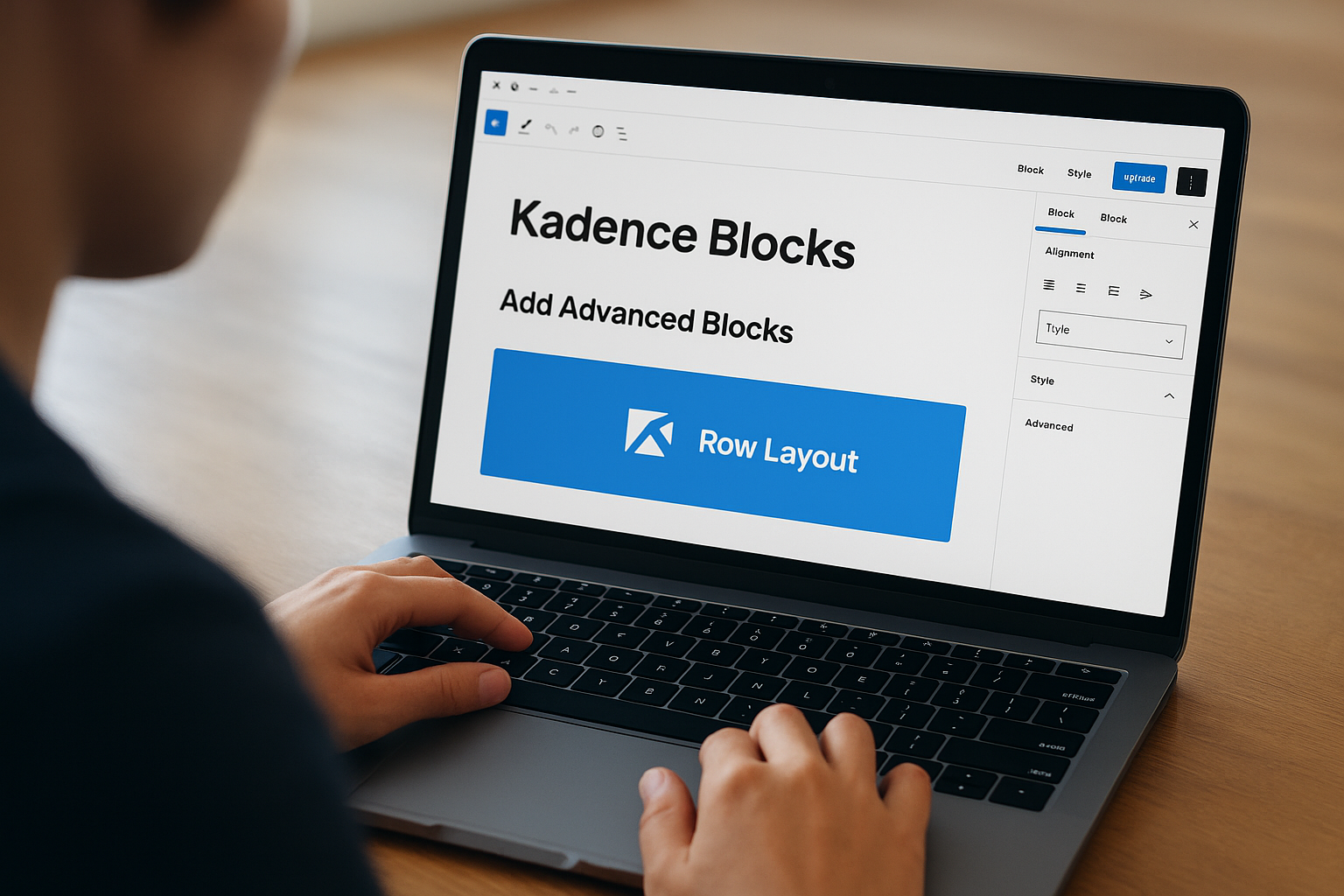
Kadence Blocks extends the native WordPress block editor rather than replacing it with a separate page builder interface. This wordpress landing page plugin adds specialized blocks, pre-designed templates, and advanced customization controls directly inside the Gutenberg editor you already know. You won’t learn a completely new system because Kadence works within the familiar WordPress environment. The block-based approach keeps pages lightweight and fast while giving you more design control than the default editor provides.
What Kadence Blocks does best
Kadence Blocks excels at adding professional design capabilities to the standard WordPress editor without the performance penalty of traditional page builders. The plugin generates clean code because it builds on WordPress’s native block system rather than creating an entirely separate rendering engine. You get the Row Layout Block that provides grid-based control over page sections, letting you create complex layouts that remain responsive across devices. The builder automatically inherits your theme’s colors and fonts through the customizer, maintaining design consistency without manual configuration on every page.
Landing page features and integrations
You access 70+ templates in the free version that cover basic landing page types like lead capture and service pages. The design library provides pre-built sections you can insert and customize without starting from scratch. Built-in blocks include testimonials, countdown timers, and icon lists that handle common landing page requirements. WooCommerce blocks let you display products and customize shop layouts without additional plugins, though the ecommerce functionality remains basic compared to dedicated builders.
Block-based design keeps pages lightweight while working natively inside WordPress, eliminating the compatibility issues that plague separate page builder plugins.
Limitations and tradeoffs
Kadence Blocks constrains you to block-based layouts that limit creative freedom compared to traditional drag-and-drop builders. You’ll need to understand Gutenberg’s block system, which feels restrictive if you’re accustomed to the flexibility of Elementor or Divi. Popups require the separate Kadence Conversions plugin, adding another purchase to your stack. Form capabilities lack multi-step workflows and advanced conditional logic that conversion-focused builders include by default.
Who should choose Kadence Blocks
Choose Kadence Blocks if you’re comfortable with the WordPress block editor and want to enhance its capabilities without switching to a completely different system. Bloggers and content creators who prioritize site speed over unlimited design options benefit from the lightweight approach. Skip this if you need traditional drag-and-drop flexibility or built-in popup and form features.
Kadence Blocks pricing overview
The free version includes essential blocks and 70+ templates without payment. Pro plans start at $119 per year for 3 sites, unlocking advanced blocks and premium templates while maintaining the performance-focused approach.
9. Landingi
Landingi operates as a cloud-based platform rather than a traditional wordpress landing page plugin, hosting your pages on external servers while connecting to WordPress through an integration plugin. This SaaS approach eliminates performance concerns that plague WordPress-hosted builders because your landing pages live separately from your website’s hosting environment. You build pages in Landingi’s interface, then embed them on your WordPress site or link to them directly. The platform prioritizes team collaboration and enterprise features over the hands-on customization that native WordPress builders provide.
What Landingi does best
Landingi excels at external hosting that removes landing page performance from your WordPress server load equation. Your pages load from Landingi’s optimized infrastructure regardless of your WordPress hosting quality. The platform includes native A/B testing and detailed analytics that track visitor behavior and conversion rates without requiring external tools. Team collaboration features let multiple marketers work on campaigns simultaneously with permission controls that prevent accidental overwrites.
Landing page features and integrations
You access hundreds of professionally designed templates spanning industries and campaign types. The builder includes popups with exit-intent triggers and form builders that connect to email platforms like Mailchimp and ActiveCampaign. Analytics dashboards track conversion metrics in real time, showing which traffic sources and page elements drive the best results. Team workspaces support multi-user environments where agencies manage client campaigns from centralized dashboards.
Cloud-based hosting means your landing pages load at consistent speeds regardless of your WordPress hosting provider’s performance or traffic spikes on your main site.
Limitations and tradeoffs
Landingi forces you into a monthly subscription model that costs more over time compared to one-time plugin purchases. You sacrifice the granular design control that native WordPress builders provide because you’re working inside Landingi’s interface rather than WordPress itself. The platform doesn’t give you ownership of the underlying code or infrastructure, creating vendor lock-in that makes migration difficult.
Who should choose Landingi
Choose Landingi if you’re an agency or marketing team managing multiple campaigns where collaboration matters more than direct WordPress integration. Teams struggling with WordPress hosting limitations benefit from the external infrastructure. Skip this if you want complete design control or prefer one-time purchases over recurring subscriptions.
Landingi pricing overview
The free plan provides basic functionality with Landingi branding. Paid plans start at $20 per month when billed annually, unlocking custom domains and removing platform branding while maintaining the cloud-based approach.
10. Getwid
Getwid extends the WordPress block editor with specialized blocks designed for landing page creation without abandoning the familiar Gutenberg interface. This wordpress landing page plugin stays completely free and lightweight, making it accessible for beginners who want professional results without monthly subscriptions or complex learning curves. You work inside the standard WordPress editor you already know, adding blocks for pricing tables, testimonials, and call-to-action sections that the default editor lacks. The plugin integrates seamlessly because it builds on WordPress’s native block system rather than fighting against it.
What Getwid does best
Getwid excels at providing advanced block functionality while maintaining the simplicity and speed of the native WordPress editor. The plugin adds essential landing page elements like countdown timers, progress bars, and image comparison sliders without the code bloat that slows down traditional page builders. You get modern design options through block-level controls that adjust spacing, colors, and typography directly inside the familiar editing interface.
Landing page features and integrations
You access an extensive block library covering content types like testimonials, pricing tables, accordion sections, and icon boxes. The blocks work with any WordPress theme because they inherit your site’s existing design system. Landing page templates provide starting points you can customize using the standard block editor tools you already understand.
Free, lightweight design means your landing pages load faster than those built with feature-heavy alternatives while maintaining professional appearance and functionality.
Limitations and tradeoffs
Getwid lacks native form builders and popups that conversion-focused builders include by default. You’ll need separate plugins for lead capture forms and exit-intent popups. The block-based approach limits design freedom compared to traditional drag-and-drop builders when you need complex custom layouts.
Who should choose Getwid
Choose Getwid if you’re a beginner on a tight budget who wants to enhance the WordPress block editor without learning a completely new system. Bloggers creating simple lead magnets benefit from the free, lightweight approach.
Getwid pricing overview
Getwid remains completely free with no premium tiers or hidden costs, making it the most budget-friendly option for basic landing page creation.
11. WPForms
WPForms approaches landing pages differently than traditional builders by making forms the central element of your conversion pages. This wordpress landing page plugin started as a dedicated form builder that later added the Form Pages addon, which transforms standalone forms into complete landing pages. You won’t use WPForms to build complex multi-section pages with hero images and testimonials. Instead, you create form-centric experiences where the lead capture mechanism takes center stage, perfect for webinar registrations, survey responses, or simple opt-in campaigns where the form drives the entire interaction.
What WPForms does best
WPForms excels at creating intelligent forms with conditional logic that adapts based on user input. The drag-and-drop form builder lets you design multi-step forms that break complex questions into manageable sections, reducing abandonment rates. You can show or hide specific fields depending on previous answers, creating personalized experiences without coding. The Form Pages addon strips away your site’s header, footer, and sidebar distractions, leaving just the form against a clean background that focuses visitor attention entirely on conversion.
Landing page features and integrations
You get seamless integrations with major email platforms like Mailchimp, ActiveCampaign, and Constant Contact through native connections that sync form submissions automatically. The lead management dashboard collects all entries in one centralized location inside WordPress. Form templates cover common scenarios like contact forms, payment forms, and survey layouts that you can customize with your branding. Smart conditional logic lets you build dynamic forms that adjust questions based on user responses, creating interactive experiences that static forms can’t match.
Form-centric landing pages eliminate design distractions, focusing visitor attention entirely on the conversion action you need them to complete.
Limitations and tradeoffs
WPForms lacks traditional landing page elements like hero sections, countdown timers, or testimonial blocks that other builders include by default. You can’t build multi-section sales pages or complex product showcases. The Form Pages functionality requires the Pro plan, making it more expensive than simple form alternatives if you only need basic lead capture.
Who should choose WPForms
Choose WPForms if you’re running form-heavy campaigns like surveys, registrations, or applications where the form itself delivers the value. Researchers collecting participant data benefit from the conditional logic that adapts questions based on responses. Skip this if you need traditional landing page layouts with multiple content sections.
WPForms pricing overview
The Form Pages addon requires the Pro plan starting at $199.50 per year, which includes form builder features alongside landing page functionality. A limited free version provides basic forms without the landing page conversion features.
12. OptinMonster
OptinMonster started as a popup builder and evolved to include basic landing page functionality, making it different from dedicated page builders on this list. This wordpress landing page plugin excels at capturing leads through targeted campaigns that display popups, slide-ins, and floating bars based on visitor behavior. You won’t build complex multi-section sales pages with OptinMonster. Instead, you create focused conversion campaigns that interrupt the browsing experience at strategic moments, capturing email addresses before visitors leave your site or click away from specific pages.

What OptinMonster does best
OptinMonster dominates the behavioral targeting space with advanced rules that trigger campaigns based on exit intent, scroll depth, time on page, or specific URL visits. You can show different messages to new visitors versus returning customers, creating personalized experiences that match user intent. The exit-intent technology detects when someone moves their mouse toward the browser’s close button, displaying your offer at the exact moment they plan to leave. This precise timing captures leads you would otherwise lose completely.
Landing page features and integrations
You access campaign templates designed specifically for lead capture, including lightbox popups, fullscreen welcome mats, and floating bars that stay visible while visitors scroll. The form builder connects directly to email platforms like Mailchimp, Constant Contact, and AWeber without middleware. Built-in analytics track conversion rates, impressions, and subscriber growth across campaigns. Campaign scheduling lets you run time-limited promotions that automatically activate and deactivate based on dates you configure.
Exit-intent targeting captures leads at the moment visitors plan to leave, converting traffic that would otherwise disappear without any interaction.
Limitations and tradeoffs
OptinMonster lacks traditional landing page elements like hero sections, testimonials, or multi-section layouts that dedicated builders provide. You can’t build complete campaign pages with product showcases or detailed content sections. The pricing model charges monthly rather than annually, making it more expensive over time compared to one-time plugin purchases.
Who should choose OptinMonster
Choose OptinMonster if you’re a digital marketer focused on list growth through behavioral targeting rather than building traditional landing pages. Bloggers and content sites benefit from the popup campaigns that capture readers without requiring separate destination pages. Skip this if you need full landing page design capabilities beyond basic lead capture forms.
OptinMonster pricing overview
Plans start at $9 per month when billed annually for the Basic tier. This entry-level plan includes essential targeting features and integrations, making it accessible for small sites focused primarily on email list growth through popup campaigns.
Bringing it all together
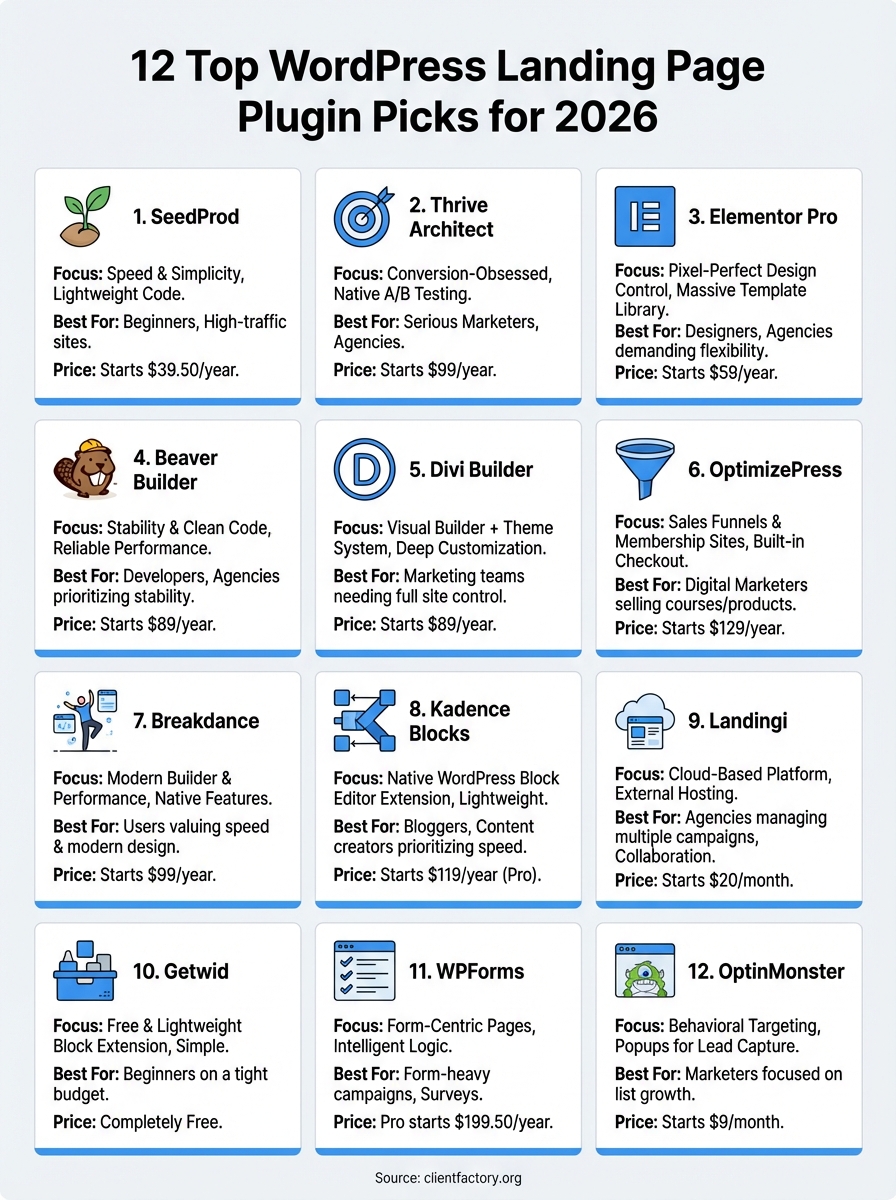
You now understand which wordpress landing page plugin matches your specific needs and budget. Beginners benefit most from SeedProd’s speed and simplicity, while marketers running serious campaigns get better results with Thrive Architect’s native A/B testing. Designers demanding pixel-perfect control choose Elementor Pro despite the performance tradeoffs. Each builder serves different priorities, and the right choice depends on whether you value conversion features, design flexibility, or raw speed.
Installing the plugin solves only half the equation. Your landing pages still need compelling copy, strategic offers, and traffic sources that deliver qualified visitors. Building pages that convert requires expertise beyond drag-and-drop tools. Client Factory specializes in creating client acquisition funnels that turn clicks into customers through data-driven strategies and proven conversion tactics. We handle the complete system so you can focus on serving clients instead of troubleshooting campaigns.
