

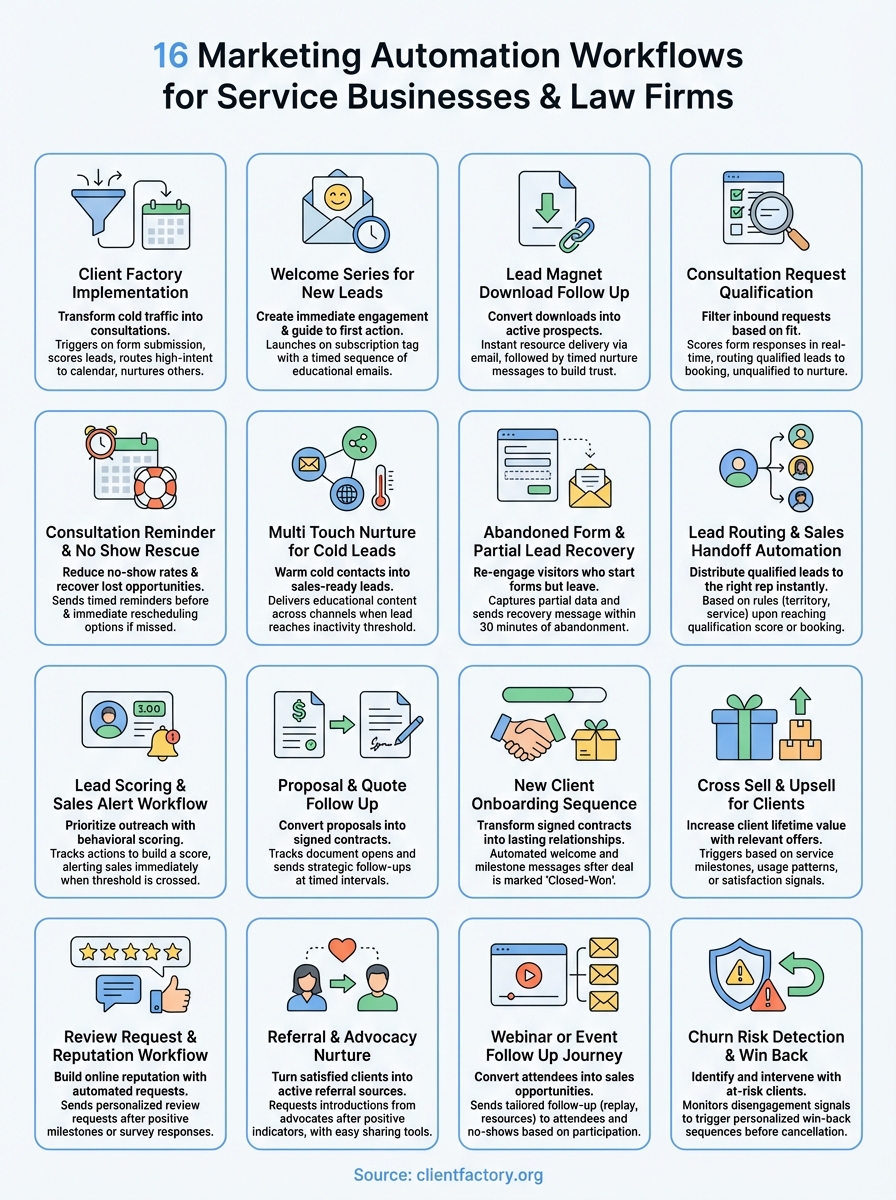
You already know marketing automation can transform your client acquisition process. The challenge isn’t understanding why automation matters. It’s figuring out which workflows to build first, what triggers to use, and how to actually set them up without wasting weeks testing configurations that don’t convert.
Most guides give you theory. This article gives you blueprints. You’ll get 16 proven marketing automation workflows designed specifically for service businesses and law firms. Each workflow includes the exact triggers that launch it, the logic that powers decision points, the channels and tools that work best, and the metrics you should track. Whether you need to nurture cold leads, recover abandoned forms, or automate your sales handoff process, you’ll find a template that matches your needs. No fluff. No generic advice. Just practical workflows you can implement this week to start converting more leads into paying clients.
1. Client Factory workflow implementation
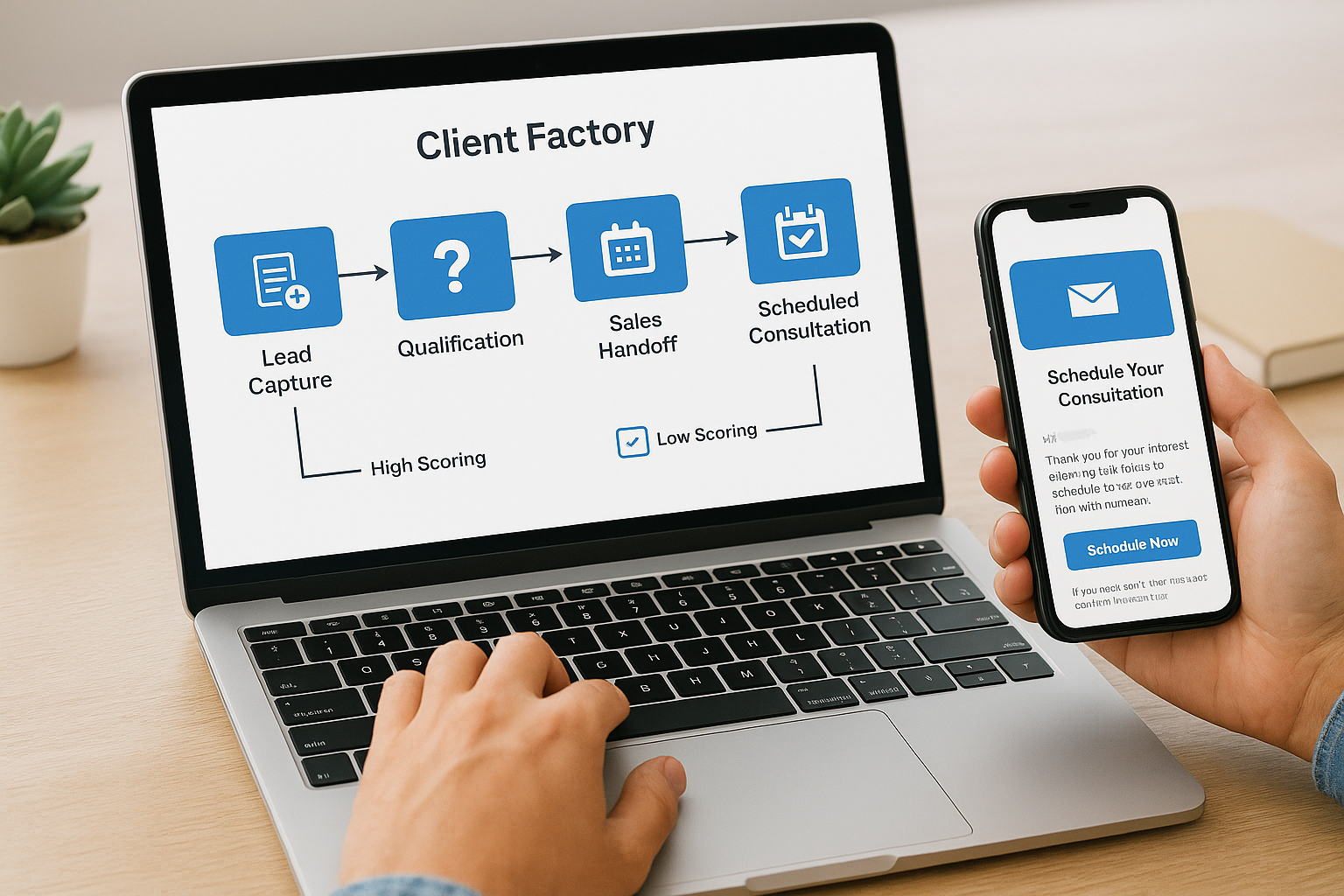
This workflow represents Client Factory’s signature client acquisition funnel that combines lead capture, qualification, and sales handoff into one automated sequence. You use this workflow to transform cold traffic into scheduled consultations with your sales team. The system automatically qualifies leads based on their engagement behavior, routes high-intent prospects to your calendar, and nurtures lower-intent contacts until they’re ready to convert. This workflow serves as the foundation for your entire lead generation system because it connects every touchpoint from first click to first meeting.
When to use this workflow
Deploy this workflow when you launch paid advertising campaigns on platforms like Google Ads, Facebook, or YouTube that drive traffic to dedicated landing pages. You should also activate it when prospects download gated content or request information about your services through website forms. The workflow works best for service businesses and law firms that rely on consultation-based sales models where qualifying leads before booking calls saves time and increases conversion rates. If you’re spending money to generate traffic but struggling to convert visitors into appointments, this workflow solves that problem immediately.
Core triggers and logic
The workflow triggers when someone submits a lead capture form on your landing page or website. Your automation platform then scores the lead based on form responses such as budget, timeline, and service interest. High-scoring leads receive an immediate email with calendar booking links and SMS reminders. Lower-scoring leads enter a nurture sequence that delivers educational content over seven to fourteen days. The system tracks email opens, link clicks, and page visits to identify engagement signals that bump leads into the high-priority path.
High-scoring leads should reach your sales team within 5 minutes of form submission to maximize booking rates.
Recommended channels and tools
You’ll run this workflow across multiple communication channels to maximize reach and response rates. Email serves as your primary channel for delivering content and calendar links. SMS reinforces critical messages like booking confirmations and appointment reminders. Your automation platform should integrate with your CRM to sync lead data and track progression through the funnel. Popular tool combinations include ActiveCampaign with Calendly, HubSpot with its native scheduler, or Zapier connecting form builders to calendar apps.
Metrics to track
Monitor your form submission to booking rate as your primary success metric, targeting 20 to 35 percent for service businesses. Track response time from form submission to first outreach, keeping it under 5 minutes for optimal results. Measure your email open rates (aim for 40 to 50 percent) and click rates (target 10 to 15 percent) to gauge message effectiveness. Calculate your cost per scheduled consultation by dividing ad spend by total bookings, then compare that against your customer lifetime value to ensure profitability.
2. Welcome series for new leads
You build this workflow to create immediate engagement with prospects who just joined your email list. The welcome series establishes your authority, sets expectations for future communications, and guides new subscribers toward their first conversion action. This workflow transforms strangers into engaged prospects by delivering a strategic sequence of emails that educates, builds trust, and moves people closer to booking a consultation or purchasing your services. Most businesses lose opportunities because they treat welcome emails as throwaway messages instead of the revenue-driving sequences they should be.
When to use this workflow
Activate this workflow every time someone subscribes to your email list through any channel, whether they sign up via your website footer, download a resource, or join through social media campaigns. You should also trigger it when prospects opt in during webinars or events where you collect contact information. The workflow works particularly well for service businesses that need to educate prospects about complex offerings before they’re ready to buy. If you’re acquiring email subscribers but seeing low engagement or conversion rates, this welcome series fixes that disconnect.
Core triggers and logic
The workflow launches immediately when a contact receives a specific tag like “New Subscriber” or gets added to your main list. Your first email arrives within 5 minutes of signup, confirming their subscription and delivering any promised resources. The second email sends 2 to 3 days later with educational content that addresses common problems your audience faces. Your third message arrives 5 to 7 days after signup and includes a clear call to action like booking a consultation or exploring your services.
Your welcome sequence should deliver value before asking for anything, establishing trust that converts into long-term client relationships.
Recommended channels and tools
Email remains your primary delivery channel for welcome series because it provides the most control over timing and content. You can enhance the sequence by adding SMS messages for high-value touchpoints like the initial welcome or consultation invitations. Most marketing automation platforms like ActiveCampaign, HubSpot, or Mailchimp include built-in welcome sequence templates you can customize. Your CRM should sync with your automation tool to track which welcome series recipients eventually become clients.
Metrics to track
Measure your welcome sequence open rates for each email, targeting 50 to 60 percent for the first message and 30 to 40 percent for subsequent emails. Track click-through rates on calls to action, aiming for 10 to 20 percent engagement. Calculate your welcome-to-client conversion rate by dividing the number of clients who came through the welcome series by total subscribers who entered it. Monitor time to first purchase to understand how long the nurture process takes before prospects convert into paying clients.
3. Lead magnet download follow up
This workflow converts lead magnet downloads into active prospects by delivering the promised resource immediately and then nurturing the relationship through strategic follow-up messages. You use this sequence to move subscribers from passive content consumers to engaged leads who take the next step in your client acquisition funnel. The automation delivers your ebook, checklist, or template instantly while capturing critical engagement data that tells you which prospects are most interested in your services. Without this workflow, you waste the investment you made creating valuable content because most downloaders never hear from you again after receiving their resource.
When to use this workflow
Deploy this workflow whenever someone completes a form to access gated content like guides, templates, checklists, or reports on your website. You should also activate it when prospects download resources from paid advertising campaigns where the lead magnet serves as your initial conversion point. The workflow works exceptionally well for service businesses that use education-based marketing to establish authority before selling. If your lead magnets generate downloads but fail to produce consultation bookings or sales conversations, this follow-up sequence bridges that gap.
Core triggers and logic
The workflow triggers the instant someone submits your lead magnet form, delivering the promised resource within seconds through an automated email. Your system then waits 2 to 3 days before sending a follow-up message that asks if they found the content helpful and introduces your core services. A third email arrives 5 to 7 days after download, featuring a case study or testimonial that demonstrates results you’ve achieved for similar clients. The sequence tracks which links prospects click to identify high-intent behaviors that warrant immediate sales outreach.
Delivering your lead magnet instantly builds trust and sets expectations for responsive communication throughout your client relationship.
Recommended channels and tools
Email serves as your primary delivery channel because it guarantees subscribers receive their download link reliably. You can add SMS messages for high-value lead magnets to increase open rates and engagement. Your marketing automation platform should integrate with your file hosting service to deliver downloads securely and track access patterns. Popular combinations include ActiveCampaign with Google Drive links, HubSpot with its native file manager, or Mailchimp with Dropbox integration.
Metrics to track
Monitor your email delivery rate to ensure subscribers actually receive their lead magnet, targeting 98 percent or higher. Track download completion rates by measuring how many people who receive the email actually click the download link, aiming for 60 to 80 percent. Calculate your lead magnet to consultation rate by dividing scheduled calls by total downloads. Measure engagement progression by tracking which follow-up emails generate the highest click rates and conversation starters.
4. Consultation request qualification flow
This workflow filters inbound consultation requests before they reach your calendar, ensuring your sales team spends time only with qualified prospects who match your ideal client profile. You use this automation to evaluate lead quality based on budget, timeline, service fit, and decision-making authority immediately after someone requests a consultation. The system routes high-quality prospects directly to booking links while redirecting unqualified leads to alternative resources or nurture sequences. Service businesses that implement qualification flows see 40 to 60 percent fewer wasted sales calls and significantly higher close rates because every conversation happens with a genuinely qualified prospect.
When to use this workflow
Activate this workflow when prospects click your consultation request button on landing pages, website forms, or email campaigns. You should also trigger it when leads respond to direct outreach from your sales team requesting more information about your services. The workflow becomes essential when your calendar fills with unqualified appointments that waste sales resources and create forecasting problems. If you’re booking consultations with prospects who can’t afford your services, aren’t ready to buy, or don’t fit your expertise, this qualification flow solves that immediately.
Core triggers and logic
The workflow launches when someone submits a consultation request form that includes qualification questions about budget range, timeline, current situation, and decision authority. Your automation platform scores responses in real time, assigning points based on ideal client characteristics. Prospects who score above your threshold receive immediate calendar access with available time slots. Lower-scoring leads get redirected to educational content, alternative service options, or scheduled for future follow-up when their situation improves.
Qualification before booking increases consultation-to-close rates by 2 to 3 times because you invest sales time only in prospects who can actually buy.
Recommended channels and tools
Email delivers your qualification questions through embedded forms or linked surveys that capture detailed prospect information. Your CRM should automatically receive and score qualification data, updating lead records with priority flags. Popular tool combinations include Typeform for qualification surveys connected to HubSpot, Calendly with custom questions integrated into ActiveCampaign, or Jotform feeding data into Salesforce for instant scoring.
Metrics to track
Measure your qualification completion rate to ensure prospects actually answer your questions instead of abandoning the process, targeting 70 to 85 percent completion. Track your qualified-to-total ratio by dividing qualified consultation requests by total requests received. Calculate consultation-to-close rate for qualified versus unqualified prospects to validate your scoring criteria. Monitor sales cycle length for qualified leads compared to unscreened appointments to quantify time savings.
5. Consultation reminder and no show rescue
You build this workflow to reduce no-show rates and recover lost revenue from missed appointments through strategic reminders and follow-up sequences. The automation sends timed reminder messages before scheduled consultations and immediately re-engages prospects who fail to attend, offering convenient rescheduling options. Service businesses lose thousands of dollars monthly to no-shows, and this workflow transforms those missed opportunities into rebooked appointments that drive revenue. Your sales team wastes less time preparing for ghosts and spends more time converting actual prospects into paying clients.
When to use this workflow
Trigger this workflow immediately after someone books a consultation appointment through your calendar system. You should also activate it for prospects who confirm meetings through email or phone conversations with your team. The workflow becomes critical when your no-show rate exceeds 15 percent or when your sales team frequently complains about wasted preparation time.
Core triggers and logic
The workflow initiates when your calendar system registers a new booking, sending a confirmation email within seconds. Your automation then schedules reminder messages at strategic intervals like 24 hours before, 2 hours before, and 15 minutes before the appointment. If the prospect misses the call, a no-show rescue sequence launches immediately with rescheduling options and addresses common objections that prevent attendance.
Sending reminders at multiple touchpoints can reduce no-show rates by 40 to 50 percent compared to single-reminder systems.
Recommended channels and tools
Email delivers your confirmation messages and initial reminders reliably across all devices. SMS messages work exceptionally well for same-day reminders because they achieve 98 percent open rates within 3 minutes. Your calendar platform should integrate directly with your automation tool, popular combinations include Calendly with ActiveCampaign, Acuity with Zapier connections, or Google Calendar with HubSpot workflows.
Metrics to track
Calculate your no-show rate by dividing missed appointments by total scheduled consultations, targeting below 15 percent. Track reminder engagement rates by measuring email opens and SMS confirmations at each touchpoint. Measure your rescue sequence success rate by dividing rescheduled appointments by total no-shows, aiming for 25 to 35 percent recovery.
6. Multi touch nurture for cold leads
This workflow converts cold prospects into sales-ready leads through strategic, multi-channel touchpoints that build trust over time. You use this automation to stay top of mind with prospects who aren’t ready to buy immediately but match your ideal client profile. The system delivers valuable content across multiple channels, gradually warming cold contacts through educational resources, case studies, and social proof until they’re prepared to schedule a consultation. Most service businesses abandon cold leads after one or two attempts, leaving money on the table. This nurture sequence keeps you connected with prospects during their entire decision-making journey.

When to use this workflow
Deploy this workflow when prospects download content but don’t book consultations within your initial follow-up window. You should also activate it for leads who express interest but aren’t ready to commit due to budget, timing, or internal approval processes. The workflow becomes essential when you generate quality leads that require longer sales cycles typical in professional services. If your sales team complains about prospects going dark after initial contact, this nurture sequence solves that problem by maintaining consistent engagement until they’re ready to buy.
Core triggers and logic
The workflow activates when a lead reaches a specific inactivity threshold, typically 14 to 21 days without engagement. Your automation platform then delivers touchpoints every 7 to 10 days, mixing educational content with subtle calls to action. Each message addresses different objections or concerns that prevent prospects from moving forward. The system tracks engagement signals like email opens, link clicks, and website visits to identify when cold leads heat up, automatically notifying your sales team when prospects show renewed interest.
Cold leads who receive consistent nurture touchpoints convert at 3 to 5 times higher rates than abandoned prospects who receive no follow-up.
Recommended channels and tools
Email serves as your foundational nurture channel because it allows longer-form educational content. You should supplement email with targeted social media retargeting ads that reinforce your messaging across platforms. Your CRM must integrate with your automation platform to track engagement history and prevent message overlap. Popular combinations include ActiveCampaign with Facebook Ads, HubSpot with LinkedIn targeting, or Salesforce with multi-channel orchestration tools.
Metrics to track
Monitor your reactivation rate by measuring how many cold leads re-engage after entering the nurture sequence, targeting 15 to 25 percent. Track time to conversion from first nurture touch to consultation booking to understand your typical warming period. Calculate nurture-to-client conversion rate by dividing clients who came through cold nurture by total leads in the sequence. Measure content engagement patterns to identify which topics generate the highest response rates and conversation starters.
7. Abandoned form and partial lead recovery
This workflow captures prospects who start your forms but abandon them before completion, turning lost opportunities into recovered leads. You use this automation to re-engage visitors who show interest by clicking your form but leave without submitting their information. The system tracks partial submissions, captures whatever data visitors entered, and triggers strategic follow-up messages that address common objections preventing completion. Service businesses typically lose 60 to 80 percent of form starts to abandonment, and this workflow recovers 15 to 30 percent of those prospects by removing friction and rebuilding momentum.
When to use this workflow
Activate this workflow on any high-value conversion forms including consultation requests, quote requests, or lead magnet downloads that require multiple fields. You should also trigger it when prospects abandon multi-step forms where completing the first screen indicates serious interest. The workflow becomes essential when your form analytics show high abandonment rates that indicate friction in your conversion process. If you’re driving qualified traffic to landing pages but seeing completion rates below 40 percent, this recovery sequence recaptures leads you’re currently losing.
Core triggers and logic
The workflow launches when a visitor enters data in any form field but exits without submitting. Your tracking script captures partial entries like email addresses or phone numbers that visitors provide before abandoning. The system waits 15 to 30 minutes before sending a recovery message that acknowledges their visit and offers assistance completing the process. Your automation identifies which field caused abandonment to customize follow-up messaging that addresses specific concerns.
Recovery emails sent within 30 minutes of abandonment convert at 3 to 4 times higher rates than delayed follow-ups sent hours later.
Recommended channels and tools
Email serves as your primary recovery channel when visitors provide email addresses before abandoning. You can supplement with retargeting ads on social platforms that remind prospects to complete their request. Your form builder must integrate with automation tools that capture partial data, popular options include Typeform with Zapier, Gravity Forms with ActiveCampaign, or Unbounce with HubSpot workflows.
Metrics to track
Calculate your recovery conversion rate by dividing completed forms from recovery emails by total abandonment triggers, targeting 15 to 25 percent. Track time to recovery from abandonment to form completion to optimize your follow-up timing. Measure abandonment by field to identify which questions create the most friction and warrant simplification.
8. Lead routing and sales handoff automation
This workflow distributes incoming leads to the right sales team members based on predefined rules like territory, service type, or lead source. You use this automation to eliminate manual lead assignment that creates delays, causes confusion, and leads to dropped opportunities. The system instantly routes qualified prospects to available representatives while sending automated notifications that keep everyone informed about new opportunities. Without intelligent routing, your best leads sit unattended while sales reps fight over hot prospects or miss critical follow-up windows that cost you conversions.
When to use this workflow
Trigger this workflow when qualified prospects complete consultation booking forms or reach scoring thresholds that indicate sales readiness. You should also activate it when prospects respond to outbound campaigns expressing interest in speaking with your team. The workflow becomes essential when you have multiple sales representatives, operate across different territories, or offer specialized services requiring specific expertise. If leads fall through cracks because nobody owns follow-up responsibility, this routing automation solves that accountability gap immediately.
Core triggers and logic
The workflow launches when a lead record updates with qualification flags or reaches predetermined score threshages in your CRM. Your automation platform evaluates routing rules based on geography, service interest, deal size, or rep availability. The system assigns the lead to the appropriate representative and sends instant notifications through email, SMS, or Slack. Your automation logs the assignment timestamp and creates follow-up tasks with deadlines to ensure consistent response times.
Automated lead routing reduces response time from hours to minutes, increasing conversion rates by 35 to 50 percent compared to manual assignment processes.
Recommended channels and tools
Your CRM serves as the central routing engine that evaluates rules and executes assignments. Email notifications alert assigned reps about new opportunities with complete lead context. Many teams add Slack integrations for real-time team visibility into lead flow. Popular combinations include Salesforce with Process Builder, HubSpot with workflow automation, or Pipedrive with Zapier connections that trigger assignments based on custom rules.
Metrics to track
Measure average response time from lead assignment to first contact attempt, targeting under 5 minutes for hot leads. Track lead distribution balance to ensure fair assignment across team members and prevent bottlenecks. Calculate assignment-to-contact rate by dividing successful first contacts by total assignments, aiming for 90 percent or higher. Monitor conversion rate by rep to identify coaching opportunities and validate routing logic effectiveness.
9. Lead scoring and sales alert workflow
This workflow automatically assigns numerical scores to every prospect in your database based on their engagement behaviors and demographic fit, then alerts your sales team the moment leads hit qualification thresholds. You use this automation to prioritize sales outreach by focusing on prospects whose actions indicate genuine buying intent. The system tracks dozens of signals including email opens, website visits, content downloads, and form interactions, building a composite score that predicts conversion likelihood. Service businesses that implement lead scoring see 50 to 70 percent increases in sales efficiency because representatives spend time pursuing hot prospects instead of chasing cold contacts who aren’t ready to buy.
When to use this workflow
Deploy this workflow when you generate more leads than your sales team can personally evaluate and need an objective system for prioritization. You should also activate it when prospects enter from multiple sources like advertising, referrals, and organic search, requiring different qualification criteria. The workflow becomes essential when your sales team wastes time on unqualified leads or misses opportunities because they can’t identify which prospects deserve immediate attention. If your conversion rates vary wildly between leads and you lack clear criteria for determining who’s sales-ready, this scoring system creates the structure that improves forecasting and resource allocation.
Core triggers and logic
The workflow monitors prospect activities continuously, adding or subtracting points based on predefined scoring rules you establish. Your automation platform increases scores when prospects complete high-intent actions like visiting pricing pages, downloading case studies, or requesting demonstrations. The system decreases scores when leads show disengagement signals like unsubscribing, bouncing multiple emails, or going dormant for extended periods. When any lead crosses your threshold score, the workflow immediately notifies assigned sales representatives through their preferred channels with complete context about what actions triggered the alert.
Scored leads convert at 2 to 3 times higher rates than unscored prospects because sales teams focus attention on behaviors that actually predict purchases.
Recommended channels and tools
Your CRM serves as the scoring calculation engine that aggregates behavioral data and maintains real-time score updates. Email alerts notify sales representatives about new high-scoring leads with complete activity histories. Many teams add Slack integrations for instant team visibility into score changes across all prospects. Popular combinations include HubSpot with native scoring workflows, Salesforce with Einstein Lead Scoring, or ActiveCampaign with custom scoring rules connected to notification systems that trigger based on threshold breaches.
Metrics to track
Calculate your score-to-conversion correlation by comparing close rates across different score ranges to validate your criteria effectiveness. Track average time to threshold to understand how long prospects typically take reaching sales-ready scores, helping you forecast pipeline velocity. Measure sales response time from alert notification to first contact attempt, targeting under 30 minutes for threshold-breach alerts. Monitor false positive rate by dividing high-scoring leads that don’t convert by total alerted prospects, using this data to refine your scoring model continuously.
10. Proposal and quote follow up
This workflow converts proposals into signed contracts by maintaining consistent engagement after you send pricing documents. You use this automation to eliminate the silence that typically follows proposal delivery when prospects disappear without explanation. The system tracks document opens, sends strategic follow-up messages at optimal intervals, and identifies when prospects need additional information or reassurance before committing. Service businesses that automate proposal follow-up see 30 to 45 percent increases in close rates because they stay connected during the critical decision window when competitors try stealing your prospects.
When to use this workflow
Activate this workflow immediately after you send formal proposals or quotes through email, proposal software, or client portals. You should also trigger it when prospects request custom pricing that requires approval or internal review before decisions happen. The workflow becomes essential when your proposals consistently go unanswered or when prospects claim they never received your pricing documents.
Core triggers and logic
The workflow launches when you mark a deal as “Proposal Sent” in your CRM or when your proposal tool logs document delivery. Your automation sends a confirmation message within hours acknowledging the proposal and offering to answer questions. The system tracks document opens using tracking pixels or analytics and schedules follow-ups at strategic intervals like 3 days, 7 days, and 14 days after sending.
Proposals followed up within 48 hours close at 2 to 3 times higher rates than documents left without strategic engagement.
Recommended channels and tools
Email delivers your follow-up messages with links back to proposal documents and booking calendars for discussion calls. Phone calls supplement automated emails for high-value proposals exceeding your average deal size. Popular combinations include PandaDoc with HubSpot, Proposify with ActiveCampaign, or DocuSign connected to Salesforce for tracking and follow-up automation.
Metrics to track
Calculate your proposal open rate to confirm prospects actually review your pricing, targeting 70 to 85 percent. Track time to close from proposal delivery to signed contract, identifying which follow-up touchpoints accelerate decisions. Measure your proposal-to-close rate by dividing signed contracts by total proposals sent.
11. New client onboarding sequence
This workflow transforms signed contracts into lasting client relationships by automating the first 30 to 90 days after someone becomes a paying customer. You use this automation to reduce buyer’s remorse, accelerate time to value, and set clear expectations for your working relationship. The system delivers welcome messages, onboarding materials, milestone check-ins, and proactive support that prevents confusion during the critical early phase when clients decide whether they made the right choice. Service businesses that automate onboarding see 40 to 60 percent fewer support tickets and significantly higher retention rates because clients understand exactly what happens next and feel confident in their decision.
When to use this workflow
Trigger this workflow the moment a prospect signs your contract or completes payment for your services. You should also activate it when your billing system processes the first invoice or when your team manually marks deals as closed-won in your CRM. The workflow becomes essential when you onboard multiple clients simultaneously or when your team struggles to deliver consistent onboarding experiences. If clients frequently ask the same questions during their first month or if you notice early-stage churn from confused customers, this automated sequence solves those problems immediately.
Core triggers and logic
The workflow launches when your CRM registers a deal status change to “Closed-Won” or when your payment processor confirms successful transactions. Your automation immediately sends a welcome email that celebrates the partnership and outlines next steps. The system schedules milestone messages at strategic intervals like day 3, day 7, day 14, and day 30 that deliver relevant resources, answer common questions, and check satisfaction levels. Your automation tracks which onboarding emails clients open and which resources they access, flagging accounts that show low engagement so your team can intervene before problems escalate.
Automated onboarding sequences reduce time to first value by 50 to 70 percent because clients receive exactly what they need exactly when they need it.
Recommended channels and tools
Email serves as your primary onboarding communication channel because it delivers detailed information clients can reference repeatedly. You should supplement with SMS messages for time-sensitive action items like scheduling kickoff calls or submitting required documents. Your CRM must integrate with your automation platform to trigger sequences based on deal closures. Popular combinations include HubSpot with native workflows, Salesforce with Journey Builder, or ActiveCampaign connected to Stripe for payment-triggered onboarding.
Metrics to track
Calculate your onboarding completion rate by measuring how many clients finish all required setup steps within your target timeframe, aiming for 85 percent or higher. Track time to first value from contract signing to when clients achieve their first meaningful result using your services. Measure early retention rate by calculating what percentage of new clients remain active after 90 days, targeting 90 percent or better. Monitor support ticket volume during the onboarding period compared to later stages, using increases as signals that your onboarding marketing automation workflows need refinement.
12. Cross sell and upsell for clients
This workflow increases client lifetime value by automatically identifying opportunities to sell additional services or premium upgrades to existing customers. You use this automation to generate revenue from your current client base without the acquisition costs associated with finding new prospects. The system monitors client usage patterns, service milestones, and satisfaction signals to determine optimal timing for expansion offers. Service businesses that implement cross-sell and upsell marketing automation workflows see 25 to 40 percent increases in average client value because they systematically present relevant offers when clients are most receptive.
When to use this workflow
Deploy this workflow when clients reach specific milestones like completing their first project, hitting service anniversaries, or achieving measurable results with your existing offerings. You should also activate it when clients show expansion signals through increased usage, positive feedback, or requests for additional capabilities. The workflow becomes essential when your business offers multiple service tiers or complementary offerings that clients don’t automatically discover. If you’re leaving revenue on the table because clients don’t know about your full service catalog, this automation solves that visibility problem.
Core triggers and logic
The workflow activates based on time-based or behavior-based conditions you define in your CRM. Your automation monitors service completion dates, satisfaction survey responses, or usage thresholds that indicate readiness for expansion. When triggers fire, the system sends personalized offers that match client needs based on their current service package and industry. Your automation tracks which offers generate responses and automatically follows up with clients who show interest but don’t immediately commit.
Clients who receive timely, relevant expansion offers convert at 4 to 6 times higher rates than those who never see your additional capabilities.
Recommended channels and tools
Email delivers your primary expansion offers with detailed information about additional services and their benefits. You should supplement with phone calls for high-value opportunities where personal conversations accelerate decisions. Your CRM must track service milestones and satisfaction data that inform offer timing. Popular combinations include Salesforce with Marketing Cloud, HubSpot with deal-based workflows, or ActiveCampaign with custom fields tracking service usage patterns.
Metrics to track
Calculate your expansion rate by dividing clients who purchase additional services by total eligible clients, targeting 15 to 25 percent. Track average revenue per client before and after implementing the workflow to quantify value impact. Measure time to expansion from initial service purchase to additional sale, identifying which milestones produce the fastest growth. Monitor offer acceptance rate by comparing responses to total expansion emails sent, using this data to refine your timing and messaging strategies.
13. Review request and reputation workflow
This workflow converts satisfied clients into powerful social proof by automatically requesting reviews at strategic moments when their enthusiasm peaks. You use this automation to systematically build your online reputation across platforms like Google, Facebook, and industry-specific review sites that influence prospect decisions. The system identifies clients who reach satisfaction milestones, delivers personalized review requests through their preferred channels, and makes leaving feedback effortless with direct links to your profiles. Service businesses that automate review collection generate 5 to 8 times more testimonials than those relying on manual outreach because the process happens consistently without requiring sales team bandwidth.
When to use this workflow
Activate this workflow when clients complete major project milestones or express satisfaction through feedback surveys. You should also trigger it after clients achieve measurable results using your services or when they renew contracts indicating continued value. The workflow becomes essential when prospects research your business online before booking consultations and your review count lags behind competitors. If you’re delivering exceptional results but struggling to collect testimonials that reflect your quality, this automated system solves that documentation gap.
Core triggers and logic
The workflow launches when satisfaction indicators appear in your CRM like positive survey responses, project completions, or renewal confirmations. Your automation waits 24 to 48 hours after the trigger event to let positive experiences solidify before requesting feedback. The system sends personalized review requests that reference specific services or results the client experienced. Your automation includes direct links to your preferred review platforms and follows up once with non-responders after 5 to 7 days.
Automated review requests sent within 48 hours of positive experiences generate 3 to 4 times more responses than delayed manual outreach.
Recommended channels and tools
Email serves as your primary request channel because it allows you to include multiple review platform options and explain why testimonials matter. SMS works exceptionally well for mobile-optimized review links that clients can complete in under 60 seconds. Your automation platform should integrate with review management tools that centralize feedback collection. Popular combinations include Podium with email automation, Birdeye connected to CRMs, or custom Zapier workflows that trigger review requests based on satisfaction scores.
Metrics to track
Calculate your review request response rate by dividing completed reviews by total requests sent, targeting 15 to 25 percent. Track average rating received to ensure you’re timing requests when satisfaction peaks, aiming for 4.5 stars or higher. Measure review platform distribution to confirm testimonials appear where prospects search most frequently. Monitor time from request to completion to identify friction points in your review submission process that need simplification.
14. Referral and advocacy nurture
This workflow transforms satisfied clients into active referral sources by systematically requesting introductions and maintaining engagement with your strongest advocates. You use this automation to build a consistent referral pipeline that generates qualified leads without advertising costs. The system identifies clients who demonstrate advocacy behaviors like leaving reviews, renewing contracts, or praising your services publicly, then nurtures those relationships with strategic touchpoints that make referrals easy and rewarding. Service businesses that automate referral nurturing generate 30 to 50 percent of new clients through word-of-mouth because they create structured processes instead of hoping advocates remember to refer.
When to use this workflow
Deploy this workflow when clients complete successful projects or reach service milestones that produce measurable results. You should also activate it after clients provide positive testimonials or renew contracts indicating satisfaction with your services. The workflow becomes essential when you rely on referrals for growth but lack systematic processes for requesting introductions. If satisfied clients tell you they love your work but rarely send new business, this nurture sequence converts passive satisfaction into active advocacy.
Core triggers and logic
The workflow activates when clients reach advocacy indicators like high NPS scores, contract renewals, or positive survey responses. Your automation waits 3 to 5 days after the trigger before sending referral requests that reference specific results the client achieved. The system makes referrals effortless by providing shareable links, email templates, and referral landing pages clients can forward to their networks. Your automation tracks which advocates generate referrals and rewards them with thank-you messages, exclusive perks, or referral bonuses that incentivize continued advocacy.
Recommended channels and tools
Email delivers your primary referral requests with pre-written templates clients can customize and forward. You should supplement with phone calls for your highest-value advocates where personal conversations strengthen relationships. Your CRM must track referral sources and rewards to maintain accurate attribution. Popular combinations include referral software like ReferralCandy or Friendbuy integrated with email platforms, or custom workflows in HubSpot and ActiveCampaign that trigger based on satisfaction scores.
Metrics to track
Calculate your referral conversion rate by dividing referred clients who purchase by total referrals received, targeting 30 to 45 percent. Track advocate participation rate by measuring what percentage of eligible clients submit referrals after receiving requests, aiming for 10 to 20 percent. Measure referral source concentration to identify which advocates generate the most valuable introductions.
15. Webinar or event follow up journey
This workflow converts webinar attendees and event participants into qualified sales opportunities by maintaining engagement after your presentation ends. You use this automation to capitalize on the heightened interest prospects show by registering for and attending your events. The system delivers replay links, resources mentioned during the presentation, and strategic follow-up messages that move attendees toward consultation bookings. Service businesses that automate event follow-up see 40 to 60 percent higher conversion rates from webinars because they strike while interest peaks instead of letting momentum fade.
When to use this workflow
Trigger this workflow immediately after prospects register for your webinars, workshops, or virtual events. You should also activate it when attendees participate in live sessions or watch recorded presentations on demand. The workflow becomes essential when you invest resources producing educational events but struggle converting attendees into paying clients. If prospects attend your webinars but never book consultations, this follow-up sequence bridges that gap by continuing the conversation beyond the event itself.
Core triggers and logic
The workflow launches when your webinar platform records registration or attendance for each prospect. Your automation sends different message paths for attendees versus no-shows, with attendees receiving replay links and next-step invitations while no-shows get recording access. The system waits 2 to 4 hours after the event before sending the first follow-up, allowing enthusiasm to remain high while giving prospects time to process information. Your automation tracks which resources attendees access and flags high-engagement prospects for immediate sales outreach.
Webinar attendees who receive follow-up within 4 hours convert at 3 to 5 times higher rates than those contacted days later.
Recommended channels and tools
Email delivers your primary follow-up messages with replay links, slide decks, and resource downloads attendees can reference later. You should supplement with retargeting ads on social platforms that reinforce key messages for attendees who didn’t take action. Your webinar platform must integrate with your CRM to sync attendance data automatically. Popular combinations include Zoom with HubSpot, WebinarJam with ActiveCampaign, or GoToWebinar connected to Salesforce for complete tracking of registration through conversion.
Metrics to track
Calculate your attendee-to-consultation rate by dividing scheduled calls by total webinar participants, targeting 15 to 25 percent. Track replay view rate to measure how many no-shows engage with recorded content, aiming for 30 to 40 percent. Measure resource download rate by monitoring which supplementary materials generate the highest engagement.
16. Churn risk detection and win back
This workflow identifies clients at risk of leaving before they cancel and deploys strategic interventions to prevent churn. You use this automation to monitor engagement patterns that signal dissatisfaction, declining usage, or competitor consideration. The system tracks warning signals like reduced login frequency, missed payments, support ticket increases, or ignored communications, then triggers personalized outreach that addresses concerns and demonstrates renewed value. Service businesses that implement churn detection marketing automation workflows reduce client loss by 30 to 50 percent because they intervene during the critical window when relationships remain salvageable rather than reacting after cancellations become final.
When to use this workflow
Activate this workflow when clients show disengagement behaviors like declining communication opens, reduced service usage, or missed scheduled touchpoints. You should also trigger it when clients submit negative feedback through surveys or support interactions that indicate frustration. The workflow becomes essential when you notice patterns of silent departures where clients cancel without warning signs your team could address. If your retention rate drops below industry benchmarks or if exit interviews reveal preventable dissatisfaction, this detection system catches problems early enough to fix them.
Core triggers and logic
The workflow monitors multiple risk indicators simultaneously, assigning churn probability scores based on weighted behaviors. Your automation platform tracks engagement metrics like email open rates dropping below 20 percent, website logins absent for 30-plus days, or satisfaction scores falling into detraction ranges. When risk scores exceed your threshold, the system launches personalized win-back sequences that vary by client value and identified concerns. Your automation escalates high-value at-risk accounts to account managers for personal intervention while routing lower-tier risks through automated educational content and special offer paths.
Detecting churn risk 60 to 90 days before cancellation increases retention success rates by 4 to 6 times compared to post-cancellation win-back attempts.
Recommended channels and tools
Email serves as your primary intervention channel for delivering value reminders and addressing common objections. You should supplement with phone calls for your highest-value clients where personal conversations rebuild relationships most effectively. Your CRM must integrate with usage tracking systems that monitor engagement signals across platforms. Popular combinations include customer success platforms like Gainsight or ChurnZero connected to communication tools, or custom workflows in HubSpot and Salesforce that aggregate risk signals from multiple data sources.
Metrics to track
Calculate your churn prevention rate by dividing at-risk clients who remain active by total clients flagged for intervention, targeting 40 to 60 percent saves. Track early warning accuracy by measuring what percentage of flagged accounts actually intended to leave, refining your scoring model to reduce false positives. Measure intervention response time from risk detection to first outreach attempt, aiming for under 48 hours. Monitor win-back campaign effectiveness by comparing retention rates between intervened accounts versus control groups that received no proactive outreach.
Next steps
You now have 16 proven marketing automation workflows that convert leads into clients. The challenge isn’t understanding what these systems do. It’s implementing them correctly so they generate measurable revenue for your service business or law firm without wasting time on configurations that don’t convert.
Start with the workflows that address your biggest revenue leaks right now. If prospects abandon forms, deploy the partial lead recovery workflow. If consultations suffer from no-shows, activate the reminder sequence. Choose one workflow this week, measure results for 14 days, then add the next. This focused implementation prevents overwhelm while proving ROI before you expand your automation infrastructure.
Your competitors already run marketing automation workflows that capture opportunities you’re missing every single day. Each abandoned form, missed consultation, and cold lead represents revenue that automated sequences would recover automatically while your team focuses on strategy instead of manual follow-up tasks.
Client Factory builds client acquisition systems that combine these workflows into complete funnels generating consistent consultations for service businesses and law firms.
