

Most businesses set up marketing automation and then wonder why their ROI stays flat. The tools are running, emails are going out, but qualified leads aren’t flowing in. The problem isn’t the technology, it’s how it’s being used. Following marketing automation best practices can mean the difference between a system that drains your budget and one that consistently delivers high-quality clients.
At Client Factory, we’ve spent over 30 years building client acquisition funnels for service businesses and law firms. We’ve seen firsthand what separates automation that works from automation that just creates noise. The patterns are clear: businesses that nail the fundamentals, data hygiene, smart segmentation, and strategic timing, consistently outperform those chasing the latest shiny features.
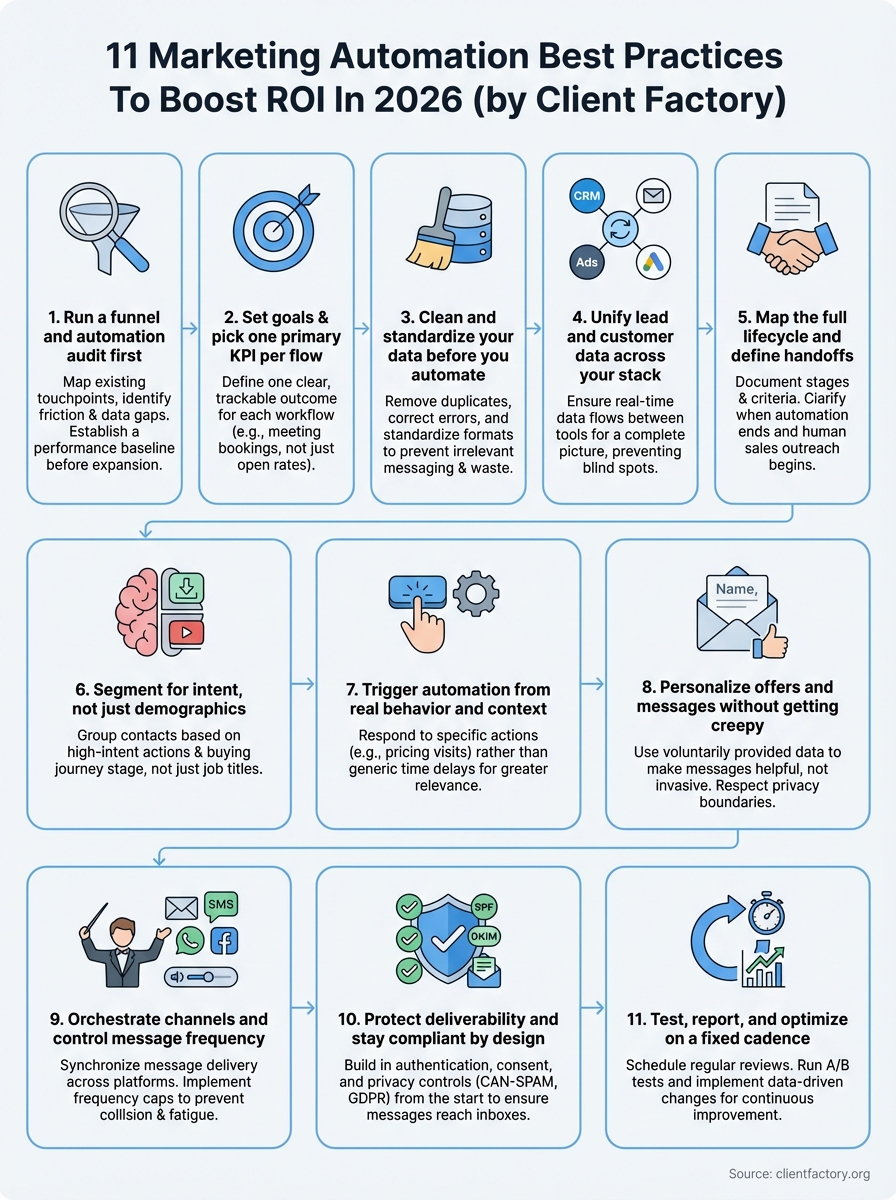
This guide breaks down 11 proven practices to optimize your marketing automation for measurable results. You’ll get actionable frameworks for cleaning your data, segmenting your audience effectively, and maximizing every dollar in your campaigns. Whether you’re just getting started or looking to squeeze more performance from your existing setup, these strategies will help you turn automated workflows into a reliable client generation engine.
1. Run a funnel and automation audit first
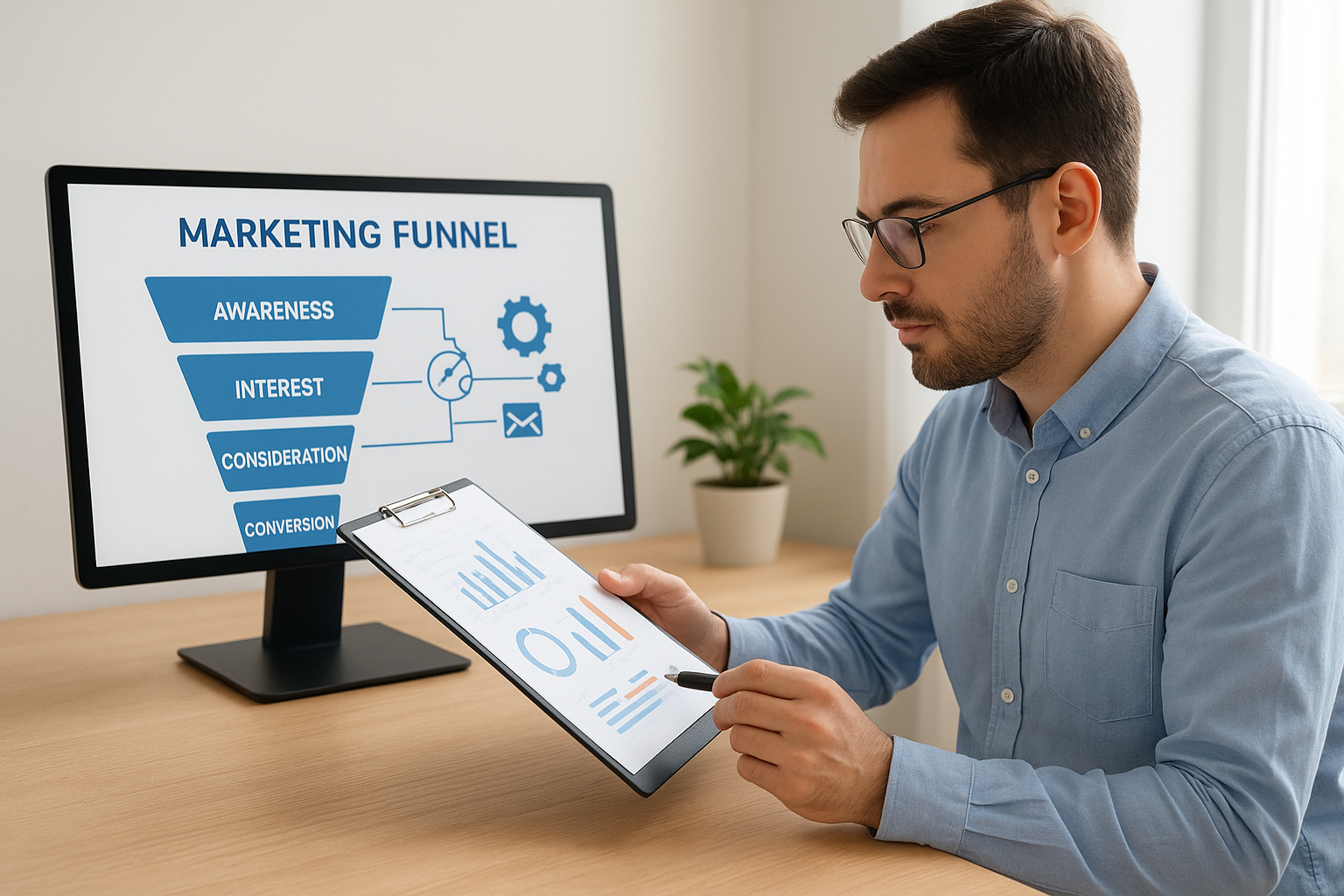
You can’t optimize what you don’t understand. Before tweaking any automation rules or launching new workflows, you need a complete picture of how your current system performs and where money gets wasted. Most businesses skip this step and build new automation on top of broken foundations, which multiplies problems instead of solving them. An audit reveals the friction points, data gaps, and workflow failures that sabotage your ROI before you invest another dollar in expansion.
What it is
An automation audit maps every touchpoint in your existing marketing funnel to identify what’s working and what’s bleeding budget. You document each workflow, trigger, data field, and integration across your entire stack. This includes tracking how leads move through your system, where they drop off, and which automation sequences generate actual conversions versus just activity. The goal is to create a baseline of truth before you make strategic changes.
A thorough audit saves you from automating bad processes faster.
How to do it in 2026
Start by exporting conversion data from each stage of your funnel for the past 90 days. Map every active workflow in your platform and identify which campaigns feed into each sequence. Test every email template for deliverability issues and broken links. Review your CRM integration logs to spot data sync failures. Document your lead scoring rules and verify they align with your sales team’s actual qualification criteria. Use screen recording tools to walk through the full customer journey as if you’re a prospect.
KPIs to track
Monitor funnel conversion rates at each transition point: visitor to lead, lead to MQL, MQL to opportunity, opportunity to customer. Track email engagement metrics including open rates, click rates, and unsubscribe rates by sequence. Measure automation completion rates to see how many contacts finish each workflow. Calculate cost per qualified lead for each entry point. Watch for data quality indicators like duplicate contact rates and missing field percentages.
Pitfalls to avoid
Don’t audit on gut feeling or cherry-picked examples. Pull complete datasets that show the full picture, including failures. Avoid analyzing only successful campaigns while ignoring the ones that burned budget. Don’t let your audit drag on for months. Set a two-week deadline to gather data and document findings, then act on what you learn. Skip the temptation to fix everything at once, prioritize the highest-impact problems first.
2. Set goals and pick one primary KPI per flow
Every automation workflow needs a single, measurable objective before you activate it. When you try to optimize for multiple goals at once, you end up achieving none of them effectively. This practice forces you to define success upfront and build each sequence around one clear outcome that ties directly to revenue. Without this focus, your automation becomes a collection of random activities that burn resources without moving the needle on client acquisition.
What it is
This means defining one primary KPI that determines whether each workflow succeeds or fails. Your welcome sequence might optimize for engagement, your re-engagement campaign for meeting bookings, and your nurture series for trial signups. Each flow gets one metric to rule them all, even if you track supporting metrics for context. The primary KPI becomes your north star for every decision about timing, messaging, and audience targeting within that specific automation.
One clear KPI per flow beats five vague metrics every time.
How to do it in 2026
List every active automation workflow in your system. For each one, write down what business outcome you need it to drive. Convert that outcome into a specific, trackable metric. Make sure your CRM or automation platform can accurately measure this KPI without manual calculation. Document the target threshold that signals success, such as 15% click-to-meeting conversion or $500 average deal value from the sequence.
KPIs to track
Focus on conversion-based metrics that connect to revenue: meeting bookings, trial starts, demo requests, purchases, or upgrade conversions. Track your primary KPI as the headline metric. Monitor supporting data like delivery rate and engagement metrics to troubleshoot when your main number drops, but never let secondary metrics distract from the one goal that matters for each flow.
Pitfalls to avoid
Don’t pick vanity metrics like open rates or total sends as your primary KPI. Avoid changing your success metric mid-flight to make performance look better. Skip the temptation to track everything equally. Never launch a workflow without first confirming your platform can measure the KPI automatically and accurately.
3. Clean and standardize your data before you automate
Bad data multiplies faster than you can fix it once automation kicks in. Every duplicate contact, incomplete field, and inconsistent format gets amplified across every workflow you run. Your automation becomes a high-speed delivery system for irrelevant messages to the wrong people, which destroys deliverability and burns through your budget. Clean data is the foundation of every effective marketing automation best practices implementation, and skipping this step guarantees mediocre results no matter how sophisticated your workflows become.
What it is
Data cleaning means removing duplicates, correcting errors, and filling critical gaps before contacts enter your automated sequences. Standardization takes it further by ensuring every field follows the same format across your entire database. Phone numbers match a consistent pattern, company names avoid random capitalization, and geographic data uses standardized abbreviations. This creates a reliable foundation where automation rules can actually function as designed instead of breaking on messy inputs.
Clean data turns automation from a liability into an asset.
How to do it in 2026
Run a full database export and identify duplicate records by matching email, phone, and company name fields. Merge duplicates while preserving the most complete record. Standardize all text fields using find-and-replace for common inconsistencies. Validate email addresses against a verification service to remove hard bounces. Set required fields for new contacts and backfill missing data for existing records using enrichment tools or manual research for your most valuable segments.
KPIs to track
Measure your duplicate rate by counting contacts with matching email addresses or phone numbers. Track field completion percentage for critical data points like company size, industry, and lead source. Monitor data decay rate by checking how many contacts have outdated information each quarter.
Pitfalls to avoid
Don’t clean data once and assume it stays clean forever. Avoid deleting incomplete records without attempting to enrich them first. Skip automated cleaning tools that merge records without human review of high-value accounts. Never standardize data without documenting your format rules for future reference.
4. Unify lead and customer data across your stack
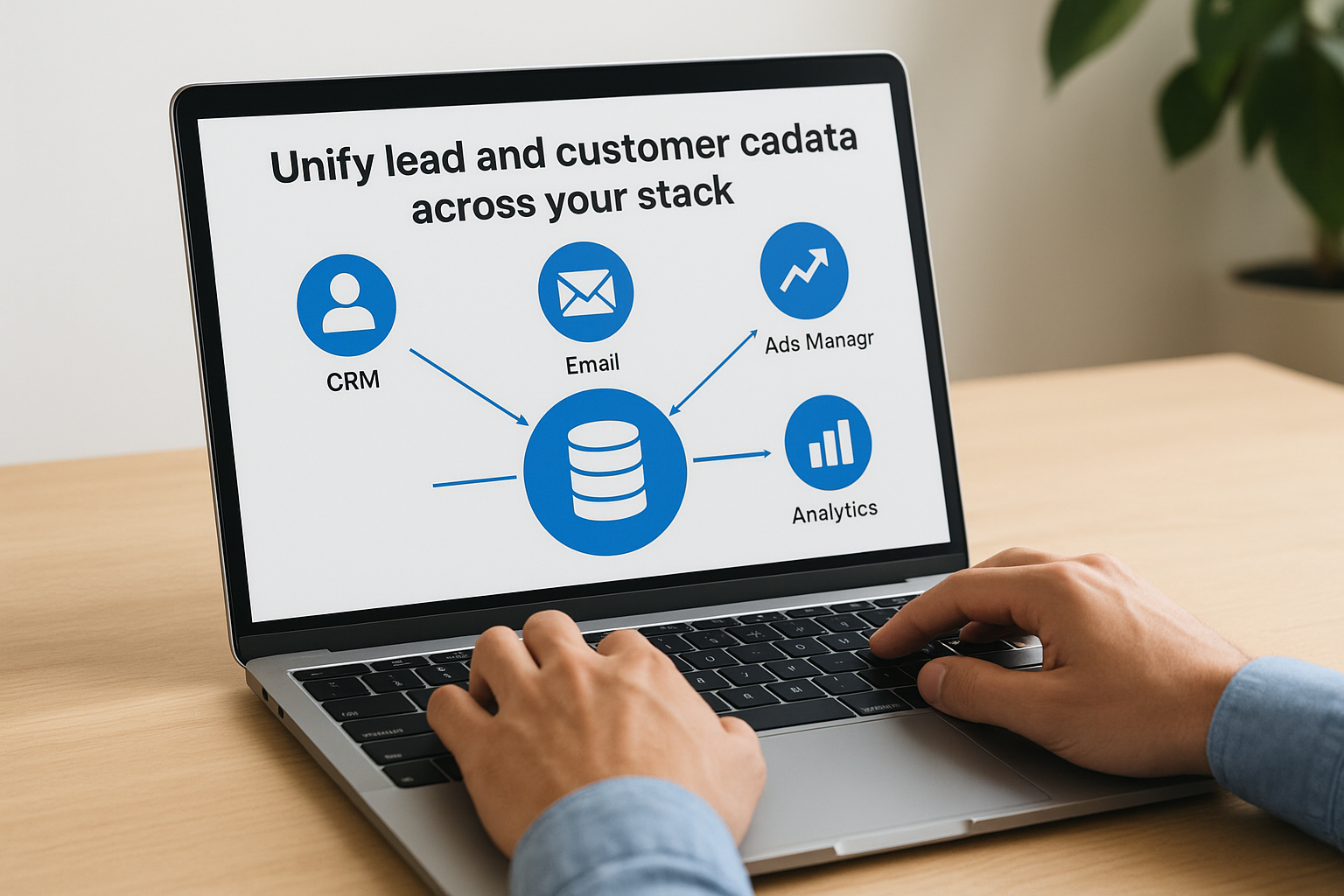
Siloed data creates blind spots that wreck your automation. When your CRM, email platform, ads manager, and analytics tools don’t talk to each other, you send the wrong message to the wrong person at the wrong time. Your paid ads keep targeting existing customers, your email sequences ignore recent purchases, and your sales team wastes time chasing leads that already converted. Unified data gives every system the complete picture it needs to make smart decisions automatically.
What it is
Data unification connects every tool in your marketing stack so customer information flows in real time across platforms. When a prospect downloads your guide, that action updates their CRM record, triggers an email sequence, and removes them from cold outreach lists simultaneously. Your advertising platforms see which contacts converted and automatically exclude them from acquisition campaigns. Every touchpoint feeds the central database that powers all your automation decisions.
Real-time data sync turns disconnected tools into one intelligent system.
How to do it in 2026
Map every platform that stores contact data or tracks customer behavior. Implement native integrations between your major tools first, starting with CRM to email platform connections. Use middleware platforms like Zapier or Make to bridge gaps where native integrations don’t exist. Set up bidirectional sync for critical fields so updates flow both directions. Test your connections by creating a dummy contact and watching it propagate across systems.
KPIs to track
Monitor sync success rate by checking how many records update correctly across platforms. Track data latency to measure how quickly changes propagate through your stack. Watch for sync error logs that indicate connection failures.
Pitfalls to avoid
Don’t sync every field between every platform. Avoid creating circular sync loops where platforms overwrite each other endlessly. Skip one-time bulk imports when you need ongoing real-time synchronization instead.
5. Map the full lifecycle and define handoffs
Your automation breaks down when responsibility shifts between marketing and sales without clear rules. Leads fall through cracks, get contacted twice by different teams, or never get followed up at all. Without documented handoff points, your marketing automation runs independently from your sales process, creating duplicate work and missed opportunities. Mapping the full lifecycle eliminates confusion about who owns each contact at every stage and ensures automation supports human conversations instead of interfering with them.
What it is
Lifecycle mapping documents every stage a contact moves through from first touch to closed customer, including exactly when marketing automation stops and human outreach begins. You define specific criteria that trigger each handoff, such as lead score thresholds or specific behaviors like requesting a demo. This creates clear ownership boundaries where both teams know their responsibilities and your automation adjusts messaging based on who’s actively working the contact.
Clear handoffs prevent leads from getting burned by conflicting messages.
How to do it in 2026
Document every lifecycle stage your contacts pass through: subscriber, lead, marketing qualified lead, sales accepted lead, opportunity, customer. Define the exact criteria that qualifies a contact for each transition. Set automation rules that notify sales when handoff criteria are met and pause marketing sequences automatically. Create a shared dashboard where both teams see handoff status in real time.
KPIs to track
Measure handoff velocity by tracking how long contacts spend in each stage before transitioning. Monitor acceptance rate by counting how many marketing qualified leads sales actually works. Track reversion rate when sales sends contacts back to marketing nurture.
Pitfalls to avoid
Don’t create handoffs based on arbitrary timelines instead of qualification criteria. Avoid keeping contacts in both systems simultaneously without suppression rules. Skip complex multi-tier handoffs that confuse teams.
6. Segment for intent, not just demographics
Demographic data tells you who someone is, but behavioral intent reveals what they actually want right now. Automation that segments by job title or company size misses the critical factor that drives conversions: readiness to engage with your specific solution. A CMO researching your pricing page needs different messaging than a CMO who only read a blog post, even though they share the same demographic profile. Intent-based segmentation aligns your automation with where prospects are in their buying journey, making every message more relevant and timely.
What it is
Intent segmentation groups contacts based on actions they’ve taken and problems they’re trying to solve rather than static attributes like industry or role. You create segments around behaviors like visiting pricing pages multiple times, downloading comparison guides, or attending product webinars. This approach recognizes that buying signals matter more than demographic checkboxes when deciding what message to send next.
Intent signals predict action better than any demographic ever will.
How to do it in 2026
Track high-intent behaviors like pricing page visits, demo video completion, case study downloads, and competitor comparison searches. Build segments that combine multiple intent signals, such as contacts who viewed pricing and downloaded ROI calculators within seven days. Layer in negative intent indicators like unsubscribing from promotional content to create suppression segments. Use your CRM to score intent based on recency and frequency of key actions.
KPIs to track
Monitor conversion rates by intent segment to identify which behavioral patterns predict purchases. Track segment size growth to see if your intent criteria are too narrow. Measure time to conversion for each intent-based segment compared to demographic segments.
Pitfalls to avoid
Don’t ignore demographics entirely when intent alone isn’t enough context. Avoid creating so many micro-segments that you can’t maintain unique content for each. Skip single-behavior segments that lack predictive power.
7. Trigger automation from real behavior and context
Generic time-based triggers send the same message to everyone regardless of what they actually did or why they did it. A contact who abandoned your pricing page after two minutes needs different follow-up than someone who spent twenty minutes comparing plans. Behavioral triggers respond to specific actions and context, making your automation feel less like broadcast spam and more like timely assistance. This approach dramatically improves relevance because you’re reacting to what people demonstrate they care about through their actual behavior.
What it is
Behavioral triggering launches workflows based on specific actions contacts take rather than arbitrary time delays or batch sends. You watch for meaningful signals like pricing page visits, email link clicks, form submissions, or content downloads, then respond with contextually relevant messages that acknowledge what they just did. Context adds depth by considering factors like time spent on page, number of visits, or sequence of actions.
How to do it in 2026
Set up event tracking across your website to capture page visits, scroll depth, and time on page. Connect these behavioral signals to your automation platform through native integrations or tracking pixels. Create trigger rules that require multiple behavioral signals before launching sequences, such as two pricing page visits within seven days. Build workflows that reference the specific action that triggered them in your messaging.
Automation that responds to real behavior converts better than scheduled blasts ever will.
KPIs to track
Measure trigger activation rate to see how many contacts qualify for each behavioral workflow. Monitor conversion rates by trigger type to identify which behaviors predict purchases best. Track time between trigger and conversion for each workflow.
Pitfalls to avoid
Don’t trigger workflows from single low-intent actions like opening one email. Avoid creating triggers so sensitive that you spam contacts with messages after every click. Skip behavior tracking without proper consent and privacy compliance.
8. Personalize offers and messages without getting creepy
Personalization boosts conversions, but cross the line into creepy and you destroy trust faster than you can rebuild it. The difference between helpful and invasive comes down to how you use the data you collect and whether your personalization serves the contact’s interests or just yours. When done right, personalization makes prospects feel understood. When done wrong, it makes them wonder how much you’re watching and what else you know about them that they never shared.
What it is
Smart personalization uses data contacts voluntarily provided or naturally revealed through their interactions with your business to customize messages and offers. You reference their company name in outreach, recommend solutions that match their stated challenges, and acknowledge their specific behavior like downloaded resources or attended events. The key is staying within the bounds of information they knowingly shared or actions they took on your properties, not pulling in third-party data that feels like surveillance.
Personalization should feel helpful, not stalkerish.
How to do it in 2026
Use first-party data from forms, surveys, and tracked behavior on your own website. Reference specific actions contacts took, like viewing particular product pages or downloading certain guides. Personalize subject lines and opening paragraphs with company names or role-specific challenges they indicated during signup. Build dynamic content blocks that swap based on industry or company size without calling out data points they never gave you.
KPIs to track
Monitor response rates and conversion rates for personalized messages versus generic ones. Track unsubscribe and complaint rates to catch when personalization crosses into discomfort. Measure click-through rates on personalized call-to-action buttons compared to standard versions.
Pitfalls to avoid
Don’t reference information contacts never shared directly with you. Avoid personalizing every element to the point where messages feel over-engineered. Skip dynamic content that fails gracefully when data fields are empty.
9. Orchestrate channels and control message frequency
Bombarding contacts across email, SMS, ads, and social at the same time burns them out and drives unsubscribes faster than any single channel ever could. When your email team, paid ads manager, and sales outreach all operate independently, you create message collision that feels like harassment instead of helpful communication. Channel orchestration coordinates timing and content across every touchpoint so contacts get consistent, spaced-out messages that reinforce each other instead of competing for attention.

What it is
Channel orchestration synchronizes message delivery across platforms so you control total exposure instead of letting each system fire at will. You set global frequency caps that limit how many touches a contact receives per week regardless of source. This approach treats all channels as one coordinated system rather than separate campaigns that accidentally overlap and overwhelm your audience.
Coordinated messaging across channels prevents fatigue and improves response rates.
How to do it in 2026
Implement frequency caps in your marketing automation platform that track total messages sent across email, SMS, and push notifications. Create suppression lists that pause new campaigns when contacts are already engaged in active sequences. Build cross-channel attribution tracking so you see which combination of touchpoints drives conversions. Set rules that space messages at least 48 hours apart unless contacts take high-intent actions that warrant immediate follow-up.
KPIs to track
Monitor unsubscribe rates and spam complaints to catch when frequency gets too aggressive. Track engagement rates by total message volume to find your optimal contact frequency. Measure response time to see how quickly contacts engage after receiving messages across different channel combinations.
Pitfalls to avoid
Don’t set frequency caps so low that high-intent prospects never get timely follow-up. Avoid counting every internal notification as part of your frequency limit. Skip orchestration rules that treat all message types equally when some are more intrusive than others.
10. Protect deliverability and stay compliant by design
Your automation means nothing if messages never reach inboxes or regulatory violations shut down your campaigns. Email providers and regulators both watch how you handle data and send messages, and violations on either front can destroy your sender reputation overnight. Building compliance and deliverability protection into your automation architecture from day one prevents expensive fixes later and keeps your messages landing in primary inboxes instead of spam folders. This matters more than ever as privacy regulations tighten and inbox providers get stricter about what they allow through their filters.
What it is
Compliance-by-design means building consent management, unsubscribe handling, and data privacy controls directly into every workflow before you activate it. Deliverability protection includes technical setup like proper authentication protocols, maintaining clean sender reputation, and following inbox provider guidelines automatically. You’re not bolting on compliance and deliverability fixes after problems appear, you’re engineering your automation so violations and reputation damage become structurally impossible.
Compliance isn’t optional and deliverability problems kill ROI faster than any other automation failure.
How to do it in 2026
Implement SPF, DKIM, and DMARC authentication on all sending domains before launching campaigns. Set up automated suppression lists that instantly honor unsubscribes across every workflow and channel. Build double opt-in confirmation for all new subscribers to verify legitimate signups. Create consent checkboxes for each communication type and respect preferences automatically in your segmentation rules. Monitor spam complaint rates daily and automatically pause sequences that cross threshold limits.
KPIs to track
Watch your inbox placement rate to see what percentage of sent emails actually reach primary inboxes versus spam folders. Track spam complaint rates and aim to stay below 0.1%. Monitor bounce rates separately for hard and soft bounces. Measure unsubscribe rates by sequence to identify workflows that trigger opt-outs.
Pitfalls to avoid
Don’t buy or rent email lists that violate CAN-SPAM and GDPR requirements. Avoid ignoring unsubscribe requests for any amount of time. Skip the practice of hiding unsubscribe links or making them difficult to find. Never send from free email domains or shared IP addresses without reputation monitoring.
11. Test, report, and optimize on a fixed cadence
Most automation runs on autopilot until someone notices conversion rates tanking. By then, you’ve wasted weeks of budget sending underperforming messages to contacts who could have converted with better optimization. Setting a regular testing schedule transforms your automation from a static system into one that gets smarter every month. Following marketing automation best practices means treating optimization as an ongoing discipline, not something you do once when you launch a workflow.
What it is
Fixed-cadence optimization schedules specific testing windows and review sessions where you evaluate performance data, implement changes, and measure results. You commit to monthly or quarterly cycles where you analyze metrics, run A/B tests on underperforming sequences, and document what worked. This creates accountability and prevents the drift that happens when optimization becomes something you’ll do later.
Regular optimization beats random improvements every time.
How to do it in 2026
Block recurring calendar time every month for automation review sessions. Pull performance data for all active workflows and identify the lowest-performing sequences. Launch A/B tests on one variable at a time: subject lines, send times, or call-to-action copy. Run tests for at least two weeks or 1,000 sends before declaring a winner. Document every change and its impact in a shared spreadsheet.
KPIs to track
Monitor month-over-month improvements in your primary conversion metrics for each workflow. Track test win rates to measure how often your optimization attempts actually improve performance. Measure the ROI lift from optimizations by comparing revenue before and after changes.
Pitfalls to avoid
Don’t change multiple variables simultaneously when testing. Avoid declaring winners on small sample sizes that lack statistical significance. Skip optimization efforts without documenting baseline performance first.
Next steps
You now have a complete framework for implementing marketing automation best practices that actually drive client acquisition. The difference between automation that wastes budget and automation that generates revenue comes down to execution. Start with the audit, clean your data, and focus on one improvement at a time rather than trying to overhaul everything simultaneously.
Your current funnel likely has gaps you haven’t identified yet. Every workflow that isn’t properly configured costs you money and burns contacts who could have converted with the right approach. The businesses that win with automation are the ones that commit to ongoing optimization instead of setting everything up once and hoping for the best.
If you want expert eyes on your current setup, book a free conversion audit with our team. We’ll identify exactly where your automation is breaking down and show you the highest-impact fixes to implement first.
