


MailerLite email marketing is a web-based platform that lets you send newsletters, build subscriber lists, create automated email sequences, and design landing pages. Founded in 2005, it gained popularity among small businesses and solopreneurs for its simple interface and affordable pricing. You get drag-and-drop editors for emails and pages, basic automation workflows, signup forms, and integrations with popular tools like Shopify and WordPress.
This guide walks you through everything you need to know before committing to MailerLite. You’ll see real pricing breakdowns across all plans, a detailed look at core features like automation and segmentation, and honest assessments of where the platform excels and where it falls short. We cover setup requirements, deliverability considerations, and head-to-head comparisons with alternatives like Mailchimp and Brevo. Whether you’re launching your first newsletter or migrating from another provider, you’ll find practical insights to make an informed decision. By the end, you’ll know if MailerLite fits your budget, technical skill level, and growth plans.
Why MailerLite email marketing matters in 2025
Email remains the highest-ROI marketing channel in 2025, with businesses earning an average of $36 for every dollar spent. You need a platform that balances functionality with cost, especially when competing tools like Mailchimp have raised prices by 30% since 2023. MailerLite positions itself as the budget alternative that doesn’t sacrifice core features, making it relevant for businesses watching margins while scaling their digital outreach. The platform serves over one million active users, proving that affordable tools can attract serious adoption when they deliver consistent value.
Accessibility for non-technical users
You don’t need coding skills or a marketing degree to launch effective campaigns with MailerLite. The drag-and-drop builder lets you design professional emails in minutes, while pre-built automation templates handle welcome sequences, cart abandonment, and re-engagement flows without custom setup. This accessibility matters because small teams lack dedicated technical staff, yet they still compete against larger companies with full marketing departments. Your ability to execute sophisticated campaigns without hiring specialists or agencies directly impacts your customer acquisition cost and profit margins.
“The best email tool is the one you’ll actually use consistently.”
Budget pressure in competitive markets
Marketing budgets face intense scrutiny in 2025 as businesses demand measurable returns. MailerLite email marketing costs 76% less than Mailchimp for equivalent subscriber counts, freeing capital for ad spend, content creation, or product development. You get unlimited monthly sends on paid plans, eliminating the pay-per-email model that punishes frequent communication. Small ecommerce stores, consultants, and agencies need predictable costs that scale linearly with list growth, not exponentially with activity. When you’re testing audience segments, running weekly newsletters, and nurturing leads through multi-touch sequences, unlimited sending prevents budget surprises that derail your strategy mid-campaign.
How to choose and set up MailerLite
You need to evaluate your requirements before committing to any email platform. MailerLite email marketing works best when your needs align with its core strengths: straightforward campaign creation, basic-to-intermediate automation, and budget-conscious pricing. The platform onboards new users within 30 minutes, but choosing the right plan and configuring domain settings requires upfront decisions that affect deliverability and scalability. Your setup process determines whether you’ll face technical hurdles or start sending campaigns the same day you register.
Evaluating if MailerLite fits your needs
Start by mapping your requirements against MailerLite’s capabilities. You get unlimited monthly sends on all paid plans, making it suitable if you email subscribers multiple times per week without worrying about overage fees. The platform handles lists up to 500,000 contacts before moving you to custom enterprise pricing, which covers most small and mid-sized businesses. Check if your current tools integrate natively with MailerLite through its 130+ direct connections or via Zapier for extended compatibility. If you rely heavily on advanced CRM features, predictive analytics, or multi-channel orchestration, MailerLite will feel limited compared to enterprise platforms.
Consider your team’s technical comfort level. The drag-and-drop editor requires no HTML knowledge, and pre-built automation workflows launch with a few clicks. You sacrifice granular control over CSS styling and JavaScript tracking, but you gain speed and simplicity that non-technical marketers appreciate.
“The right platform is one that your team will use daily without frustration.”
Creating your account and initial setup
Registration requires your business name, email address, and password. MailerLite asks follow-up questions about your industry, list size, and lead collection methods to customize your dashboard. You’ll verify your email within five minutes by clicking the confirmation link. The free plan lets you test most features with up to 500 subscribers and 12,000 monthly sends, giving you a realistic trial before upgrading. Import your existing contacts through CSV upload, copy-paste from spreadsheets, or direct Mailchimp migration if you’re switching providers.
Domain authentication and sender setup
You must authenticate your sending domain before launching campaigns, a requirement that ensures proper DKIM and SPF records exist. MailerLite detects your DNS provider automatically and displays step-by-step instructions for adding authentication records. If you host your domain through major providers like GoDaddy or Cloudflare, you’ll complete authentication in under ten minutes. Smaller or custom hosting setups require manual DNS editing, which can take 24 hours to propagate. Contact MailerLite’s support if authentication fails after following prompts. Skipping this step blocks all campaign sends and prevents you from testing email designs, so complete domain setup immediately after account creation.
Authentication protects your sender reputation and improves inbox placement rates. Your emails arrive marked as verified, reducing spam flags and building recipient trust from your first send.
MailerLite pricing and plans at a glance
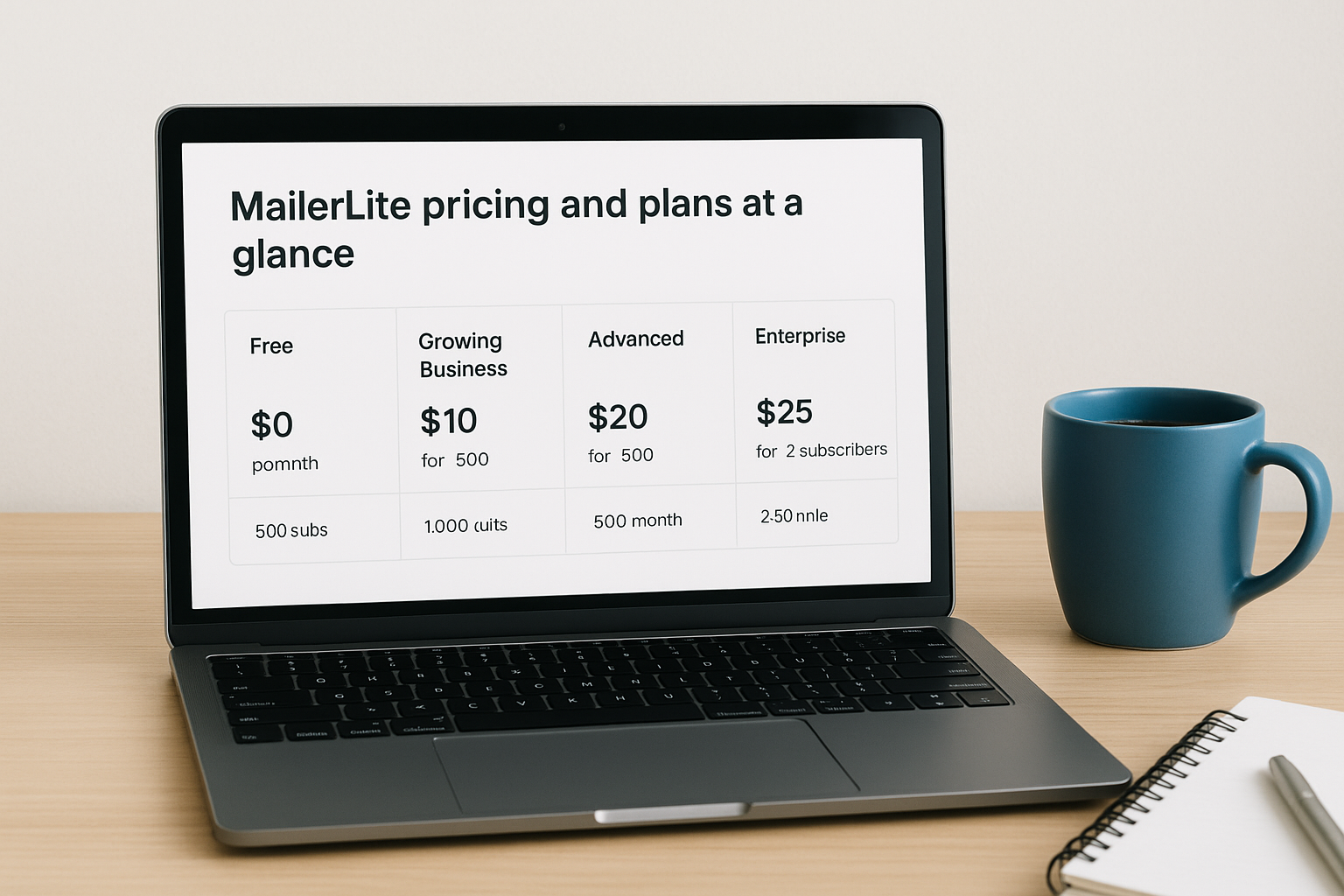
MailerLite email marketing uses subscriber-based pricing where you pay according to your list size, not how many emails you send each month. The platform offers four distinct tiers: Free, Growing Business, Advanced, and Enterprise. You get unlimited monthly sends on all paid plans, which means sending daily newsletters costs the same as sending weekly campaigns. Pricing starts at $10 per month for 500 subscribers on the Growing Business plan, scaling predictably as your list grows. The transparent pricing calculator on their site lets you drag a slider to see exact costs for any subscriber count between 500 and 500,000 contacts.
Free plan limitations and capabilities
You receive access to most core features on the free plan, including the drag-and-drop email builder, basic automation workflows, signup forms, and landing pages. The plan supports up to 500 subscribers with a 12,000 monthly send limit, sufficient for weekly newsletters to a small audience. You won’t get email templates on the free tier, forcing you to build campaigns from scratch using content blocks. Customer support restricts you to email-only assistance without the 24/7 live chat available on paid accounts. Domain authentication is required even on free accounts, and MailerLite displays their branding on emails and landing pages you create. The free plan works for early-stage businesses testing email marketing before committing budget, but the template library absence slows campaign creation compared to paid alternatives.
Growing Business plan essentials
Upgrading to Growing Business costs $10 monthly for 500 subscribers, $25 for 2,500, and $73 for 10,000 contacts. This tier unlocks the 90+ email template library, removes MailerLite branding from your sends, and adds auto-resend campaigns that automatically retry unopened emails with different subject lines. You gain access to multiple user seats, allowing team collaboration without sharing login credentials. The plan includes email support with responses typically within 24 hours, but you still miss live chat functionality. Most small businesses operate comfortably on this tier, using the template library and unlimited sends to run sophisticated campaigns without the advanced features reserved for higher plans.
“Predictable pricing removes the anxiety of scaling your email volume.”
Advanced plan and enterprise options
Advanced plan pricing starts at $20 monthly for 500 subscribers and $99 for 10,000, adding features like 24/7 live chat support, promotional popup A/B testing, and preference centers that let subscribers control email frequency. You get priority support with faster response times and access to MailerLite’s HTML email editor for custom code modifications. Enterprise plans begin at 100,000 subscribers with custom pricing negotiated directly with their sales team, including dedicated account management and volume discounts. Consider Advanced tier when your team needs immediate technical support during campaign launches or when sophisticated popup testing becomes central to your list growth strategy.
Essential features you get with MailerLite
MailerLite email marketing delivers a focused feature set that covers daily campaign needs without overwhelming you with options you’ll never use. You access the same drag-and-drop editor across all plans, building emails from 12 content modules including video blocks, product showcases, countdown timers, and embedded surveys. The platform supports five campaign types: standard newsletters, A/B split tests, auto-resend campaigns, RSS-triggered digests, and multivariate tests that compare up to eight combinations of subject lines, sender names, and content. Your campaigns preview across desktop and mobile views before sending, and you schedule sends based on recipient time zones to maximize open rates. Real-time analytics track opens, clicks, unsubscribes, and top-performing links within minutes of deployment.
Drag-and-drop email editor and templates
You build emails by dragging modules from a left sidebar onto your canvas, adjusting spacing, colors, and fonts through intuitive controls. The editor provides pre-designed content blocks for common layouts like two-column product grids, testimonial showcases, and call-to-action buttons that maintain mobile responsiveness automatically. Your global styles feature lets you set default fonts, colors, and header/footer elements once, applying them consistently across all future campaigns without manual copying. The saved blocks library stores frequently used sections like product recommendations or social media footers, letting you insert them into new emails with a single click.

Paid plans unlock 90+ professionally designed templates covering industries from ecommerce to nonprofits, each customizable through the same drag-and-drop interface. Templates include pre-written placeholder text and optimized layouts that guide your content structure. Free plan users build campaigns from scratch using individual modules, which adds 10-15 minutes to campaign creation compared to starting from templates.
Campaign types and sending options
Standard campaigns function as one-time sends to selected subscriber segments, while A/B split tests compare two versions by sending each to a percentage of your list before automatically delivering the winner to remaining contacts. Auto-resend campaigns retry unopened emails after 24-72 hours with modified subject lines, increasing reach without duplicating messages to engaged subscribers. RSS campaigns automate email sends whenever your blog publishes new content, pulling headlines and excerpts directly from your feed. Multivariate testing goes beyond simple A/B comparisons by testing combinations of elements simultaneously, revealing which mix of subject line, sender name, and send time generates the highest engagement.
“Campaign variety lets you match email tactics to specific marketing objectives.”
AI writing assistant capabilities
MailerLite’s AI subject line generator analyzes your email content and suggests compelling headlines designed to improve open rates. You receive limited monthly credits for AI generation on paid plans, with each suggestion consuming one credit. The tool translates finished email copy into multiple languages, useful for businesses serving international audiences without hiring translators. AI functionality extends to landing page headlines and product descriptions, speeding up page creation when you’re launching promotions or lead magnets. The assistant won’t generate full newsletter content or preheader text, limiting its usefulness compared to platforms with comprehensive generative AI. You still write email body copy manually, using AI primarily for optimization rather than content creation.
Forms, landing pages, and site builder overview
MailerLite email marketing extends beyond email campaigns into list building and web hosting through its integrated form builder, landing page creator, and website builder. You design signup forms and promotional popups without coding, embed them on your site, or host standalone pages on MailerLite’s infrastructure. The platform provides 30+ landing page templates on paid plans and hosts pages on custom domains you already own, eliminating the need for separate hosting services. Your forms connect directly to subscriber lists and automation workflows, capturing leads that immediately enter your email sequences. This integration reduces technical complexity by keeping list growth, nurturing, and conversion tools within a single dashboard.
Embedded forms and popup builders
Your embedded forms offer basic customization without template libraries, forcing you to build designs from scratch using limited styling controls. The editor lets you choose between default, horizontal, or card-with-image layouts, then adjust colors, fonts, and field types like text inputs, checkboxes, and dropdowns. You add reCAPTCHA protection, confirmation checkboxes, and marketing permission fields to comply with regulations. The popup editor provides more advanced functionality than embedded forms, including a template library and drag-and-drop interface for modifying designs. Your popups trigger based on time delays, scroll depth, exit intent, or specific page visits, letting you display targeted messages to different visitor segments.
Popup forms include multiple blocks like images, countdown timers, and social links that create urgency and build trust. You configure success popups with custom colors, backgrounds, and social media links that appear after form submission, reinforcing brand identity and encouraging further engagement.
Landing page creation process
You start landing pages from templates or build from scratch using the drag-and-drop editor, which mirrors the email builder’s interface but offers different content blocks optimized for web pages. The platform lets you add password protection to pages, though the same password applies across all protected pages, limiting its usefulness for member-only content. Your landing pages include SEO settings like meta descriptions, page titles, and Open Graph tags for social sharing, helping pages rank in search results and display properly when shared.
MailerLite’s AI landing page builder generates three design variations based on your prompt, incorporating brand colors and styles you specify. Results vary significantly based on prompt quality, and you’ll spend time refining the output to match your exact vision.
“Integrated page hosting eliminates dependencies on external website builders.”
Website builder for basic sites
The website builder creates multi-page sites with navigation bars, blog functionality, and product pages for selling digital goods. You add or hide pages from navigation menus, creating site structures that range from single landing pages to complete business websites. Blog features automate sitemap updates and let you add custom robots.txt files for search engine control. The builder restricts customization compared to WordPress or Webflow, preventing you from translating complex designs into reality without coding workarounds. Your free plan forces MailerLite subdomain usage, while paid plans connect custom domains you already own.
Automation, segmentation, and personalization
MailerLite email marketing provides workflow automation that handles subscriber journeys from initial signup through long-term engagement without manual intervention. You build automated sequences using a visual workflow editor that connects triggers, conditions, delays, and actions into logical paths. The platform offers pre-built automation templates for welcome emails, cart abandonment, win-back campaigns, and subscriber re-engagement that launch with minimal configuration. Your automation capabilities sit between basic autoresponders and enterprise-grade marketing automation, giving you enough power to nurture leads effectively without overwhelming complexity. Workflows execute based on subscriber behavior and data changes, ensuring timely, relevant communication that adapts to individual actions.
Automation workflows and triggers
You initiate automation when subscribers join specific groups, complete forms, click particular links, or update profile fields in your database. The platform supports date-based triggers including anniversaries and exact date matches, useful for birthday campaigns or subscription renewal reminders. Your workflows contain four module types: emails that deliver content, delays that create timed pauses, conditions that split paths based on criteria, and actions that modify subscriber data or group membership. Conditions evaluate field values, campaign engagement, and group membership to route subscribers through appropriate sequences.

Advanced plan users access multiple trigger combinations within single workflows, creating sophisticated journeys that respond to complex subscriber behaviors. You cannot trigger workflows based on website visits or browsing behavior, which limits behavioral targeting compared to platforms with native site tracking.
“Effective automation matches message timing to subscriber readiness.”
Segmentation capabilities
Your subscriber management tools let you create custom fields beyond default name and email address, storing data like company size, industry, purchase history, or product interests. Groups function as static lists where subscribers remain until manually removed, while segments act as dynamic filters that automatically update based on criteria you define. You segment subscribers by demographics, campaign engagement metrics, automation enrollment status, inactivity periods, and ecommerce purchase data from integrated stores. Filter combinations produce precise audience subsets, ensuring campaigns reach only relevant recipients.
Import processes automatically remove duplicates and role-based emails, maintaining list hygiene without manual cleanup. Your segments save for reuse across campaigns, eliminating repetitive filtering before each send.
Personalization options
Dynamic content blocks display different images, text, or offers based on subscriber attributes, though you must duplicate blocks rather than create variations within single elements. If you want to show one message to women and another to men, you add two separate blocks with visibility conditions rather than toggling content within one block. Your personalization extends to merge tags that insert subscriber data like names, company information, or custom field values anywhere in email copy. Preference centers let subscribers control communication frequency and topic preferences, reducing unsubscribe rates by giving them granular control.
The platform lacks predictive personalization that automatically suggests products or content based on behavioral patterns. You manually configure all personalization rules using available data fields and engagement metrics.
Deliverability, reporting, and integrations
MailerLite email marketing prioritizes inbox placement through mandatory domain authentication and automated sending infrastructure that manages delivery speeds without manual throttling controls. The platform supports SPF, DKIM, and DMARC authentication to verify your sender identity and reduce spam flags. You configure authentication during initial setup, with MailerLite detecting your DNS provider and providing step-by-step instructions for adding required records. Domain verification prevents spoofing and builds recipient trust, directly impacting whether your campaigns reach primary inboxes or get filtered to spam folders. Your analytics dashboard tracks campaign performance in real time, showing opens, clicks, unsubscribes, and device data within minutes of sending. Native integrations connect MailerLite to ecommerce platforms, CRM systems, and productivity tools without requiring Zapier middleware for common workflows.
Email deliverability and authentication
Your sender reputation depends on proper authentication and consistent sending practices that signal legitimate email activity to inbox providers. MailerLite automatically includes List-Unsubscribe headers in campaign emails, giving recipients easy opt-out options that reduce spam complaints and protect your domain reputation. The platform lacks custom tracking domains and return-path domain alignment, preventing full DMARC compliance that larger enterprises require for maximum deliverability control. Internal systems manage sending speeds automatically, distributing your campaigns across time windows to avoid triggering rate limits at recipient mail servers.
Authentication failures block all campaign sends until you resolve DNS configuration issues, so contact MailerLite support if records don’t verify within 24 hours. Your deliverability improves when you maintain engaged lists, remove inactive subscribers regularly, and avoid purchased or scraped contact databases that generate high bounce rates.
“Authenticated domains signal trustworthiness to inbox providers and subscribers alike.”
Analytics and reporting dashboard
Campaign reports display open rates, click rates, and unsubscribe percentages alongside geographic data showing which countries generated the most engagement. You see top-performing links ranked by click volume, device breakdowns indicating mobile versus desktop opens, and email client statistics revealing whether subscribers use Gmail, Outlook, or Apple Mail. List growth reports track subscription trends over time, showing daily additions, unsubscribes, and net growth across your database. The platform provides basic metrics without advanced features like heat maps, engagement scoring, or predictive analytics found in enterprise tools.

Native integrations and API access
MailerLite connects directly to 130+ platforms including Shopify, WooCommerce, WordPress, Stripe, and Zapier for extended compatibility with thousands of additional applications. Ecommerce integrations sync product catalogs into your email editor, track purchase data for segmentation, and trigger abandoned cart automations when shoppers leave items in their baskets. You access the RESTful API for custom integrations that push subscriber data, trigger automations, or pull campaign statistics into external dashboards and reporting tools. API documentation provides endpoints for managing contacts, campaigns, groups, and automation workflows programmatically.
Pros, cons, and common pain points
MailerLite email marketing delivers genuine value in specific areas while falling short in others, and understanding these trade-offs helps you avoid surprises after committing. Your experience with the platform depends heavily on whether its strengths match your priorities and whether its weaknesses block your essential workflows. Real users report consistent patterns of satisfaction and frustration across pricing, features, and support quality. This section reveals what you’ll love, what will annoy you, and where you’ll hit walls that require workarounds or alternative tools.
What MailerLite does well
You get exceptional pricing that undercuts major competitors by 50-76% while maintaining comparable core functionality, making it the clear choice for budget-conscious businesses. The drag-and-drop editors for emails, forms, and landing pages work intuitively without training, letting non-technical team members build professional campaigns within minutes. Unlimited sending on paid plans removes the anxiety of staying within message limits, encouraging frequent communication with subscribers without penalty. Customer support responds quickly on paid plans, with 24/7 live chat available on Advanced tier resolving technical issues in under ten minutes based on user reports. The platform includes website hosting and landing page creation that competitors charge separately for, consolidating tools and reducing monthly subscriptions you need to maintain.
“Cost savings matter most when they don’t sacrifice features you use daily.”
Limitations you’ll encounter
Your automation capabilities stop short of website behavior tracking, preventing workflows that trigger based on page visits or browsing patterns that platforms like ActiveCampaign handle natively. The free plan excludes email templates entirely, forcing you to build campaigns from scratch and adding 15-20 minutes to creation time compared to starting with pre-designed layouts. Customization options feel restrictive for forms and templates, particularly when clients or stakeholders request specific designs that the editor can’t replicate without custom HTML coding. Analytics remain basic, lacking heat maps, engagement scoring, and conversion attribution that larger teams expect from enterprise platforms. You’ll find fewer native integrations compared to Mailchimp or HubSpot, occasionally requiring Zapier middleware that adds complexity and subscription costs.
Common user frustrations
Migration from MailerLite Classic to the updated platform caused widespread complaints about weeks of rebuild work for existing campaigns and automation workflows, with some users refusing to migrate despite pricing increases. The different interfaces across email builder, form builder, and website builder create learning curve friction, forcing you to relearn navigation patterns for each tool instead of maintaining consistent controls. Domain authentication blocks all campaign activity until you complete DNS setup correctly, frustrating beginners without technical backgrounds or access to hosting control panels. Free plan users receive email-only support that responds within 24-48 hours instead of immediate live chat, leaving you stuck during time-sensitive campaign launches. The AI writing assistant consumes limited monthly credits and won’t generate full email content or preheader text, providing less value than competitors with comprehensive generative AI features.
Who MailerLite is best for
MailerLite email marketing serves specific business types better than others based on its pricing structure, feature depth, and technical requirements. Your success with the platform correlates directly with how well your needs align with its core strengths: affordable pricing, ease of use, and straightforward automation. Businesses operating outside these parameters often outgrow the platform quickly or struggle with missing functionality that competitors provide. You should evaluate your current situation and growth trajectory against these profiles to determine fit before investing time in migration or setup.
Small businesses and solopreneurs
You benefit most from MailerLite when you run a lean operation with limited marketing staff and need to execute professional campaigns without hiring specialists. The platform lets you build emails, landing pages, and automation sequences yourself, eliminating agency fees that can reach $2,000-5,000 monthly for comparable services. Your subscriber list typically ranges from 500 to 25,000 contacts, placing you in the sweet spot where MailerLite’s pricing delivers maximum value compared to enterprise platforms. Solopreneurs appreciate the website builder that removes dependencies on WordPress or Squarespace subscriptions, consolidating tools into a single monthly payment.
Budget-conscious marketers with straightforward needs
Your marketing budget stays predictable with MailerLite’s unlimited sending model that charges only for subscriber count, not message volume. Agencies managing multiple client accounts value the ability to send daily campaigns without watching message limits or incurring overage penalties. You prioritize core functionality over advanced features, accepting limited CRM capabilities and basic analytics in exchange for substantial cost savings. Teams that previously paid $200-400 monthly for Mailchimp or Constant Contact reduce expenses by 60-75% while maintaining campaign quality and deliverability rates.
“Platform value emerges when cost savings fund growth in other areas.”
Businesses prioritizing simplicity over customization
You choose MailerLite when your team lacks technical expertise and needs intuitive interfaces that work immediately without extensive training. Service businesses like consultants, coaches, and local retailers launch campaigns within hours of account creation, avoiding the weeks of configuration that enterprise platforms demand. Your design requirements stay within the boundaries of pre-built templates and drag-and-drop modules, rarely needing custom HTML or complex integrations that push MailerLite’s capabilities.
How MailerLite compares to other tools
MailerLite email marketing occupies a specific position in the crowded email platform landscape, competing directly on price and simplicity while conceding ground on advanced features and enterprise functionality. Your choice between MailerLite and alternatives depends on whether you prioritize cost savings and ease of use over comprehensive automation, CRM integration, and multi-channel capabilities. Direct competitors include Mailchimp for general email marketing, ActiveCampaign for automation-focused users, and Brevo for budget-conscious businesses needing CRM features. Understanding where MailerLite wins and loses these comparisons helps you select the platform that best matches your current needs and growth trajectory.
MailerLite versus Mailchimp
Your costs drop 50-76% with MailerLite compared to Mailchimp for equivalent subscriber counts, with the savings increasing as your list grows. MailerLite provides unlimited monthly sends on paid plans while Mailchimp enforces strict message limits that trigger overage fees when exceeded. Automation capabilities favor MailerLite through its visual workflow editor that supports multiple triggers and complex conditions, while Mailchimp restricts advanced automation to higher-tier plans. Mailchimp offers features MailerLite lacks, including postcard campaign creation, integrated Facebook and Google Ads management, and a more extensive template library with 300+ designs versus MailerLite’s 90+ options. Mailchimp’s reporting provides deeper insights with engagement scoring and comparative industry benchmarks, while MailerLite delivers basic metrics focused on opens, clicks, and device data. Your decision hinges on whether the additional Mailchimp features justify paying double or triple the monthly cost for similar list management and sending capabilities.
“Platform comparisons reveal whether extra features justify higher subscription costs.”
MailerLite versus advanced automation platforms
ActiveCampaign delivers enterprise-grade marketing automation with website behavior tracking, lead scoring, and CRM functionality that MailerLite completely omits. You build sophisticated multi-step workflows triggered by page visits, form submissions, and complex scoring thresholds that adapt messaging to individual prospect behaviors. ActiveCampaign costs 2-3 times more than MailerLite for comparable subscriber counts, pricing that reflects its deeper feature set and target audience of businesses with dedicated marketing teams. HubSpot provides even more comprehensive capabilities including sales CRM, content management, and service ticketing, but charges 5-10 times MailerLite’s rates for equivalent contact volumes. Your business graduates to these platforms when automation complexity, sales team collaboration, and integrated CRM become essential rather than optional features.
MailerLite versus budget alternatives
Brevo offers similar pricing to MailerLite with added CRM functionality and SMS marketing that appeals to businesses wanting unified contact management. Brevo’s email sending limits restrict free plan users to 300 daily sends versus MailerLite’s 12,000 monthly allowance, creating different value propositions for high-volume senders. GetResponse includes webinar hosting and conversion funnels at price points 10-20% higher than MailerLite, providing additional tools that eliminate separate software subscriptions. Moosend undercuts MailerLite slightly on pricing while offering comparable core features, though users report less reliable customer support and slower feature updates. Your platform selection among budget options depends on which secondary features beyond basic email marketing deliver the most value to your specific business model and customer communication strategy.
Key takeaways
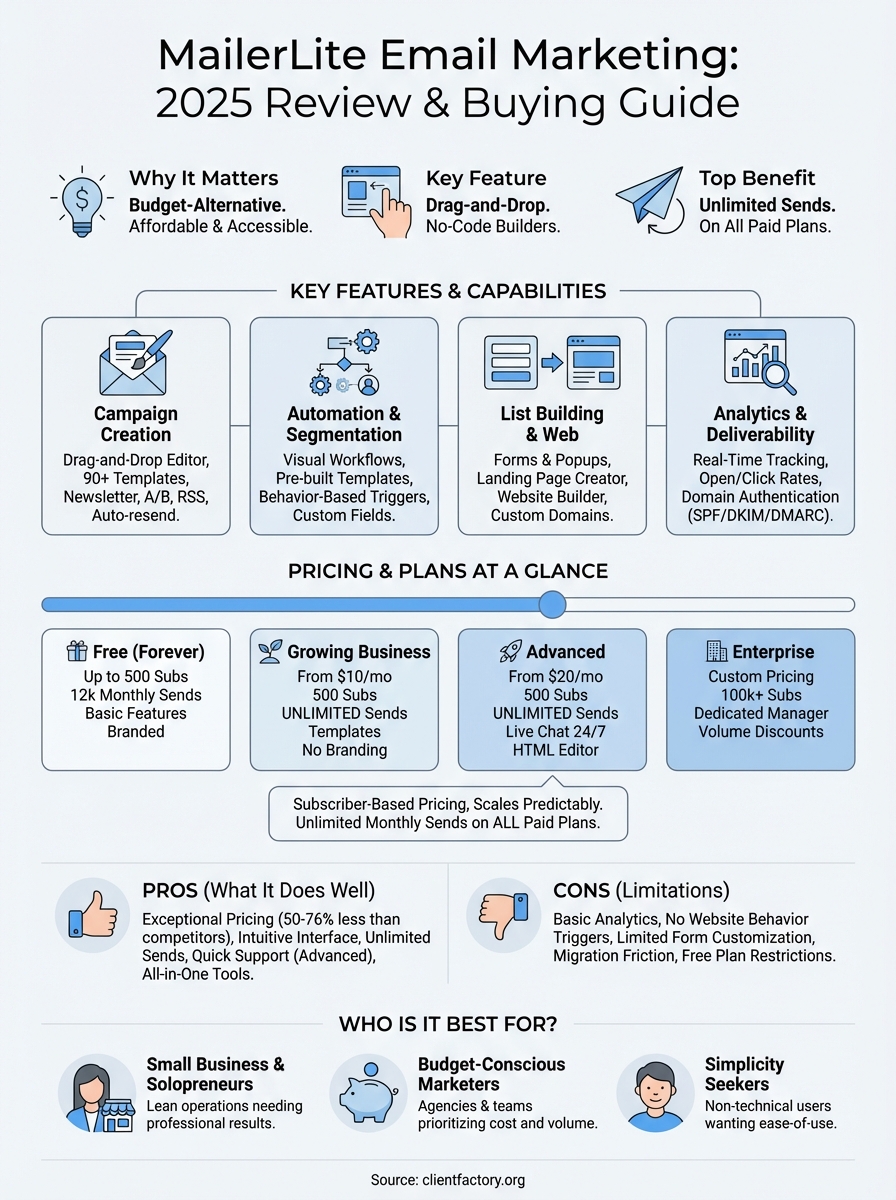
MailerLite email marketing delivers affordable, user-friendly functionality that covers essential campaign needs without the complexity or cost of enterprise platforms. You get unlimited monthly sends, drag-and-drop editors, basic automation workflows, and landing page hosting at prices 50-76% lower than Mailchimp. The platform works best for small businesses, solopreneurs, and budget-conscious marketers who need straightforward email tools rather than advanced CRM integration or multi-channel orchestration. Your subscriber lists below 50,000 contacts find the most value here, where predictable pricing and simple interfaces reduce both costs and learning curves.
Limitations appear in form customization, analytics depth, and automation triggers that can’t respond to website behavior. Migration between MailerLite versions frustrated existing users, and the different interfaces across builders create friction. Still, 24/7 support on Advanced plans and consistent deliverability make it a reliable choice when your priorities align with its strengths. If you need a comprehensive digital marketing strategy that converts prospects into clients beyond just email campaigns, explore how Client Factory builds complete acquisition systems tailored to service businesses and law firms.
