

Your email list is only as valuable as the people who actually read your messages. You can craft the perfect offer, build an incredible funnel, and have a product that genuinely helps people, but none of it matters if your emails sit unopened. That’s why learning to improve email open rates is one of the most impactful skills you can develop for your business. At Client Factory, we’ve helped service businesses and law firms optimize every stage of their client acquisition process, and email performance is often the hidden bottleneck holding back otherwise solid marketing systems.
The good news? Open rates aren’t mysterious. They respond to specific, measurable changes you can start making today. From subject line tweaks to list hygiene practices and strategic send times, the tactics that move the needle are well-documented and repeatable.
This guide breaks down nine proven methods to get more eyes on your emails in 2026. Whether you’re seeing a slow decline in engagement or starting fresh with a new list, these strategies will help you turn your email list into a reliable source of leads and clients. Let’s get into it.
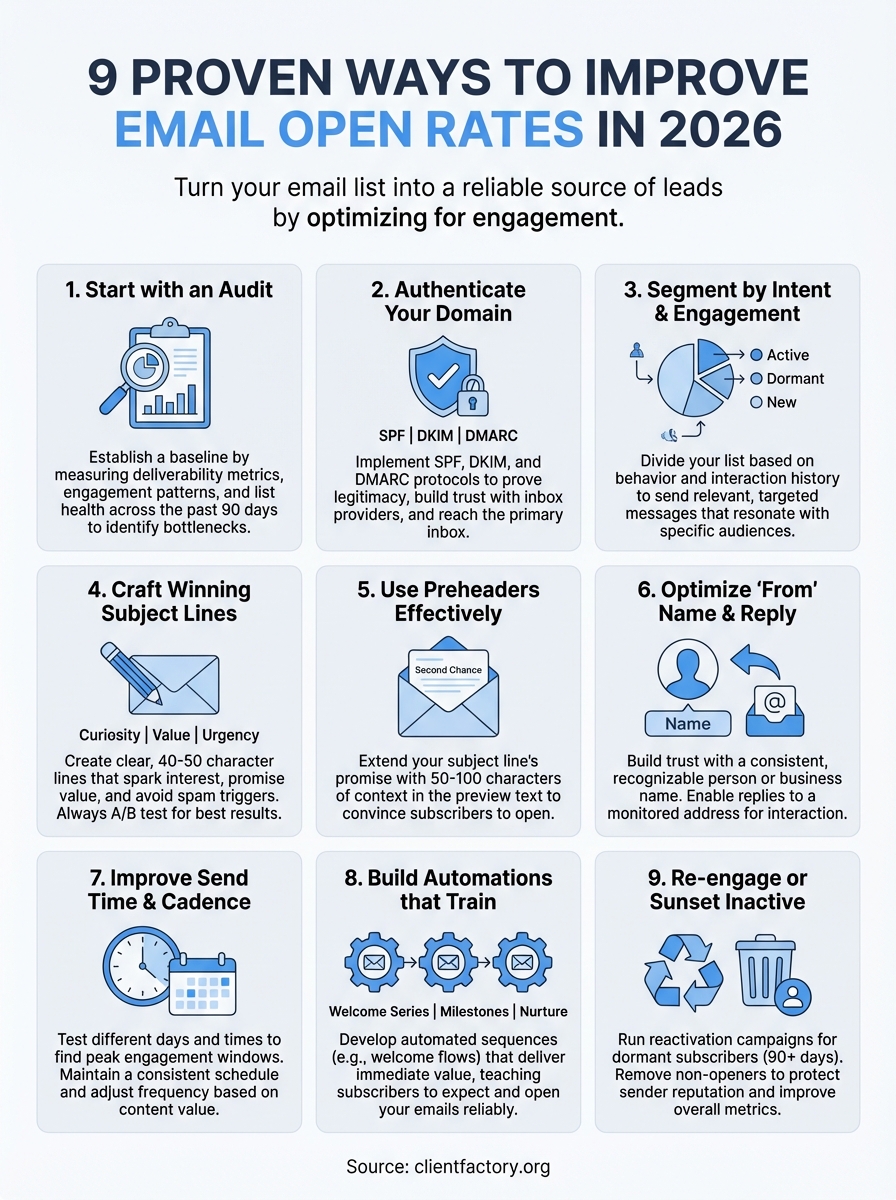
1. Start with an email performance audit
Before you change a single subject line or adjust your send schedule, you need to understand where you currently stand. An email performance audit gives you a baseline and reveals which parts of your strategy are underperforming. Most businesses skip this step and start making changes blindly, which means they never know what actually moved the needle. Your audit should cover deliverability metrics, engagement patterns, and list health across the past 90 days at minimum. This diagnostic step separates guesswork from strategy and helps you improve email open rates based on real data, not assumptions.
Why it improves opens
You can’t fix what you don’t measure. Running an audit surfaces hidden deliverability issues that suppress your open rates before anyone even sees your subject line. Problems like spam folder placement, blacklisted IPs, or broken authentication protocols all tank your performance invisibly. An audit also shows you which segments respond and which campaigns drive engagement versus fatigue. When you identify your best-performing content and timing patterns, you can replicate what works and stop wasting effort on tactics that don’t deliver. This clarity makes every subsequent optimization more effective because you’re building on a foundation of accurate performance data.
Regular audits reveal the invisible barriers that keep your emails from reaching inboxes in the first place.
How to do it in 2026
Start by pulling open rates, click rates, bounce rates, and unsubscribe rates for every campaign over the past three months. Break this data down by send time, day of week, subject line type, and audience segment. Check your sender reputation using tools provided by your email service provider or third-party monitors. Look at your list growth versus decay rate to understand if you’re adding quality subscribers or just inflating numbers. Review spam complaint rates and hard bounce percentages, both of which directly impact deliverability. Document everything in a simple spreadsheet so you can compare performance month over month and identify trends before they become problems.
What to measure
Track your overall open rate as your primary health indicator, but don’t stop there. Monitor unique open rates versus total opens to understand how often people re-open your emails. Measure deliverability rate (emails delivered divided by emails sent) to catch server or reputation issues early. Look at open rates by device type, since mobile versus desktop behavior differs significantly. Check engagement by list segment to see which audiences respond best. Finally, track your inbox placement rate if your platform offers it, because this tells you how many emails actually reach the inbox versus spam folders. These metrics combined give you a complete picture of your email program’s health.
2. Authenticate your domain and protect deliverability
Email providers treat unauthenticated senders like strangers showing up at the door without ID. Domain authentication proves you’re legitimate and gives inbox providers confidence your messages belong in the primary inbox, not the spam folder. Setting up SPF, DKIM, and DMARC records tells Gmail, Outlook, and other platforms that you actually own the domain you’re sending from and haven’t been spoofed by bad actors. This technical foundation directly impacts your ability to improve email open rates because authentication determines whether your emails reach inboxes at all. Without it, you’re fighting deliverability problems before anyone sees your subject line.
Why it improves opens
Authentication builds trust with email service providers at the infrastructure level. When your domain passes all authentication checks, ISPs route your messages to the inbox instead of flagging them as suspicious. This single change can move thousands of emails from spam folders to primary inboxes where recipients actually see them. Proper authentication also protects your sender reputation over time by preventing fraudulent emails from being sent using your domain, which would otherwise damage your deliverability scores.
Authentication is the difference between being recognized as a legitimate sender and being treated like a spammer.
How to do it in 2026
Work with your email platform and DNS provider to publish SPF and DKIM records in your domain settings. SPF lists which servers can send email on your behalf, while DKIM adds a digital signature to your messages. Add a DMARC policy that tells receiving servers how to handle emails that fail authentication checks. Most email platforms provide step-by-step guides for implementing these protocols, and you can verify proper setup using free authentication testing tools.
What to measure
Check your authentication pass rate through your email platform’s deliverability reports to confirm SPF, DKIM, and DMARC align correctly. Monitor your inbox placement rate before and after implementing authentication to quantify the improvement. Track spam complaint rates, which should decrease as legitimate subscribers receive your authenticated emails.
3. Segment by intent and engagement
Sending the same email to your entire list treats all subscribers as identical, which kills engagement faster than almost anything else. Segmentation divides your list into groups based on behavior, preferences, and interaction history so you can send relevant messages that people actually want to open. When you match content to where someone sits in their journey with your business, your open rates naturally climb because recipients see value in hearing from you. This strategy helps you improve email open rates by respecting that different people need different messages at different times.
Why it improves opens
Generic emails feel like noise, while targeted messages feel personal. When you segment by engagement level, you send your most valuable content to your most active subscribers while using different tactics for dormant contacts. Behavioral segmentation lets you match message intensity to audience readiness, so you’re not burning out interested prospects with too much volume or ignoring hot leads with too little communication. Relevance drives opens, and segmentation creates relevance at scale.
Targeted emails consistently outperform broadcast messages because they speak directly to what each segment needs.
How to do it in 2026
Create segments based on recency of interaction, such as opened in the last 30 days versus inactive for 90 days or more. Build groups around purchase behavior or service interest if you offer multiple solutions. Tag subscribers by lead source so you can reference how they found you. Set up engagement tiers that automatically move people between segments as their behavior changes, keeping your targeting current without manual work.
What to measure
Track open rates by segment to identify which groups respond best to your messaging. Monitor segment size over time to ensure your criteria still make sense. Compare engagement patterns between segments to validate that your targeting logic actually creates meaningful differences in behavior.
4. Write subject lines that earn the open
Your subject line determines whether someone opens your email or scrolls past it, making this the single most important piece of copy in your entire message. Most businesses treat subject lines as an afterthought and wonder why their engagement stays flat. A strong subject line creates curiosity, promises value, or taps into urgency without resorting to manipulation or false hype. The words you choose here directly control your ability to improve email open rates because they form the first and often only impression subscribers get before deciding whether to engage.
Why it improves opens
Subject lines create the decision point where your subscriber either clicks or ignores you. Well-crafted lines speak directly to what your audience cares about right now, making the value of opening immediately clear. Testing different approaches reveals what resonates with your specific list, since what works for one audience often falls flat with another. Strong subject lines also set accurate expectations for what’s inside, which trains subscribers to trust that opening your emails delivers on the promise made in the preview pane.
The subject line is your only chance to prove an email deserves attention before it gets buried forever.
How to do it in 2026
Write subject lines between 40 and 50 characters to avoid mobile truncation while maximizing preview space. Use numbers, specifics, and concrete benefits instead of vague promises. Test personalization like first names or company names where it fits naturally. Avoid spam triggers like all caps, excessive punctuation, or words like “free” and “urgent” that flag automated filters. Create A/B tests on every major send to compare performance between different approaches and build a swipe file of winners.
What to measure
Track open rate by subject line type to identify which styles perform best for your audience. Monitor mobile versus desktop opens since character limits affect these differently. Compare A/B test results to understand whether personalization, questions, or benefit-driven statements drive better engagement for you.
5. Use preheaders to complete the promise
The preheader text appears right after your subject line in most email clients, giving you a second chance to convince someone your message deserves their attention. Most businesses leave this space blank or let their email platform auto-populate it with generic text like “View this email in your browser,” which wastes valuable real estate. Your preheader should extend the subject line’s promise or add context that makes opening more compelling. When you treat this preview text as strategically as your subject line, you create a one-two punch that significantly boosts engagement and helps you improve email open rates.
Why it improves opens
Preheaders give subscribers additional information to evaluate whether your email matches what they need right now. When your subject line sparks curiosity, the preheader can deliver the payoff or tease the solution. This combination increases confidence that opening the email will be worth their time. Research shows that well-crafted preheaders can lift open rates by double digits because they work together with subject lines to overcome inbox skepticism. The extra context reduces uncertainty and makes the decision to engage feel safer.
A strong preheader turns your subject line from a standalone pitch into a compelling conversation starter.
How to do it in 2026
Write preheaders between 50 and 100 characters to ensure visibility across devices without getting cut off. Complement your subject line instead of repeating it, adding new information or context that strengthens the case to open. Avoid letting your platform default to body text or unsubscribe links in this space. Test preheader variations alongside subject lines to find winning combinations that work together.
What to measure
Track open rates when preheaders are customized versus auto-generated to quantify the impact. Compare performance between preheaders that extend the subject line versus those that add new angles. Monitor mobile open rates specifically since preheaders display differently across devices.
6. Optimize the from name and reply handling
The name that appears in your subscriber’s inbox carries more weight than most marketers realize. Your from name tells recipients who’s contacting them before they even process your subject line, and that split-second recognition determines whether they engage or delete. When you pair a recognizable sender name with proper reply handling, you build trust that encourages opens over time. Many businesses default to generic company names or no-reply addresses that feel impersonal and discourage interaction, missing a critical opportunity to improve email open rates through simple sender optimization.
Why it improves opens
People open emails from senders they recognize and trust, which means your from name becomes your brand in the inbox. Using a consistent personal name or recognizable business name creates familiarity that cuts through inbox clutter. Subscribers mentally categorize senders into trusted sources versus promotional noise, and your from name placement in that hierarchy directly impacts open rates. Reply-enabled addresses signal you’re a real person or business willing to engage, which builds confidence that opening your message will deliver value rather than just a sales pitch.
Recognition drives action, and your from name is what subscribers recognize first.
How to do it in 2026
Use either a person’s name (like “Sarah from Client Factory”) or your business name consistently across all sends so subscribers learn to recognize you. Avoid generic department names like “marketing@” or “info@” that feel automated. Enable replies to go to a monitored inbox where you can respond to questions or feedback, never use no-reply addresses. Test different from name formats with your audience to see whether personal names or business names generate better engagement for your specific list.
What to measure
Track open rates by from name variation when you test different sender formats to identify what resonates with your audience. Monitor reply rates to gauge whether your audience views you as approachable and responsive. Compare engagement between personal versus business from names to understand which builds stronger recognition with your subscribers.
7. Improve send time and cadence
Timing determines whether your email arrives when subscribers have attention to give or gets buried under dozens of other messages they’ll never scroll back to find. Your send schedule affects open rates more than most businesses realize because you’re competing for attention in an inbox that fills constantly throughout the day. Testing different days and times reveals when your specific audience checks email and engages most readily. The frequency you choose matters just as much, since too many emails create fatigue while too few let competitors stay top of mind. Strategic timing helps you improve email open rates by reaching people when they’re most receptive rather than hoping they stumble across your message later.
Why it improves opens
Subscribers develop inbox checking patterns based on their work schedules, time zones, and personal habits, which means optimal send times vary dramatically between audiences. When you land in their inbox during an active checking session, your email sits at the top of their queue instead of buried under newer messages. Consistent send schedules also train your audience to expect and look for your emails at specific times, which creates anticipation that drives opens. Overloading your list with daily sends burns out even interested subscribers, while spacing messages too far apart makes you forgettable.
The right timing puts your message in front of subscribers when they actually have the bandwidth to engage.
How to do it in 2026
Start by testing different send times across morning, midday, and evening windows to find when your open rates peak. Run experiments with Tuesday through Thursday sends versus Monday or Friday to identify your audience’s preferred days. Adjust for your subscribers’ primary time zones if you serve a geographically concentrated market. Space emails based on content value rather than arbitrary schedules, sending more frequently when you have high-value information and pulling back during slower periods.
What to measure
Track open rates by send time across different hours and days to identify your peak engagement windows. Monitor engagement decay as you adjust frequency up or down to find your optimal cadence. Compare performance between consistent schedules versus varied timing to understand whether predictability helps or hurts your results.
8. Build automations that train people to open
Email automation sequences create behavioral conditioning that teaches subscribers to open your messages by consistently delivering value when they engage. Unlike one-off campaigns that rely on individual performance, automated series build compounding trust over time as people learn that opening your emails reliably provides useful information. Welcome sequences, onboarding flows, and milestone-based campaigns establish patterns where subscribers associate your sender name with content that matters to their goals. This conditioning effect makes automation one of the most powerful ways to improve email open rates because you’re training audience behavior rather than just optimizing individual sends.
Why it improves opens
Automated sequences let you deliver personalized content journeys that match where each subscriber sits in their relationship with your business. When someone joins your list and immediately receives valuable information through a welcome series, they learn to open future messages because that first experience set expectations. Behavioral triggers like abandoned actions or milestone dates create relevance that generic broadcasts can’t match, which drives higher engagement. The consistency of automation also reinforces recognition and trust because subscribers receive predictable value at logical moments rather than random promotional blasts.
Strategic automation creates positive reinforcement loops where opening one email makes subscribers more likely to open the next.
How to do it in 2026
Set up a welcome series that delivers your best content to new subscribers in their first week, establishing immediate value. Create automated sequences triggered by specific behaviors like content downloads, webinar attendance, or purchase milestones. Build nurture flows for different segments that deliver relevant information based on their stated interests or past engagement. Design reactivation sequences for subscribers who haven’t opened in 30, 60, or 90 days with specialized content designed to win them back.
What to measure
Track open rates across automation steps to identify which emails in your sequences perform strongest and where engagement drops. Monitor conversion from automated sequences versus broadcast campaigns to quantify automation’s impact. Compare engagement longevity between subscribers who complete your welcome series versus those who don’t to validate that early automation drives lasting open rate improvements.
9. Re-engage inactive subscribers or sunset them
Every list accumulates subscribers who stop opening emails over time, and these inactive contacts drag down your overall open rates while signaling to inbox providers that your content doesn’t resonate. Your engaged subscribers deserve better targeting, and your sender reputation improves when you clean out people who never interact with your messages. Running reactivation campaigns gives dormant contacts one last chance to re-engage before you remove them, which protects your metrics while respecting that people’s interests change. This strategy helps you improve email open rates by focusing your efforts on subscribers who actually want to hear from you rather than inflating list size with dead weight.
Why it improves opens
Inactive subscribers suppress your aggregate open rate by sitting in your denominator without contributing opens, which makes your overall performance look worse than it actually is with engaged contacts. Removing non-openers improves your sender reputation with inbox providers because you’re no longer sending to people who ignore you, which algorithms interpret as a sign your content lacks value. A smaller, more engaged list outperforms a bloated one because your messages reach people who care rather than getting lost in inboxes that never check your emails.
A list of 5,000 engaged subscribers beats 20,000 contacts where half never open.
How to do it in 2026
Identify subscribers who haven’t opened any email in 90 days or more and segment them into a separate reactivation list. Send a targeted sequence of three to five emails spaced a week apart with your strongest content and a clear ask about whether they want to stay subscribed. Make the unsubscribe option obvious and easy rather than trying to trap people. After the sequence ends, remove anyone who still doesn’t engage from your active list to protect your metrics and deliverability.
What to measure
Track reactivation rate by measuring how many dormant subscribers open at least one message in your win-back sequence. Monitor your overall open rate before and after removing inactive contacts to quantify the cleanup impact. Compare deliverability metrics like inbox placement and spam complaints after sunsetting non-openers to confirm your sender reputation improves.
Next steps
Your open rates won’t fix themselves, and waiting for subscribers to suddenly start engaging more actively just lets competitors capture their attention instead. Start with your audit to understand your current baseline, then tackle the changes that will have the biggest impact on your specific situation. Most businesses see measurable improvements within two to three email sends after implementing authentication and segmentation changes, making these high-priority fixes that deliver fast results.
Remember that working to improve email open rates is an ongoing process rather than a one-time project. Test different approaches, measure what works with your audience, and double down on the tactics that move your numbers up. The strategies in this guide work across industries, but your specific audience will respond differently than others, which makes testing essential.
If you need help optimizing your entire client acquisition funnel beyond just email, schedule a free conversion audit with our team. We’ll identify exactly where you’re losing potential clients and show you how to fix it.
