

You run Facebook ads that get clicks but those clicks rarely turn into actual leads. Your forms have high abandonment rates. Prospects lose interest somewhere between clicking your ad and completing your landing page. You spend more each month without seeing better results.
Facebook Lead Ads solve this friction problem. They let prospects submit their information without ever leaving the platform. Forms auto-populate with user data from their Facebook profile. The entire conversion happens in seconds on mobile or desktop. No redirects, no page loads, no excuses for prospects to bounce.
This guide walks you through everything you need to run profitable Facebook lead generation campaigns. You’ll learn how to set up Lead Ads from scratch, target the right audience, write forms that convert, connect leads to your CRM, and optimize for quality over quantity. We’ll cover proven tactics, real examples, and advanced strategies that separate campaigns that waste budget from campaigns that fill your pipeline with qualified prospects ready to buy.
What Facebook lead generation ads are
Facebook Lead Ads are ad formats that collect prospect information directly inside the Facebook or Instagram app. When someone clicks your ad, a form opens instantly without sending them to an external landing page. The form pre-fills with data from their Facebook profile such as name, email address, phone number, and company name. Prospects review the information, add any missing details, and submit. The entire process takes seconds and keeps users on the platform they trust.
How Lead Ads work on Meta platforms
You create your ad in Meta Ads Manager and select “Leads” as your campaign objective. Facebook then shows your ad to people who match your targeting criteria. When someone taps your call-to-action button, an Instant Form slides up over the feed without redirecting them anywhere. They see your offer details, answer your custom questions if you include them, and submit their information. You receive the lead data through direct download, webhook integration, or CRM connection. This streamlined approach removes friction points that cause prospects to abandon traditional landing page forms.
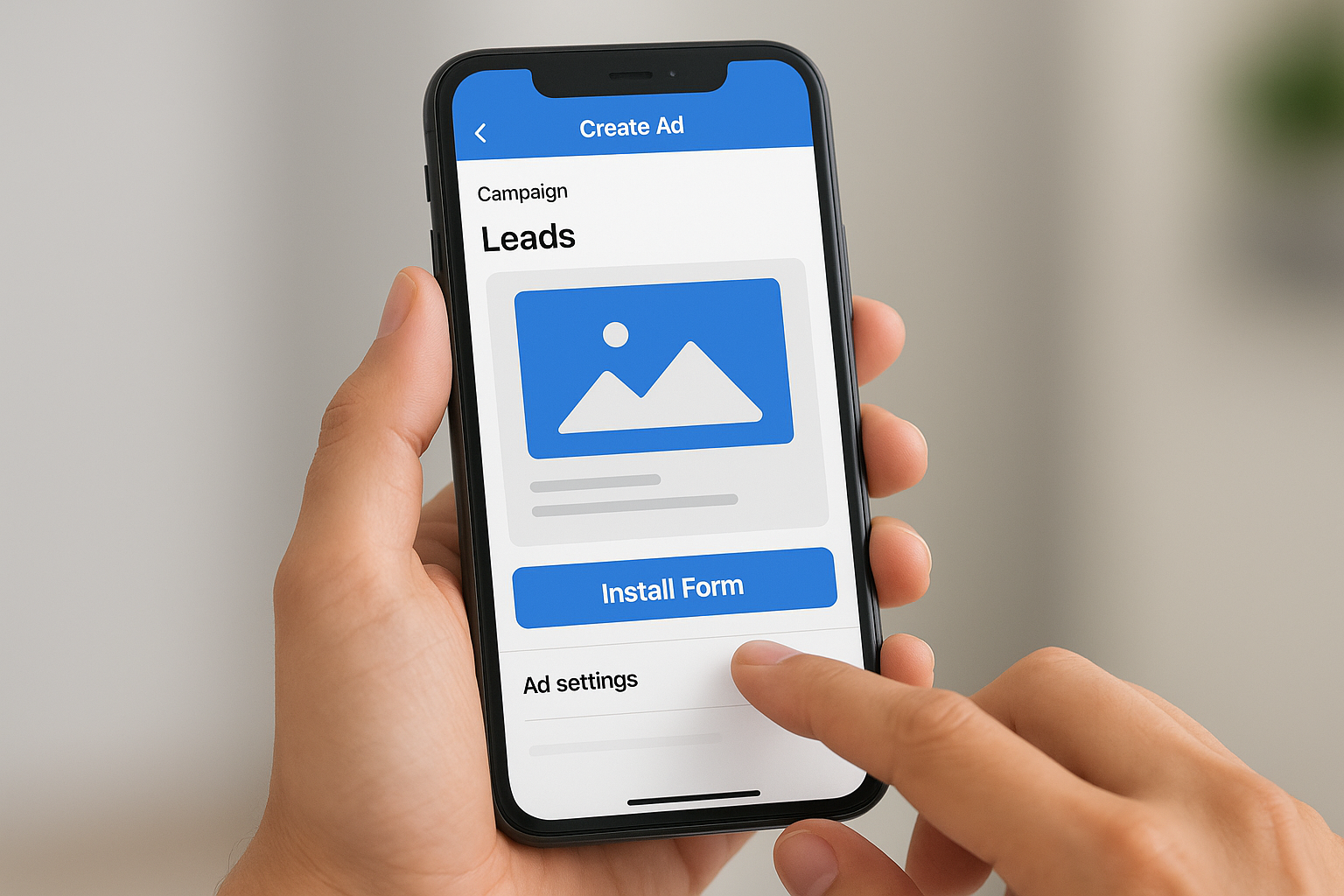
Facebook Lead Ads eliminate the biggest conversion killer: forcing mobile users to leave the platform and navigate to an external website.
Key differences from standard conversion ads
Standard Facebook ads send traffic to your website where prospects fill out forms on your landing pages. Lead Ads skip that step entirely by capturing information without any page redirects. You avoid issues with slow website loading times, broken mobile experiences, or complicated multi-step forms. The trade-off is that you get less control over the post-click experience compared to a custom landing page. You also typically see higher lead volume but sometimes lower lead quality since the submission process is so easy. Smart advertisers use Lead Ads for top-of-funnel offers like content downloads or webinar signups, then qualify leads through follow-up sequences before passing them to sales teams.
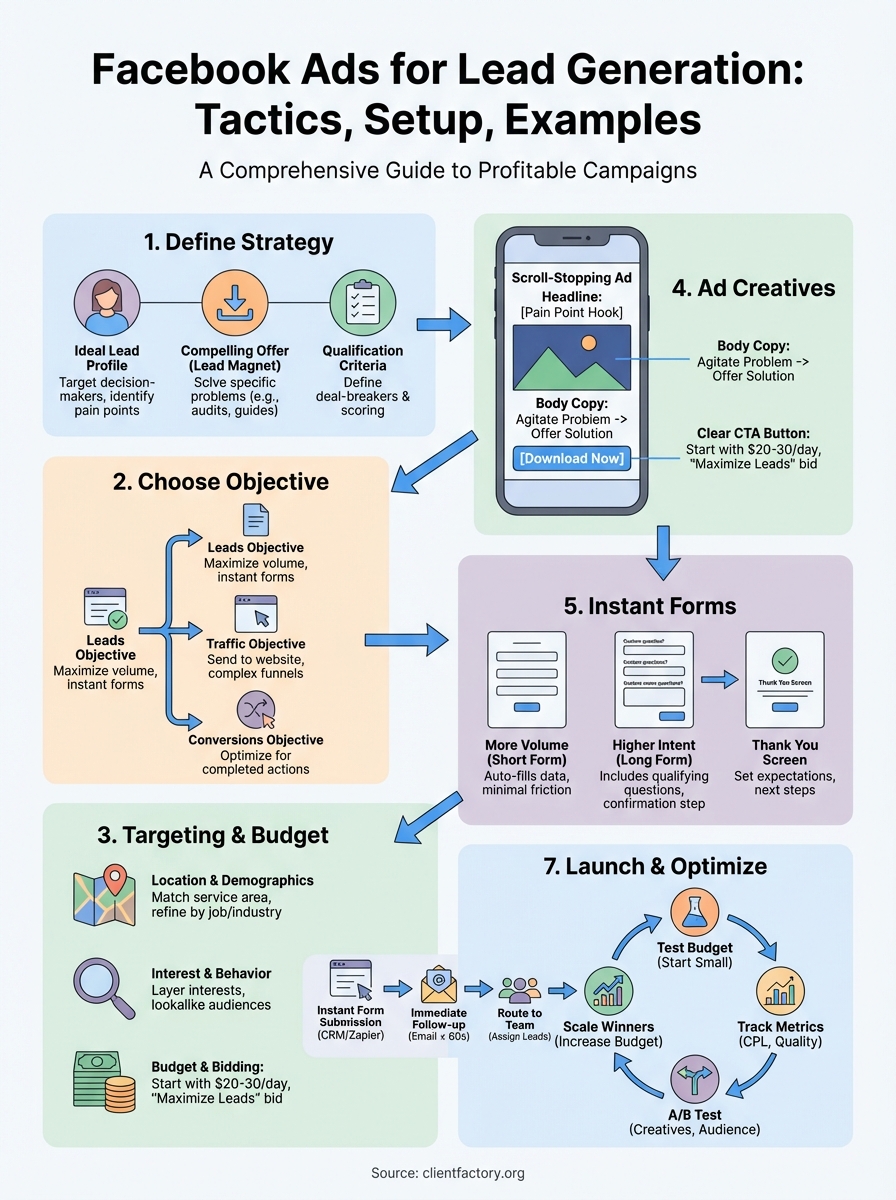
Step 1. Define your lead generation strategy
You need a clear strategy before you create your first ad. Facebook ads for lead generation fail when you skip planning and jump straight to campaign setup. Your strategy determines who you target, what you offer, and how you qualify prospects before they ever see your ad. Start by defining exactly what type of lead you want to attract and what information you need to collect from them.
Identify your ideal lead profile
Build a detailed picture of your perfect customer before you write a single ad. Write down their job title, industry, company size, budget range, and pain points. Specify whether you want individual consumers or business decision makers. Define their level of buying intent based on where they sit in your sales funnel. Someone ready to request a demo needs different messaging than someone downloading a free guide. The more specific your profile, the better you can target and qualify your leads through both ad targeting and form questions.
Create a simple profile document that includes:
- Job title and seniority level
- Industry and company size
- Budget authority and decision-making power
- Current challenges your product or service solves
- Preferred content formats and communication channels
- Expected timeline from first contact to purchase
Choose your lead magnet or offer
Your offer determines your conversion rate and lead quality more than any other element in your campaign. Free consultations, product demos, and pricing quotes attract high-intent leads but generate lower volume. E-books, templates, and webinars drive higher volume but require more qualification. Match your offer to your sales process and team capacity. A sales team that can handle 50 qualified calls per week should not run an offer that generates 500 leads per day.
Strong lead magnets solve one specific problem your ideal customer faces right now. Generic offers like “Download our guide” perform worse than “Get the 2026 compliance checklist for healthcare IT directors.” Test different offers against the same audience to find what resonates. B2B companies often see the best results with free audits, ROI calculators, or recorded expert presentations rather than generic content downloads.
The best lead magnet attracts your ideal customer while naturally repelling poor-fit prospects who would waste your sales team’s time.
Map out your qualification criteria
Decide which information you must collect to determine if a lead is worth pursuing before you build your form. Phone number and email address are standard, but you might also need company size, current software, budget range, or timeline. Each additional form field reduces completion rates but improves lead quality. Balance these factors based on your average deal value. High-ticket B2B services justify longer forms with more qualifying questions. Low-cost products need minimal friction.
Build a qualification matrix that scores leads based on their responses:
| Qualification Factor | High Value (3 points) | Medium Value (2 points) | Low Value (1 point) |
|---|---|---|---|
| Company size | 100+ employees | 25-99 employees | Under 25 employees |
| Timeline | Ready in 30 days | 1-3 months | Just researching |
| Budget confirmed | Yes, budget approved | Estimated range | Not sure yet |
| Decision authority | Final decision maker | Influences decision | No buying authority |
Leads scoring below your threshold go into nurture sequences while high-scoring leads get immediate sales contact. This system helps your team focus on prospects most likely to close.
Step 2. Choose the right Meta lead objective
Meta Ads Manager offers multiple campaign objectives, but not all of them work equally well for capturing contact information. The objective you select tells Facebook’s algorithm what action you want people to take and how to optimize your ad delivery. Choosing the wrong objective wastes your budget by showing ads to people unlikely to complete your forms. Your objective must align with your lead generation goal and the conversion path you create for prospects.
The Leads objective explained
The Leads objective was built specifically for collecting contact information through Instant Forms that open inside Facebook and Instagram. When you select this objective, Facebook’s algorithm prioritizes showing your ads to users most likely to submit their information based on their past behavior with lead forms. You get access to pre-built form templates that auto-populate with profile data and mobile-optimized layouts that load instantly. This objective works best when you want maximum form submissions with minimal friction and you plan to qualify leads after capture rather than before.
Alternative objectives that can generate leads
The Traffic objective sends people to your website where they complete forms on your landing pages. You maintain full control over the user experience and can build complex multi-step qualification funnels. Choose this when you need to collect sensitive information that requires secure hosting or when your offer needs extensive explanation before prospects will convert. The Conversions objective optimizes for completed actions on your website tracked through the Meta Pixel. Use this when you want Facebook to find people most likely to complete your specific form, not just click your ad. Your landing page must load quickly and work perfectly on mobile or you will see high bounce rates that waste spend.
How to select the right objective
Pick the Leads objective when you prioritize volume and speed over immediate qualification. Your sales team should handle follow-up qualification through email sequences or discovery calls. Choose Traffic or Conversions objectives when you need prospects to engage with detailed content before they submit information or when your compliance requirements prevent using third-party hosted forms. Test both approaches with small budgets to see which delivers better cost per qualified lead for your specific offer and audience. Facebook ads for lead generation perform best when your objective matches both your conversion path and your team’s capacity to handle incoming prospects.
The Leads objective generates higher submission rates while website-based objectives attract more engaged prospects who have already invested time in learning about your offer.
Step 3. Configure targeting and budgets
Your targeting determines who sees your ads while your budget controls how many people you reach and how quickly. Facebook ads for lead generation succeed or fail based on these two settings more than any other configuration choice. Poor targeting floods your CRM with junk leads from people who will never buy. Insufficient budgets prevent your ads from reaching enough qualified prospects to generate meaningful results. You need to balance precision targeting against reach while allocating enough budget to let Facebook’s algorithm learn and optimize.
Set your audience targeting parameters
Start with location targeting that matches your service area or shipping zones. Select countries, states, cities, or radius targeting around specific addresses. Add language preferences if you serve multilingual markets. Build your demographic filters based on the ideal lead profile you defined earlier. Age ranges, gender, education level, job titles, and employer information all help narrow your audience to decision makers who can actually buy from you.
Layer behavioral and interest targeting on top of demographics to find people actively researching solutions like yours. Target users who engage with competitor pages, industry publications, or relevant software tools. Exclude people who already converted or who clearly fall outside your ideal customer profile. You can target based on purchase behavior, device usage, travel patterns, and life events that signal buying intent.
Test these audience combinations to find your best performers:
- Lookalike audiences built from your existing customer email list
- Custom audiences retargeting website visitors or past lead form openers
- Detailed targeting combining job titles with specific interests or behaviors
- Broad targeting with demographic guardrails letting Facebook’s algorithm find converting users
Smaller, precisely targeted audiences often deliver better cost per qualified lead than large, loosely defined audiences that generate high volume but low quality.
Determine your budget strategy
Allocate at least $20-30 per day for each ad set to give Facebook enough data to optimize delivery. Campaigns below this threshold take too long to learn and rarely reach their full potential. Calculate your total monthly budget by multiplying your target cost per lead by the number of leads you want, then add 30-50% buffer for testing and optimization. B2B campaigns targeting senior decision makers need larger budgets than B2C campaigns targeting broad consumer audiences.
Choose between daily budgets that spend consistently or lifetime budgets that let Facebook pace spending across your campaign duration. Daily budgets work better for ongoing lead generation programs. Lifetime budgets suit time-limited promotions or event registrations with fixed end dates.
Configure bidding and optimization
Select “Maximize number of leads” as your bid strategy when you first launch campaigns and want Facebook to find the lowest cost per submission. Switch to “Cost per result goal” once you have conversion data and want to control your maximum acceptable cost per lead. Your optimization choice tells Facebook what action to prioritize when deciding who sees your ads and when to show them.
Set your attribution window to match your typical sales cycle length. Seven-day click attribution captures most conversions for quick decision purchases. Thirty-day attribution better reflects longer B2B sales cycles where prospects research for weeks before converting.
Step 4. Create scroll stopping lead ad creatives
Your ad creative determines whether prospects stop scrolling or keep moving past your message in crowded social feeds. You compete against friends’ photos, viral videos, and dozens of other advertisers for attention. The average person spends less than 2 seconds deciding whether to engage with any piece of content in their feed. Your image, video, headline, and body copy must work together to interrupt that scroll and communicate immediate value. Weak creatives waste even the best targeting and form design by failing to earn that critical first click.
Write compelling ad copy that speaks to pain points
Start with a headline that identifies a specific problem your ideal customer faces right now. Skip generic statements like “Grow your business” in favor of concrete pain points like “Spending $10K monthly on ads that don’t convert?” Your first sentence must hook readers who are scanning quickly by calling out their exact situation. Describe the frustration, cost, or risk they experience without your solution.
Use the body copy to agitate the problem briefly before introducing your offer as the solution. Keep sentences short and conversational. Write the way you talk to prospects on sales calls, not the way you write formal business documents. Include a clear call-to-action that tells people exactly what happens when they click. “Download the free guide” works better than vague CTAs like “Learn more.”
Follow this proven structure for high-performing ad copy:
- Hook: Call out your target audience and their pain point
- Agitate: Explain why this problem matters or costs them money
- Solution: Introduce your offer as the answer
- Proof: Add one credibility element like a statistic or customer result
- CTA: Tell them exactly what to do next
Design visuals that capture attention
Choose images or videos that contrast with typical feed content through bright colors, unexpected compositions, or human faces looking directly at the camera. Product screenshots, generic stock photos, and text-heavy graphics blend into feeds and get ignored. Test real photos of your team, customers, or products against designed graphics to see what resonates with your specific audience. B2B audiences often respond better to authentic workspace photos than polished marketing images.
Keep your visual simple with one clear focal point rather than cramming multiple messages into a single frame. Mobile users see your creative at thumbnail size first. They should instantly understand what they are looking at. Add text overlay only if it reinforces your headline without repeating it word-for-word. Video creatives should capture attention in the first 3 seconds before viewers scroll past. Show the result or transformation your offer delivers rather than explaining your process.
The best creatives for facebook ads for lead generation show your ideal customer seeing themselves in the problem you solve, not your product features.
Test multiple creative variations
Launch each campaign with at least 3-5 different creative combinations to identify your best performers quickly. Test one variable at a time so you know what drives results. Run image versus video formats, different headlines, or contrasting visual styles against the same audience. Facebook’s algorithm needs variety to learn what resonates and optimize delivery toward your top performers.
Replace underperforming creatives every 7-10 days as ad fatigue sets in and response rates decline. Keep your winning variations running while you test new concepts against them. Track cost per lead by individual creative rather than campaign-level metrics to spot winners and losers fast. Winners should scale up with increased budget while losers get paused before they waste significant spend.
Step 5. Build high converting instant forms
Your Instant Form design directly impacts both submission rates and lead quality in ways that most advertisers overlook. A poorly designed form generates high abandonment rates despite excellent ad creative. Forms that collect too little information deliver unqualified leads while forms that ask too much scare prospects away before they submit. You need to balance friction against qualification to capture enough data for your sales team without killing conversion rates. The right form structure matches your offer value, sales cycle length, and team’s ability to qualify leads through follow-up contact.
Choose your form type and length
Select “More volume” form type when you want maximum submissions and plan to qualify leads through email sequences or phone calls afterward. This option shows fewer questions upfront and pre-fills as much data as possible from Facebook profiles. Pick “Higher intent” when you need prospects to demonstrate interest by answering custom qualification questions before they submit. This format adds an extra step that reduces volume but improves quality by filtering out casual browsers.
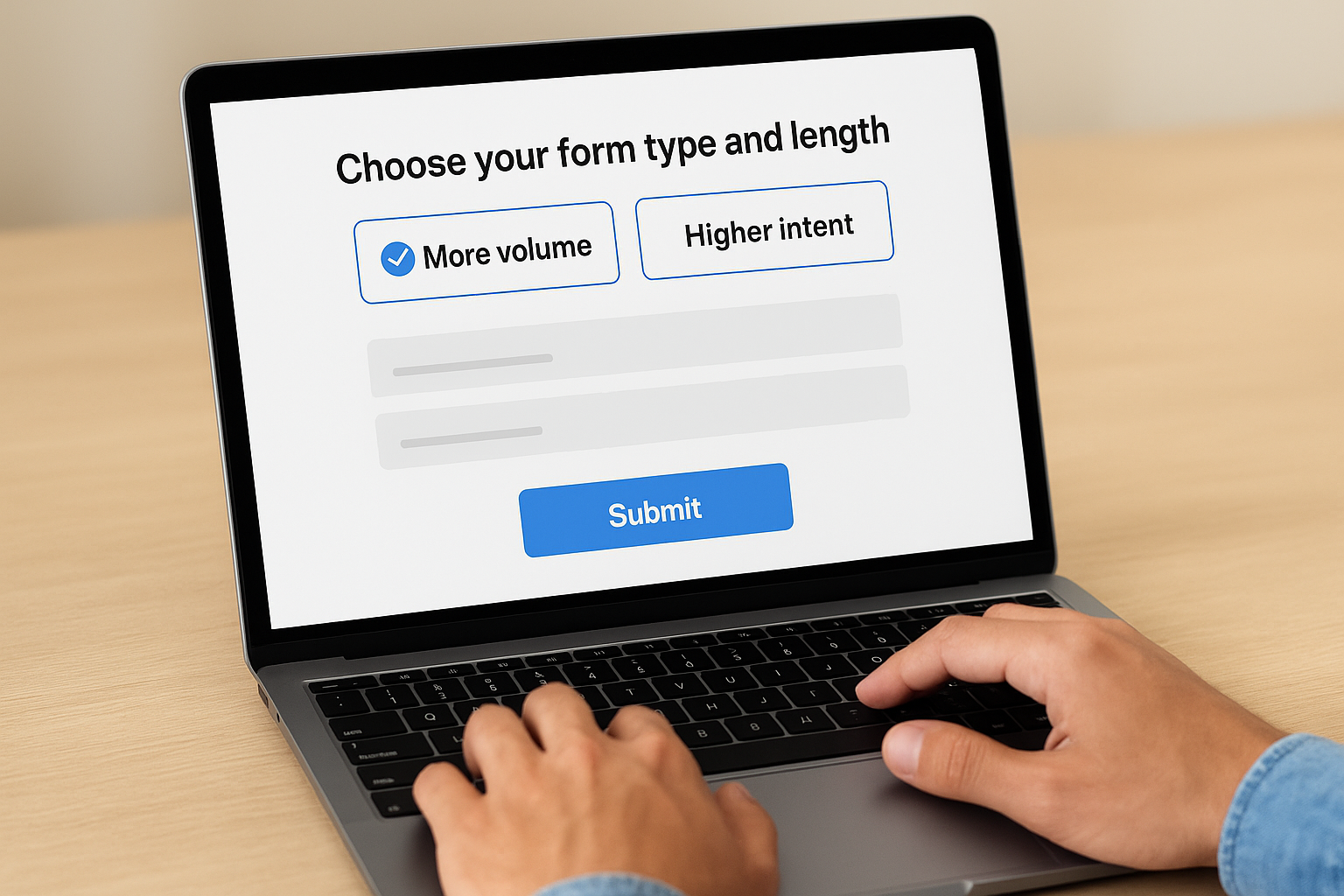
Limit your form to 3-5 fields for top-of-funnel offers like content downloads or newsletter signups. Mid-funnel offers such as webinar registrations can justify 6-8 fields including job title and company size. High-value offers like demos or consultations warrant 8-12 fields with specific qualifying questions about budget, timeline, and decision authority. Test shorter versions against longer versions to find your optimal balance for each offer type.
Write form questions that qualify leads
Standard fields like name, email, and phone number auto-populate from Facebook profiles, making them essential starting points that add zero friction. Company name, job title, and work email help you separate business prospects from consumers. Custom multiple-choice questions let you segment leads automatically based on their responses without requiring manual review.
Structure your custom questions to identify deal-breakers early:
| Question Type | Example Question | Purpose |
|---|---|---|
| Budget qualification | “What’s your monthly ad spend?” | Filter prospects below minimum |
| Timeline identification | “When do you plan to start?” | Prioritize urgent buyers |
| Authority verification | “What’s your role in purchasing decisions?” | Route to appropriate follow-up |
| Need confirmation | “Which challenge matters most to you?” | Customize sales approach |
Avoid open-ended text fields that require prospects to type lengthy responses on mobile devices. Dropdown menus and radio buttons convert significantly better than text boxes for everything except custom message fields.
The best forms for facebook ads for lead generation collect exactly enough information to route leads appropriately without asking prospects to work hard during submission.
Optimize your thank you screen
Your thank you screen confirms successful submission while setting expectations for next steps. Tell prospects exactly what happens next and when they will hear from you. Include your phone number and email address so prospects can contact you immediately if they have urgent questions. Link to your website or relevant resource page for prospects who want to learn more while they wait for follow-up.
Use this template structure for high-converting thank you screens:
Headline: "Thanks! Check your email in the next 5 minutes."

Body text: "We're sending [specific deliverable] to [email@example.com] right now. You'll also hear from [team member name] within 24 hours to [specific next step]."

CTA button: "Visit Our Website" or "Schedule a Call Now"

Footer: Contact information and links to privacy policy
Test adding social proof elements like customer logos, testimonials, or case study links to your thank you screen to keep engaged prospects interested while they wait for your follow-up contact.
Step 6. Connect and follow up with new leads
Lead data sits trapped inside Facebook until you connect it to your sales and marketing systems. Manual downloads from Ads Manager create delays that kill conversion rates. Prospects expect instant delivery of promised content and fast response from your team. Speed matters more than perfection when you follow up with new leads. Research shows that responding within five minutes increases conversion rates by 400% compared to waiting 30 minutes. You need automated systems that move leads from Facebook into your CRM and trigger immediate follow-up sequences without any manual work.
Set up automated lead delivery
Connect your Lead Ads directly to your CRM through native integrations or third-party tools like Zapier or LeadsRidge. Facebook allows instant webhooks that send lead data in real-time as soon as someone submits your form. Configure your integration to include all form fields including custom questions and hidden tracking parameters that help you track campaign performance and lead source.
Your integration should automatically:
- Create a new contact record in your CRM
- Tag leads with campaign name and ad set identifier
- Assign leads to appropriate sales rep or territory
- Trigger welcome email with promised content
- Add leads to nurture sequences based on their responses
- Update existing records if email already exists in database
Test your integration thoroughly before launching campaigns by submitting test leads and verifying they appear correctly in your CRM with all data fields populated.
Create your immediate follow-up sequence
Send your first email within 60 seconds of form submission to deliver promised content and set expectations for next steps. This message confirms their request went through and provides instant value. Your second email should arrive 24-48 hours later to check if they reviewed your content and ask qualifying questions or offer a next step.
Use this proven welcome email template structure:
Subject: Here's your [specific deliverable] + next steps

Hi [First Name],

Thanks for requesting [specific offer]. You can access it here: [link]

I'm [your name], and I help [ideal customers] solve [specific problem].

Quick question: [one qualifying question related to their interest]

Reply to this email or book a 15-minute call here: [calendar link]

[Your signature]
Route leads to the right team members
Assign leads automatically based on geographic territory, company size, or responses to qualifying questions you included in your form. High-scoring leads from your qualification matrix should trigger immediate alerts to sales reps. Lower-scoring leads enter automated nurture sequences until they demonstrate increased engagement or buying signals that warrant personal outreach.
Fast, personalized follow-up on facebook ads for lead generation converts more prospects than perfect email copy sent three days late.
Step 7. Launch, test, and optimize campaigns
Launching your campaign is just the beginning of your facebook ads for lead generation success. The real work starts after your ads go live when you collect performance data and make strategic improvements. Most advertisers waste budget by either changing too many variables at once or waiting too long to optimize underperforming elements. You need a structured testing framework that isolates variables, gives campaigns enough time to generate meaningful data, and scales winners while cutting losers quickly.
Start with a test budget phase
Begin every new campaign with a conservative test budget of $20-30 per day for 3-5 days before increasing spend on successful ad sets. This testing phase lets Facebook’s algorithm learn which users convert best without burning through your entire monthly budget on unproven creative or targeting. Watch your cost per lead during these first few days to ensure it stays within your target range before you commit larger budgets.
Launch your test campaigns using this checklist:
- Set daily budgets at minimum recommended levels per ad set
- Enable automatic placements to gather cross-platform data
- Start with 3-5 creative variations per audience segment
- Schedule ads to run 24/7 unless you have specific timing data
- Turn on campaign budget optimization only after individual ad sets prove viable
- Monitor hourly for the first 24 hours to catch major errors early
Pause any ad set that exceeds 3x your target cost per lead after spending at least $100. Continue testing those that fall within acceptable ranges.
Track the right metrics
Focus on cost per lead and lead quality scores rather than vanity metrics like impressions or reach. Your dashboard should show leads generated, cost per lead, form completion rate, and follow-up conversion rate from lead to opportunity. Calculate your actual cost per qualified lead by filtering out junk submissions that your sales team rejects immediately.
Monitor these essential metrics daily:
| Metric | What It Tells You | Action Threshold |
|---|---|---|
| Cost per lead | Ad efficiency | Pause if 2x target CPL |
| Form completion rate | Form friction level | Optimize if below 60% |
| Lead quality score | Targeting accuracy | Adjust if below 40% qualified |
| Click-through rate | Creative relevance | Refresh if below 1% |
Export lead data to your CRM and tag which leads convert to customers so you can track return on ad spend accurately beyond initial form submissions.
Run structured A/B tests
Test one element at a time so you know exactly what drives performance changes. Run your control creative against one variation for at least 500 impressions or $50 spend per variant before declaring a winner. Split tests should compare headlines against headlines, images against images, or audiences against audiences without changing multiple variables simultaneously.
Use this testing priority order:
- Audience segments (broad vs narrow, different job titles, industries)
- Offer type (audit vs guide, webinar vs template)
- Creative format (image vs video, different visual styles)
- Ad copy angles (pain-focused vs benefit-focused)
- Form length (short vs long, different qualifying questions)
Document your test results in a spreadsheet that tracks what you tested, winner, losing variant, improvement percentage, and date so you build a knowledge base of what works for your specific audience.
Small iterative improvements from consistent testing compound into dramatically better campaign performance over 60-90 days compared to set-it-and-forget-it approaches.
Scale winning campaigns strategically
Increase budgets on winning ad sets by 20-30% every 3-4 days rather than doubling spend overnight. Sudden budget changes force Facebook’s algorithm to re-learn your audience and often spike your cost per lead temporarily. Create duplicate campaigns of your top performers with expanded audience targeting once you max out smaller segments.
Monitor frequency metrics as you scale to avoid ad fatigue. When the same user sees your ad 3-4 times without converting, pause that ad set and introduce fresh creative variations to maintain performance at higher spend levels.
Step 8. Advanced tactics for better lead quality
High lead volume means nothing when your sales team spends hours sorting through unqualified prospects who will never buy. The tactics that generate the most form submissions often deliver the lowest conversion rates to customers. You need strategies that deliberately reduce lead quantity while dramatically improving the percentage of prospects who actually match your ideal customer profile. These advanced techniques add strategic friction at key points to filter out tire kickers while making it easier for serious buyers to connect with your team.
Use custom questions as disqualifiers
Add multiple-choice questions that automatically separate qualified prospects from bad fits based on their specific circumstances. Structure your questions so that certain answers clearly indicate someone falls outside your service area, budget range, or decision authority. Create conditional logic that adjusts your follow-up based on how prospects answer qualification questions without rejecting anyone at the form stage.
Build disqualifying questions using this framework:
Question: "What's your current monthly marketing budget?"

Options:
- Under $2,000 (triggers nurture sequence)
- $2,000 - $5,000 (triggers standard follow-up)
- $5,000 - $10,000 (triggers priority contact)
- Over $10,000 (triggers immediate sales call)
Test questions about company size, timeline, decision authority, and current solutions to identify which filters best predict actual customers in your data. Remove questions that every prospect answers the same way since they add friction without improving qualification.
Implement higher intent form types
Switch from “More volume” to “Higher intent” form format in your facebook ads for lead generation campaigns when you need prospects to demonstrate genuine interest. This option adds a confirmation step between the initial form view and final submission that reduces completions by 20-40% while improving lead quality scores by similar margins. The extra click filters casual browsers who tap your ad accidentally or out of mild curiosity rather than serious interest.
Configure your higher intent forms to include:
- A detailed intro screen explaining what prospects receive
- Clear expectations about follow-up timing and method
- Company logo and trust signals like customer count or ratings
- 2-3 key benefit bullets reinforcing the value of your offer
Combine higher intent forms with longer qualification questions for high-ticket offers where each qualified lead justifies more aggressive filtering upfront.
Pre-qualify through ad targeting and copy
Narrow your audience targeting to exclude prospects who clearly fall outside your ideal customer profile even when it reduces your total addressable audience. Layer multiple qualification criteria such as job title AND company size AND industry to reach decision makers who actually have budget authority. Write ad copy that explicitly states requirements or limitations that disqualify poor fits before they ever click your ad.
Use disqualifying language in your headlines and body copy:
- “For companies with 50+ employees”
- “Must have annual revenue above $5M”
- “Available only in California, Texas, and Florida”
- “Requires existing CRM and marketing automation platform”
The prospects you scare away with specific requirements are the same ones who would waste your team’s time after submitting forms with unrealistic expectations.
Track your cost per qualified lead separately from cost per total lead to measure whether tighter targeting and more selective copy actually improves your return on ad spend despite generating fewer overall submissions.
Examples of effective Facebook lead ads
Real-world examples show you exactly what works when you run facebook ads for lead generation campaigns. The best ads combine compelling offers with smooth form experiences that match prospect intent. Study these examples to identify patterns you can adapt for your own campaigns rather than copying them directly. Different industries and offer types require different approaches, but the underlying principles remain consistent across successful campaigns.
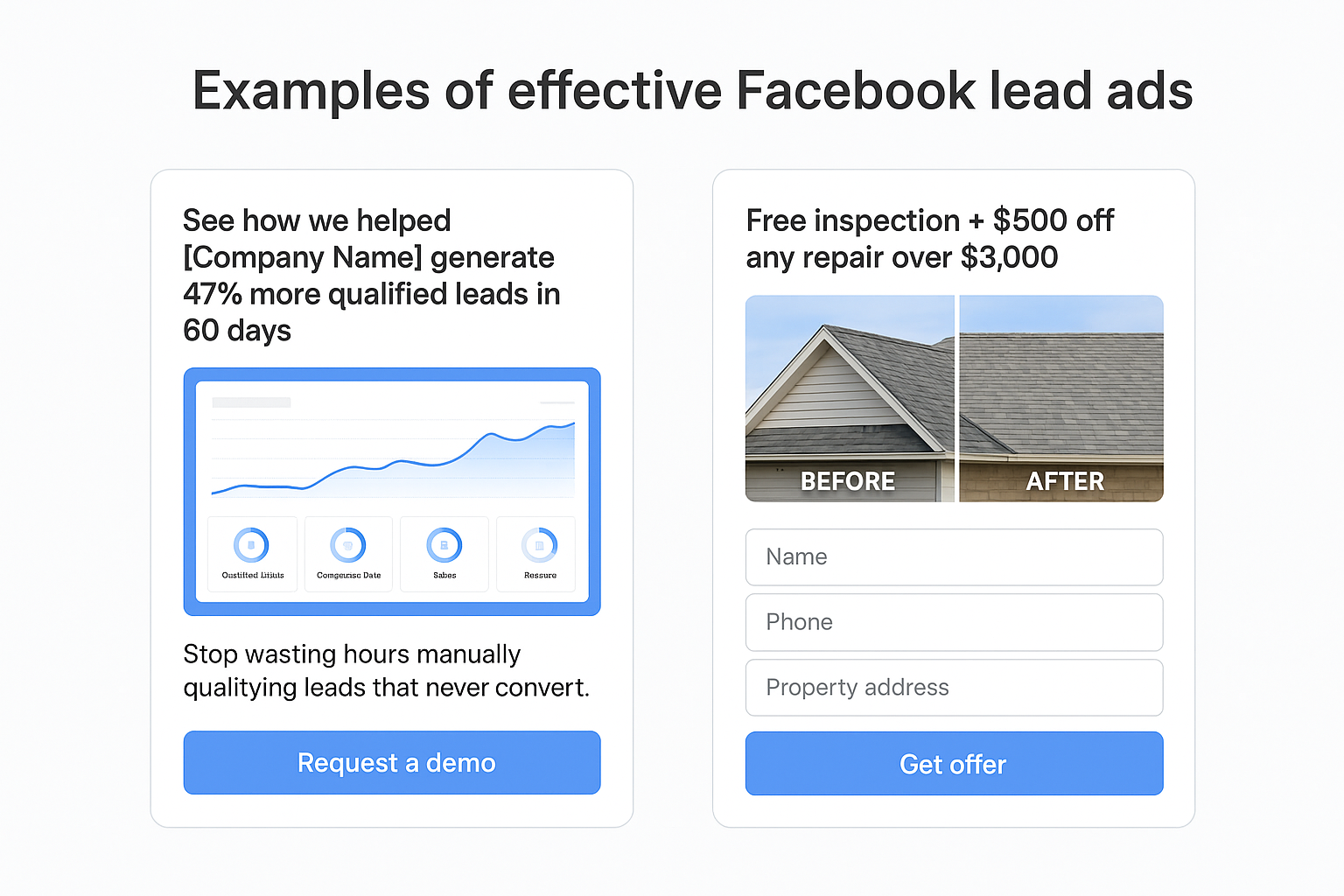
B2B software demo request
A marketing automation platform runs ads targeting marketing directors at companies with 50-500 employees. Their ad shows a clean screenshot of their dashboard with the headline “See how we helped [Company Name] generate 47% more qualified leads in 60 days.” The body copy addresses a specific pain point: “Stop wasting hours manually qualifying leads that never convert.” Their Instant Form collects six fields: name, work email, company name, company size, current marketing tools, and desired implementation timeline. The thank you screen confirms that their sales team will reach out within two hours and includes a link to their customer success stories page.
Home services consultation offer
A roofing company targets homeowners in specific zip codes within their service area using radius targeting around past customer addresses. Their video ad opens with dramatic before-and-after footage of a roof repair while text overlay states “Free inspection + $500 off any repair over $3,000.” The form asks only four questions: name, phone number, property address, and preferred contact time. They add a custom question asking “What roofing issue concerns you most?” with options like “Leaks,” “Missing shingles,” “Age of roof,” or “Storm damage.” This single question lets them route leads to appropriate specialists and prepare relevant information before the first call.
The most effective examples pre-qualify prospects through smart targeting and custom questions rather than relying on long forms that scare away serious buyers.
Both examples succeed by matching form length to offer value and using targeting that reaches decision makers when they actively search for solutions.
Next steps
You now have the complete framework to launch profitable facebook ads for lead generation campaigns that fill your pipeline with qualified prospects. Start by defining your ideal customer profile and creating one compelling offer that solves their specific problem. Build a simple three-field Instant Form first rather than trying to perfect a complex qualification system right away. Launch with a test budget of $30 per day and run at least three creative variations to identify what resonates with your audience.
Track your cost per qualified lead daily and pause anything that exceeds twice your target cost after spending $100. Most campaigns need 30-60 days of consistent testing and optimization before they hit peak performance. You should replace underperforming creative every week while scaling budgets on winners by 20-30% increments.
Your follow-up system matters as much as your ads themselves. Connect your forms directly to your CRM and respond within five minutes to maximize conversion rates. If you need expert help implementing these strategies and optimizing your entire client acquisition funnel, schedule a free conversion audit with Client Factory to identify exactly where your campaigns leak revenue.
