

Managing email campaigns manually drains your time and limits your ability to nurture leads effectively. You know you need automation to scale your client acquisition efforts, but choosing from dozens of platforms with overlapping features and confusing pricing tiers feels overwhelming. Some tools promise everything but deliver basic functionality. Others charge premium prices for features you’ll never use.
This guide breaks down 15 email marketing automation platforms that actually deliver results. We’ve evaluated each tool based on core automation capabilities, ease of use, pricing transparency, and real user feedback. You’ll find options ranging from free plans perfect for testing the waters to enterprise-grade systems built for high-volume campaigns. Each platform review covers how the automation works, who benefits most from using it, and exact pricing details including limitations on the free tiers. Whether you run a service business, law firm, or ecommerce store, you’ll discover which software fits your specific needs and budget. By the end, you’ll have everything needed to make an informed decision and start automating your email marketing.
1. Client Factory email automation services
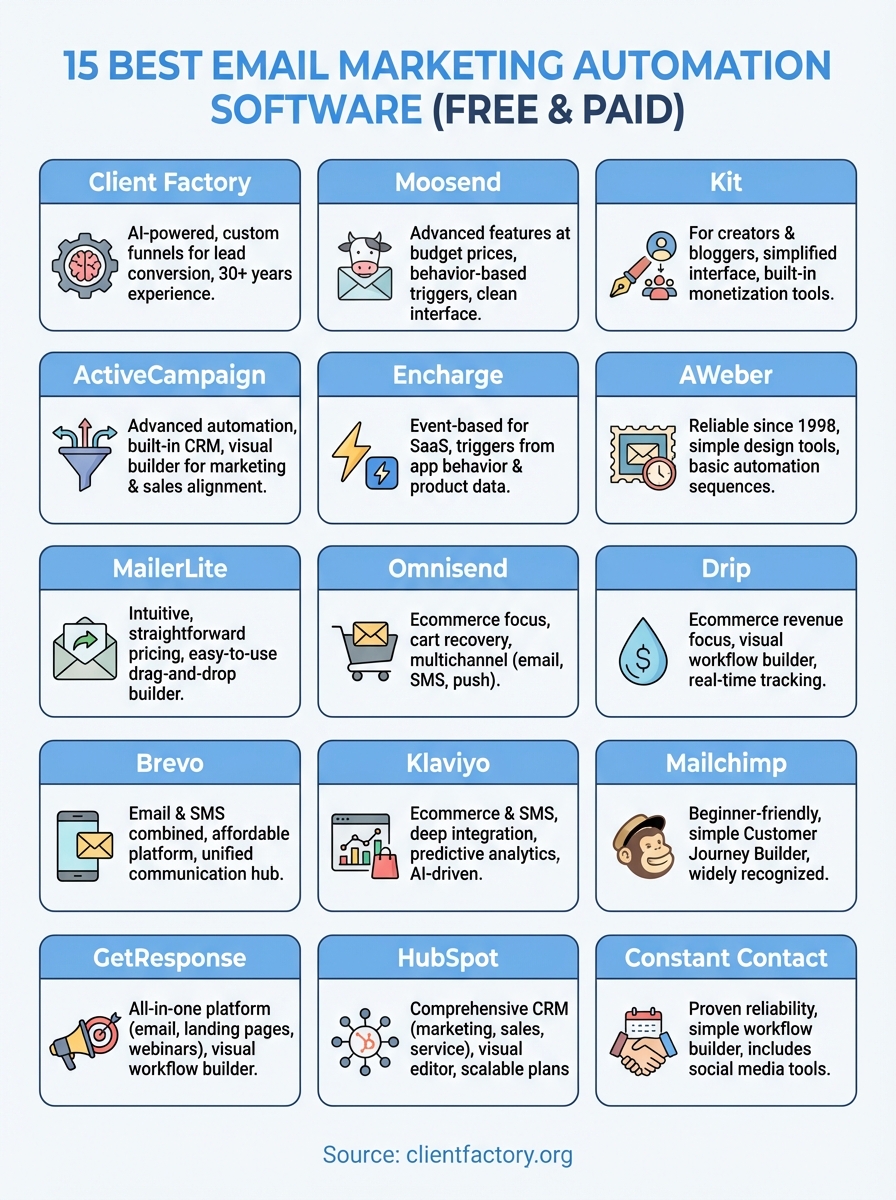
Client Factory combines over 30 years of experience with AI-powered automation to create email campaigns that convert leads into paying clients. Your email sequences integrate directly with your client acquisition funnels, ensuring every message aligns with where prospects are in their buying journey. The platform doesn’t just send emails; it builds complete automation workflows that nurture leads from first contact through conversion.
How this email automation tool works
You get access to custom-built automation funnels designed specifically for your business model and target audience. Client Factory’s team develops email sequences based on data-driven insights from your existing customer behavior and conversion patterns. The system tracks every interaction, from email opens to link clicks, and automatically adjusts messaging based on prospect engagement levels. Your campaigns connect with paid advertising efforts across Facebook, YouTube, and Google Ads, creating a unified approach that reinforces your message across multiple touchpoints. The platform includes Susan, an AI-powered virtual assistant that handles immediate prospect inquiries and feeds qualified leads directly into your automated email sequences.
Client Factory’s email automation turns your marketing funnel into a predictable client acquisition system rather than a collection of disconnected campaigns.
Who this platform is best for
Service businesses and law firms see the strongest results from Client Factory’s email marketing automation software. You benefit most if you’re generating leads through paid advertising but struggling with low conversion rates or inconsistent follow-up. The platform works particularly well for businesses with longer sales cycles where prospects need multiple touchpoints before making a decision. Your team should be ready to invest in professional implementation and optimization rather than managing everything in-house.
Pricing, free plan, and limits
Client Factory operates on a custom pricing model based on your specific business needs and campaign complexity. You start with a free conversion audit that identifies gaps in your current email automation and acquisition process. Pricing typically includes strategy development, funnel implementation, ongoing optimization, and dedicated support from a U.S.-based team. Contact their team directly to receive a customized quote that matches your lead volume and automation requirements.
2. ActiveCampaign email marketing automation
ActiveCampaign delivers advanced automation capabilities combined with built-in CRM functionality that appeals to businesses seeking sophisticated email workflows. You access over 900 pre-built automation templates covering everything from welcome sequences to complex lead nurturing campaigns. The platform handles both marketing and sales processes within a single system, creating alignment between your email efforts and revenue generation activities. Your campaigns respond to subscriber behavior in real-time, adjusting message delivery based on opens, clicks, website visits, and custom events you define.

How this email automation tool works
You build automation workflows using a visual drag-and-drop editor that maps out every step of your customer journey. The system triggers emails based on specific actions your contacts take, including form submissions, link clicks, tag additions, or even visits to particular pages on your website. ActiveCampaign’s conditional logic lets you create branching paths where different subscribers receive different messages depending on their engagement patterns. Your automations can score leads automatically, assigning points based on behavior to identify your most engaged prospects. The platform integrates email marketing automation software with sales pipelines, allowing your team to see exactly where each contact stands in both marketing nurture sequences and sales follow-up activities.
ActiveCampaign transforms basic email sequences into intelligent workflows that adapt to how each subscriber interacts with your content.
Who this platform is best for
Small to mid-sized businesses benefit most from ActiveCampaign when they need marketing and sales alignment in one platform. You’ll find the most value if your business relies on multi-touch campaigns that require sophisticated segmentation and personalization. Service businesses, agencies, and B2B companies with longer sales cycles see strong results because the system handles both automated nurturing and manual sales follow-up. Your team should have some technical comfort with automation concepts, as the platform’s power comes with a learning curve steeper than simpler alternatives.
Pricing, free plan, and limits
ActiveCampaign starts at $15 per month for 1,000 contacts on the Starter plan with basic automation features. You get access to more advanced workflows, lead scoring, and predictive analytics on the Plus plan at $95 per month for 2,500 contacts. Professional plans run $149 per month, while Enterprise pricing starts at $255 monthly. The platform offers a 14-day free trial that lets you test automation capabilities before committing. Pricing increases as your contact list grows, with all plans including unlimited email sends.
3. MailerLite email marketing platform
MailerLite provides intuitive email automation combined with straightforward pricing that makes it accessible for businesses just starting their automation journey. You access a clean interface that prioritizes ease of use without sacrificing essential automation capabilities. The platform delivers drag-and-drop email builders, landing page creation, and automation workflows that handle common scenarios like welcome sequences, abandoned cart recovery, and subscriber re-engagement campaigns. Your team can launch campaigns quickly without extensive training or technical knowledge.
How this email automation tool works
You create automation workflows using a visual builder that connects triggers, conditions, and actions into logical sequences. The system sends emails automatically when subscribers join specific groups, click certain links, or reach particular dates like birthdays or anniversaries. MailerLite’s email marketing automation software supports A/B testing within automation sequences, letting you optimize subject lines and content based on actual performance data. Your workflows can include time delays, conditional splits based on subscriber behavior, and actions like tagging or moving contacts between groups. The platform tracks opens, clicks, and conversions through a straightforward dashboard that shows exactly how each automation performs.
MailerLite removes complexity from email automation while maintaining the core features most businesses actually use daily.
Who this platform is best for
Small businesses, freelancers, and bloggers gain the most value from MailerLite’s approach to email automation. You’ll appreciate the platform if you need reliable automation basics without paying for advanced features that remain unused. The system works well for businesses with straightforward nurture sequences and standard follow-up needs rather than complex multi-path workflows requiring extensive conditional logic.
Pricing, free plan, and limits
MailerLite offers a free plan covering up to 1,000 subscribers and 12,000 monthly emails with full automation access. Paid plans start at $9 per month for up to 500 subscribers with unlimited email sends and premium features including auto-resend campaigns and A/B testing. Pricing scales based on subscriber count, with the $18 per month Advanced plan adding priority support and advanced segmentation capabilities.
4. Brevo email and SMS marketing
Brevo (formerly Sendinblue) combines email and SMS automation into a single affordable platform that appeals to budget-conscious businesses. You access marketing automation features typically found in premium tools without the premium price tag. The system handles both promotional campaigns and transactional emails like order confirmations or password resets, creating a unified communication hub for your customer interactions. Your campaigns reach subscribers through multiple channels while maintaining consistent messaging across email and text.
How this email automation tool works
You build automation workflows using Brevo’s visual editor that triggers messages based on subscriber actions, website behavior, or specific dates. The platform tracks contact activity across your site through installed tracking codes, allowing you to send emails when visitors view certain pages, abandon carts, or complete specific goals. Brevo’s email marketing automation software includes basic CRM functionality that stores contact information, deals, and conversation history in one location. Your workflows combine email sequences with SMS messages, creating multi-channel campaigns that increase response rates. The system supports conditional logic for creating branching paths based on how subscribers interact with your content.
Brevo delivers enterprise-level automation capabilities at small business prices, making sophisticated workflows accessible to companies with limited budgets.
Who this platform is best for
Small businesses and startups benefit most from Brevo when they need affordable multi-channel communication. You’ll find strong value if your business sends both marketing emails and transactional messages, as consolidating these functions saves money compared to using separate services. The platform works well for ecommerce stores requiring cart abandonment sequences and order confirmations within the same system.
Pricing, free plan, and limits
Brevo offers a free plan with 300 emails daily and unlimited contacts, including basic automation features. Paid plans start at $8.08 per month for 5,000 emails monthly on the Starter tier. The Business plan runs $16.17 monthly and adds advanced automation, A/B testing, and landing pages.
5. GetResponse marketing automation suite
GetResponse functions as an all-in-one marketing platform that extends beyond email to include landing pages, webinars, and website building tools. You access a comprehensive suite designed for businesses wanting multiple marketing functions unified under one dashboard. The platform delivers automation workflows alongside conversion-focused features like sales funnels and webinar hosting capabilities. Your campaigns benefit from integrated tools that support the entire customer journey from initial contact through conversion.
How this email automation tool works
You create automation sequences using GetResponse’s visual workflow builder that connects triggers, conditions, and actions into logical paths. The system activates based on subscriber behavior including form submissions, email opens, link clicks, or specific dates. GetResponse’s email marketing automation software supports ecommerce integrations with Shopify and WooCommerce for automated cart recovery and post-purchase follow-ups. Your workflows can include time delays, conditional splits, and actions like tagging or scoring contacts based on engagement. The platform provides pre-built automation templates for common scenarios including welcome sequences, abandoned cart recovery, and webinar promotion campaigns.
GetResponse consolidates multiple marketing tools into one platform, eliminating the need to connect separate services for email, landing pages, and conversion tracking.
Who this platform is best for
Small to medium businesses gain the most value from GetResponse when they need comprehensive marketing tools beyond basic email automation. You’ll appreciate the platform if your strategy includes webinars, landing pages, or sales funnels alongside email campaigns. The system works well for businesses wanting to centralize their marketing technology stack without managing multiple subscriptions.
Pricing, free plan, and limits
GetResponse offers a free plan covering up to 500 contacts with unlimited newsletters, signup forms, and popups. Paid plans start at $15.58 per month for the Starter tier including unlimited emails, landing pages, and basic automation. The Marketer plan runs $48.38 monthly and adds advanced automation, sales funnels, and webinar capabilities.
6. Moosend email automation platform
Moosend delivers advanced automation capabilities at budget-friendly prices that make sophisticated workflows accessible to businesses of all sizes. You access professional-grade features including behavior-based triggers, dynamic content personalization, and detailed segmentation without paying premium platform rates. The system provides over 25 automation triggers that respond to subscriber actions across your website and email campaigns. Your workflows benefit from a clean, intuitive interface that reduces setup time while maintaining flexibility for complex automation sequences.

How this email automation tool works
You build automation sequences using Moosend’s visual workflow editor that connects triggers, conditions, and actions into logical customer journeys. The platform responds to subscriber behavior including email interactions, website visits, form submissions, and specific dates or anniversaries. Moosend’s email marketing automation software includes website tracking capabilities that monitor visitor activity and trigger emails based on pages viewed, time spent on site, or specific goals completed. Your campaigns can include conditional splits, time delays, and personalized content blocks that change based on subscriber data. The system automatically updates contact fields and segments based on behavior, ensuring your audience groupings stay current without manual intervention.
Moosend combines enterprise-level automation features with straightforward pricing that eliminates the need to upgrade plans for accessing advanced functionality.
Who this platform is best for
Small businesses and growing companies benefit most from Moosend when they need powerful automation without complex pricing tiers. You’ll appreciate the platform if you want advanced features like web tracking and behavioral triggers at an accessible price point. The system works well for businesses ready to implement sophisticated workflows but lacking budgets for premium automation tools.
Pricing, free plan, and limits
Moosend starts at $7 per month for 500 contacts with unlimited email sends and full access to all automation features. The platform offers a 30-day free trial that includes complete functionality without requiring credit card information. Pricing increases based solely on contact count, with all subscribers accessing the same comprehensive feature set regardless of list size.
7. Encharge behavior based email automation
Encharge specializes in event-based email automation built specifically for SaaS companies and product-led businesses. You trigger campaigns based on actual user behavior within your application rather than relying solely on email interactions or time-based sequences. The platform connects directly to your product data through integrations with tools like Stripe, Segment, and various analytics platforms. Your email sequences respond to product usage patterns, feature adoption, subscription changes, and custom events you define within your application.
How this email automation tool works
You build automation workflows using Encharge’s visual flow builder that connects product events to email sequences and contact management actions. The system triggers emails when users complete specific actions like starting trials, activating features, reaching usage thresholds, or churning from paid plans. Encharge’s email marketing automation software pulls data from your product analytics and billing systems to create segments based on subscription status, feature usage frequency, and customer lifetime value. Your workflows include conditional logic that branches based on how users interact with both your product and email campaigns. The platform automatically updates contact properties and tags based on product behavior, keeping your audience segments accurate without manual data entry.
Encharge transforms product usage data into targeted email campaigns that match where each user actually stands in their customer journey.
Who this platform is best for
SaaS companies and app developers gain the most value from Encharge when they need product-triggered email automation. You’ll benefit from the platform if your business relies on user onboarding sequences, feature adoption campaigns, or upgrade prompts based on actual product usage rather than assumptions.
Pricing, free plan, and limits
Encharge starts at $79 per month for the Growth plan covering 2,000 subscribers with unlimited emails and core automation features. Premium plans begin at $129 monthly and add Salesforce, HubSpot, and Segment integrations plus advanced event-based capabilities.
8. Omnisend ecommerce email automation
Omnisend focuses exclusively on ecommerce email automation with features designed to recover abandoned carts and increase repeat purchases. You access pre-built workflows tailored for online stores alongside multichannel campaigns that combine email, SMS, and push notifications within single automation sequences. The platform integrates directly with Shopify, WooCommerce, BigCommerce, and other major ecommerce platforms to pull product data, order history, and customer behavior into your campaigns. Your automation responds to shopping actions like cart abandonment, product views, order confirmations, and customer lifecycle stages specific to online retail.
How this email automation tool works
You create automation sequences using Omnisend’s visual workflow builder that triggers based on shopping behaviors and customer actions. The system activates emails automatically when visitors abandon carts, browse specific product categories, make purchases, or reach certain spending thresholds. Omnisend’s email marketing automation software includes dynamic product recommendations that populate your emails with items based on browsing history, past purchases, or complementary products. Your workflows support conditional splits that send different messages based on order value, product type, or customer segment. The platform combines email sequences with SMS messages and web push notifications, creating coordinated campaigns that reach customers through multiple touchpoints.
Omnisend turns standard ecommerce events into revenue-generating automation sequences without requiring technical setup or custom development.
Who this platform is best for
Online store owners benefit most from Omnisend when they need ecommerce-specific automation rather than general email marketing capabilities. You’ll find strong value if your business focuses on cart recovery, product promotions, and customer retention campaigns. The platform works well for stores with established product catalogs seeking to automate post-purchase sequences and cross-sell campaigns.
Pricing, free plan, and limits
Omnisend offers a free plan covering 250 contacts with 500 monthly emails and 500 web push notifications. Paid plans start at $11.20 per month for 500 contacts with 6,000 emails and unlimited web pushes. Standard plans include priority support and advanced segmentation features unavailable on the free tier.
9. Klaviyo ecommerce email and SMS
Klaviyo powers email and SMS automation specifically engineered for online retailers seeking to maximize customer lifetime value. You access deep integrations with major ecommerce platforms that automatically sync product catalogs, order histories, and customer behavior into your campaigns. The platform excels at predictive analytics, using machine learning to identify customers most likely to make repeat purchases or churn. Your automation workflows respond to real shopping behaviors including product views, cart additions, purchases, and browse abandonment across both email and text message channels.
How this email automation tool works
You build automation sequences using Klaviyo’s flow builder that triggers campaigns based on shopping events pulled directly from your ecommerce platform. The system activates emails and SMS messages when customers abandon carts, browse specific product categories, reach spending milestones, or show signs of disengagement. Klaviyo’s email marketing automation software generates dynamic product recommendations that populate messages with items based on individual browsing patterns, purchase history, and predicted preferences. Your workflows include conditional logic that segments customers by lifetime value, purchase frequency, or product affinity to deliver highly targeted content. The platform’s AI-powered features optimize send times, predict customer behavior, and suggest next-best actions for each segment.
Klaviyo transforms raw ecommerce data into profitable automation sequences that increase both initial conversions and long-term customer retention.
Who this platform is best for
Established online stores benefit most from Klaviyo when they need sophisticated segmentation and predictive analytics. You’ll find strong value if your business has substantial customer data to leverage and requires advanced personalization beyond basic cart recovery emails. The platform works exceptionally well for direct-to-consumer brands and Shopify stores with growing catalogs that justify the investment in premium automation capabilities.
Pricing, free plan, and limits
Klaviyo offers a free plan covering up to 250 profiles with 500 monthly emails and 150 SMS credits. Email-only plans start at $45 per month for 15,000 emails with advanced segmentation and AI content tools. Combined Email + SMS plans begin at $60 monthly and include 1,250 SMS credits alongside unlimited email features. Pricing scales significantly as your contact list grows, making it one of the more expensive options for larger databases.
10. HubSpot all in one marketing hub
HubSpot operates as a comprehensive CRM platform that unifies marketing, sales, and customer service functions under one system. You access email marketing automation software alongside tools for content management, social media, advertising, and customer support within a single dashboard. The platform scales from free basic features suitable for startups through enterprise-level capabilities that support large organizations. Your email campaigns integrate directly with sales pipelines, website analytics, and customer service interactions to create a complete view of each contact’s relationship with your business.
How this email automation tool works
You create automation workflows using HubSpot’s visual editor that triggers emails based on contact properties, behaviors, and lifecycle stages. The system activates sequences when contacts submit forms, visit specific pages, open emails, or reach particular points in your sales funnel. HubSpot’s email marketing automation software connects email campaigns with landing pages, forms, and live chat to capture leads and automatically route them into appropriate nurture sequences. Your workflows support complex conditional logic that branches based on contact data, engagement patterns, and integration data from connected tools. The platform includes AI-powered features that optimize send times, generate content suggestions, and score leads automatically based on engagement signals across all customer touchpoints.
HubSpot eliminates data silos by connecting every customer interaction from first website visit through post-purchase support within one unified platform.
Who this platform is best for
Businesses seeking complete marketing, sales, and service alignment gain the most value from HubSpot’s integrated approach. You’ll benefit from the platform if your team needs visibility across multiple customer touchpoints rather than just email campaign performance. The system works well for B2B companies, agencies, and service businesses with longer sales cycles requiring coordination between marketing automation and sales follow-up activities.
Pricing, free plan, and limits
HubSpot offers a free plan covering 100 contacts, 2,000 monthly emails, basic automation, landing pages, and forms. Email-focused plans start at $20 per month for 1,000 contacts with 5,000 emails on the Marketing Hub Starter tier. Professional plans begin at $890 monthly and include advanced automation, predictive lead scoring, and multichannel campaigns. Enterprise pricing requires custom quotes based on your specific needs and contact volume.
11. Kit email marketing for creators
Kit (formerly ConvertKit) builds email automation specifically for creators, bloggers, and digital product sellers who prioritize audience growth over complex workflows. You access a simplified interface that removes technical barriers while maintaining essential automation capabilities for building and monetizing your subscriber base. The platform focuses on helping creators turn their audience into revenue through features like paid newsletters, landing pages, and automated product delivery. Your campaigns benefit from tools designed around creator-specific needs rather than enterprise-level complexity that adds features you’ll never use.
How this email automation tool works
You create automation sequences using Kit’s visual automation builder that triggers emails based on subscriber actions like form submissions, link clicks, or tag additions. The system supports basic conditional logic for creating branching paths based on how subscribers interact with your content. Kit’s email marketing automation software includes built-in commerce features that let you sell digital products, subscriptions, and paid newsletters directly through automated sequences. Your workflows can segment subscribers automatically based on purchases, interests indicated through link clicks, or custom tags you apply manually or through automation rules.
Who this platform is best for
Content creators, course sellers, and newsletter writers benefit most from Kit when they need straightforward automation paired with monetization tools. You’ll appreciate the platform if your business model relies on building direct relationships with subscribers rather than running complex multi-touch campaigns.
Pricing, free plan, and limits
Kit offers a free plan covering up to 10,000 subscribers with unlimited broadcasts but limited to one automation and one sequence. Paid Creator plans start at $25 per month for 1,000 subscribers with full automation access, paid recommendations, and no Kit branding.
12. AWeber email marketing service
AWeber operates as one of the longest-running email marketing platforms, having served businesses since 1998 with a focus on simplicity and design quality. You access over 600 pre-built templates and a drag-and-drop editor that prioritizes creating attractive emails over complex automation sequences. The platform delivers solid basic automation capabilities alongside unique design tools including Smart Designer, which automatically generates branded templates based on your website URL. Your campaigns benefit from straightforward workflows and extensive integration options that connect with over 750 third-party applications.
How this email automation tool works
You create automation sequences using AWeber’s simple workflow builder that handles basic triggers like form submissions, link clicks, and date-based events. The system sends automated welcome emails, follow-up sequences, and subscriber nurturing campaigns without requiring technical knowledge. AWeber’s email marketing automation software includes Canva integration directly within the email editor, letting you design custom graphics without leaving the platform. Your workflows support basic conditional logic and time delays but lack the advanced behavioral triggers and complex branching paths found in more sophisticated automation tools. The platform focuses on making email creation fast through its extensive template library rather than building intricate multi-path automation sequences.
Who this platform is best for
Small businesses and entrepreneurs benefit most from AWeber when they need reliable email delivery with strong design support. You’ll appreciate the platform if your priority centers on creating professional-looking emails quickly rather than implementing complex automation workflows. The system works well for businesses with straightforward follow-up needs and subscribers who value established platform stability over cutting-edge features.
Pricing, free plan, and limits
AWeber offers a free plan covering 500 subscribers with 3,000 monthly emails and basic automation features. Paid plans start at $12.50 per month for 500 contacts with unlimited email sends and access to advanced features including behavioral automation and split testing. Pricing increases based on list size, with all paid tiers including priority customer support and removal of AWeber branding from emails.
13. Drip ecommerce email automation
Drip concentrates exclusively on ecommerce email automation with a visual workflow builder that appeals to online retailers seeking revenue-focused campaigns. You access sophisticated automation capabilities designed specifically for driving sales through abandoned cart recovery, product recommendations, and behavioral targeting based on shopping patterns. The platform integrates seamlessly with Shopify, WooCommerce, Magento, and other major ecommerce platforms to automatically pull customer data, purchase history, and browsing behavior into your campaigns. Your automation sequences combine email and SMS within unified workflows that respond to how shoppers interact with your store.
How this email automation tool works
You build automation workflows using Drip’s visual canvas that connects triggers, conditions, and actions into complete customer journeys. The system activates sequences when shoppers abandon carts, view specific products, make purchases, or reach particular engagement thresholds. Drip’s email marketing automation software includes real-time revenue tracking that shows exactly how much money each automation generates, helping you identify your most profitable campaigns. Your workflows support dynamic product blocks that automatically populate with items based on browsing history, past purchases, or predicted preferences. The platform tags and segments customers automatically based on purchase behavior, lifetime value, and product affinities without requiring manual list management.
Drip transforms shopping behavior into automated revenue streams by connecting product data directly with targeted email and SMS campaigns.
Who this platform is best for
Online store owners benefit most from Drip when they need ecommerce-specific automation that ties directly to sales performance. You’ll appreciate the platform if your business prioritizes conversion tracking and requires workflows built around shopping events rather than general marketing campaigns. The system works well for established stores with consistent traffic seeking to maximize customer lifetime value through sophisticated segmentation and personalization.
Pricing, free plan, and limits
Drip offers one pricing tier at $39 per month covering up to 2,500 contacts with unlimited email sends, 50 workflows, and full automation access. The platform includes dynamic segmentation, onsite campaigns, and complete API access in all accounts. Pricing increases based solely on contact count, with all subscribers accessing identical features regardless of list size.
14. Mailchimp email marketing platform
Mailchimp stands as arguably the most recognizable name in email marketing, having evolved from a simple newsletter tool into a comprehensive marketing platform. You access email automation, landing pages, social advertising, and basic CRM features within one interface designed for beginners and small business owners. The platform prioritizes ease of use over advanced automation capabilities, making it straightforward to launch campaigns quickly but limiting your options for complex behavioral workflows. Your automation features work well for standard sequences but lack the depth needed for sophisticated product-based triggers or detailed customer journey mapping that growing businesses eventually require.
How this email automation tool works
You create automation sequences using Mailchimp’s Customer Journey Builder that handles basic triggers like list subscriptions, purchase events, and date-based activities. The system sends welcome emails when subscribers join your list, birthday messages on special dates, and abandoned cart reminders for connected ecommerce stores. Mailchimp’s email marketing automation software supports simple conditional logic that creates basic branching paths based on email opens, clicks, or tag assignments. Your workflows can include time delays and basic personalization using merge tags that pull subscriber data into message content. The platform offers pre-built automation templates for common scenarios, though these focus on straightforward sequences rather than complex multi-touch campaigns that adapt to detailed behavioral patterns.
Mailchimp delivers sufficient automation for basic email sequences but falls short when your business needs sophisticated workflows tied to customer behavior.
Who this platform is best for
Beginners and small businesses benefit most from Mailchimp when they need familiar, trusted software with minimal setup requirements. You’ll appreciate the platform if you’re launching your first email campaigns and want templates, guidance, and widespread integration support. The system works well for businesses sending newsletters, promotional campaigns, and simple follow-up sequences without requiring advanced segmentation or behavioral triggers.
Pricing, free plan, and limits
Mailchimp offers a free plan covering 500 contacts with pre-built templates and basic reporting plus email support for 30 days. Paid plans start at $13 per month for the Essentials tier including automated customer journeys and A/B testing. Standard plans run $20 monthly with predictive segmentation and advanced automation, while Premium pricing begins at $350 per month for unlimited contacts and phone support. Pricing increases significantly as your list grows, with costs often exceeding competitors for similar contact volumes.
15. Constant Contact email marketing
Constant Contact ranks among the original email marketing platforms, having launched in 1995 to serve small businesses with straightforward campaign creation and audience management. You access over 300 responsive email templates alongside an intuitive drag-and-drop builder enhanced with AI writing assistance that speeds up content creation. The platform extends beyond email to include social media scheduling, event marketing tools, and basic automation workflows designed for businesses wanting reliable, uncomplicated campaign management. Your campaigns benefit from decades of deliverability optimization and an interface built specifically for users without technical backgrounds.
How this email automation tool works
You create automation sequences using Constant Contact’s workflow builder that handles standard triggers including form submissions, list additions, and date-based events like birthdays or anniversaries. The system sends automated welcome emails when subscribers join your list and delivers pre-scheduled messages at intervals you define. Constant Contact’s email marketing automation software supports time delays and basic conditional splits that route contacts down different paths based on email interactions. Your workflows focus on simple, reliable sequences rather than complex behavioral triggers or product-based automation. The platform includes social media posting schedules and event invitation management that work alongside your email campaigns to create coordinated marketing activities.
Who this platform is best for
Local businesses, nonprofits, and service providers benefit most from Constant Contact when they need proven reliability over advanced features. You’ll appreciate the platform if your business hosts events, manages social media alongside email, or simply wants straightforward campaign tools without learning curves. The system works well for organizations that value established platform stability and responsive support more than cutting-edge automation capabilities.
Pricing, free plan, and limits
Constant Contact starts at $12 per month for 500 contacts and 5,000 monthly emails on the Lite plan with basic automation and templates. Standard plans run $35 monthly and add advanced automation, A/B testing, and social media tools. The platform offers a 30-day free trial but maintains no permanent free tier like several competitors provide.
Wrapping up your choice
Choosing the right email marketing automation software depends on your specific business model and growth stage. You’ve seen platforms ranging from beginner-friendly options like MailerLite and AWeber to sophisticated systems like ActiveCampaign and Klaviyo that handle complex behavioral workflows. Ecommerce businesses benefit most from specialized tools like Omnisend or Drip, while SaaS companies gain more value from Encharge’s product-based triggers.
Your decision comes down to matching features with actual needs rather than paying for capabilities you won’t use. Start with a free trial or plan to test automation builders, template quality, and integration options before committing long term. Most businesses see better results from choosing simpler software they’ll actually use over feature-packed platforms that remain underutilized.
If you need help implementing your chosen platform or want custom automation workflows that convert leads into clients, Client Factory’s team can design and optimize your complete email marketing strategy.
