

You spent hours crafting the perfect email campaign. The copy is sharp, the offer is dialed in, and the list is ready. Then you hit send, and half your messages vanish into spam folders. If you’ve been searching for email deliverability tips, you already know this problem costs real revenue.
Here’s the thing most businesses miss: email deliverability isn’t just a technical issue, it’s a client acquisition issue. Every email that lands in spam is a potential client you never reach. At Client Factory, we see this constantly with service businesses and law firms running lead generation campaigns. A killer funnel means nothing if your follow-up emails don’t make it to the inbox. That’s why getting deliverability right is foundational to turning clicks into clients.
This guide breaks down 12 proven tips to keep your emails out of spam and in front of the people who matter. We’re covering everything from authentication protocols to list hygiene to content fixes, practical steps you can implement starting today. No theory. Just what works in 2026.
1. Start with a deliverability audit
Before you apply any email deliverability tips, you need to know exactly where your sending reputation stands. A deliverability audit gives you a clear baseline so you’re fixing real problems instead of guessing. Most businesses skip this step and spend months tweaking subject lines when the actual issue is a broken authentication record or a blacklisted IP address.
What deliverability problems look like in metrics
Your metrics tell the story before your inbox does. Low open rates under 20% for most industries often signal that messages are landing in spam, not that your subject lines are weak. A high spam complaint rate above 0.08% is a serious warning sign, since Gmail and Yahoo treat that threshold as a firm line for suppressing mail.
If your complaint rate crosses 0.10%, major mailbox providers will actively filter your mail before you notice any drop in open rates.
What to check in your sending setup
Start your audit by pulling your authentication records: SPF, DKIM, and DMARC. Confirm all three are active and properly aligned in your DNS settings. Also check your sending IP reputation against major blocklist databases. A single blocklist hit can damage inbox placement across multiple providers at the same time.
How to prioritize fixes for the biggest lift
Not every problem carries equal weight. Authentication failures, like a missing SPF or misaligned DKIM record, should be your first fix because they affect every email you send. After that, address bounce rate issues, since mailbox providers read excessive bounces as a signal that you’re ignoring sender health. Save content-level adjustments for after the infrastructure is solid.
Quick benchmarks to use in 2026
Use this table to judge where your program stands before you make any changes:
| Metric | Healthy Range | Warning Zone |
|---|---|---|
| Open rate | 25%+ | Below 15% |
| Bounce rate | Below 2% | Above 3% |
| Spam complaint rate | Below 0.05% | Above 0.08% |
| Unsubscribe rate | Below 0.5% | Above 1% |
Inbox placement rate is the most direct measure of deliverability health, and you should target 90% or higher. If your placement rate drops below 80%, treat that as an emergency and complete a full audit before you send another campaign.
2. Set up SPF, DKIM, and DMARC the right way
Authentication is the foundation of every list of email deliverability tips worth following. Without it, mailbox providers have no way to verify that your messages come from your domain, and they will route your mail to spam by default.
Why authentication drives inbox placement
SPF, DKIM, and DMARC work together to prove your identity to receiving mail servers. When all three are correctly configured, providers like Gmail and Outlook treat your messages as legitimate and improve your inbox placement significantly.
Missing even one of these records can cause otherwise clean campaigns to land in spam regardless of how good your content is.
How to get SPF right without breaking mail flow
Your SPF record tells receiving servers which IP addresses are authorized to send mail on behalf of your domain. Keep it to a single DNS TXT record and include every platform you send from, whether that’s your CRM, marketing tool, or helpdesk system.
Exceeding 10 DNS lookups in your SPF record causes it to fail, so trim unnecessary entries whenever you switch sending tools.
How DKIM signing affects trust and alignment
DKIM adds a cryptographic signature to every outgoing message, letting receiving servers confirm the email was not altered in transit. Set your DKIM key length to 2048 bits minimum, since shorter keys are now considered weak by major providers.
Confirm that your DKIM signing domain aligns with your From address, because misalignment breaks DMARC checks even when DKIM is technically active.
How to move DMARC from monitoring to enforcement
Start your DMARC policy at p=none to collect data without affecting mail flow, then advance to p=quarantine and finally p=reject once you confirm all legitimate mail passes authentication. Reviewing DMARC aggregate reports weekly helps you catch misconfigurations before they hurt your sender reputation.

3. Separate marketing and transactional email streams
One of the most overlooked email deliverability tips is keeping your marketing and transactional email streams completely separate. When both types share the same sending infrastructure, a spam complaint from a promotional campaign can suppress your password reset emails before you even notice the problem.
Why mixing mail types hurts reputation
Marketing emails draw higher complaint rates by nature because recipients opt out, ignore, or flag them at much higher rates than transactional messages. When you route everything through a single IP or domain, that complaint rate bleeds directly into your transactional sending reputation, putting critical messages like receipts and account alerts at risk.
A single promotional campaign with a complaint spike can cause your transactional emails to land in spam for days.
How to use subdomains and consistent from domains
Set up a dedicated subdomain for marketing email, such as news.yourdomain.com, and keep your transactional mail on mail.yourdomain.com or your root domain. This separation gives each stream its own sender reputation, so a bad promotional run does not drag down your operational mail.
How to protect receipts and password resets
Transactional emails carry your highest engagement rates because people actively expect them. Route these through a dedicated IP with a clean, consistent sending history. Never batch them with bulk campaigns, even for small lists.
Common setup mistakes to avoid
The most common mistake is using one ESP account for everything because it feels simpler. Another frequent error is letting marketing tools send from your root domain while also using it for transactional mail. Split them from the start to protect both streams.
4. Warm up new domains and IPs before scaling
When you launch a new domain or IP address, mailbox providers have zero history on your sending behavior. Skipping the warm-up process is one of the fastest ways to destroy your sender reputation before you run a single real campaign, and it’s a step that most email deliverability tips lists underestimate.
What warming actually does to reputation
Warming builds your sender reputation gradually by showing mailbox providers a pattern of low-volume, high-engagement sending before you scale. Providers track how recipients interact with your early messages, and positive engagement signals like opens and replies tell their algorithms you are a trustworthy sender worth routing to the inbox.
Jumping straight to high volume on a cold domain will almost certainly land your first real campaign in spam.
A practical warm-up schedule that works
Start with 25 to 50 emails per day in week one, doubling volume roughly every five to seven days. Target your most engaged contacts first, since early positive signals carry extra weight during the warming period. Most domains reach a stable sending reputation after 30 to 45 days of consistent, disciplined growth.

How to ramp volume without triggering filters
Keep your daily sending increases gradual, never more than doubling your previous send volume in a single step. Avoid sending to purchased or unverified lists during warm-up, because a single complaint spike on a fresh domain can push your reputation back by weeks.
Signs you are moving too fast
Watch for sudden drops in open rates or rising bounce rates, both of which signal that providers are actively filtering your mail. If complaints climb above 0.05% during warm-up, pause and diagnose the problem before you send another batch.
5. Use permission-first list growth
Building your list with explicit permission is one of the most effective email deliverability tips you can apply. When someone genuinely opts in to hear from you, they engage with your emails, and those positive engagement signals tell mailbox providers you belong in the inbox.
Why consent affects complaints and engagement
Recipients who never agreed to receive your emails are the ones who hit the spam button. High complaint rates from non-consenting contacts damage your sender reputation at the domain level, and that damage affects every campaign you send.
A complaint rate above 0.08% triggers active filtering at Gmail and Yahoo, regardless of how strong your content is.
Your list growth method is ultimately your reputation management strategy. Buying lists, scraping contacts, or adding people without permission sets you up for complaint rates that recovery takes months to fix.
When to use double opt-in vs single opt-in
Double opt-in requires subscribers to confirm their email address after form submission, which eliminates typos, fake addresses, and low-intent signups in one step. Use it when list quality matters more than raw volume, which is most of the time for service businesses.
Single opt-in works for high-trust situations like existing customer upsells, but always weigh the short-term convenience against the long-term cleanup cost.
How to set expectations at signup
Tell subscribers what you will send and how often before they confirm their address. A welcome email sent immediately after signup reinforces those expectations and generates an early positive engagement signal that helps establish your sending reputation.
How to keep lead magnets from attracting junk
Tie your lead magnet delivery to a confirmed opt-in so only real addresses receive it. Generic offers like free gift card sweepstakes pull in contacts who have zero intent to engage with your actual content and will drag your metrics down fast.
6. Clean your list with a hygiene routine
Most email deliverability tips focus on setup, but list hygiene is what sustains your sender reputation across months of sending. Emailing a dirty list signals to mailbox providers that you are not managing your program responsibly, and they respond by filtering more of your mail.
Why list hygiene beats almost every “hack”
Mailbox providers track bounce rates, open rates, and spam flags across every send you make. A list packed with invalid addresses pulls those metrics down faster than any content optimization can recover them.
Clean lists consistently outperform larger, unmanaged lists on inbox placement, open rates, and reply rates.
No single hack replaces this foundation. Inbox placement tied to list quality is more predictable and durable than any one-time tactic you might apply.
How to handle hard bounces and repeated soft bounces
Remove hard bounces immediately after they occur. Continuing to send to non-existent addresses signals poor hygiene to every major provider and compounds reputation damage with each send.
For soft bounces, suppress any address that fails three or more times within 30 days, since repeated failures typically point to a permanently unavailable mailbox.
How to spot risky addresses before they hurt you
Role-based addresses like info@ and admin@ route to multiple people who never opted in and generate outsized complaint rates. Run new batches through email verification to flag these before they enter your active list.
Spam traps look identical to real addresses but exist purely to catch senders with poor list practices. An email verification step before each new import catches most of them early.
How often to clean based on sending volume
High-volume senders above 50,000 emails per month should audit their lists monthly. If you send fewer than that, quarterly cleaning works, but never let more than six months pass between your reviews.
7. Set a sunset policy for inactive subscribers
A sunset policy is one of the most underused email deliverability tips for protecting your sender reputation long-term. Without one, inactive contacts accumulate quietly on your list and drag your engagement metrics down with every send, signaling to mailbox providers that your content is not worth routing to the inbox.
Why inactivity drags down inbox placement
Mailbox providers calculate engagement signals across your entire sending list, not just your most active segment. Emailing contacts who have not opened or clicked in months lowers your overall engagement rate, and that decline directly reduces inbox placement for everyone on your list, including your best subscribers.
Inactive contacts are not neutral. They actively work against your sender reputation with every campaign you send to them.
How to define inactive for your business
High-frequency senders emailing daily or weekly should treat 90 days without engagement as the inactive threshold. If your sending cadence is monthly or slower, extend that window to six months before routing someone into a re-engagement flow.
How to run a simple re-engagement sequence
Send two to three short emails over two weeks asking whether the subscriber still wants to hear from you. Each message should carry a single clear call to action to confirm their interest. Anyone who ignores the entire sequence is unlikely to engage with future campaigns.
When to suppress vs unsubscribe vs delete
Suppress contacts who complete re-engagement but still never interact, so you stop mailing them without closing the record permanently. Unsubscribe contacts who ignore every re-engagement email or request opt-out directly. Delete records only after you satisfy any data retention obligations that apply to your industry or region.
8. Make it easy to unsubscribe and manage preferences
Friction around opt-outs does not protect your list, it damages your sender reputation. When subscribers cannot find a clear way out, they hit the spam button instead, and that complaint lands directly against your domain reputation in every major mailbox provider’s system.
Why easy opt-outs reduce spam complaints
Every spam complaint costs far more than a clean unsubscribe. Complaint rates above 0.08% trigger active filtering at Gmail and Yahoo, meaning your future campaigns reach fewer inboxes regardless of how strong your content is. A visible, one-click unsubscribe link gives unhappy subscribers a clean exit before they reach for the spam button.
One spam complaint carries roughly 1,000 times more damage to your sender reputation than one unsubscribe.
How to implement one-click unsubscribe correctly
Google and Yahoo now require one-click List-Unsubscribe headers for bulk senders, meaning recipients can opt out directly from their email client without visiting a separate page. Your ESP should support this natively, but verify it is enabled in your account settings and that your unsubscribes process within two business days as required.
How to build a preference center people use
A preference center lets subscribers choose topics and frequency rather than opting out entirely. Keep it to three or four clear options so the decision takes seconds. Link it prominently in your footer alongside your unsubscribe link so it is the first thing someone reaches when they want less mail.
What not to do with “breakup” flows
Sending three or four emotional “are you sure?” emails after someone requests to unsubscribe generates complaints and violates CAN-SPAM requirements. Process opt-outs immediately and confirm the removal with a single, plain acknowledgment email.
9. Send content people actually engage with
Content quality is one of the most actionable email deliverability tips you can apply once your technical setup is solid. When subscribers open, click, and reply to your emails, mailbox providers record those interactions as positive signals that push your future sends toward the inbox.
How mailbox providers read engagement signals
Gmail, Yahoo, and Outlook all track how recipients interact with your mail at the individual and aggregate level. Strong engagement, meaning opens, clicks, forward actions, and replies, tells their algorithms your content is worth routing to the inbox. Low engagement over time is treated as a soft complaint and will suppress your placement without any formal flag against your account.
Consistent engagement from even a smaller active segment outperforms high send volume to a disengaged list every time.
How to segment based on intent and behavior
Send behavior-based segments by grouping contacts around what they actually did, not just what list they joined. Someone who clicked a service page deserves different content than someone who only opened a welcome email. Tighter segmentation produces higher click rates, and those click rates directly strengthen your sender reputation with every send.
How to write subject lines that earn opens
Your subject line determines whether engagement signals accumulate or stall. Write subject lines that match what the email actually delivers, keep them under 50 characters, and avoid words that spam filters flag like “free” or “guaranteed.” Specificity beats cleverness for both open rates and trust.
How to design CTAs that drive clicks and replies
Place one primary call to action per email so the click path is obvious. Occasionally ask subscribers a direct question to drive replies, since reply signals carry significant weight with major inbox providers evaluating your sender credibility.
10. Keep your email design and code inbox-friendly
Your email’s HTML structure and visual design directly affect how mailbox providers and spam filters evaluate your messages before they ever reach a subscriber. Sloppy code and unbalanced design are among the most overlooked email deliverability tips that marketers skip after getting their authentication setup right.
Why heavy HTML and image-only emails backfire
Spam filters flag emails with excessive HTML complexity, large file sizes, or images with no accompanying text because these patterns match classic phishing and bulk spam templates. Image-only emails are especially risky since filters cannot read the content inside an image, making your message look suspicious by default.
An email that renders as a single large image with minimal text will score poorly on most spam filter checks before it ever reaches a human.
How to balance text, images, and links
Aim for a 60/40 ratio of text to images as a general rule, keeping your HTML clean and lightweight. Limit the number of external links to what the email actually needs, since a high link density triggers spam scoring systems that watch for redirect chains and URL manipulation.

How to avoid rendering issues that look “spammy”
Test your emails across multiple clients including Gmail, Outlook, and Apple Mail before you send. Broken layouts, missing alt text, and unrendered CSS all signal poor sender quality to both spam filters and real recipients who decide in seconds whether to engage or delete.
Accessibility and mobile checks that impact engagement
Over 60% of emails are opened on mobile, so responsive design is not optional. Use alt text on every image and keep font sizes readable without zooming, since low engagement from poor mobile rendering feeds directly back into your sender reputation.
11. Control sending cadence and volume spikes
Sending cadence is one of the most underrated email deliverability tips you can apply after your list and authentication are in order. Mailbox providers build a behavioral model of your sending patterns over time, and anything that disrupts that model, including sudden volume spikes or erratic gaps, triggers closer scrutiny of every message you send.
Why consistency matters more than frequency
Consistent sending patterns train mailbox provider algorithms to recognize your mail as expected and legitimate. A sender who mails 10,000 contacts every Tuesday builds a predictable profile, while one who sends irregularly in bursts of 500 one week and 50,000 the next looks like a compromised account or a bulk spammer.
Frequency itself matters less than the rhythm you establish. Stick to a schedule your audience expects and your infrastructure can support without dramatic swings in daily send volume.
How to throttle large sends safely
When you need to send a large batch, spread the deployment over several hours rather than releasing the full volume at once. Most ESPs offer built-in throttling controls that let you cap sends per hour. Use them for any campaign above your typical daily average.
A sudden volume spike that doubles or triples your normal send rate in a single hour is a reliable way to trigger spam filter holds across multiple providers simultaneously.
How to avoid sudden spikes after promotions or launches
Plan promotional campaigns in advance so you can ramp toward the peak volume gradually over three to five days rather than hitting a surge on a single send date. Announce major launches to your most engaged segment first, then expand to your broader list once engagement signals confirm clean inbox placement.
How to coordinate multiple teams and tools
If your marketing, sales, and customer success teams all send from the same domain, set a shared sending calendar so your total daily volume stays predictable. Uncoordinated sends from multiple tools can push your combined domain volume into spike territory even when each individual team’s send looks normal in isolation.
12. Monitor reputation, blocklists, and inbox placement
Applying every other email deliverability tip on this list means nothing if you are not actively watching what happens after you hit send. Ongoing monitoring is what catches problems before they compound into a full reputation crisis.
The difference between delivery rate and deliverability
Your delivery rate measures the percentage of emails your ESP accepted and passed to a receiving server, which is almost always above 98%. Inbox placement rate measures how many of those accepted messages actually landed in the inbox rather than the spam folder, and that number can be far lower without triggering any ESP-level alert.
The metrics that usually predict trouble first
Watch spam complaint rate and open rate together. A complaint rate climbing past 0.05% paired with a sudden drop in open rate typically signals that providers have started filtering your mail before subscribers ever see it.
Complaint rate and open rate moving in opposite directions at the same time is the clearest early warning sign of a deliverability problem developing.
How to use provider tools to spot issues early
Google Postmaster Tools and Microsoft SNDS give you direct visibility into how the two largest mailbox providers score your domain and IP reputation. Check both weekly, not just when a campaign underperforms.
What to do if you land in spam or hit a blocklist
Stop sending high volume immediately and identify the root cause first, whether that is a complaint spike, a compromised IP, or an authentication failure. Most blocklist operators publish removal request processes, but submitting a removal request without fixing the underlying issue will only delay the next hit.
Keep your emails in the inbox
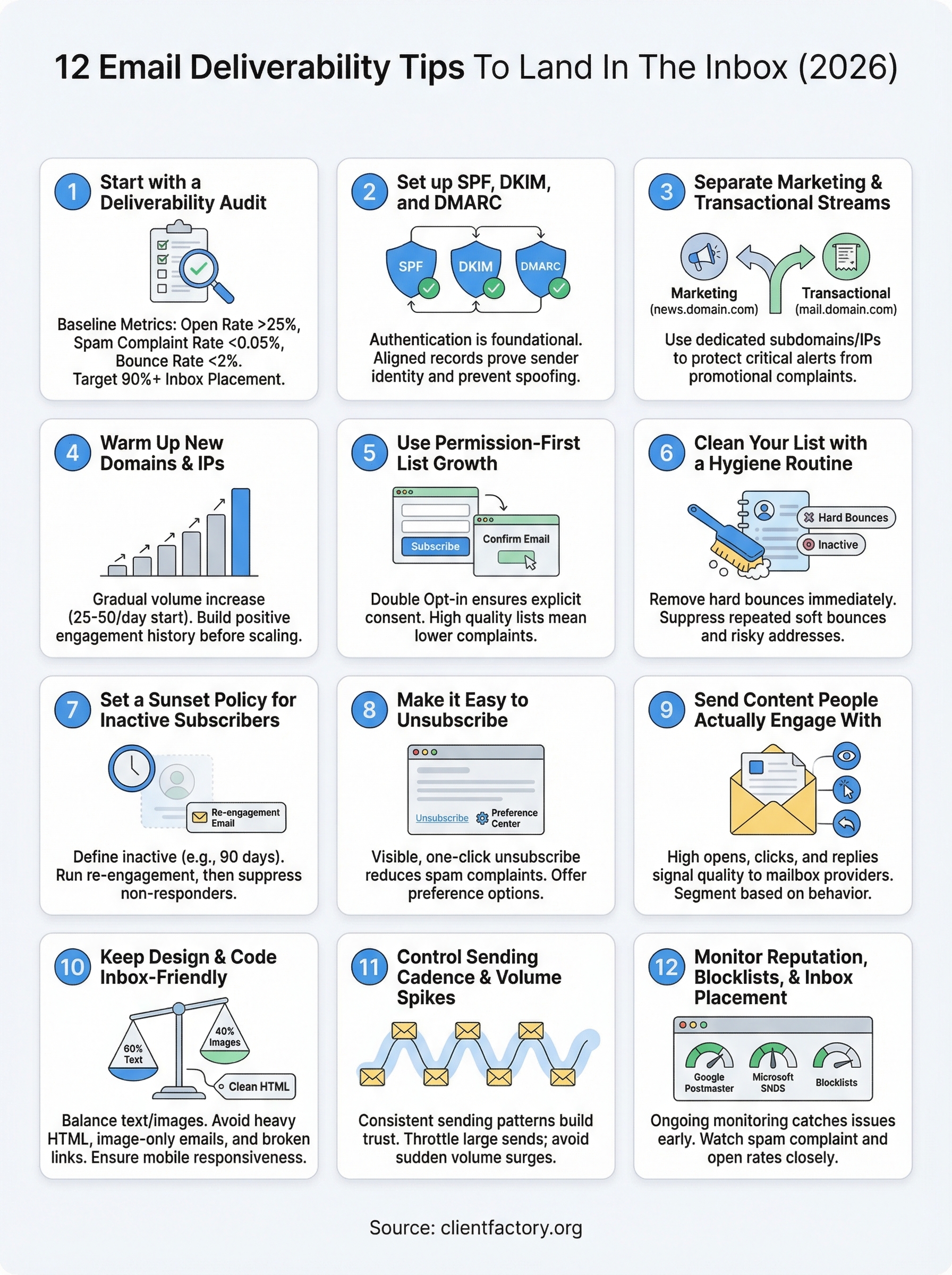
These 12 email deliverability tips cover every layer of a healthy sending program, from authentication and warm-up to list hygiene, content quality, and reputation monitoring. No single fix solves everything. Inbox placement is the result of many small decisions made consistently over time, and the businesses that treat it as an ongoing practice rather than a one-time setup are the ones who keep their messages in front of the right people.
Start with the audit, lock in your authentication, and build from there. Each step in this list reinforces the others, so fixing one weak point makes the next fix more effective. If your email campaigns are part of a broader client acquisition strategy and you want a second set of eyes on the full funnel, book a free conversion audit to see exactly where leads are falling through the cracks.
