

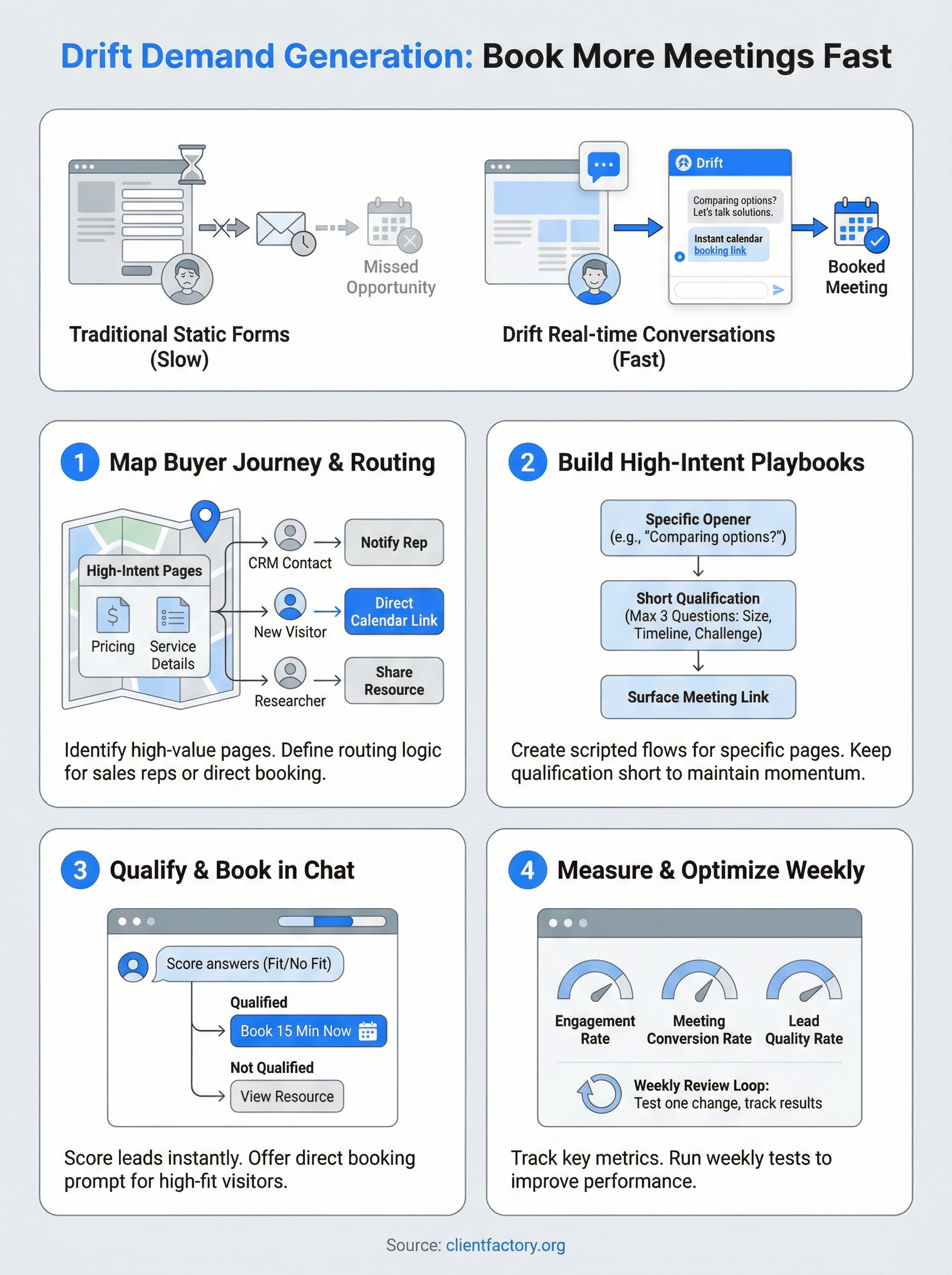
Most B2B websites still rely on static forms that kill momentum. A prospect lands on your page, gets interested, fills out a form, and then… waits. By the time someone follows up, they’ve already moved on. Drift demand generation flips that model by replacing passive forms with real-time conversations that capture intent the moment it peaks.
Drift’s conversational marketing platform lets you engage visitors instantly through chatbots, live chat, and automated meeting booking, no forms, no friction. For service businesses and law firms especially, where every qualified lead matters, this approach can shorten the path from first click to booked meeting dramatically. At Client Factory, we build client acquisition funnels designed to do exactly that: turn clicks into clients with as little friction as possible.
This guide breaks down how Drift works for demand generation, how to set it up to book more meetings faster, and what to avoid so you don’t waste the tool’s potential. Whether you’re evaluating Drift for the first time or looking to squeeze more pipeline out of your current setup, you’ll walk away with a clear, actionable plan.
What Drift demand generation looks like now
Drift demand generation has shifted significantly over the past few years. Where the tool once focused almost entirely on website chat, it now sits at the center of a full demand generation workflow: from first-touch visitor engagement all the way through to calendar booking and CRM handoff. Drift connects to your CRM, marketing automation, and calendar tools so the entire buyer experience runs through one conversation thread.
The goal is not just to chat with visitors. It’s to identify, qualify, and convert them before they leave your page.
How the platform is structured
Drift organizes your experience around playbooks, which are automated conversation flows you assign to specific pages, audiences, or traffic sources. Each playbook can greet a visitor, ask qualifying questions, route the conversation to the right sales rep, and surface a calendar link, all without human involvement unless you choose otherwise. Targeted messaging lets you trigger different conversations based on company size, industry, or behavior data pulled from your CRM or IP enrichment tools, so a Fortune 500 visitor sees a different experience than a small business owner.
What makes it different from traditional lead capture
Traditional lead capture asks visitors to give before they get: fill out a form, wait for a follow-up email, and trust that someone will respond quickly. Drift reverses that sequence. Your visitor gets immediate answers, real value inside the conversation itself, and a frictionless path to booking a meeting while their intent is still high. For service businesses and law firms, this matters because buyers often research quickly and decide faster than a standard 48-hour email follow-up cycle allows. Every hour you take to respond is an hour your competitor has to answer instead.
Step 1. Map your buyer journey and routing
Before you touch Drift’s playbook builder, you need to know where your buyers are and what they need at each stage. Skipping this step means you’ll apply the same conversation to every visitor, which wastes high-intent traffic and produces weak results from your drift demand generation setup.
Identify your high-intent pages
Your highest-value pages are typically pricing pages, service detail pages, and case studies. These are where buyers actively compare options. Pull your Google Analytics data and sort pages by time on page and exit rate to confirm which ones attract serious visitors who are close to making a decision.
The pages where visitors spend the most time but still leave without converting are your biggest opportunities to intercept and convert.
Set up routing rules
Routing logic is what separates a useful Drift setup from a generic chatbot experience. Define who should receive each conversation: a sales rep for enterprise visitors, a direct calendar link for SMB leads, or a specific team member for returning customers. Use this framework to get started:

| Visitor Type | Routing Action |
|---|---|
| Known CRM contact | Notify assigned account owner |
| High-intent new visitor | Offer direct meeting booking |
| Early-stage researcher | Share a relevant resource |
Step 2. Build playbooks for high-intent pages
Once you have your routing map in place, you can start building Drift playbooks for the pages that matter most. A playbook is a scripted conversation flow that fires when a visitor lands on a specific page. For drift demand generation to work, each playbook needs to match the context of that page exactly: a pricing page visitor gets a different message than someone reading a blog post.
Write a playbook that opens strong
Your opening message sets the tone for everything that follows. Skip the generic “How can I help?” and instead lead with something specific to the page. For a pricing page, try:
“Comparing options? I can walk you through which plan fits your team’s size in under 2 minutes.”
This kind of opener acknowledges what the visitor is already doing and delivers immediate value without asking them to commit to anything upfront.
Keep the qualification short
Limit your playbook to three qualifying questions maximum before you surface a meeting link. Ask about company size, timeline, and the primary challenge they want to solve. Anything beyond three questions drops completion rates quickly and wastes the high intent you just captured on that page.
Step 3. Qualify leads and book meetings in chat
Qualifying inside the conversation is where drift demand generation pays off most. Once your playbook fires, your job is to move the visitor from “interested” to “booked” without breaking the flow. Every extra step you add between the first message and the calendar link is a chance for the visitor to leave.

Score answers before offering a meeting
Your qualification threshold should be simple: if the visitor matches two or more of your target criteria (budget, timeline, company size), trigger the meeting offer immediately. If they don’t match, route them to a resource instead of wasting a rep’s time. This keeps your calendar full of high-fit leads rather than exploratory conversations that go nowhere.
Treat the chat like a fast intake form, not a discovery call. Get the minimum information you need to confirm fit, then get out of the way.
Use a direct booking prompt
When a visitor qualifies, send a clear, low-friction prompt instead of a vague “let’s connect.” Here is a template you can paste directly into your playbook:
"Based on what you've shared, I can get you 15 minutes with our team today.
Here's a link to pick a time: [calendar link]"
This removes ambiguity and makes the next step obvious.
Step 4. Measure results and optimize weekly
Running drift demand generation without measuring results is guesswork. You need to check a small set of key metrics every week to know what’s converting, what’s leaking, and where to adjust before you lose more qualified visitors.
Track the right numbers
Focus on three core metrics: playbook engagement rate (how many visitors start a conversation), meeting conversion rate (how many conversations end in a booked meeting), and lead quality rate (how many booked meetings match your target criteria). Pull these weekly from Drift’s reporting dashboard and log them in a simple tracker.
If your engagement rate is high but your meeting conversion rate is low, your qualifying questions are either too long or poorly sequenced.
Run a weekly optimization loop
Use this weekly review template to stay consistent and avoid reviewing data without taking action:
Week of: [date]
Playbook engagement rate: ____%
Meeting conversion rate:  ____%
Leads matched target criteria: ____
Top drop-off point in playbook: ____
One change to test next week: ____
Document one specific change per week, such as rewording your opening message or removing a qualifying question, and track whether the target metric improves. Testing one variable at a time gives you clean data to act on instead of guessing which change moved the number.
Next steps
You now have everything you need to build a drift demand generation system that books meetings without relying on passive forms or slow follow-up cycles. The four steps in this guide work together: mapping your buyer journey sets the foundation, strong playbooks capture intent, in-chat qualification converts visitors fast, and weekly measurement keeps the whole system improving over time.
Start with your single highest-intent page, whether that’s pricing or a core service page, and deploy one playbook there before expanding to other pages. One well-built playbook on the right page will outperform five generic ones spread across your site. Once you see your first round of booked meetings come through, use the weekly tracking template to find your next optimization point and build from there.
If you want an expert to review your current funnel before you build, book a free conversion audit and we will show you exactly where you are losing qualified leads.
