

Your sales team closes deals in one system while marketing runs campaigns in another. Customer data sits in silos, leads slip through the cracks, and nobody has a complete picture of the buyer journey. This disconnect costs service businesses and law firms real revenue every single day. CRM and marketing automation integration solves this problem by creating a unified system where customer data flows freely between platforms, enabling smarter targeting, faster follow-ups, and higher conversion rates.
When these two systems communicate effectively, your team stops guessing and starts acting on real insights. Marketing knows which leads sales actually closed. Sales sees every touchpoint a prospect had before picking up the phone. The result? Shorter sales cycles, better lead quality, and marketing spend that directly ties to revenue. For businesses serious about scaling their client acquisition, this integration isn’t optional, it’s foundational.
At Client Factory, we build data-driven client acquisition funnels that depend on this exact synergy between CRM and marketing automation. This guide breaks down the best practices for integration, common pitfalls to avoid, and actionable steps to connect your systems the right way. Whether you’re evaluating new tools or optimizing what you already have, you’ll walk away with a clear roadmap.
What CRM and marketing automation integration means
CRM and marketing automation integration creates a two-way data bridge between your customer relationship management software and your marketing automation platform. Instead of treating these systems as separate tools, you connect them so information updates automatically in both places. When a lead fills out a form on your website, that data flows into your marketing automation system and simultaneously appears in your CRM. When your sales rep marks a deal as closed, your marketing platform sees that outcome and can adjust future targeting. This technical connection eliminates manual data entry, reduces errors, and gives every team member access to the same current information.
The two systems and what they handle separately
Your CRM tracks the entire customer lifecycle from the moment a prospect becomes a qualified lead through every deal stage, contract renewal, and support ticket. Sales reps log calls, update deal values, schedule follow-ups, and record notes about customer preferences. The system stores contact details, company information, purchase history, and relationship timelines. Most service businesses and law firms use their CRM as the single source of truth for who owns which client relationship and where each opportunity stands in the pipeline.
Marketing automation platforms handle everything that happens before a lead reaches sales readiness. You build email campaigns, segment audiences based on behavior, score leads according to engagement, and track which content pieces drive conversions. These systems capture form submissions, monitor website visits, trigger automated sequences based on specific actions, and measure campaign performance. The platform knows which blog posts a prospect read, which emails they opened, and how many times they visited your pricing page, but it doesn’t typically know what your sales team discussed on yesterday’s call.
How integration creates a connected workflow
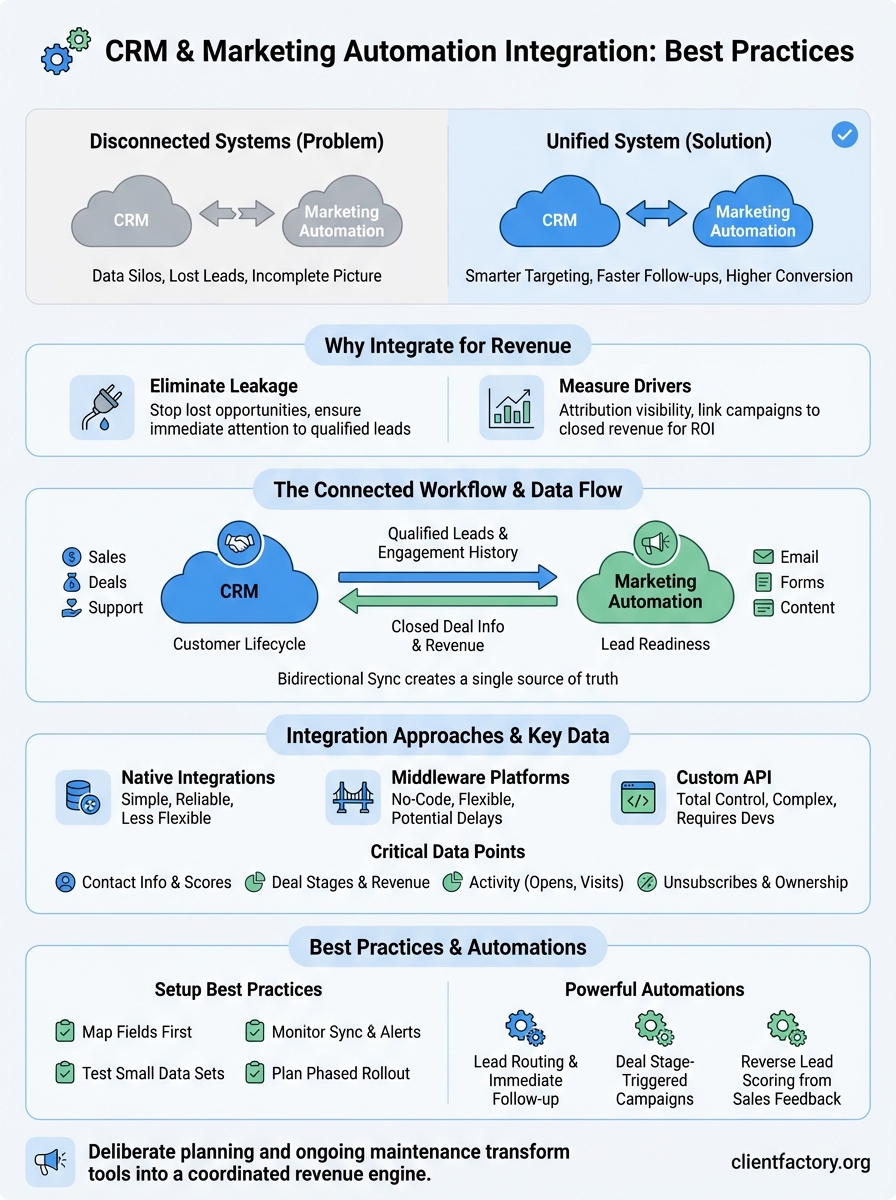
When you connect these platforms, bidirectional data sync replaces the manual handoff that breaks most sales processes. Your marketing automation system pushes qualified leads directly into your CRM, complete with every interaction they had before sales engagement. Lead scoring data transfers automatically, so your sales rep sees exactly why this prospect qualified. Campaign history, email engagement metrics, and content consumption patterns all become visible inside the same interface where your team manages deals.

Integration turns scattered data points into a complete customer story that both teams can act on immediately.
The flow works in reverse too. Your CRM sends closed deal information back to your marketing platform, letting marketing see which campaigns actually generated revenue, not just leads. When a prospect goes cold or a deal closes, your marketing automation platform updates its segmentation rules automatically. If someone converts from lead to customer, they exit nurture sequences and enter customer retention campaigns without anyone clicking a button. This automated workflow coordination means you stop sending product demos to existing clients or re-targeting people who already hired you.
Technical integration methods vary, but most platforms connect through native integrations, third-party middleware, or API connections. Native integrations work out of the box with minimal setup. Middleware platforms like Zapier or Make handle the data transfer between systems that don’t talk directly to each other. Custom API integrations give you the most control but require developer resources to build and maintain. Regardless of method, the goal stays the same: accurate, timely data that flows where your team needs it without manual intervention.
Why integration matters for revenue teams
Your revenue depends on coordination between marketing and sales, yet most businesses run these functions on separate platforms that never communicate. This disconnect creates measurable financial damage every quarter. Marketing generates leads that sales never contacts because notifications get missed. Sales closes deals without telling marketing which campaigns actually worked, so your team keeps spending money on channels that don’t convert. Meanwhile, prospects receive contradictory messages because neither team knows what the other just sent. For service businesses and law firms competing on responsiveness, these gaps directly reduce your close rate and extend sales cycles.
Eliminating revenue leakage from disconnected data
Data silos cost you qualified opportunities every single week. When your marketing automation platform doesn’t sync with your CRM, leads sit unassigned for hours or days while your competitors respond in minutes. Your sales team wastes time on unqualified prospects because they can’t see lead scores or engagement history. You lose track of follow-ups because tasks exist in one system but not the other. Integration fixes this by creating automatic lead routing, complete engagement histories, and unified task management that prevents prospects from falling through cracks between platforms.
CRM and marketing automation integration turns revenue leakage into revenue capture by ensuring every qualified lead receives immediate, informed attention.
Measuring what actually drives revenue
Attribution becomes possible when your systems share data freely. You finally see which marketing campaigns generated clients, not just clicks. Your marketing team stops guessing which content resonates because they track closed revenue by source, not just lead volume. Sales reps provide feedback that automatically updates lead scoring models, improving qualification accuracy over time. This closed-loop reporting lets you cut spending on campaigns that generate leads sales can’t close while doubling down on channels that produce actual revenue. For businesses focused on ROI, this visibility transforms marketing from a cost center into a predictable revenue driver you can scale confidently.

When to integrate systems or use one platform
You face a fundamental choice before investing time and money into CRM and marketing automation integration: connect two best-of-breed tools or adopt an all-in-one platform that handles both functions. This decision affects your team’s daily workflow, your technology budget, and how quickly you can adapt to market changes. The right answer depends on your current scale, technical resources, and specific business requirements, not industry trends or vendor marketing claims.
When separate systems make sense
Specialized platforms outperform general-purpose tools when you need advanced capabilities in either marketing or sales. Your law firm might require sophisticated case management features inside your CRM that no marketing platform offers. Your service business might run complex multi-touch attribution models that demand enterprise marketing automation capabilities beyond what CRM vendors build. Integration lets you choose industry-specific CRM solutions alongside marketing platforms that excel at demand generation without compromising on either side.
You should integrate separate systems when your team size justifies specialized roles and you have technical resources to maintain the connection. If you employ dedicated marketing operations staff and sales operations specialists, each team benefits from tools built for their specific workflows. Companies with development resources can build custom integrations that sync exactly the data fields they need while excluding irrelevant information. This approach gives you flexibility to swap one platform without rebuilding your entire stack, protecting your investment as vendors merge, pivot, or raise prices.
Integration between specialized platforms delivers superior functionality when your team has grown large enough to justify the added complexity and maintenance overhead.
When all-in-one platforms work better
Unified platforms eliminate integration headaches for small teams running lean operations. You avoid syncing errors, reduce vendor relationships, and give every team member access to complete customer data without technical setup. Your monthly software costs stay predictable because you pay one vendor instead of managing multiple contracts with different renewal dates. For service businesses and law firms under 25 employees, this operational simplicity often outweighs the feature depth you gain from specialized tools.
Choose an all-in-one system when you lack dedicated technical staff to maintain integrations. Native platforms handle updates automatically without breaking data flows between modules. Your team learns one interface instead of context-switching between applications, which reduces training time and user adoption friction. These platforms work best when your marketing and sales processes align closely with the vendor’s built-in workflows rather than requiring heavy customization.
Integration approaches and key data flows
You connect CRM and marketing automation systems through three primary technical methods, each with different setup complexity and maintenance requirements. Native integrations offer the simplest path when your platforms already support direct connections. These pre-built connectors sync data automatically once you authenticate both accounts and map your fields. Middleware platforms like Zapier or Make handle connections between systems that don’t talk directly, giving you drag-and-drop workflow builders without custom code. Custom API integrations provide the most control but require developer resources to build and maintain over time.
Native integrations and pre-built connectors
Most major CRM and marketing automation platforms ship with built-in connections to popular counterparts. You authenticate both systems, select which data fields to sync, and set your refresh frequency. These integrations handle bidirectional updates automatically, pushing new leads from marketing to sales while pulling closed deal information back to marketing. Setup takes hours instead of weeks, and updates from vendors maintain compatibility as platforms evolve. You sacrifice some customization flexibility, but you gain reliability and support directly from your software providers.
Middleware platforms and custom APIs
Third-party integration platforms bridge the gap when your systems lack native connections. You build workflows that trigger when specific events occur, like a new contact creation or deal stage change. These tools require no coding knowledge but may introduce slight delays in data syncing depending on your plan tier. Custom API integrations eliminate those delays and give you complete control over which data moves where, but you need technical staff to write the code, monitor for errors, and update connections when vendors change their APIs.
The integration method you choose should match your technical resources and data freshness requirements, not just your initial budget.
Critical data that flows between systems
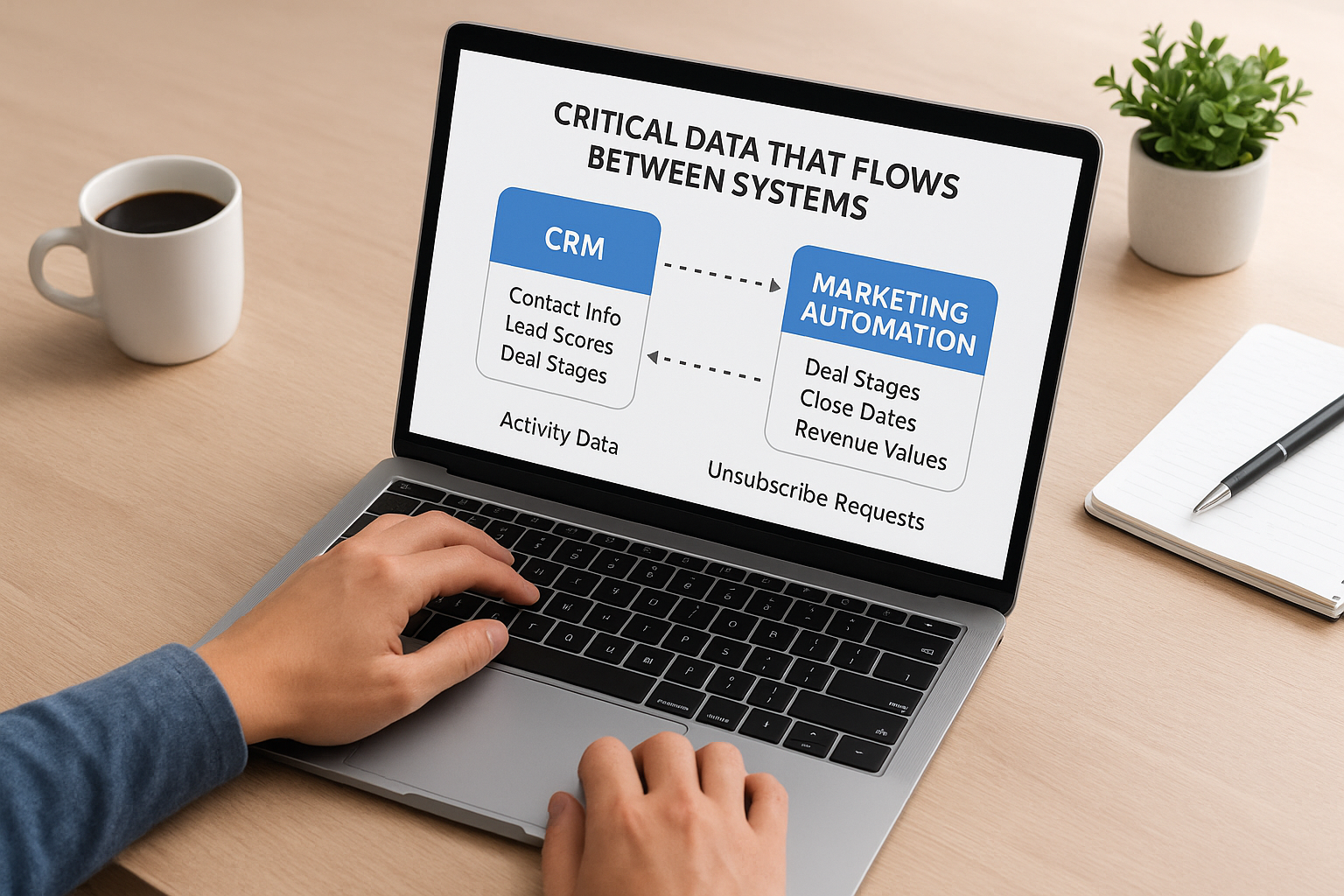
Contact information and lead scores must sync from marketing automation to your CRM so sales reps see complete prospect profiles. Your CRM pushes deal stages, close dates, and revenue values back to marketing for attribution reporting. Activity data like email opens, website visits, and content downloads flows into your CRM to inform sales conversations. Marketing automation platforms need unsubscribe requests and contact ownership changes from your CRM to prevent messaging mistakes. This crm and marketing automation integration creates the unified customer view that drives coordinated revenue team performance.
Best practices for a reliable integration
Your crm and marketing automation integration only delivers value when it runs consistently without breaking your team’s workflow. Poorly planned connections create duplicate records, sync conflicts, and data gaps that destroy trust in both systems. You need deliberate setup practices that prevent common failures before they impact your sales pipeline. The difference between integrations that teams love and those they work around comes down to upfront planning and ongoing maintenance rather than expensive software choices.
Map data fields before you connect anything
Field mapping determines which information flows where between your systems, and mistakes here cascade into every record your platforms touch. You must identify which data fields exist in both systems and decide how they correspond to each other. Your marketing automation platform might call something “Company Name” while your CRM uses “Account Name.” These fields need explicit mapping so new contacts don’t create duplicate company records. Document every mapped field in a spreadsheet before configuring your integration, and standardize field formats like phone numbers and dates so data syncs cleanly in both directions.
Clean field mapping prevents the duplicate records and data inconsistencies that make teams abandon integrated systems within months.
Test with small data sets first
Production data mistakes affect thousands of records and take weeks to clean up, so you test integrations in sandbox environments with sample contacts before going live. Create 10 to 20 test contacts that represent different scenarios like existing customers, new leads, and unsubscribed prospects. Run these through your integration and verify each field appears correctly in both systems. Check that your sync timing works as expected and updates happen within acceptable time frames for your sales process. If you find errors during testing, you fix them without impacting real customer data or disrupting your team’s daily work.
Monitor sync health and set up alerts
Integrations fail silently when APIs change or authentication tokens expire, leaving you with outdated data across systems. You need automated monitoring that alerts your team when syncs fail, records get rejected, or sync volumes drop unexpectedly. Most integration platforms offer error logging and email notifications when problems occur. Assign one person to review these logs weekly and investigate any repeated errors. Document your error handling procedures so anyone on your team can troubleshoot common issues like field validation failures or API rate limits without waiting for technical support.
Automations to build once systems connect
Your crm and marketing automation integration unlocks workflow automations that eliminate manual tasks and respond to customer behavior faster than any human team could. These automations run continuously in the background, moving prospects through your funnel based on real-time data signals from both systems. You stop relying on sales reps to remember follow-up tasks or marketing teams to manually segment lists after deal stages change. The most valuable automations combine trigger events from your CRM with actions in your marketing platform, creating a coordinated response that feels personalized to every prospect.
Lead routing and immediate follow-up sequences
Automatic lead assignment distributes new qualified leads to the right sales rep based on territory, product interest, company size, or lead score. You set rules once and your system routes every incoming lead within seconds of qualification. Your marketing automation platform simultaneously enrolls that prospect in a welcome sequence customized to their specific interest area. If your sales rep doesn’t contact the lead within 24 hours, your automation sends a reminder task to their manager and triggers an additional nurture email to keep the prospect engaged while sales catches up.
Automated lead routing eliminates the minutes and hours that prospects spend waiting for someone to notice they raised their hand, directly improving your response time metrics and close rates.
Deal stage triggered campaigns
Your marketing automation platform monitors CRM deal stage changes and automatically adjusts messaging for each prospect. When a deal moves to proposal stage, your system sends case studies and testimonials that reinforce buying confidence. If a deal stalls for more than two weeks, marketing launches a re-engagement campaign with fresh content while notifying the sales rep. Closed-won deals exit all sales sequences immediately and enter customer onboarding campaigns. Lost deals move into long-term nurture sequences that stay top-of-mind without pestering prospects who clearly said no.
Reverse lead scoring from sales feedback
You improve lead quality prediction by feeding sales outcomes back into your scoring model. When your CRM marks a lead as unqualified, your marketing automation platform automatically reduces the score weight for that lead source or characteristic. Deals that close quickly from specific industries or company sizes increase scoring for similar future leads. This continuous optimization loop means your lead scoring becomes more accurate every month without manual model adjustments.
How to pick tools and plan the rollout
Your software selection process should prioritize integration readiness over feature lists, because even the most powerful CRM or marketing automation platform becomes a liability when it can’t share data cleanly. You need to evaluate how each tool connects to your existing stack before comparing marketing features or sales capabilities. The rollout phase determines whether your team adopts or resists the new system, so you phase implementation carefully rather than forcing a company-wide switch overnight.
Evaluate integration capabilities before features
Native integration support matters more than any single feature when you choose platforms for crm and marketing automation integration. You check whether your shortlisted tools already connect to each other directly or require middleware platforms to sync data. Ask vendors for technical documentation on their APIs and review what data fields sync bidirectionally without custom development. Your evaluation should include questions about sync frequency limits, whether historical data imports automatically, and how the integration handles duplicate records. Tools with mature integration ecosystems save you months of technical troubleshooting and thousands in custom development costs.
Request a sandbox environment or trial period where you test the actual integration with your real data structure before committing to annual contracts. You build sample workflows that mirror your team’s daily operations and verify that data flows correctly under realistic conditions. Pay attention to error handling and whether the integration provides clear troubleshooting information when syncs fail. The platforms that seem powerful in demos often reveal integration limitations only after you attempt complex multi-step automations with your specific data architecture.
Choose platforms based on how reliably they share data with your existing tools, not how impressive their standalone feature sets appear in sales presentations.
Start with a pilot group and expand gradually
Your rollout begins with one sales team or marketing campaign rather than migrating your entire organization at once. You select a pilot group willing to provide honest feedback and work through initial configuration issues without disrupting critical deals. This contained approach lets you identify workflow gaps and fix integration problems before they affect your whole revenue team. You document every issue the pilot group encounters and resolve these systematically before adding more users to the integrated system.
Plan a three-month rollout timeline that moves from pilot to full deployment in stages. Your first month focuses on technical setup and pilot group testing. Month two addresses feedback and trains additional teams on refined workflows. The final month completes migration while monitoring adoption metrics and providing hands-on support to users struggling with new processes.
Next steps
Your successful crm and marketing automation integration depends on deliberate planning rather than reactive fixes after problems emerge. You start by documenting your current data structure and mapping exactly which fields need to sync between systems. Select platforms based on their integration capabilities with your existing tools, not standalone features that look impressive in demos. Launch with a small pilot group that tests workflows under real conditions before rolling out to your entire team.
This integration transforms disconnected tools into a coordinated revenue engine, but only when you maintain it properly. Schedule monthly audits of your sync health, review automation performance, and adjust lead scoring based on actual closed deals. Your team needs ongoing training as you refine workflows and add new automations over time.
Client Factory specializes in building client acquisition funnels that depend on clean data flows between your marketing and sales systems. Schedule a free conversion audit to identify integration gaps costing you qualified leads and discover how to fix them.
