

Email remains one of the most effective channels for turning prospects into paying clients, but choosing the right platform matters. Constant Contact email marketing has been a go-to solution for businesses looking to build relationships through automated campaigns and professional templates. Whether you’re evaluating it for the first time or comparing it against competitors, understanding what it actually delivers is essential before committing your budget.
This article breaks down Constant Contact’s features, pricing structure, and real-world performance. You’ll get a clear picture of what works, what falls short, and whether it fits your specific business needs. No fluff, just the practical information you need to make a smart decision.
At Client Factory, we help service businesses and law firms optimize every piece of their client acquisition funnel. Email marketing is a critical touchpoint in that process, and the platform you choose can significantly impact your conversion rates. Here’s everything you need to know about Constant Contact to determine if it belongs in your marketing stack.
Why email marketing still works for service firms
Service firms face a specific challenge: decision cycles are longer and trust matters more than in typical retail transactions. Email marketing addresses both issues directly by keeping your firm visible throughout the research phase while demonstrating expertise through valuable content. Unlike social media, where algorithms control visibility, your email list gives you direct access to prospects who have already shown interest in your services.
Your competitors might be investing heavily in paid ads, but those clicks disappear the moment budgets dry up. Email builds an owned asset that compounds over time. Each subscriber represents a potential client you can reach without paying per impression, and the return on investment consistently outperforms other digital channels for service-based businesses.
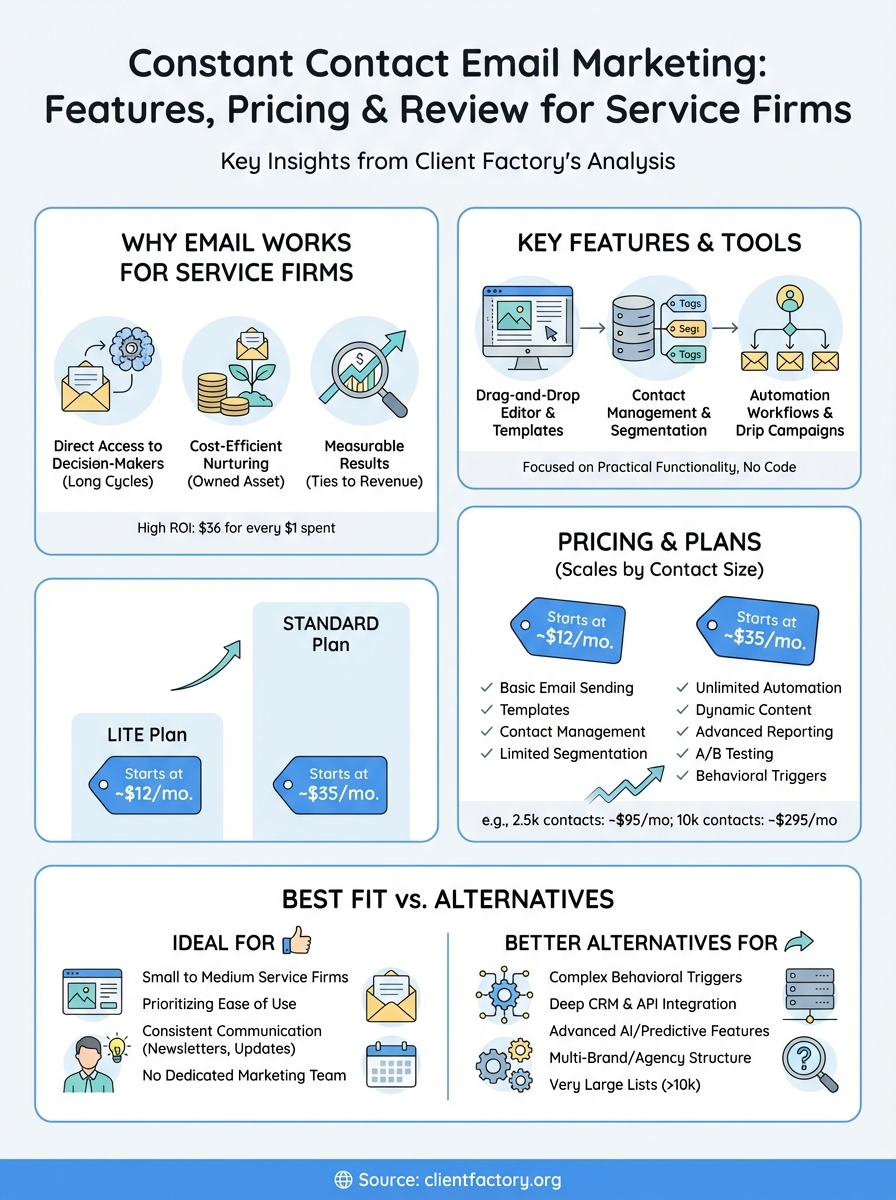
Email marketing generates $36 for every $1 spent, making it one of the highest-ROI channels available to service firms.
Platforms like constant contact email marketing make this process accessible even if you’re not a technical expert. The question isn’t whether email works, but how well you execute your strategy and whether your platform supports the specific workflows service firms need.
Direct access to decision-makers
Service firms sell to people who research thoroughly before committing. These prospects read multiple pieces of content and compare several providers before making contact. Email keeps you in front of them during this entire evaluation period without requiring them to remember your website URL or search for you again.
When someone subscribes to your list, they’re giving you permission to educate them over time. You control the message, the timing, and the sequence. This direct line matters more than social media followers because email subscribers convert at higher rates and represent warmer leads. They’ve taken a deliberate action that signals genuine interest rather than passive scrolling.
Cost efficiency compared to other channels
Paid advertising costs continue rising across all platforms. Every click costs money, and those costs compound when decision cycles stretch across weeks or months. Email marketing flips this model by letting you nurture leads at virtually no incremental cost once someone joins your list.
You pay based on list size, not message volume. Sending ten emails to your subscribers costs the same as sending one, which means you can stay top-of-mind without burning through budget. This efficiency becomes critical for service firms where client lifetime value justifies longer nurture sequences. The math works better when you’re not paying for every touchpoint.
Measurable results that tie to revenue
Service firms need to justify marketing spend with clear attribution. Email platforms provide detailed tracking on opens, clicks, and conversions that connect directly to revenue. You can see which messages drive consultation requests and which ones get ignored, then adjust your approach based on actual behavior rather than assumptions.
This data becomes more valuable over time. Patterns emerge showing which subject lines perform better, what content types generate responses, and when your audience engages most. You build institutional knowledge that improves results with each campaign. Compare this to brand awareness plays where attribution remains fuzzy and optimization depends on guesswork rather than hard numbers.
What Constant Contact email marketing is
Constant Contact email marketing is a cloud-based email marketing platform designed to help small businesses and service providers manage campaigns, build subscriber lists, and automate customer communication. You access it through a web browser, which means no software installation is required. The platform combines email creation tools with contact management, automation features, and basic analytics in a single interface that prioritizes ease of use over advanced complexity.
Founded in 1995, Constant Contact targets businesses that need professional email capabilities without requiring a dedicated marketing team. You’ll find the interface simpler than enterprise platforms like Salesforce Marketing Cloud, but more structured than basic newsletter tools. The system handles technical requirements like SMTP configuration and email authentication behind the scenes, letting you focus on message content rather than deliverability infrastructure.
Core platform capabilities
The platform centers on drag-and-drop email builders that let you create branded messages using pre-designed templates or starting from scratch. You upload your contact lists, segment them into groups, and send targeted campaigns based on criteria you define. Constant Contact also includes landing page builders and signup forms that connect directly to your email lists, creating a complete lead capture system without third-party integrations.
Beyond basic sending, you get access to automated email sequences triggered by subscriber actions like joining your list or clicking specific links. The system tracks opens, clicks, and conversions, presenting this data in dashboards that show campaign performance at a glance. Most users handle their entire email marketing operation within Constant Contact rather than connecting multiple tools to achieve similar results.
Who typically chooses this platform
Service firms, consultants, and professional practices make up a significant portion of Constant Contact’s user base. These businesses need reliable email delivery and professional templates but don’t require the advanced segmentation or API integrations that enterprise teams demand. You might choose constant contact email marketing if you’re running campaigns yourself or with a small team rather than managing complex multi-channel automation.
Small businesses generate 40% higher email open rates than enterprise companies, making platforms like Constant Contact particularly effective for service providers building direct client relationships.
The platform fits businesses sending regular newsletters, promotional offers, and educational content to established client bases. You won’t find the sophisticated behavioral triggers or predictive analytics available in higher-end tools, but you get everything needed to maintain consistent communication with prospects and clients.
Key features and tools inside Constant Contact
Constant Contact email marketing provides a focused set of tools that handle the complete email marketing workflow from message creation to performance tracking. You get access to template libraries, automation builders, and contact management systems that work together without requiring technical expertise. The platform prioritizes practical functionality over advanced features, which means you can launch campaigns quickly without navigating complex menus or configuration settings.
Email editor and template library
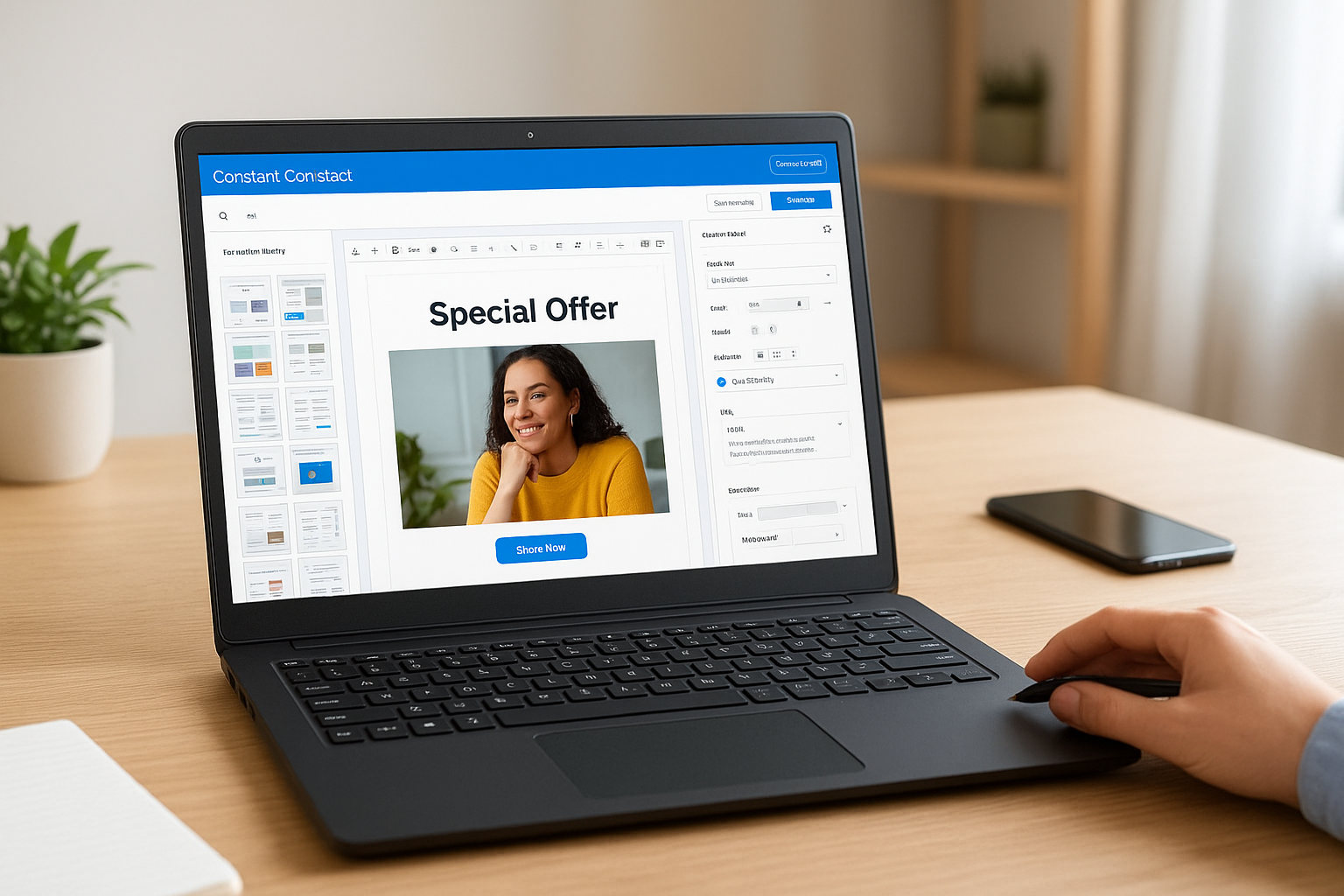
You build emails using a drag-and-drop editor that lets you add text blocks, images, buttons, and social media links by clicking and positioning elements where you want them. The template library includes hundreds of pre-designed layouts organized by industry and purpose, so you can start with a structure that matches your business type rather than designing from scratch.
Customization happens through simple controls that adjust colors, fonts, and spacing without touching code. You upload your logo, select brand colors, and the system applies these consistently across templates. The mobile preview shows exactly how messages appear on smartphones, and the editor automatically optimizes layouts for different screen sizes so your emails remain readable regardless of device.
Contact management and list organization
The platform stores your subscriber information in a unified database where you organize contacts using tags, custom fields, and list segments. You create segments based on criteria like signup source, engagement history, or demographic data, then send targeted campaigns to specific groups. This segmentation happens within the interface rather than requiring exports or external tools.
Segmented email campaigns generate 760% more revenue than broadcast sends, making Constant Contact’s built-in segmentation a critical feature for service firms.
Import processes accept CSV files or integrate with popular platforms to pull contacts directly. You track subscriber status, engagement metrics, and opt-out preferences automatically, ensuring you maintain clean lists that improve deliverability rates.
Automation and signup tools
You set up automated welcome sequences that trigger when someone joins your list, delivering a series of messages over days or weeks without manual intervention. The automation builder uses a visual workflow interface where you define triggers, delays, and conditions that determine which emails subscribers receive.
Signup forms embed on your website or function as standalone landing pages that capture contact information and add subscribers directly to your lists. You customize form fields, design elements, and confirmation messages to match your brand while Constant Contact handles the technical requirements for secure data collection and list management.
Constant Contact pricing and plan differences
Constant Contact email marketing operates on a tiered pricing model that scales based on your contact list size and the features you need. You choose between two primary plans: Lite and Standard, with costs increasing as your subscriber count grows. The platform charges monthly or annually, with annual commitments offering modest discounts. Understanding these tiers matters because you might outgrow your initial plan as your list expands or your automation needs become more sophisticated.
Core plan tiers and monthly costs
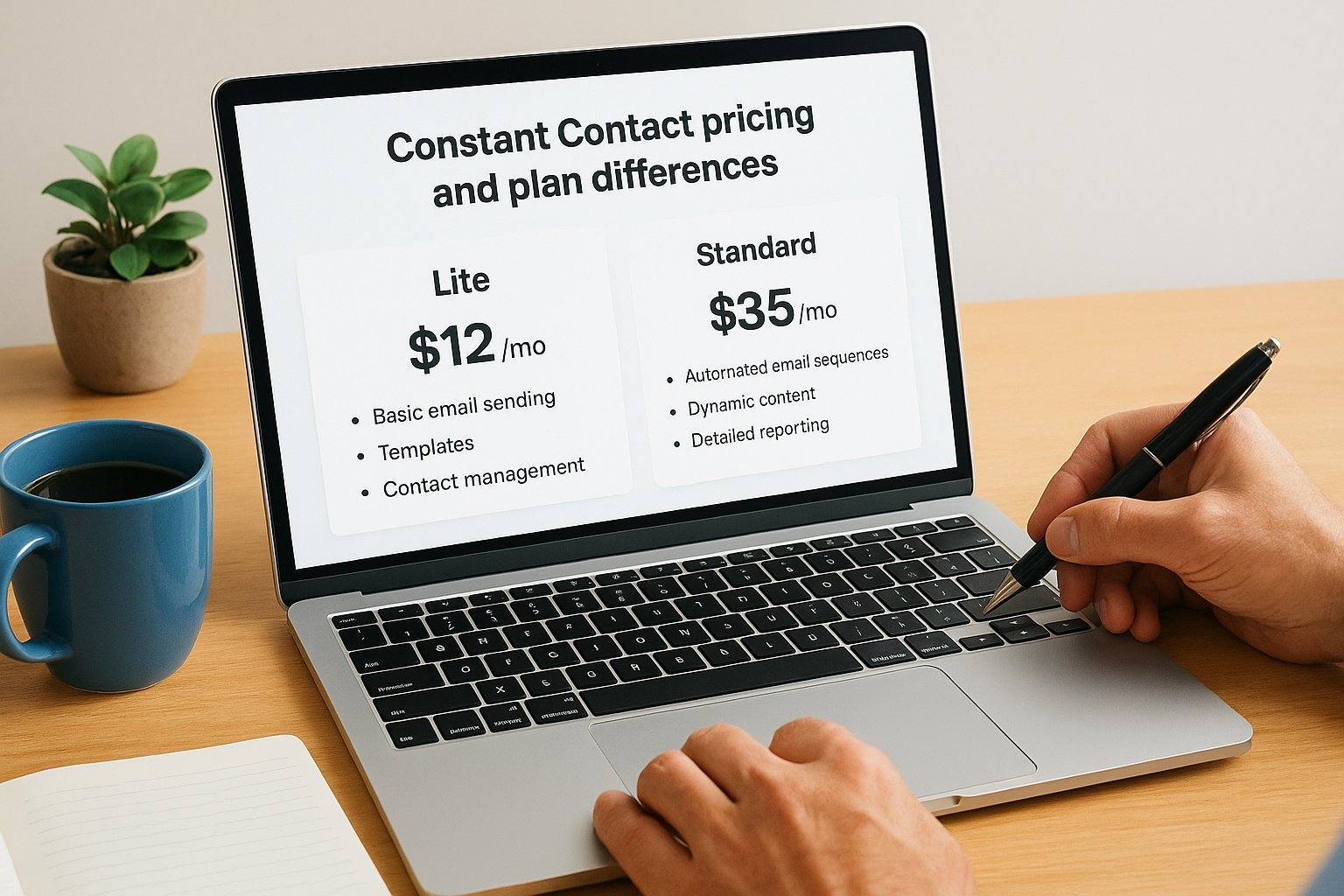
The Lite plan starts at $12 per month for up to 500 contacts and includes basic email sending, templates, and contact management. You get everything needed to launch campaigns but miss out on automation workflows and advanced segmentation. The Standard plan begins at $35 per month for the same contact volume and adds automated email sequences, dynamic content, and detailed reporting features that service firms typically require.
Businesses using automated email sequences see 320% more revenue than those sending only broadcast campaigns, making the Standard plan investment worthwhile for most service firms.
Both plans include unlimited email sends within your contact tier, which means you pay based on list size rather than message volume. This structure benefits businesses that communicate frequently with their audience since your costs remain predictable regardless of campaign frequency.
Contact volume impact on pricing
Pricing jumps significantly as your list grows. The Standard plan reaches $95 per month at 2,500 contacts, $145 per month at 5,000 contacts, and $295 per month at 10,000 contacts. These increases can surprise businesses experiencing rapid list growth, so you need to factor expansion costs into your email marketing budget.
You pay for total contacts stored in your account, not just active subscribers. If you maintain outdated or unengaged contacts, you’re paying for list bloat that doesn’t contribute to revenue. Regular list cleaning becomes financially important under this model since reducing your contact count by a few hundred can drop you into a lower pricing tier.
Feature differences between plans
The Lite plan limits you to three automated series and basic segmentation, which restricts your ability to create complex nurture sequences tailored to different prospect types. Standard unlocks unlimited automation, A/B testing on subject lines and content, polling and surveys, and behavioral triggers that send messages based on subscriber actions.
Service firms typically need Standard plan features because longer sales cycles require sophisticated follow-up sequences rather than simple newsletters. You gain access to social media posting tools and event marketing features that expand beyond email alone, creating a more complete marketing system within constant contact email marketing.
How Constant Contact handles contacts and lists
Constant Contact email marketing organizes your subscribers through a contact database system that separates individuals into manageable lists and segments. You upload contact information directly or connect external sources, and the platform assigns each subscriber a unique profile that stores their email address, engagement history, and any custom data you choose to track. This centralized approach keeps your audience organized without requiring manual spreadsheet management or duplicate entry across multiple systems.
Import methods and data requirements
You bring contacts into the platform through CSV file uploads, manual entry, or direct integrations with platforms like Shopify, WordPress, and Eventbrite. The system requires at minimum an email address for each contact, but you can include additional fields like names, phone numbers, and custom attributes that enhance segmentation capabilities. Files containing thousands of contacts upload in minutes, and Constant Contact automatically checks for formatting errors that might prevent successful imports.
Businesses with properly segmented email lists see 14.31% higher open rates than those using unsegmented broadcasts, making accurate data import critical for campaign success.
Integration options let you sync contacts automatically rather than performing manual uploads each time your list changes. You connect your CRM or e-commerce platform once, and new subscribers flow into your constant contact email marketing database without additional intervention.
Tagging and custom field options
You organize contacts using tags that identify subscriber characteristics like interests, purchase history, or engagement level. These tags function as flexible labels you apply manually or automatically based on subscriber behavior. Custom fields store additional information beyond basic contact details, such as company size, industry type, or specific service interests that matter for your targeting strategy.
The combination of tags and custom fields lets you create precise audience segments without maintaining separate lists for each variation. You might tag contacts as “consultation requested” and filter by a custom field indicating their budget range, then send targeted content to that specific group.
List hygiene and bounce management
The platform automatically removes hard bounces (invalid email addresses) from your active list and flags soft bounces (temporary delivery issues) for monitoring. You see bounce rates in your campaign reports, which helps identify potential deliverability problems before they damage your sender reputation. Constant Contact also tracks unsubscribe requests and processes opt-outs immediately to maintain compliance with email marketing regulations.
You manually remove inactive subscribers by filtering contacts who haven’t engaged with your emails over specific timeframes. This cleanup reduces your contact count, which directly lowers your monthly costs while improving overall engagement metrics that email providers use to assess sender quality.
Automation, segmentation, and personalization basics
Constant Contact email marketing moves beyond simple broadcast sending by letting you automate follow-up sequences and target specific subscriber groups based on their characteristics or behaviors. You create rules that determine which messages different contacts receive and when they receive them, eliminating manual campaign management while improving relevance. These capabilities matter because service firms need to nurture prospects over weeks or months, and personalized messaging converts better than generic announcements sent to your entire list.

Setting up automated email sequences
You build automation workflows using a visual editor that maps out the subscriber journey from trigger to final message. Common triggers include joining a specific list, clicking a particular link, or reaching a certain engagement threshold. Each workflow contains multiple emails separated by time delays you define, creating a drip sequence that educates prospects gradually rather than overwhelming them with information at once.
The system sends these automated messages without requiring your involvement after you activate the workflow. You might create a five-email sequence introducing new subscribers to your services, with messages spaced three days apart. Contacts enter automatically when they meet your trigger criteria and progress through the sequence based on your timing rules.
Automated email campaigns generate 320% more revenue than broadcast emails, making workflow automation essential for maximizing your constant contact email marketing investment.
Segmentation strategies that improve targeting
You divide your contact database into smaller groups based on shared attributes like signup source, geographic location, or engagement history. These segments let you send relevant content to specific audiences rather than broadcasting identical messages to everyone. A law firm might segment by practice area interest, sending estate planning content to contacts who downloaded that guide while criminal defense prospects receive different messaging.
Segmentation happens through filters you apply to your master contact list rather than creating separate disconnected databases. You combine multiple criteria to create highly specific groups, such as contacts who opened your last three emails and live in a particular state.
Personalization options within messages
You insert merge tags into your email content that automatically populate with subscriber-specific information like first name, company name, or custom field data. This personalization makes messages feel individually crafted even when sent to thousands of contacts simultaneously. Beyond basic name insertion, you can vary entire content blocks based on subscriber attributes, showing different service descriptions to different audience segments within a single campaign.
Dynamic content features let you create one email template with multiple variations that display conditionally based on subscriber data. You define rules determining which version each contact sees, reducing the number of separate campaigns you need to build and manage.
Reporting, deliverability, and compliance essentials
Constant Contact email marketing provides performance data that shows exactly how your campaigns perform and identifies areas requiring improvement. You access dashboard reports that track opens, clicks, bounces, and unsubscribes across individual campaigns and your overall account. Understanding these metrics helps you optimize future sends rather than guessing what resonates with your audience. The platform also handles technical deliverability requirements and legal compliance automatically, reducing the risk of landing in spam folders or violating email marketing regulations.

Campaign performance metrics and analysis
You review detailed reports showing open rates, click-through rates, and conversion tracking for each campaign you send. The system breaks down these metrics by device type, geographic location, and time of day, revealing patterns that inform your sending strategy. You see which specific links generated clicks and which subject lines drove higher open rates, giving you concrete data for improving subsequent campaigns.
Email campaigns with personalized subject lines see 26% higher open rates, making performance tracking essential for identifying what resonates with your specific audience.
Comparison features let you benchmark your results against industry averages provided by Constant Contact, helping you understand whether your performance meets typical standards for your business type. You export raw data for deeper analysis or integration with external reporting tools when you need insights beyond the built-in dashboards.
Inbox placement and sender reputation
The platform manages SMTP configuration and authentication protocols like SPF and DKIM that verify your emails come from legitimate sources. These technical elements happen behind the scenes, but they directly impact whether your messages reach inboxes or get filtered as spam. Constant Contact maintains relationships with major email providers that help preserve deliverability rates for users following best practices.
You monitor bounce rates and spam complaints through your account dashboard, which provides early warning when deliverability problems emerge. The system automatically removes invalid addresses and processes unsubscribe requests to maintain list quality that protects your sender reputation.
Legal compliance requirements
Constant Contact includes required elements like unsubscribe links and physical mailing addresses in every email you send, ensuring compliance with CAN-SPAM regulations. You maintain subscriber consent records through the platform’s signup forms, which document when and how contacts joined your list. The system also supports GDPR requirements for European contacts by providing tools to manage data access requests and deletion requirements that apply to international audiences.
How to set up your first campaign step by step
You launch your first constant contact email marketing campaign through a straightforward process that takes fifteen to thirty minutes once you understand the workflow. The platform guides you through each stage using a sequential setup wizard that prevents you from skipping critical elements like recipient selection or required legal text. Starting your first campaign feels less overwhelming when you break it into distinct phases rather than trying to configure everything simultaneously.
Choose your campaign type and template
You begin by clicking the Create button in your dashboard and selecting Email from the campaign types. Constant Contact presents its template library organized by purpose, such as announcements, newsletters, or promotional offers. You preview templates by hovering over thumbnails and select one that matches your content structure rather than your exact visual preferences, since you’ll customize colors and imagery in the next step.
Consider your primary campaign goal before choosing a template. A template designed for event invitations includes RSVP buttons and date-focused layouts, while newsletter templates emphasize content blocks and article summaries. Picking the right starting point reduces the customization work required later.
Add content and customize design
You enter the drag-and-drop editor where you replace placeholder text with your actual message and swap template images for your own visuals. The editor lets you add new content blocks by dragging elements from the sidebar into your email body, including text sections, images, buttons, and social media links. You adjust colors by clicking any element and selecting from your brand palette or entering specific hex codes that match your visual identity.
Emails with clear calls-to-action see 371% higher click rates than those without prominent action buttons, making design decisions directly impact campaign performance.
Preview your message using the mobile and desktop views to verify text remains readable and buttons stay clickable across devices. Check that your primary call-to-action appears visible without scrolling, since readers make decisions about engagement within seconds of opening your email.
Configure recipients and send settings
You select which contacts receive your campaign by choosing entire lists or specific segments you created earlier. The platform displays your selected audience size and warns you if you’re about to exceed your plan limits. You write a compelling subject line that clearly indicates your message content without relying on clickbait tactics that damage long-term trust.
Schedule your send immediately or choose a specific date and time based on when your audience typically engages with email. Review the final checklist that confirms you’ve included required elements like unsubscribe links, then click Send to launch your campaign.
When Constant Contact fits and when it doesn’t
Constant Contact email marketing works best for specific business types and marketing approaches, but it doesn’t solve every email marketing challenge equally well. You need to match your actual requirements against what the platform delivers rather than assuming any email tool will meet your needs. The right fit depends on your team size, technical expertise, and campaign complexity rather than just your budget or industry category.
Ideal use cases for service businesses
You benefit most from Constant Contact when you run a small to medium-sized service firm that needs reliable email delivery without building complex automation workflows. Law practices sending monthly newsletters, consulting firms nurturing prospects through educational content, and professional services maintaining client relationships through regular updates all fit this profile perfectly. The platform handles these straightforward communication patterns without requiring dedicated marketing staff or technical configuration.
Service businesses using email marketing consistently see 40% higher client retention rates than those relying solely on sporadic outreach, making platforms like Constant Contact valuable for relationship maintenance.
Your business fits well if you prioritize ease of use over advanced features and prefer pre-built templates to custom designs. The drag-and-drop interface lets you launch campaigns quickly without learning HTML or hiring designers. You also benefit when your email volume justifies the monthly cost but doesn’t require the sophisticated segmentation that enterprise platforms provide.
Scenarios where alternatives work better
Constant Contact falls short when you need deep CRM integration that syncs bidirectionally with your sales process or connects to custom applications through robust API access. Businesses running complex behavioral triggers based on website activity, purchase patterns, or multi-channel engagement sequences often outgrow the platform’s capabilities. You face limitations when your marketing strategy demands advanced features like predictive sending, AI-powered content optimization, or detailed attribution modeling across multiple touchpoints.
The platform struggles for businesses managing multiple brands or sub-accounts within a single organization since it lacks the hierarchical structure that agencies and franchises require. You might find better options if your team includes experienced email marketers who want granular control over deliverability settings, custom SMTP configurations, or advanced testing beyond basic A/B subject line comparisons. Budget becomes a concern when your contact list exceeds 10,000 subscribers, as pricing jumps significantly while feature sets remain relatively basic compared to competitors at similar price points.
Final take
Constant Contact email marketing delivers reliable campaign management and straightforward automation for service businesses that prioritize ease of use over complex features. You get professional templates, solid deliverability, and enough segmentation tools to handle most client nurturing needs without requiring technical expertise or dedicated marketing staff. The platform works particularly well when you’re building consistent communication habits rather than running sophisticated multi-channel campaigns that demand advanced behavioral triggers or deep CRM integration.
Your choice ultimately depends on matching platform capabilities to your actual marketing requirements rather than paying for features you won’t use or struggling with limitations that slow your growth. Service firms often succeed with simpler tools that they actually implement consistently. If you need help evaluating whether constant contact email marketing fits your specific client acquisition strategy or want to optimize your entire funnel beyond just email, Client Factory specializes in building data-driven systems that turn marketing activity into measurable client growth for service businesses and law firms.
