

Picking the right landing page builder can make or break your conversion rates. At Client Factory, we build and optimize client acquisition funnels every day for service businesses and law firms, which means we’ve spent serious time inside nearly every major platform on the market. When clients ask us to compare landing page builders, we don’t point them to a spec sheet. We walk them through what actually matters: ease of use, integration options, pricing, and how well each tool converts.
That hands-on experience is exactly what shaped this guide. We’ve tested these tools across real campaigns with real ad spend behind them, so the pros and cons you’ll read here come from practical use, not surface-level feature lists. Whether you’re launching your first funnel or replacing a tool that isn’t pulling its weight, you need a clear picture of what’s out there before committing your budget.
Below, you’ll find 13 landing page builders broken down by features, pricing, and honest pros and cons, everything you need to make a confident decision and start turning more clicks into clients.
1. Client Factory
Client Factory is not a self-serve tool, and that distinction matters. When most people compare landing page builders, they’re evaluating software they’ll use themselves. Client Factory is a done-for-you service that builds, manages, and optimizes your entire client acquisition funnel from the ground up. If you want results without becoming a part-time marketer, this option belongs at the top of your list.
Best for
Service businesses and law firms with an active or planned paid advertising budget are the core fit here. If your business depends on booking consultations, phone calls, or intake appointments, Client Factory is built specifically for that conversion path. It’s not designed for e-commerce brands or solo marketers who want to control every pixel themselves.
What you get
When you work with Client Factory, you receive a custom-built landing page designed around your specific offer and target audience, not a generic template with your logo dropped in. That page sits inside a complete funnel that includes ad campaign management, structured lead capture, and follow-up automation that keeps your pipeline moving. Their AI assistant also engages new leads immediately after form submission, which keeps your response time sharp even outside business hours.
A landing page without a connected follow-up system loses most of its value the moment a prospect bounces without booking.
How the process works
Everything starts with a free conversion audit of your current marketing setup. That audit identifies exactly where you’re losing leads and what your funnel needs before a single dollar goes toward ads. From there, the Client Factory team builds your full acquisition system and handles ongoing campaign optimization, so performance compounds over time rather than plateauing after the first week.

Pros and cons
The main trade-off with Client Factory is direct control. You won’t be logging in to swap headlines or edit images yourself. Here’s an honest breakdown:
- Done-for-you service: No software to learn, no design decisions to make
- Full-funnel scope: Your landing page connects directly to ads, capture, and follow-up
- Experienced team: U.S.-based specialists with over 30 years in client acquisition
- Ramp-up period: Results build over weeks, not immediately after launch
- Budget requirement: The model works best when paired with a real paid traffic spend
Pricing
Client Factory does not publish flat-rate packages because every engagement is scoped to your specific goals and ad budget. You start with a free funnel audit, which gives you a clear picture of what your setup actually needs before any commitment changes hands. To get a proposal tailored to your business, visit clientfactory.org and book a call directly with their team.
2. Unbounce
Unbounce has been around since 2009 and is one of the most recognized names when marketers compare landing page builders. It targets digital marketers and agencies who want professional-grade conversion tools without needing a development team behind them.
Best for
Unbounce works best for marketing teams and agencies running multiple paid campaigns simultaneously. If you manage Google Ads or Meta Ads at scale and need a library of landing pages that you can test, duplicate, and iterate on quickly, this platform gives you that infrastructure.
Standout features
Unbounce’s drag-and-drop builder is genuinely flexible, and it ships with over 100 pre-built templates organized by campaign type. The platform also includes Smart Copy, an AI writing assistant that helps you generate and rework landing page text directly inside the editor. You can build pages fast without starting from scratch every time.
The combination of flexible templates and built-in AI copy tools is one reason Unbounce keeps a loyal base among performance marketers.
Testing and optimization tools
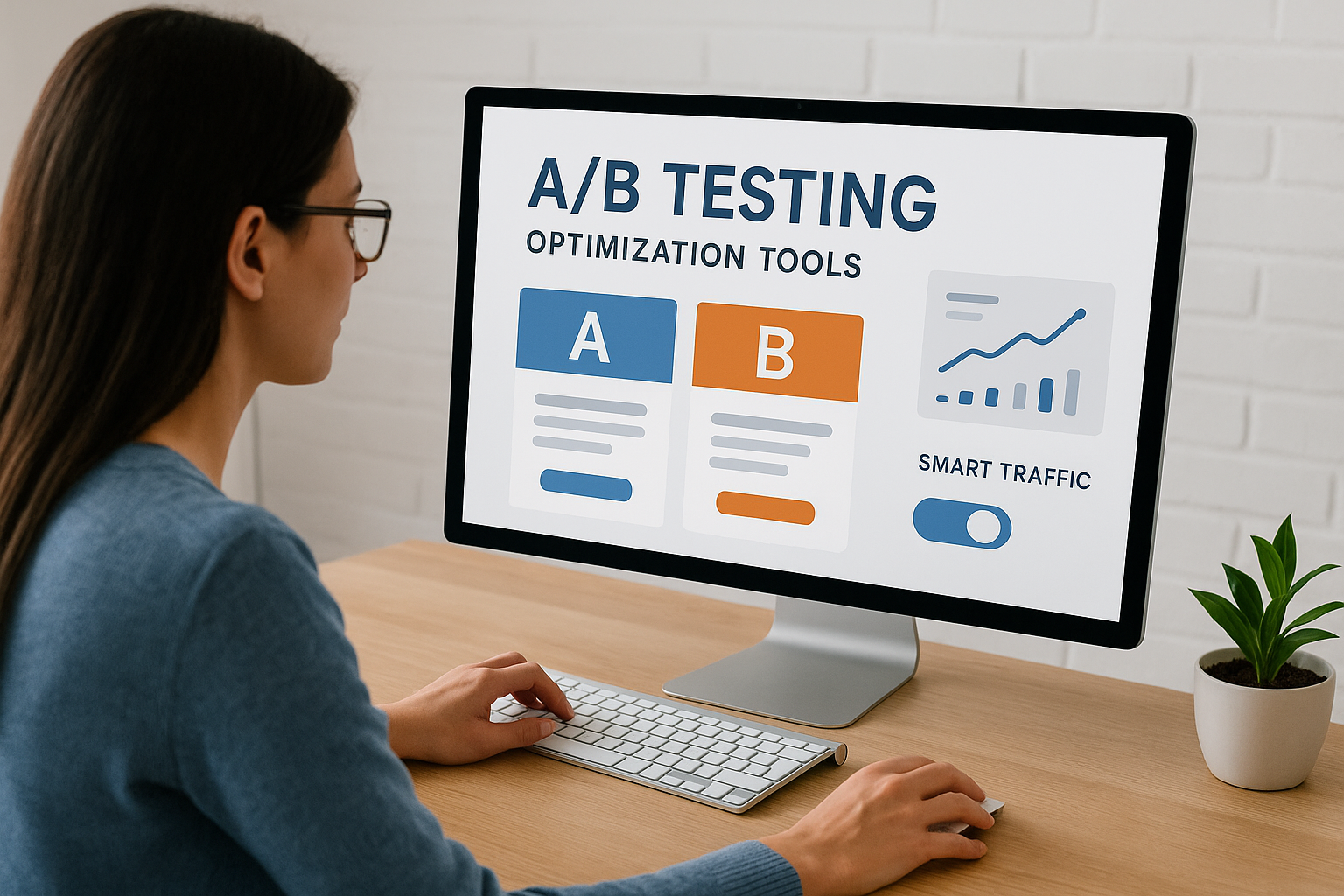
Unbounce includes both A/B testing and Smart Traffic, which is its AI-driven feature that automatically routes visitors to the page variant most likely to convert for them. Smart Traffic starts working with as few as 50 visits, which makes it useful earlier in a campaign than most traditional split-testing setups. Both tools live inside the same dashboard, so you don’t need a third-party testing tool layered on top.
Publishing and integrations
You can publish Unbounce pages to a custom domain, a WordPress site, or directly via the Unbounce subdomain. It connects natively with HubSpot, Mailchimp, Salesforce, Zapier, and most major email and CRM platforms. Setup is straightforward, and most integrations activate without custom code.
Pricing
Unbounce offers three paid tiers. Build starts at $99/month, Experiment at $149/month, and Optimize at $249/month. All plans include unlimited landing pages, and pricing scales based on conversion volume and feature access.
3. Instapage
Instapage sits at the premium end of the market when you compare landing page builders for enterprise-level performance. The platform focuses heavily on post-click optimization, which means it goes beyond building pages and into making those pages work harder for every visitor who lands on them.
Best for
Instapage is built for larger marketing teams and enterprise advertisers running high-traffic paid campaigns. If you’re spending serious money on Google Ads or Meta Ads and need to squeeze more return from every click, the platform’s personalization and analytics depth gives you the leverage to do that at scale.
Standout features
Instapage offers a pixel-perfect drag-and-drop builder with no column or grid restrictions, which gives you precise design control that most builders don’t match. The platform also includes AdMap, a visual tool that connects your ads directly to specific landing pages, so you can maintain message match across your entire campaign structure without hunting through separate dashboards.
Message match between your ad copy and your landing page headline is one of the strongest levers for improving conversion rates.
Collaboration and workflow
Teams get a built-in real-time collaboration workspace where reviewers can leave comments directly on the page itself. That cuts out the back-and-forth of emailing screenshots or juggling version files. Approval workflows are built in too, so pages move from draft to live without getting buried in someone’s inbox.
Publishing and integrations
You can publish to a custom domain or directly through a WordPress plugin. Instapage connects natively with major platforms including Salesforce, HubSpot, Marketo, and Zapier. Most integrations activate without custom code, which keeps your tech stack manageable as your campaigns scale.
Pricing
Instapage offers a Create plan starting at $99/month billed annually. Enterprise pricing is custom and requires a direct conversation with their sales team. The platform carries a higher price point than most competitors, which makes it a better fit for teams with established ad budgets than for solo marketers testing the waters.
4. Leadpages
Leadpages targets small business owners and solo marketers who need to build conversion-focused landing pages without a steep learning curve. When you compare landing page builders by accessibility and value, Leadpages consistently lands near the top for teams operating with tighter budgets.
Best for
Leadpages works best for small businesses, freelancers, and coaches who need a reliable landing page tool without paying enterprise prices. If your priority is launching clean pages quickly and capturing leads through a straightforward setup, this platform covers the essentials without overwhelming you with features you won’t use.
Standout features
The platform includes a drag-and-drop editor with over 200 templates, all organized by conversion rate so you can prioritize what actually works. Leadpages also includes a built-in AI writing assistant for generating headlines and copy directly inside the editor. Every template is mobile-responsive by default, which saves you from manually optimizing each page for smaller screens after the fact.
Starting with a high-converting template gives your campaign a measurable head start over building a page from scratch with no performance data behind it.
Selling and lead capture options
Leadpages supports direct checkout through Stripe integration, so you can sell products or services without routing visitors through a separate platform. The built-in pop-up builder and alert bars give you additional lead capture touchpoints beyond the main page. Lead magnet delivery is built in as well, which means you can automatically send a file to new subscribers immediately after they opt in.
Publishing and integrations
You can publish your pages to a custom domain or a free Leadpages subdomain. The platform connects with major tools including Mailchimp, ActiveCampaign, HubSpot, and Zapier. WordPress users get a dedicated plugin that embeds pages directly inside their existing site without requiring custom code.
Pricing
Leadpages offers two main paid plans. Standard starts at $49/month and Pro at $99/month, both billed annually. A 14-day free trial is available on all plans before you commit.
5. Landingi
Landingi sits in the mid-market range when you compare landing page builders for volume and flexibility. The platform targets marketing agencies and growing businesses that need to manage multiple campaigns across different clients or products without crossing into enterprise pricing territory.
Best for
Landingi is a strong fit for agencies and in-house marketing teams that build landing pages at high volume. If you’re running several offers simultaneously or managing campaigns across multiple clients, the platform’s workspace organization and multi-user tools give you the structure that most solo-focused builders skip over entirely.
Standout features
Landingi ships with over 400 templates covering a wide range of industries and campaign types. The drag-and-drop editor supports full custom styling, and the platform includes a built-in AI section generator that builds entire page sections from a short text prompt. That feature speeds up production considerably when you need to launch multiple variants in a short window.
Generating full page sections with AI rather than just headline suggestions is a real time-saver for teams working at scale.
Building and scaling pages
Landingi includes a PageInsider tool that scores your landing page against conversion best practices before you hit publish. A/B testing is available across all paid plans, so you can run structured experiments without adding a separate testing tool to your stack. Bulk page duplication and campaign grouping make it practical to scale your page library without losing track of what belongs to which campaign or client.
Publishing and integrations
You can publish to a custom domain or a Landingi subdomain with a straightforward setup process. The platform connects natively with HubSpot, Mailchimp, ActiveCampaign, Salesforce, and Zapier. WordPress users get a dedicated plugin for embedding pages directly inside their existing site.
Pricing
Landingi offers a Lite plan starting at $29/month and a Professional plan at $69/month, both billed annually. A free plan with limited features is also available if you want to test the builder before putting money behind it.
6. Swipe Pages
Swipe Pages focuses on one thing most platforms treat as secondary: page load speed. When you compare landing page builders purely on mobile performance, Swipe Pages stands out because it builds Accelerated Mobile Pages (AMP) natively, which keeps load times under control even on slower mobile connections.
Best for
Swipe Pages is the right pick for performance marketers and direct response advertisers who run paid traffic primarily to mobile audiences. If a significant portion of your clicks come from mobile devices, slower load times are actively costing you conversions, and this platform is built specifically to close that gap without requiring any custom development work.
Standout features
The editor uses a modular drag-and-drop system that keeps page structure clean without sacrificing design flexibility. Swipe Pages also includes a built-in A/B testing tool and a conversion analytics dashboard, so you can spot what’s working without connecting a separate testing platform. Every page you build is optimized for speed from the moment you hit save.
Cutting even one second off your mobile load time can meaningfully lift your conversion rate, particularly on paid traffic campaigns where every click costs money.
Speed and mobile options
Swipe Pages generates AMP versions of your landing pages automatically, which means Google serves them from its cache rather than your own server. That technical advantage keeps your mobile pages fast regardless of your hosting setup. The platform also supports dynamic text replacement, so your ads and landing pages stay aligned without manual edits between campaigns.

Publishing and integrations
You can publish to a custom domain or a Swipe Pages subdomain through a clean, guided setup. The platform connects natively with Mailchimp, HubSpot, ActiveCampaign, and Zapier, which covers most standard marketing stacks without requiring custom code.
Pricing
Swipe Pages offers a Starter plan at $39/month and a Marketer plan at $89/month, both billed annually. A 14-day free trial is available across all plans before you commit.
7. ClickFunnels
ClickFunnels takes a different angle than most tools you’ll encounter when you compare landing page builders. Instead of positioning itself as a standalone page builder, ClickFunnels is built around complete sales funnel sequences, where your landing page is just the entry point into a structured conversion path.
Best for
ClickFunnels fits best with coaches, course creators, and info-product businesses that sell online programs or high-ticket offers. If your sales process runs through a specific sequence of pages, including an opt-in, a sales page, an order form, and an upsell, this platform is designed around that exact flow rather than expecting you to wire it together yourself.
Standout features
The platform ships with a library of pre-built funnel templates organized by goal type, so you’re selecting a complete sequence rather than building page by page. ClickFunnels also includes a built-in email broadcast and follow-up tool, which means you can manage your entire post-click sequence without connecting a separate email platform.
Building your funnel and your follow-up automation inside the same tool reduces the friction that normally comes from managing multiple disconnected platforms.
Funnel building and checkout
ClickFunnels handles order forms, one-click upsells, and order bumps natively inside the funnel editor. You don’t need a separate checkout tool or payment page plugin to capture revenue. The funnel flow editor gives you a visual map of how each page connects, which makes it easier to spot gaps in your sequence before you send traffic through it.
Publishing and integrations
You publish your funnels to a custom domain or a ClickFunnels subdomain through a guided setup. The platform connects with Stripe, PayPal, and major autoresponders including Mailchimp and ActiveCampaign. Zapier integration is also available for pushing data to other tools in your stack.
Pricing
ClickFunnels offers a Basic plan at $97/month and a Pro plan at $297/month, both billed monthly. Annual billing brings those costs down, and a 14-day free trial is available before you commit to either tier.
8. HubSpot
HubSpot is a full CRM platform that includes landing page building as one piece of a much larger system. When you compare landing page builders in isolation, HubSpot may not win on page-building features alone, but if your team already works inside HubSpot’s ecosystem, the native connection between pages, contacts, and follow-up automation makes it a compelling option worth evaluating seriously.
Best for
HubSpot works best for B2B marketing teams and growing businesses that want their landing pages tied directly to their CRM without configuring third-party integrations. If you’re already using HubSpot for email, sales pipelines, or customer management, adding landing pages inside the same platform keeps your data clean and your workflow streamlined from the first form submission onward.
Standout features
The HubSpot landing page builder includes drag-and-drop editing with a library of templates you can customize without touching code. Every page you build connects automatically to your contact database, which means new form submissions flow directly into your CRM the moment they happen. Smart content rules let you display different page content to visitors based on their lifecycle stage or existing list membership.
Connecting your landing pages directly to your CRM eliminates the data gaps that develop when separate tools handle capture and contact management independently.
CRM-powered personalization
HubSpot’s strongest differentiator is its ability to personalize landing page content based on who is visiting. Returning contacts can see different headlines, offers, or CTAs than first-time visitors. That level of on-page personalization is difficult to replicate in standalone landing page tools without significant custom development work behind it.
Publishing and integrations
Your pages publish through HubSpot’s hosted domain or a custom domain you connect through your DNS settings. Native integrations cover Salesforce, Gmail, Slack, and Zapier, with hundreds of additional connections available through the HubSpot App Marketplace.
Pricing
HubSpot’s Marketing Hub Starter begins at $20/month, with Professional at $890/month. Landing pages are available on paid tiers only, with no standalone page-builder plan.
9. Elementor
Elementor is a WordPress page builder plugin, and that distinction shapes everything about how you use it. Unlike dedicated landing page platforms, Elementor works directly inside your WordPress installation, giving you design control over your entire site, not just your landing pages.
Best for
Elementor fits best for WordPress site owners and web designers who want to build landing pages without leaving the platform they already use. If your website already runs on WordPress and you’re comfortable managing a self-hosted environment, Elementor saves you from running a separate landing page tool alongside your existing stack.
Standout features
Elementor’s front-end drag-and-drop editor gives you real-time visual editing directly on the page, with no preview toggle required. The plugin ships with a large template library covering a wide range of page types, and the Pro version unlocks form widgets, pop-ups, and a theme builder that extends your control beyond individual pages to headers, footers, and post layouts.
Elementor’s depth makes it one of the more powerful options when you compare landing page builders that operate inside WordPress specifically.
WordPress setup considerations
Because Elementor runs inside WordPress, your page performance depends heavily on your hosting environment and the other plugins you’re running alongside it. A bloated WordPress install can slow your landing pages down, which directly affects your conversion rates on paid traffic. You’ll want to pair Elementor with a fast, well-configured host and a minimal plugin footprint to keep load times competitive.
Testing and analytics options
Elementor does not include native A/B testing. To run structured split tests, you’ll need to connect a third-party tool such as Google Optimize or a dedicated testing plugin. Analytics similarly depend on external connections, typically Google Analytics or a compatible WordPress plugin, rather than a built-in dashboard.
Pricing
Elementor’s free version is available through the WordPress plugin directory. Elementor Pro starts at $59/year for one site, with higher tiers covering additional sites and premium features.
10. Wix
Wix is a hosted website builder that includes landing page functionality as part of its broader site-building toolkit. When you compare landing page builders, Wix sits in a different category from dedicated platforms because it’s designed to build full websites first, with landing pages treated more as a component of that structure than a standalone conversion tool.
Best for
Wix works best for small business owners and solopreneurs who want a single platform for their website and their lead capture pages without managing two separate subscriptions. If you need a basic web presence alongside simple landing pages and don’t require advanced A/B testing or deep funnel analytics, Wix covers both without a steep learning curve.
Standout features
Wix ships with a large template library spanning dozens of categories, giving you a strong visual starting point for most business types. The drag-and-drop editor is one of the more flexible on the market for general site building, and Wix’s built-in form tool captures leads directly into your contact dashboard without requiring a third-party integration for basic use cases.
Design and site-building flexibility
Wix gives you near-total freedom over page layout, which is useful for creating distinctive designs. The trade-off is that the same freedom produces inconsistent results if you don’t approach the build with a clear conversion structure in mind. Wix ADI (Artificial Design Intelligence) can generate a starter site automatically based on a short questionnaire, which speeds up initial setup considerably.
Design freedom without a conversion-focused structure often produces pages that look good but underperform on paid traffic.
SEO and performance considerations
Wix has improved its SEO toolset significantly in recent years, but page load speed can still be inconsistent depending on how your pages are built. Heavy design elements and embedded apps slow things down, which matters when you’re sending paid traffic to these pages and expecting tight conversion rates.
Pricing
Wix offers a free plan with Wix-branded hosting and paid plans starting at $17/month billed annually. Higher tiers unlock custom domains, increased storage, and additional marketing features.
11. Carrd
Carrd is a minimalist site builder designed for fast, single-page builds without the overhead of a full landing page platform. When you compare landing page builders across the full pricing spectrum, Carrd sits at the lowest cost tier with a feature set that reflects that positioning honestly.
Best for
Carrd works best for freelancers, creators, and solo marketers who need a clean one-page presence without paying for tools they won’t use. If your goal is a simple landing page with a form, a link list, or a basic offer summary, Carrd gets you there fast and keeps your monthly outlay minimal.
Standout features
The platform keeps its editing experience deliberately simple, offering a small library of clean templates you can customize through a lightweight interface. Carrd supports custom domains on paid plans, basic form collection with email notifications, video embeds, and full hosting through their infrastructure, which removes any server management from your plate entirely.
Carrd’s simplicity is its biggest advantage, but it’s also the ceiling that limits how far you can take a campaign built on it.
Limits to know before you commit
Carrd does not support several features that paid traffic campaigns typically require:
- No native A/B testing or built-in analytics dashboard
- No multi-step forms or conditional logic
- No upsell flows or checkout sequences
- Limited design customization compared to dedicated builders
You can embed Google Analytics through a code widget, but there is no built-in reporting layer that tracks conversions automatically.
Embeds, forms, and integrations
Paid Carrd plans support basic form submissions with email notifications, and you can connect forms to Mailchimp or push data through a Zapier webhook to reach other tools in your stack. Code embeds let you add third-party widgets including calendars, chat tools, or custom scripts, which extends the platform’s functional range modestly beyond its native feature set.
Pricing
Carrd offers a free plan covering up to three sites with Carrd branding included. Paid plans start at $19/year, making it one of the most affordable options across any serious landing page tool comparison.
12. Zapier Forms
Zapier Forms is not a traditional landing page builder, and understanding that distinction upfront saves you from mismatched expectations. It is a lightweight form and page tool built natively inside Zapier’s automation platform, designed primarily for users who want to capture data and trigger workflows without managing a separate tool. When you compare landing page builders in terms of automation depth, Zapier Forms occupies a narrow but genuinely useful niche for teams already operating inside the Zapier ecosystem daily.
Best for
Zapier Forms works best for operations teams and small businesses that need a simple intake form or lead capture page connected directly to existing automation workflows. If your primary goal is to trigger a Zap the moment someone submits a form rather than design a polished, high-converting landing page, this tool handles that path efficiently without adding another subscription to your monthly costs.
Standout features
The core value here is the tight, native connection between form submissions and Zapier’s automation library. Every form submission triggers a Zap automatically, which means you can route new leads to your CRM, send team notifications, or fire off a follow-up email without any manual integration configuration on your end.
The ability to connect form submissions to thousands of apps instantly is the main reason to choose Zapier Forms over a standalone tool.
Automation workflows you can build
With Zapier Forms, your submission data flows directly into any app in Zapier’s catalog. You can build multi-step workflows that handle several actions from a single submission event:

- Notify your sales team through Slack or email
- Add the contact to an email nurture sequence automatically
- Create a new CRM record without manual data entry
- Log submission data to a Google Sheet for reporting
Design and publishing options
Zapier Forms gives you a basic form layout with minimal design customization. You can share your form through a direct link or embed it into an existing page using a provided embed code. Branding options are limited, so if visual presentation matters to your campaign, this tool works better as a backend capture mechanism than as your main landing page.
Pricing
Zapier Forms is included at no additional cost inside any paid Zapier plan, with paid plans starting at $19.99/month billed annually. There is no standalone Forms product, so your access depends entirely on your existing Zapier subscription tier.
13. GetResponse
GetResponse started as an email marketing platform and has since expanded into a broader marketing suite that includes landing pages, funnels, and automation. When you compare landing page builders that bundle page creation with email marketing infrastructure, GetResponse is one of the few tools that covers both sides of that workflow inside a single subscription.
Best for
GetResponse fits best for small businesses and solo marketers who want their landing pages and email follow-up handled inside the same platform. If you’re running campaigns where the landing page and the follow-up sequence are equally important, this tool removes the integration work that typically sits between your capture form and your email list.
Standout features
The platform ships with over 200 landing page templates organized by campaign goal, covering lead generation, sales pages, and webinar registration. GetResponse also includes a built-in webinar hosting tool, which is a feature you won’t find in most dedicated landing page platforms and makes it practical for businesses that use online events as a core lead generation tactic.
Combining landing pages, email automation, and webinar hosting inside a single platform reduces the number of tools your team has to manage and pay for separately.
Email, funnels, and follow-up automation
GetResponse includes a visual automation builder that connects your landing page submissions directly to email sequences without requiring Zapier or any external connector. You can set up conditional logic inside your automation flows, so new leads follow different paths based on how they came in or what they clicked after opting in.
Publishing and integrations
You publish your pages to a custom domain or a GetResponse subdomain through a straightforward DNS setup process. The platform connects natively with Shopify, WordPress, Stripe, and PayPal, with Zapier available for extending your stack further.
Pricing
GetResponse offers a free plan covering up to 500 contacts, with paid plans starting at $19/month billed annually. Landing pages are available across all tiers.
Final picks and next steps
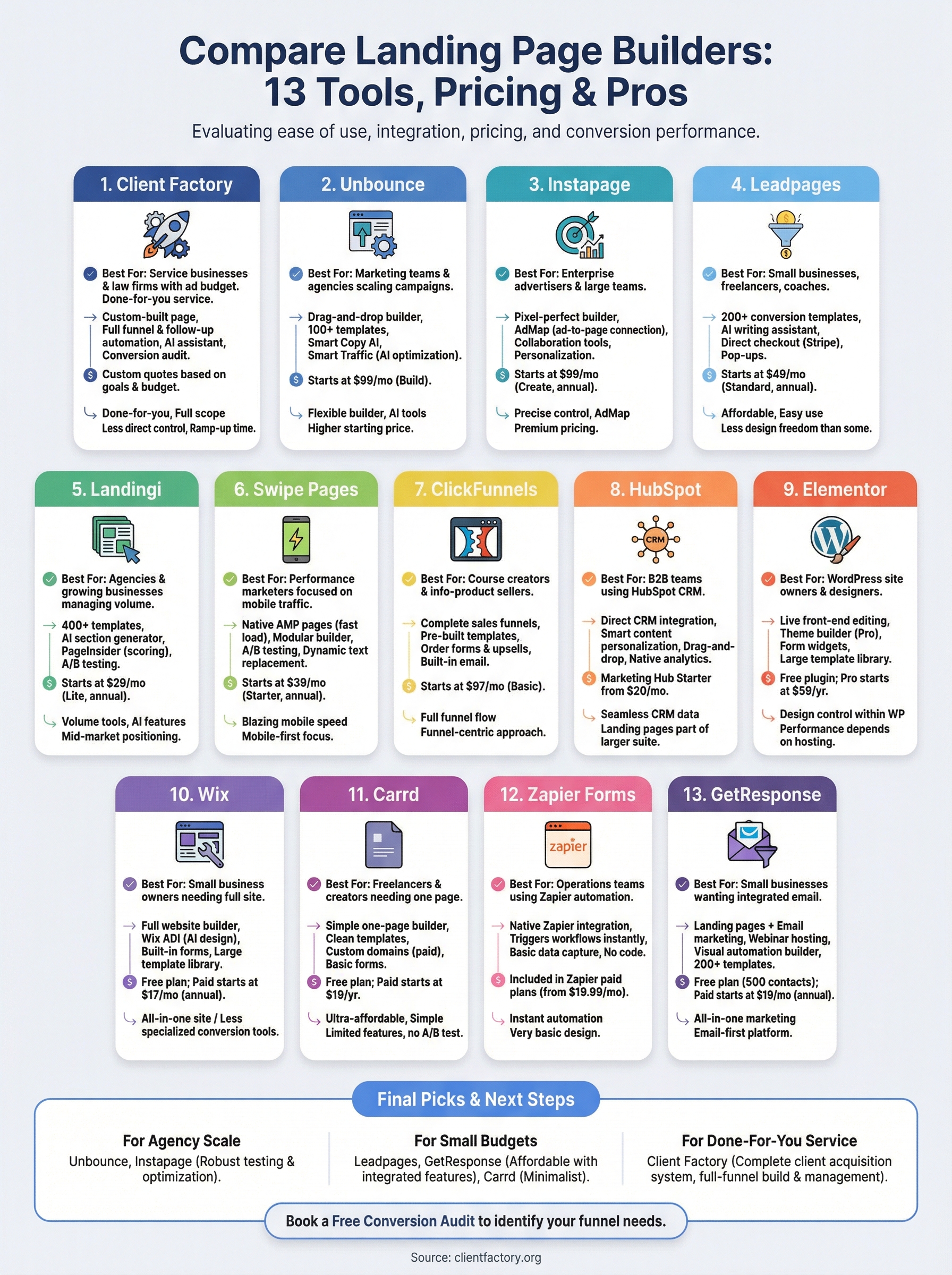
Every tool in this guide serves a different kind of marketer, and the right choice depends on what you actually need from your setup. If you want to compare landing page builders as standalone software tools, Unbounce and Instapage lead for agency-scale campaigns, Leadpages and GetResponse work well for smaller budgets with email follow-up baked in, and Carrd handles simple one-page needs at minimal cost.
For service businesses and law firms that want a complete client acquisition system without managing software themselves, Client Factory handles the full build for you, from the landing page to the ad campaign to the follow-up automation. Your time goes toward running your business, not tweaking templates. If you want to see exactly where your current funnel is losing clients before making any decisions, book a free conversion audit and get a clear picture of what your setup actually needs.
