

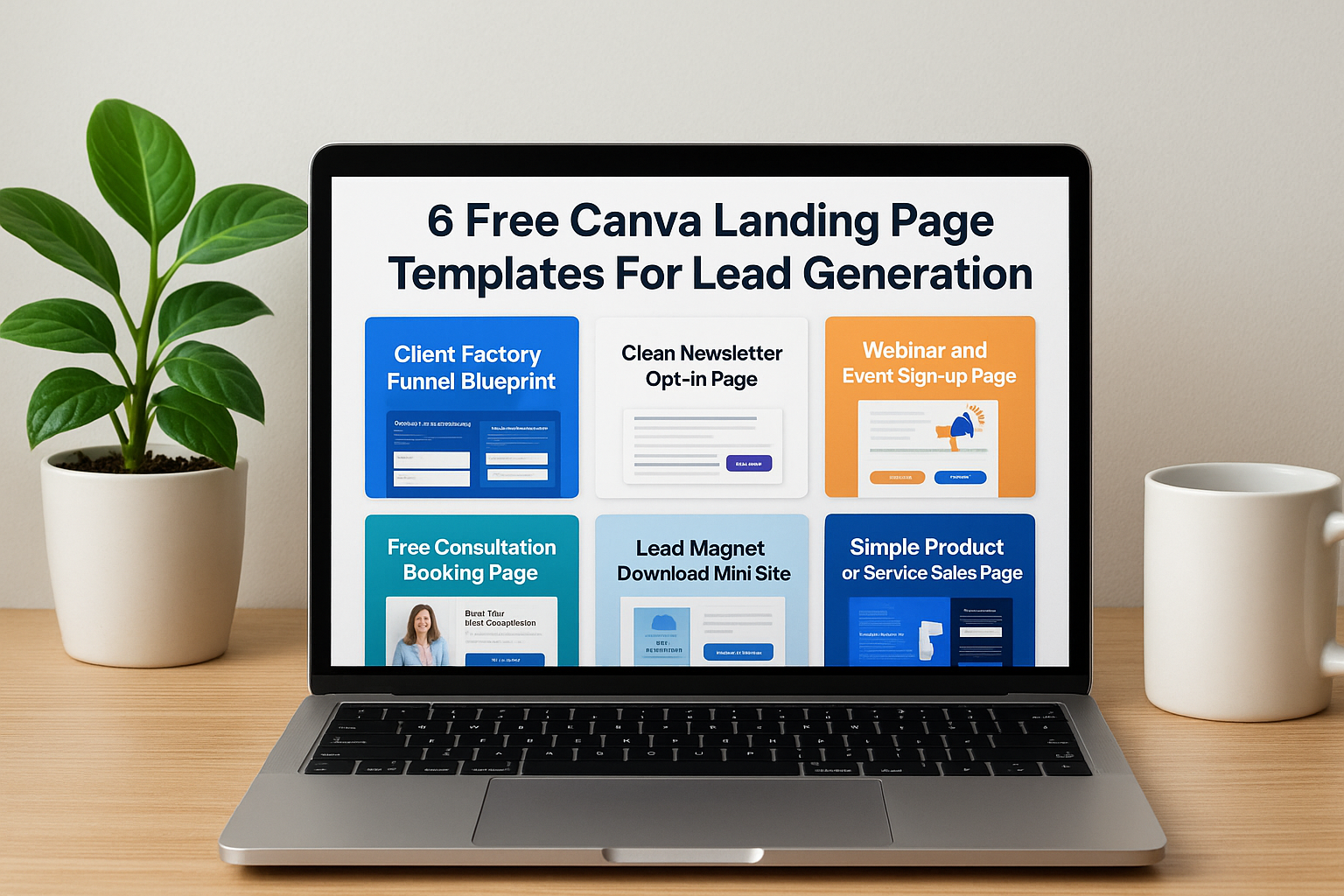
You need a landing page that converts visitors into leads. But hiring a developer costs thousands of dollars, and most website builders force you through a steep learning curve. Canva offers a faster path. You can design professional landing pages without touching code, and the best part is you can start for free.
This guide walks you through six free Canva landing page templates designed specifically for lead generation. Each template serves a different purpose, from capturing email subscribers to booking high ticket consultations. You’ll learn what makes each layout effective, how to customize it for your business, and which integrations help you track results. By the end, you’ll have a clear roadmap for building landing pages that actually bring in qualified leads.
1. Client Factory Canva funnel blueprint
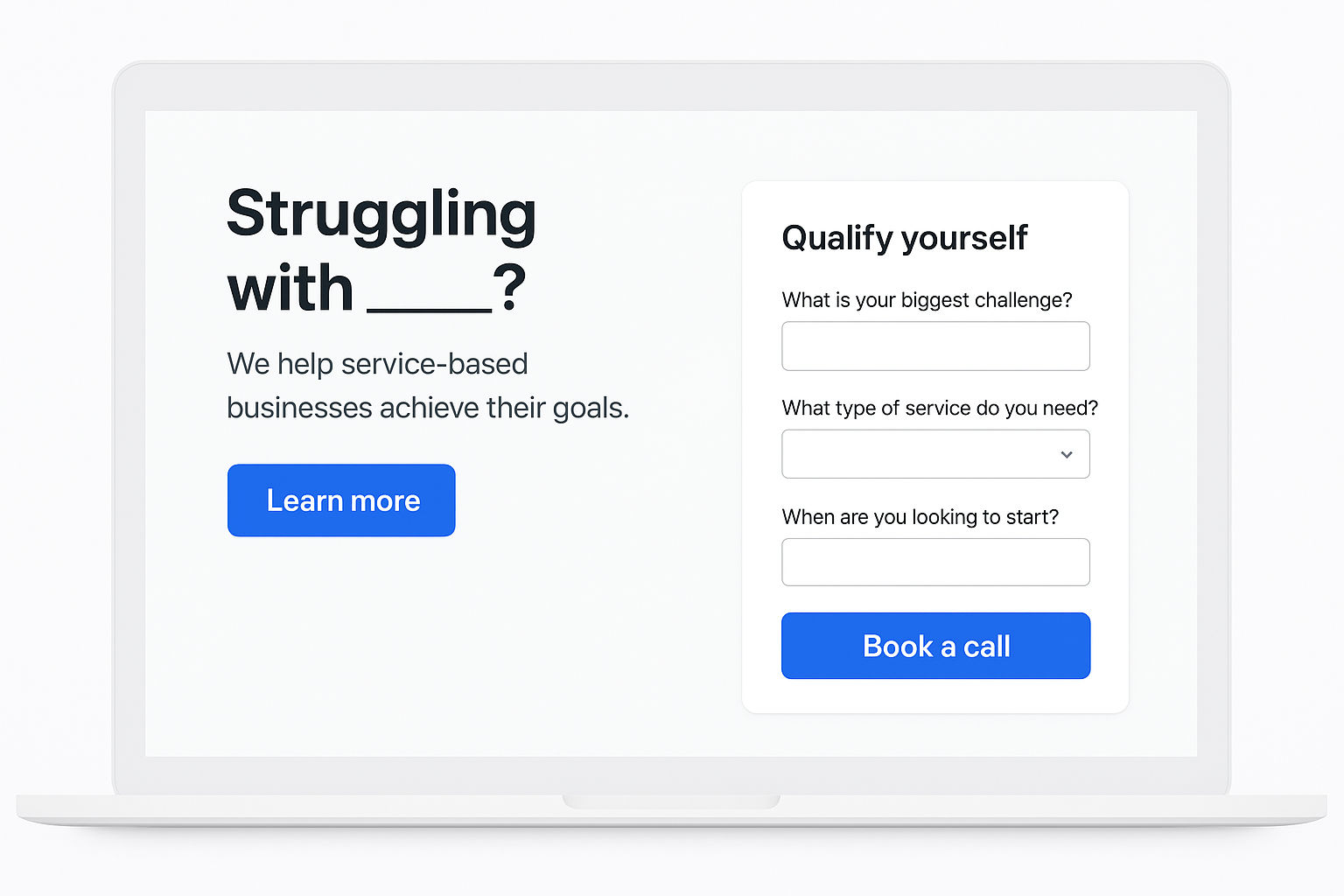
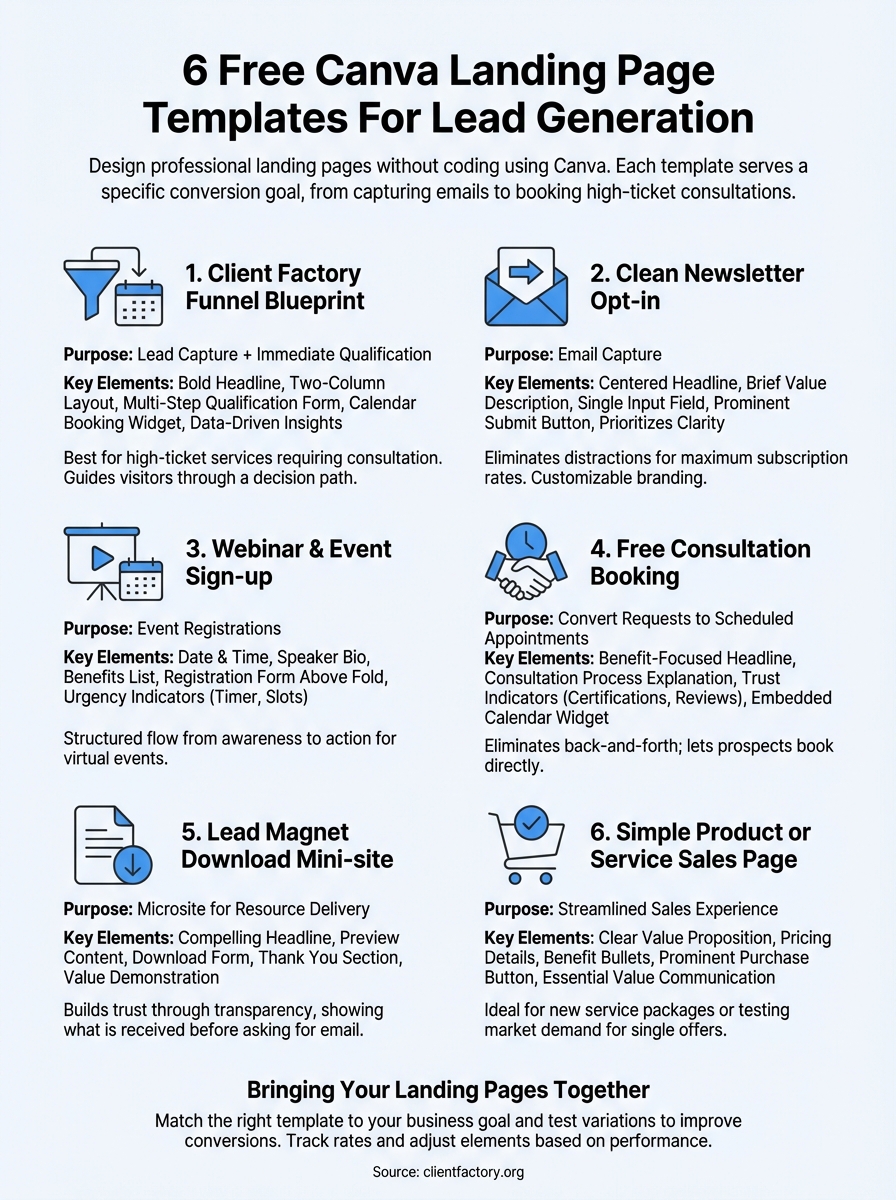
This Canva landing page template combines lead capture with immediate qualification. The framework includes a compelling headline, a brief value statement, a multi-step form that segments leads by need, and a calendar booking widget. You start with a promise, filter prospects through strategic questions, and end with a scheduled call. The layout guides visitors through a decision path rather than asking for contact information alone.
What this framework looks like in Canva
The template opens with a bold headline that speaks directly to your prospect’s pain point. Below that sits a two-column layout where the left side explains your unique approach and the right side displays a short qualification form. The form asks three to five questions that help you understand the lead’s situation before they book a time. Each question acts as a filter, so you spend time only with people who match your ideal client profile.
How Client Factory strengthens this template
Client Factory builds this framework around data-driven insights from thousands of service business campaigns. The questioning sequence matches the psychology of high-intent buyers who want to feel understood before they commit to a call. The template also includes conversion tracking tags that connect to your analytics platform, so you can see which traffic sources produce qualified leads. This approach transforms a simple contact form into a lead qualification system.
“The best landing pages qualify leads before they enter your sales process, saving you hours of unproductive conversations.”
Best situations to use this approach
You should deploy this template when you offer high-ticket services that require a consultation. Law firms, consulting agencies, and professional service providers get the most value because they need to screen prospects before investing time. The multi-step qualification works especially well when you run paid advertising campaigns where traffic volume is high but lead quality varies.
Steps to launch and measure results
First, customize the headline and questions to match your target audience’s specific challenges. Next, connect your form to a CRM that tags leads based on their answers. Then, link your calendar tool so prospects can book immediately after submitting the form. Track your conversion rate from landing page view to scheduled appointment, and test different question sequences to improve qualification accuracy over time.
2. Clean newsletter opt in landing page
This Canva landing page template strips away distractions and focuses entirely on email capture. The layout features a centered headline, a brief description of what subscribers receive, a single email input field, and a prominent submit button. The design prioritizes clarity over complexity, making the decision to subscribe feel effortless. You can customize colors, fonts, and imagery to match your brand while maintaining the template’s conversion-focused structure.

Why this layout works for email list growth
Simplicity drives conversions when your primary goal is building an email list. This template eliminates navigation menus, sidebar links, and competing calls to action that typically reduce opt-in rates by 20 to 30 percent. The centered layout creates a natural focal point, guiding the visitor’s eye directly to the subscription form. Research shows that pages with a single objective convert at higher rates because they remove decision fatigue.
“Every additional element on your page creates another opportunity for visitors to leave without converting.”
Key sections to customize in Canva
You should personalize the headline to clearly state the benefit subscribers receive, such as “Weekly Marketing Strategies” or “Industry News Delivered Every Monday.” Adjust the subheadline copy to explain what makes your content valuable and how often you’ll send emails. Replace placeholder images with photos or graphics that reflect your brand’s visual identity, and modify the button text to create urgency like “Start Receiving Tips” instead of generic “Submit” language.
Connecting the form to your email platform
Canva allows you to embed custom HTML forms from major email service providers directly into your design. You copy the form code from your email platform, paste it into Canva’s embed element, and the form displays seamlessly within your layout. This connection ensures every new subscriber automatically enters your email automation sequences without manual data transfer.
Ideas to A/B test on this page
Test different headline variations that emphasize either the benefit or the frequency of your newsletter. Experiment with button colors that contrast strongly with your background, as high-contrast buttons typically increase click-through rates. Try adding a single testimonial above the form to build credibility, or test removing it to maintain maximum simplicity and compare which version produces more subscribers.
3. Webinar and event sign up page
This Canva landing page template prioritizes event registrations through a structured layout that emphasizes date, time, and immediate value. The design features a hero section with event details, a speaker bio area, a benefits list, and a registration form positioned for maximum visibility. You can adapt this template for webinars, workshops, virtual conferences, or live training sessions where securing attendance commitments drives your campaign’s success.
Overview of the webinar style layout
The template divides content into distinct sections that follow a logical flow from awareness to action. Your header displays the event title, date, and time prominently, followed by a compelling description of what attendees will learn. Below that, speaker credentials and photos build authority, while a bulleted list highlights key takeaways participants gain from attending. The registration form appears both above the fold and at the page bottom to capture leads at multiple decision points.
Must have elements above the fold
You need to display the event date and time in the header so visitors immediately know if they can attend. Place a clear registration button within the first screen view to capture impulse registrations from highly motivated prospects. Include a single sentence that describes the specific problem your webinar solves, positioned directly under your headline where attention naturally focuses first.
How to build trust and urgency
Showcase speaker credentials through brief bios that highlight relevant experience and past results. Add a countdown timer that displays days or hours remaining until the event to create time pressure that motivates immediate registration. Display the number of spots remaining or total registrants to activate social proof mechanisms that increase perceived value.
“Urgency converts browsers into registrants when paired with clear credibility markers.”
Promotion and follow up tips
Drive traffic to this Canva landing page template through targeted email campaigns sent to your existing list and paid social ads aimed at your ideal audience. Send confirmation emails immediately after registration, followed by reminder messages at seven days, three days, and one hour before the event. Include calendar invites in your confirmation sequence to reduce no-show rates by 30 to 40 percent.
4. Free consultation booking page
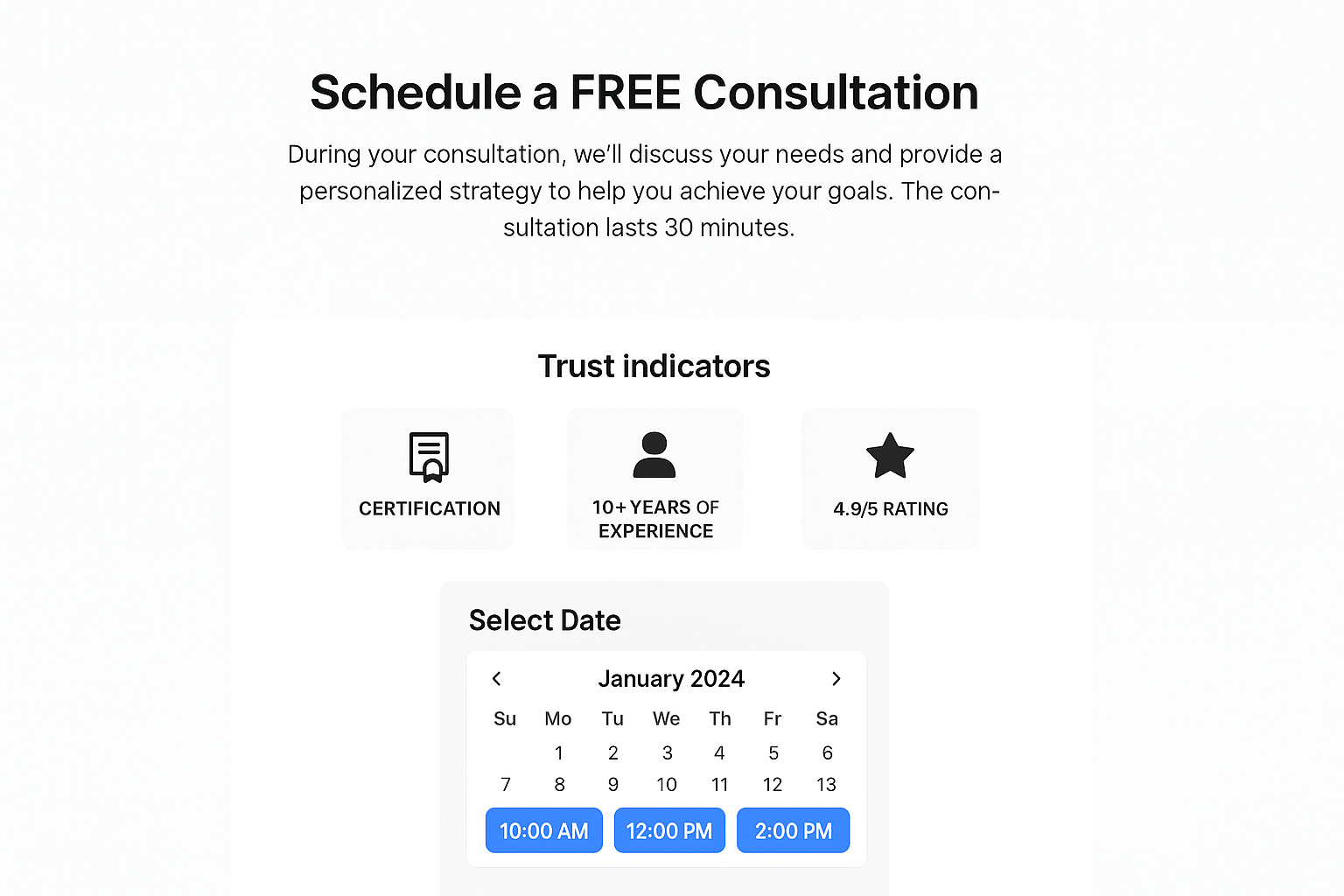
This Canva landing page template transforms consultation requests into scheduled appointments by combining persuasive copy with embedded scheduling tools. The layout features a benefit-focused headline, a section explaining your consultation process, credibility markers like certifications or case results, and a calendar widget that displays available time slots. You eliminate back-and-forth email exchanges by letting prospects book directly from the page.
How the booking page layout is structured
The template organizes content in a vertical flow that builds confidence before asking for commitment. Your header section communicates what prospects receive during the consultation and how long it lasts. A middle section displays trust indicators such as client logos, review scores, or professional credentials. The booking calendar sits near the bottom where visitors land after reading your value proposition.
Tailoring it to your service business
You should modify the consultation description to explain exactly what happens during the call and what outcomes prospects can expect. Adjust qualification questions that appear before booking to filter out unqualified leads who don’t match your service criteria. Replace generic imagery with photos that reflect your specific industry, whether that’s legal services, business consulting, or technical expertise.
Integrations for calendar and CRM
Connect scheduling tools like Calendly or Acuity directly into your Canva design through embed codes that display real-time availability. Link these bookings to your CRM so each appointment automatically creates a contact record with the prospect’s information and answers to pre-booking questions.
“Direct booking eliminates friction and converts interested prospects into confirmed appointments.”
Conversion tips for high ticket leads
Display your consultation value in monetary terms to frame the free offer as a significant opportunity. Add a guarantee statement that removes risk, such as “No pressure sales tactics” or “Cancel anytime before the call.” Use button text like “Reserve Your Strategy Session” instead of passive language to create stronger commitment.
5. Lead magnet download mini site
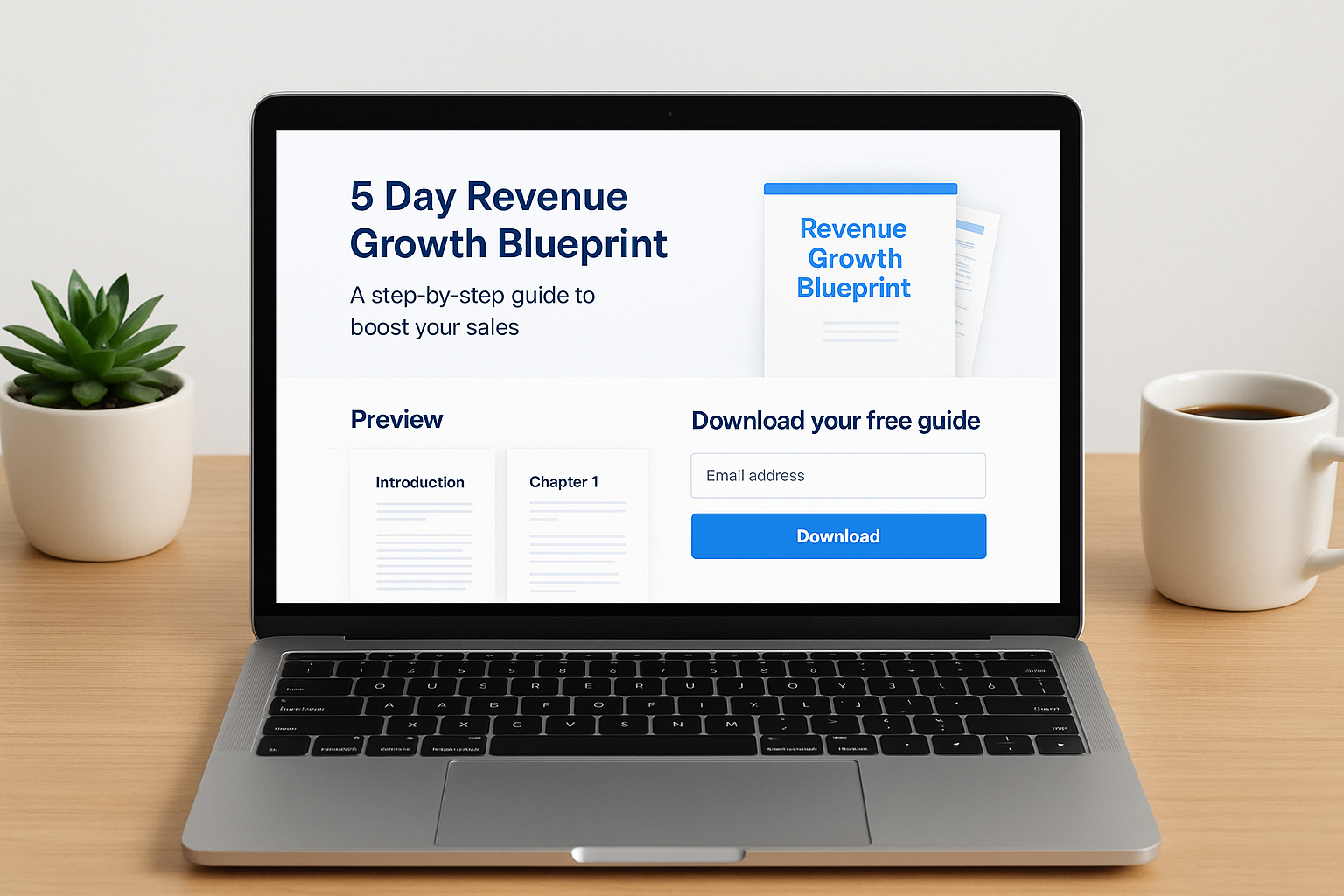
This Canva landing page template creates a dedicated microsite for delivering valuable resources like ebooks, templates, or guides in exchange for contact information. The design features a compelling headline about your lead magnet, preview content that demonstrates value, a download form, and a thank you section that appears after submission. You build trust through transparency by showing visitors exactly what they receive before asking for their email address.
How the mini site template is organized
The template follows a three-section structure that moves prospects from curiosity to commitment. Your header displays the lead magnet title and a benefit-driven subheadline that explains what problem the resource solves. A middle section showcases preview pages, chapter titles, or sample content that proves the quality of your offer. The download form appears below the preview, followed by a confirmation area that includes next steps and related resources.
Structuring your lead magnet offer
You should position your lead magnet as a complete solution to a specific challenge your audience faces rather than general information. Frame the title to emphasize outcomes like “5 Day Revenue Growth Blueprint” instead of vague descriptions. Include a clear statement about what formats you provide, whether PDF, template file, or video series, so prospects know exactly what to expect after submitting their information.
On page SEO basics for this layout
Optimize your page title and meta description to include search terms your target audience uses when looking for solutions. Add descriptive alt text to all images that explains what each visual represents. Structure your headline tags properly with H1 for the main title and H2s for section breaks to help search engines understand your content hierarchy.
Nurture sequence ideas after opt in
Send an immediate email with the download link and a brief message that reinforces the value they just received. Follow up three days later with a case study email showing how others used the resource to achieve results. Schedule a final message one week after download that offers a related paid service or consultation to convert leads into paying clients.
“Lead magnets work best when your follow-up sequence builds on the trust established through your free resource.”
6. Simple product or service sales page
This Canva landing page template delivers a streamlined sales experience for single products or core services without overwhelming prospects with options. The design features a clear value proposition, pricing details, benefit bullets, and a prominent purchase or inquiry button. You communicate your offer’s essential value while removing navigation and links that distract from the conversion goal. This template works best when you want to test a new offering quickly or create dedicated pages for specific marketing campaigns.
When to use this simple sales page
You should deploy this template when launching a new service package or testing market demand for a specific offer before building a comprehensive website. The focused layout converts effectively for single-solution businesses like coaching programs, consulting packages, or specialized technical services. This approach also works well for paid advertising campaigns where you drive targeted traffic to one specific offer rather than a general website.
How to write persuasive section copy
Your headline needs to state the specific transformation your product or service delivers rather than generic descriptions. Write benefit bullets that address pain points your ideal client experiences and explain exactly how your solution resolves each challenge. Frame your offer in terms of outcomes prospects achieve rather than features you provide, and include a clear timeline that sets expectations about when results appear.
Visuals and social proof to include
Add client testimonials that mention specific results achieved through your product or service. Display logos of recognizable companies you’ve worked with to build instant credibility. Include before and after images when applicable, or use professional photos that reflect your brand positioning and target market.
“Sales pages convert when they focus on customer transformation rather than company credentials.”
Upsell and cross sell opportunities
Position a secondary offer below your main call to action that complements the primary purchase. Add a bonus section that includes additional resources available to buyers, which increases perceived value without changing your price. Consider placing a comparison table that shows your different service tiers to encourage prospects to choose higher value packages.
Bringing your landing pages together
You now have six proven canva landing page template options that address different stages of your lead generation funnel. Each template serves a specific conversion goal, from building your email list to booking high-ticket consultations. The key is matching the right template to your current business priority and testing variations to improve results over time.
Start by selecting one template that aligns with your immediate lead generation need. Customize the copy to speak directly to your target audience’s challenges, then connect your forms to your CRM and email platform. Track your conversion rates weekly and adjust elements like headlines, button colors, and form questions based on real performance data.
If you need help building a complete client acquisition system that connects these landing pages to paid advertising campaigns, Client Factory specializes in turning clicks into qualified leads for service businesses and law firms.
