

Most of your website visitors leave without taking action. That’s not a guess, it’s a well-documented reality. Roughly 97% of first-time visitors bounce without filling out a form, booking a call, or making a purchase. Understanding how retargeting ads work gives you a practical way to bring those people back, and it’s one of the most efficient tools in any client acquisition strategy.
Retargeting works because it focuses your ad budget on people who already showed interest in your business. They visited your site. They looked at your services page. They just weren’t ready yet. Instead of letting that traffic disappear, retargeting puts your brand back in front of them, on Facebook, Google, YouTube, and across the web, until they are ready. For service businesses and law firms, where a single new client can be worth thousands, that kind of precision matters.
At Client Factory, we build retargeting into every client acquisition funnel we create. It’s central to how we turn clicks into clients and drive measurable ROI from paid advertising. In this article, we’ll break down exactly how retargeting ads function, from the tracking pixels and cookies that make them possible, to the audience segments and campaign strategies that actually move the needle.
Why retargeting ads matter for ROI
When you spend money on paid advertising, you’re paying for attention. Most of that attention walks away without converting. Cold traffic, meaning people who have never encountered your brand, requires significant budget to reach and even more to persuade. Retargeting shifts that equation by concentrating your spend on people who already showed interest in your business, making every dollar work harder than it would in a standard cold campaign.
Warm audiences convert at a fraction of the cost
The core reason retargeting delivers strong ROI is audience temperature. Someone who visited your services page yesterday is fundamentally different from a stranger who has never heard your name. Warm audiences have already cleared the awareness hurdle, which is typically the most expensive stage of any paid campaign. Because they’ve already engaged with your brand, you need fewer impressions and fewer clicks to push them toward a decision.
Retargeting audiences consistently outperform cold audiences in cost-per-lead metrics, often by a factor of two to five times, depending on industry and funnel structure.
This dynamic is especially important for service businesses and law firms, where trust drives the buying decision. A prospective client who visited your site once may need to see your brand several more times before they feel comfortable reaching out. Retargeting automates that follow-up at scale, without requiring a sales team to manually chase every lead that didn’t convert on the first visit.
Why first-touch advertising alone leaves money on the table
Understanding how retargeting ads work reveals a critical flaw in running first-touch campaigns without a follow-up strategy. When you only run cold traffic ads, you pay to generate interest and then abandon it. You’re driving visitors to your site but capturing only the small fraction ready to act immediately, while everyone else disappears back into the internet.
Retargeting closes that gap. Instead of letting warm prospects exit your funnel, you create multiple additional opportunities to bring them back with a relevant message at the right moment. For a law firm, a single retained client can be worth several thousand dollars. For a consulting firm, a new account can run into six figures. At that level of deal value, spending a few dollars per impression to re-engage a qualified lead is not optional. It’s a straightforward calculation.
The businesses that get the highest return from paid advertising are rarely the ones with the biggest cold traffic budgets. They’re the ones with disciplined retargeting systems that squeeze conversion value from every visitor their initial campaigns already paid to attract.
How retargeting ads work step by step
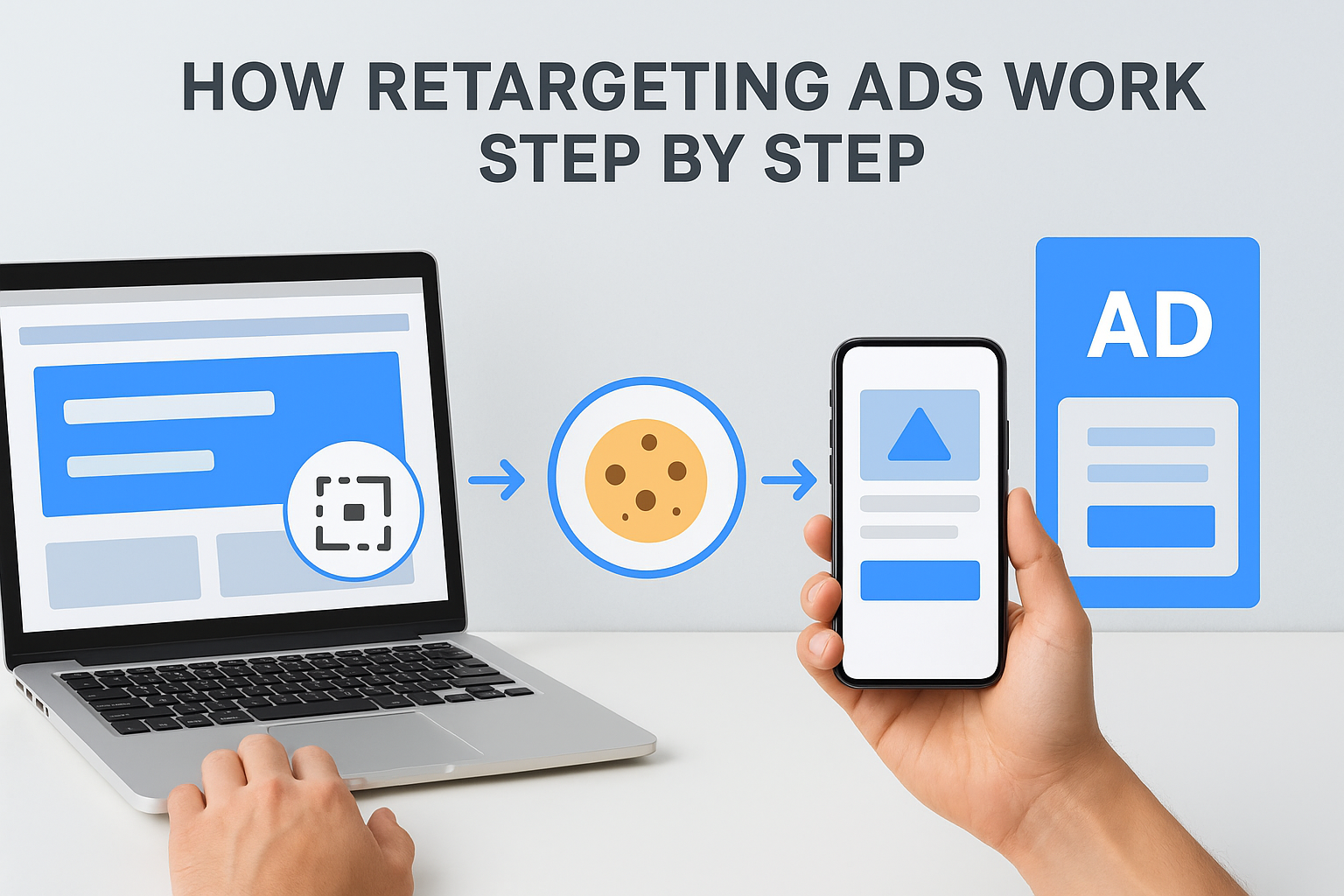
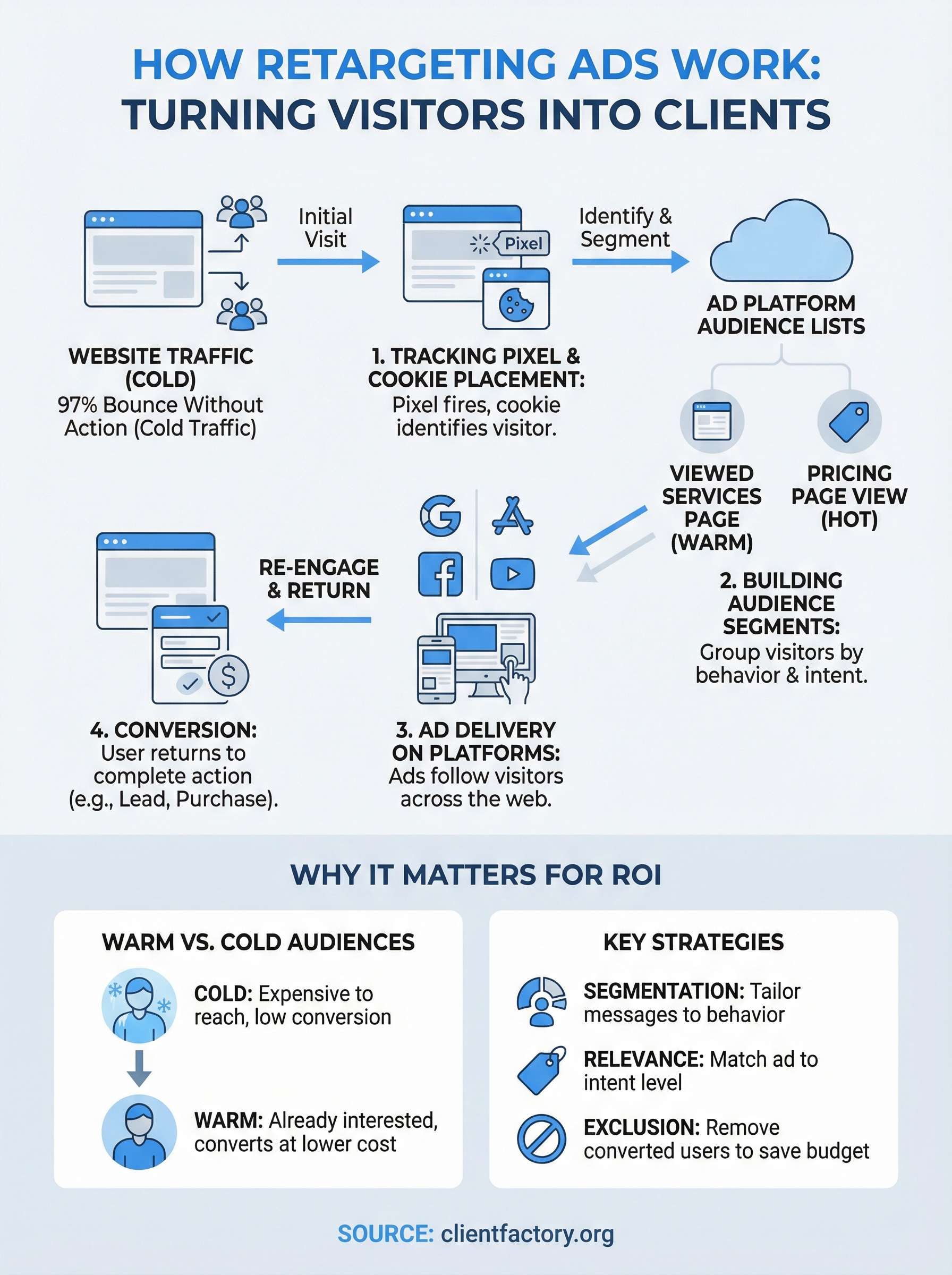
Understanding how retargeting ads work is straightforward once you break the process into its core stages. Every retargeting campaign follows the same basic sequence: a visitor interacts with your site, a tracking mechanism records that interaction, and your ad platform uses that data to serve targeted ads to that visitor across other channels.
The tracking phase
When a visitor lands on your website, a small piece of code called a tracking pixel fires in the background. That pixel, placed by you through platforms like Google or Meta, drops a cookie in the visitor’s browser that marks them as someone who visited your site. You can track not just homepage visits but specific pages, meaning you can tell the difference between someone who read a blog post and someone who viewed your pricing page.
The more specific your tracking, the more relevant your retargeting ads can be, which directly improves your conversion rate.
Different behaviors signal different levels of intent, and your pixel records all of it. A visitor who spent four minutes on your services page and clicked through to your contact form carries far more intent than someone who bounced in ten seconds. Both can be retargeted, but the messaging should reflect where they are in the decision process.
The matching and delivery phase
Once a visitor has a cookie attached to their browser, your ad platform adds them to a retargeting audience list. As that person moves through the internet, visiting news sites, watching YouTube, or scrolling through Facebook, your platform recognizes them and serves your ads. The ad auction runs in real time, often in milliseconds, determining whether your ad appears based on your bid, budget, and audience settings.
Pixels, cookies, and audience lists explained
The mechanics behind retargeting come down to three connected components: pixels, cookies, and audience lists. Each one plays a specific role, and understanding how retargeting ads work at this technical level helps you configure your campaigns more effectively and avoid common setup mistakes.
How tracking pixels actually work
A tracking pixel is a small snippet of JavaScript code that you install on your website, typically through a tag manager or directly in the site header. When a visitor loads a page, the pixel fires and communicates with the ad platform’s server, such as Google’s or Meta’s. That communication triggers the creation of a cookie in the visitor’s browser, a tiny file that identifies them as someone who visited your site.
Cookies store no personal information. They assign an anonymous identifier that platforms use to recognize the same browser across different websites.
Cookies have expiration windows, typically between 30 and 180 days depending on your settings, so your audience lists stay current and relevant rather than targeting people who visited your site months ago with no recent intent signals.
Building audience lists from visitor behavior
Your ad platform takes the cookie data and automatically adds matching visitors to audience lists you define. You can build a list of everyone who visited any page, or get granular by segmenting visitors who viewed a specific service page, watched a video, or reached your contact form without submitting it.
Segmented audience lists let you tailor your message to where each visitor dropped off in your funnel. Someone who viewed your pricing page gets a different ad than someone who only read a blog post. Message relevance is what separates retargeting campaigns that generate qualified leads from ones that burn budget with generic impressions.
How to set up retargeting on Google and Meta
Setting up retargeting on the two largest ad platforms is more accessible than most business owners expect. Understanding how retargeting ads work at a technical level makes the setup faster, because you already know what each setting is trying to accomplish. Both Google Ads and Meta Ads Manager follow the same fundamental logic: install a pixel, build an audience, and attach that audience to a campaign.
Setting up Google retargeting
Google’s retargeting runs through Google Ads using a tag called the Google tag (formerly the Google Ads Remarketing Tag). You install it on every page of your site through Google Tag Manager or directly in your site’s HTML. Once the tag fires and collects enough visitors, Google activates your remarketing audience list and makes it available for campaign targeting.
Your audience must reach minimum size thresholds before Google will serve your retargeting ads, so install your tag as early as possible.
You then create a new campaign in Google Ads, select your bidding strategy, and attach your remarketing audience under the Audiences tab. Google lets you target those visitors across the Google Display Network, YouTube, and search results, giving you broad coverage across the platforms your prospects already use.
Setting up Meta retargeting
Meta’s setup centers on the Meta Pixel, which you install through Meta Events Manager. Once installed, the pixel tracks page visits, button clicks, and form submissions automatically. You then navigate to Audiences in Meta Ads Manager, create a custom audience based on website traffic, and define your lookback window, which controls how far back you pull visitor data, up to 180 days.
From there, you attach that custom audience to any ad set inside a new or existing campaign and set your daily or lifetime budget to start serving ads to warm visitors.
Measuring performance and avoiding common traps
Once your retargeting campaigns are live, measuring the right metrics tells you whether your setup is actually working or just burning budget. Knowing how retargeting ads work at a technical level helps you connect the dots between audience behavior and campaign results, so you can make informed adjustments rather than guessing.
Metrics that actually matter
Track click-through rate (CTR), cost per lead (CPL), and conversion rate as your primary indicators. A high CTR with a low conversion rate often signals a disconnect between your ad and your landing page. If your CPL is climbing, check whether your audience lists have shrunk, your frequency is too high, or your creative has gone stale.
Retargeting campaigns typically perform best when you refresh ad creative every three to four weeks to prevent audience fatigue.
Frequency measures how many times the same person sees your ad within a given time window. High frequency without conversion is a signal to pause, not spend more.
Traps that kill retargeting results
The most common mistake is retargeting everyone the same way. Running one generic ad to your entire site audience ignores the intent signals your pixel already captured. You end up wasting spend on people who barely engaged while under-investing in your highest-intent visitors.
Another trap is skipping exclusion audiences. If someone already converted, remove them from your retargeting pool immediately. Continuing to show acquisition ads to existing clients wastes budget and creates a poor experience. Set up conversion-based exclusions in both Google Ads and Meta Ads Manager before your campaign goes live, not after you notice the problem.
Final takeaways
Understanding how retargeting ads work gives you a concrete advantage over competitors still running disconnected, first-touch-only campaigns. Your pixel captures intent data every day. Your audience lists are already growing. The question is whether you’re putting that data to work or leaving conversions on the table.
Retargeting works because it matches your message to where each visitor actually is in the decision process. The businesses that see the strongest ROI are not spending more. They’re spending smarter by targeting warm audiences, segmenting by intent, refreshing creative regularly, and excluding people who already converted. Those habits compound over time and lower your cost per client acquisition in ways that cold traffic spending never will.
If your current funnel isn’t capturing and re-engaging the traffic you’re already paying for, that’s a solvable problem. Book a free conversion audit and we’ll show you exactly where your setup is leaking leads.
