

Picking the right email marketing platform can make or break your client acquisition efforts. At Client Factory, we build and optimize marketing funnels for service businesses and law firms every day, and email is almost always a core piece of that puzzle. So when clients ask us to help them compare email marketing platforms, we don’t just look at feature lists. We look at what actually moves the needle: deliverability, automation quality, and real cost at scale.
The problem? There are dozens of platforms out there, each claiming to be the best. Some are genuinely excellent for small teams on tight budgets. Others shine when you need advanced segmentation and behavioral triggers. A few are overpriced for what they deliver. Sorting signal from noise takes time most business owners don’t have, especially when a wrong choice means months of migration headaches and lost momentum on lead nurturing.
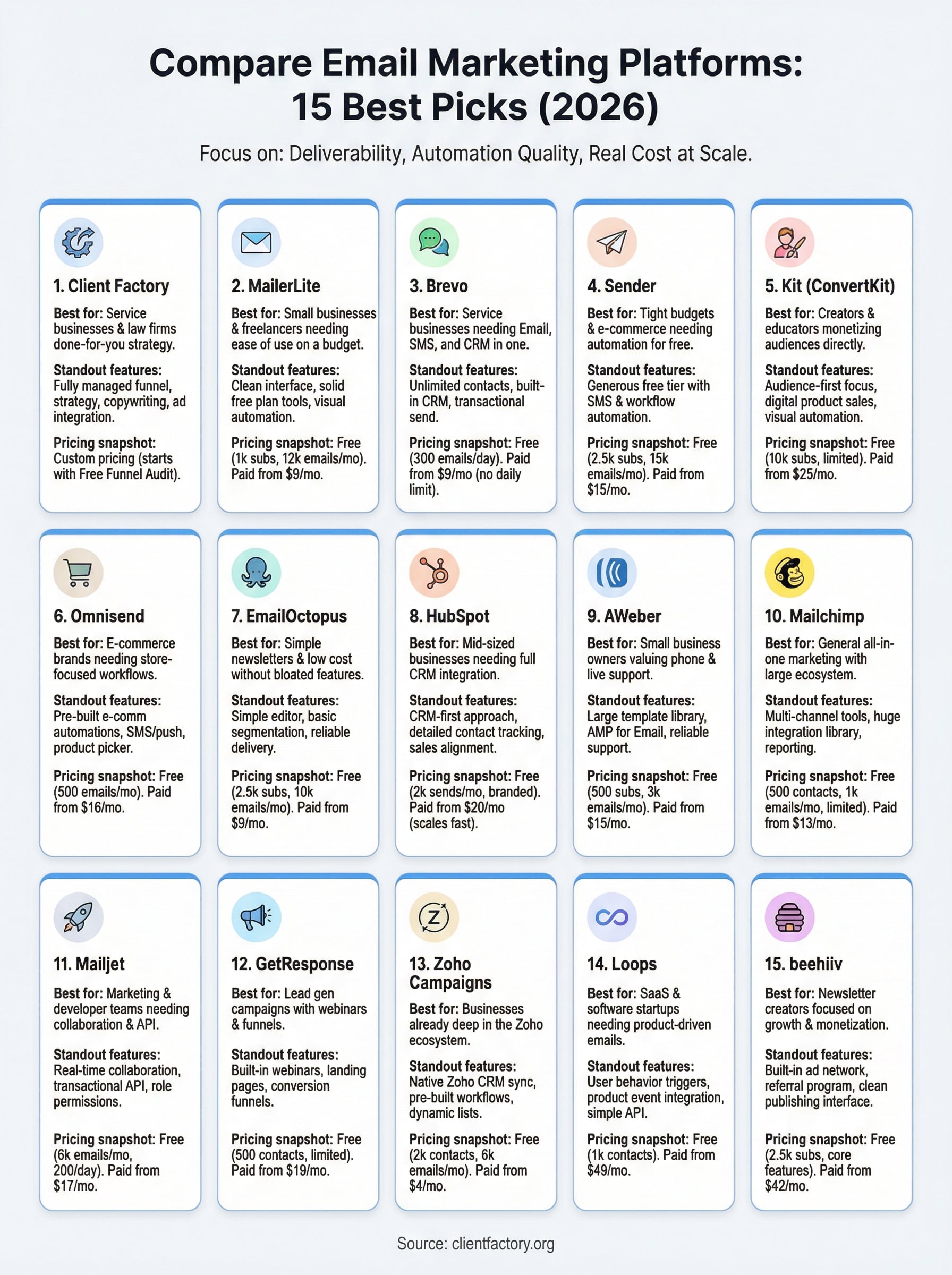
That’s why we put together this comparison of 15 email marketing platforms worth your attention in 2026. We evaluated each one based on pricing (including free tiers), core features like automation and analytics, ease of use, and which types of businesses they fit best. Whether you’re a solo attorney sending a monthly newsletter or a growing service company ready to build out full drip sequences, you’ll find a platform here that matches your needs and your budget. Let’s get into it.
1. Client Factory
Client Factory is a done-for-you digital marketing agency, not a self-serve software tool. That distinction matters when you compare email marketing platforms, because sometimes the better answer is not another login and dashboard but a team that builds, runs, and optimizes your email strategy for you. Client Factory specializes in client acquisition for service businesses and law firms, so every email sequence they create is built around one goal: turning subscribers into paying clients.
Best for
Client Factory is the right fit if you run a service business or law firm and you want someone to handle the strategy, copywriting, and automation setup without handing you a manual and walking away. It works especially well for owners who have tried self-serve platforms and struggled to get results, or those who simply lack the time to build proper nurture sequences from scratch. If your priority is measurable client acquisition rather than tinkering with email templates, this is worth a serious look.
What you get
When you work with Client Factory, you get a fully managed marketing funnel that includes email as a core channel. That means audience segmentation, behavioral automation, follow-up sequences, and ongoing optimization based on real performance data. The team pairs email with paid advertising on platforms like Google Ads, Facebook, and YouTube, so your email list is not working in isolation but as part of a coordinated acquisition system.
Email that sits outside your broader funnel rarely converts. Client Factory connects your email sequences directly to your ad campaigns and landing pages so every touchpoint reinforces the same message.
How the engagement works
You start with a free conversion audit where the team reviews your current funnel and identifies the specific gaps costing you leads. From there, Client Factory builds a tailored plan and gets to work. You are not locked into a rigid package; the approach adapts to your business goals and the channels that fit your audience. Throughout the engagement, you receive clear reporting on what is working so you can see exactly where your marketing budget is going.
Trade-offs to consider
Client Factory is not a budget option for businesses that want a $20-a-month tool to send a newsletter. It is a professional service, which means the investment reflects the level of hands-on work involved. You also give up some direct control over day-to-day campaign execution compared to running a self-serve platform yourself.
Pricing snapshot
Client Factory offers a free funnel audit as the starting point. Ongoing pricing is custom and based on your specific needs. Contact the team directly at clientfactory.org to get a quote tailored to your business size and goals.
2. MailerLite
MailerLite consistently lands near the top when small businesses compare email marketing platforms on a budget. It packs a solid feature set into a clean interface that does not overwhelm new users, making it one of the easier platforms to get started without a steep learning curve.
Best for
MailerLite fits small businesses, freelancers, and nonprofits that need reliable email delivery without paying for features they will never use. It works well for teams that want to send newsletters, build basic automations, and grow a list without navigating a bloated dashboard.
Standout features
The platform includes a strong bundle of tools that cover most small business needs without forcing you to upgrade. Template quality is solid, and the interface stays clean enough that you can produce professional-looking campaigns without any design experience.
Key tools included on all plans:
- Drag-and-drop email editor
- Landing page builder
- Pop-up and embedded forms
- Website builder
Automation and segmentation
MailerLite gives you visual automation workflows for standard sequences like welcome series and re-engagement campaigns. Segmentation runs on subscriber behavior and custom fields, so you can target the right contacts precisely without paying for a higher tier.
Pairing behavioral segmentation with solid deliverability means your automated sequences actually reach inboxes and fire at the right moment.
Limits to watch
Advanced features like A/B testing on automations and priority support are locked behind paid plans. The free tier caps you at 1,000 subscribers, so fast-growing lists will hit that ceiling sooner than expected.
Pricing snapshot
Free plan: Up to 1,000 subscribers and 12,000 emails per month. Paid plans start at $9 per month for unlimited sends on up to 500 subscribers.
3. Brevo
Brevo (formerly Sendinblue) stands out when you compare email marketing platforms because it bundles email marketing, SMS, and a built-in CRM into one platform. That combination makes it a strong option for service businesses that want to consolidate tools without juggling multiple subscriptions and logins.
Best for
Small to mid-sized service businesses and agencies that need email, SMS, and basic contact management in one place will get the most value from Brevo. It suits teams that need to send transactional emails alongside marketing campaigns through a single interface.
Teams running both outbound campaigns and automated follow-up sequences will also find the all-in-one setup reduces the friction of connecting separate tools.
Standout features
The platform delivers a practical feature set without forcing you to upgrade for basic functionality. Unlimited contact storage across all plans is a genuine differentiator that most competing email tools do not offer at this price point.
Key tools available across plans:
- Email campaign builder
- SMS marketing
- Live chat
- Transactional email via API or SMTP
Automation and CRM fit
Brevo’s built-in CRM lets you track contacts and deals inside the same dashboard you use for email, cutting the need for a separate tool early on. Automation workflows cover welcome sequences, lead scoring, and behavior-based triggers without requiring third-party integrations.

Keeping your CRM and email automation in one platform reduces data sync friction and gives you a cleaner view of how contacts move through your pipeline.
Limits to watch
The free plan caps daily sends at 300 emails, which is too restrictive for any active campaign. Multi-user access and advanced reporting are gated behind higher-tier paid plans.
Pricing snapshot
Brevo’s free plan includes unlimited contacts with a hard 300-email daily send ceiling. Paid plans start at $9 per month for 5,000 monthly emails with no daily sending limit.
4. Sender
Sender earns attention when you compare email marketing platforms because it delivers a surprisingly generous free tier with automation features most platforms lock behind paid plans. It keeps the interface simple and focuses on core email and SMS functionality without overcomplicating the dashboard.
Best for
It works well for small businesses and e-commerce brands that need solid automation on a tight budget. Sender suits teams that want to build basic nurture sequences without committing to a paid plan until they see real subscriber growth.
Standout features
The platform gives you more tools than most free-tier competitors. Automated workflows and SMS campaigns are accessible without upgrading, which is rare at this price point.
Key tools available across plans:
- Drag-and-drop email editor
- SMS marketing
- Pop-ups and embedded forms
- Basic analytics dashboard
Automation and segmentation
Sender lets you build multi-step automation workflows triggered by subscriber behavior, including clicks, opens, and purchases. Segmentation covers custom fields and activity-based filters, giving you enough flexibility to send targeted sequences to specific contact groups.
Behavioral triggers on a free plan are a genuine advantage if you want to test automated sequences before committing to a paid platform.
Limits to watch
Advanced analytics and branded email removal are gated behind paid plans. The free tier also caps you at 2,500 subscribers and 15,000 monthly emails, so fast-growing lists will need to upgrade sooner than expected.
Pricing snapshot
Free plan: Up to 2,500 subscribers and 15,000 emails per month. Paid plans start at $15 per month for up to 2,500 subscribers with higher send limits and premium features unlocked.
5. Kit
Kit (formerly ConvertKit) targets creators who need more than a basic newsletter tool when they compare email marketing platforms. The platform is built around audience-first thinking, making it a natural fit for content creators, coaches, and course sellers who earn revenue directly from their list.
Best for
Kit works best for independent creators, bloggers, and online educators who want to monetize their audience through digital products, paid newsletters, or course sales. If your business runs on content and community, Kit gives you the infrastructure to turn that audience into paying customers without bolting on extra tools.
Standout features
The platform keeps email design intentionally simple, which actually works in its favor for personal-style, text-heavy emails that tend to perform well with creator audiences. Kit also includes a built-in digital product and paid newsletter storefront, so you can sell directly without adding a separate e-commerce layer.
Selling digital products through the same platform you use for email removes friction and keeps your subscriber data clean in one place.
Key tools available across plans:
- Visual automation builder
- Built-in digital product storefront
- Landing page and form builder
- Subscriber tagging system
Automation and list growth
Kit’s visual automation builder lets you map out subscriber journeys based on tags, form submissions, and purchases. The tagging system replaces traditional list-based segmentation, giving you flexible subscriber organization without duplicating contacts across multiple lists.
Limits to watch
Kit’s template library is narrow compared to platforms like MailerLite or AWeber, so rich visual emails require manual effort. The free plan also restricts automated sequences and team features to paid tiers.
Pricing snapshot
Free plan: Up to 10,000 subscribers with limited features. Paid plans start at $25 per month with full automation and monetization tools unlocked.
6. Omnisend
Omnisend earns its place when you compare email marketing platforms specifically for retail and e-commerce use cases. Unlike general-purpose email tools, Omnisend is built from the ground up around online store workflows, which means the features you actually need for product-driven campaigns are front and center rather than buried in add-ons.
Best for
Omnisend fits e-commerce brands of any size that sell physical or digital products through platforms like Shopify, WooCommerce, or BigCommerce. It works particularly well if you want email, SMS, and push notifications running from a single dashboard without stitching together separate tools.
Standout features
The platform ships with pre-built e-commerce automation templates that cover the sequences online stores need most, including cart abandonment, post-purchase follow-up, and browse abandonment. You also get product picker functionality directly inside the email editor, so pulling items from your store into a campaign takes seconds rather than manual copy-pasting.
Removing friction from product-based email creation means your team ships campaigns faster and with fewer formatting errors.
Ecommerce automations
Omnisend’s automation workflows trigger on real shopping behavior, including order placement, cart activity, and customer lifetime value milestones. You can layer SMS and push notifications into the same workflow alongside email, creating coordinated multi-channel sequences without building them separately in different tools.
Limits to watch
Omnisend is not the right fit for service businesses or creators since its feature set is almost entirely oriented toward product sales. The free plan also limits you to 500 emails per month, which makes it suitable for testing but not active campaigns.
Pricing snapshot
Free plan: 500 emails per month to unlimited contacts. Paid plans start at $16 per month for up to 6,000 monthly emails with full automation access.
7. EmailOctopus
EmailOctopus positions itself as a stripped-down alternative when you compare email marketing platforms and find most options loaded with features you will never touch. It focuses on simplicity and low cost, making it a practical choice for teams that want to send clean campaigns without paying for a bloated feature set.
Best for
EmailOctopus fits small businesses, startups, and nonprofits that prioritize affordability over advanced automation. If your email program runs on standard newsletters and basic subscriber management, this platform covers those needs without the pricing overhead of more complex tools.
Standout features
The platform keeps its toolset focused and intentional. You get a drag-and-drop email editor, basic segmentation, and simple reporting without having to wade through settings you will never use. The interface loads quickly and stays out of your way.
Key tools available:
- Drag-and-drop email editor
- Subscriber segmentation
- Campaign analytics
- Customizable sign-up forms
Integrations and deliverability basics
EmailOctopus connects with tools like Shopify, WordPress, and Zapier, which extends its reach without requiring you to build custom integrations. Deliverability performance sits in a solid range for standard marketing emails, though the platform lacks the advanced deliverability controls that larger senders typically need, such as dedicated IP options.
If your sending volume is moderate and your list is clean, EmailOctopus deliverability holds up well without extra configuration.
Limits to watch
The platform lacks advanced automation workflows and A/B testing, so growing businesses will likely need to migrate once their email strategy matures. Reporting is also basic compared to competitors at similar price points.
Pricing snapshot
Free plan: Up to 2,500 subscribers and 10,000 emails per month. Paid plans start at $9 per month for expanded send limits and removed branding.
8. HubSpot
HubSpot comes up often when businesses compare email marketing platforms because it is more than an email tool. It is a full CRM platform with email built in, which changes the value calculation entirely depending on how much of the broader feature set you actually plan to use.
Best for
HubSpot works best for mid-sized to larger businesses that need email marketing connected directly to their sales pipeline. If your team tracks deals, contacts, and communications in one place, HubSpot removes the need to sync data between separate tools.
Standout features
The platform gives you a drag-and-drop email editor, A/B testing, and detailed contact tracking out of the box. Every email interaction ties back to the contact record in the CRM, so your sales team sees exactly which emails a prospect opened before a call.
Connecting email engagement data to your CRM gives sales teams real context for follow-up, rather than going in blind.
CRM-first email marketing
HubSpot’s email sits inside a broader marketing hub that includes landing pages, forms, live chat, and ad management. You can trigger email sequences based on CRM properties, deal stages, and contact activity, which makes your automation far more context-aware than standalone email tools allow.
Limits to watch
HubSpot’s free plan caps you at 2,000 email sends per month, and branding removal plus meaningful automation both require a paid upgrade. Costs scale quickly as your contact count grows, making it expensive for smaller teams that only need basic email functionality.
Pricing snapshot
Free plan: 2,000 email sends per month with HubSpot branding. Paid plans start at $20 per month for the Starter tier with expanded sends and basic automation unlocked.
9. AWeber
AWeber has been around since 1998, making it one of the longest-standing names when you compare email marketing platforms. It targets small business owners and entrepreneurs who want a reliable, established tool that covers the core features without demanding a steep learning curve upfront.
Best for
AWeber fits small business owners, coaches, and service providers who want a straightforward platform with solid support behind it. If you value phone and live chat support over cutting-edge automation, AWeber delivers on that front more consistently than most competitors at a similar price point.
Standout features
The platform ships with a large library of pre-built email templates and a drag-and-drop editor that keeps campaign creation fast. You also get AMP for Email support, which lets you embed interactive elements like surveys directly inside the email itself without requiring a click-through to a separate page.
Interactive email elements can lift engagement rates noticeably compared to static campaigns that depend entirely on a link click to gather a response.
Design and templates
AWeber’s template library is one of the largest in this comparison, with hundreds of options spanning most business categories. You can also import a custom HTML template from outside the platform if you already have a branded design ready, rather than rebuilding it inside the editor from scratch.
Limits to watch
AWeber’s automation builder lags behind newer competitors like MailerLite in terms of visual workflow design and flexibility. The free plan also applies AWeber branding to outgoing emails, and meaningful segmentation requires moving to a paid tier.
Pricing snapshot
Free plan: Up to 500 subscribers with a 3,000 monthly email send limit. Paid plans start at $15 per month for up to 500 subscribers with branding removed and full feature access unlocked.
10. Mailchimp
Mailchimp is the name most people recognize when they first compare email marketing platforms, and that brand recognition comes with real substance behind it. The platform remains a widely used, feature-rich option for small businesses that want an all-in-one marketing tool with a large support ecosystem and a familiar interface.
Best for
Mailchimp works well for small to mid-sized businesses that want email paired with light e-commerce tools, basic landing pages, and social media ads under one login. It fits your team well if you are early in building a marketing stack and want a single platform that can expand before you need enterprise-level features.
Standout features
The platform gives you a drag-and-drop email editor, multi-step automations, A/B testing, and a built-in audience dashboard that tracks subscriber growth over time. You also get pre-built campaign templates spanning most business categories, so launching a campaign rarely starts from a blank screen.
Reporting and integrations
Mailchimp’s reporting suite covers opens, clicks, revenue tracking, and audience growth trends in a clean dashboard that makes performance easy to read at a glance. The platform connects with over 300 third-party tools, including Shopify, WordPress, and Salesforce, so it plugs into most existing tech stacks without friction.
Strong native integrations reduce the manual data syncing that eats time and creates reporting gaps across your funnel.
Limits to watch
The free plan has grown increasingly restrictive with feature gating, and pricing jumps noticeably as your contact list scales. Advanced segmentation and multivariate testing are reserved for higher-tier plans, which can push costs well above comparable platforms.
Pricing snapshot
Free plan: Up to 500 contacts and 1,000 monthly email sends. Paid plans start at $13 per month for the Essentials tier with increased send limits and removed branding.
11. Mailjet
Mailjet separates itself when you compare email marketing platforms by focusing on two things most competitors underserve: real-time team collaboration and transactional email through a developer-friendly API. It suits organizations where marketers and developers both touch the email workflow regularly.
Best for
Mailjet works best for marketing teams and development teams that operate on the same platform simultaneously. If your business sends both marketing campaigns and transactional emails like receipts and account notifications, Mailjet handles both through one account without requiring separate tool setups.
Standout features
The platform gives you a drag-and-drop email editor with live multi-user collaboration, which means your copywriter and designer can work on the same template at the same time without overwriting each other’s changes. You also get contact segmentation and A/B testing on standard plans without upgrading to a higher tier.
Key tools available across plans:
- Multi-user collaboration on email templates
- Transactional email via SMTP and API
- Contact list segmentation
- Campaign analytics dashboard
Collaboration and API needs
Mailjet’s REST API is one of the more straightforward implementations in this comparison, making it a practical choice for developers who need to send triggered transactional emails at scale without building a custom infrastructure. Role-based permissions let you control exactly what each team member can see and edit inside the account.
Giving developers and marketers access to the same email infrastructure under one account eliminates the sync delays and permission gaps that slow down campaign launches.
Limits to watch
Advanced automation workflows are limited compared to dedicated marketing tools like MailerLite, so growing teams will likely feel constrained as their sequences become more complex. The free plan also caps you at 200 emails per day, which restricts any active campaign use.
Pricing snapshot
Free plan: 6,000 emails per month with a 200-email daily send limit. Paid plans start at $17 per month for 15,000 monthly emails with no daily sending cap applied.
12. GetResponse
GetResponse stands out when you compare email marketing platforms because it bundles email marketing with landing page creation, webinar hosting, and funnel building in one platform. That combination makes it a practical choice for businesses that want to run complete lead generation campaigns without connecting multiple standalone tools.
Best for
GetResponse suits coaches, consultants, and small to mid-sized businesses that run lead generation campaigns combining email with webinars or online courses. It works particularly well if you want a single platform to capture leads, nurture them through email sequences, and host a live or automated webinar without juggling separate subscriptions.
Standout features
The platform gives you a drag-and-drop email editor, advanced segmentation, A/B testing, and a built-in webinar tool that accommodates up to 1,000 live attendees depending on your plan. You also get pre-built conversion funnels called Autofunnels that walk you through campaign setup step by step, which reduces the guesswork involved in launching a new lead generation campaign from scratch.
Running your lead magnet delivery, email nurture, and webinar registration inside one tool keeps your subscriber data consistent and eliminates sync errors between platforms.
Landing pages and funnels
GetResponse includes a landing page builder with over 200 templates covering opt-ins, sales pages, and webinar registration pages. The funnel builder connects each step automatically, so your landing page, thank-you page, and email sequence link together without manual configuration.
Limits to watch
Webinar hosting and advanced automation are locked behind higher-tier plans, so the entry-level price understates what most growing businesses actually need. The interface also carries a steeper learning curve than simpler tools like MailerLite.
Pricing snapshot
Free plan: Up to 500 contacts with limited features. Paid plans start at $19 per month for the Email Marketing tier with full automation and landing pages included.
13. Zoho Campaigns
Zoho Campaigns makes the most sense when you compare email marketing platforms and already run your business inside the Zoho ecosystem. It is a capable email tool on its own, but the real value shows up when it connects natively to Zoho CRM, Zoho Desk, and other Zoho apps without requiring third-party connectors or custom API work.
Best for
Small to mid-sized businesses already using Zoho CRM as their primary contact system will get the most from this platform. If your sales team lives inside Zoho daily, your email marketing data and contact records stay in sync automatically without manual exports or complicated configuration.
Standout features
The platform gives you pre-built automation workflows and A/B testing across all paid tiers. You also get advanced list management tools that organize contacts using tags, segments, and dynamic lists built from field values or engagement behavior.
Key tools available:
- Drag-and-drop email editor
- Multi-step automation workflows
- A/B testing on campaigns
- Dynamic contact segmentation
Keeping your contact data inside one connected suite eliminates the sync delays that cause mismatched segments and misfired automation triggers.
Templates and Zoho ecosystem fit
Zoho Campaigns ships with a solid template library covering newsletters, promotions, and event announcements. The native connection to Zoho CRM lets you pull deals, contacts, and lead scores directly into your email segments, so your campaign targeting reflects your actual sales pipeline rather than a static imported list.
Limits to watch
Navigating the platform carries a steeper learning curve than simpler tools like MailerLite, and the dashboard design feels less intuitive than most competitors in this comparison. Third-party integrations outside the Zoho suite are more limited than what Mailchimp or GetResponse offer, which matters if your stack includes non-Zoho tools.
Pricing snapshot
Free plan: Up to 2,000 contacts and 6,000 emails per month. Paid plans start at $4 per month for up to 500 subscribers with full automation access and removed branding unlocked.
14. Loops
Loops enters the picture when you compare email marketing platforms specifically for SaaS companies. It is built around product-driven email, meaning the platform focuses on sending the right message to users based on what they actually do inside your app, rather than treating all subscribers as a flat, undifferentiated list.
Best for
SaaS teams and software startups that need lifecycle emails tied directly to user behavior and product events will get the most from Loops. If your business runs a software product and you need onboarding sequences, feature announcements, and churn prevention emails that fire based on what users actually do in your app, Loops is built for exactly that workflow.
Standout features
The platform keeps its interface focused and intentional. You get a simple drag-and-drop email editor, contact management organized around user properties, and event-based triggering that connects directly to your product data without requiring a complex middleware setup between your app and your email tool.
Lifecycle messaging for SaaS
Loops handles onboarding sequences, activation campaigns, and re-engagement flows by pulling real user data from your product through a straightforward API. Your emails fire based on specific actions like completing a signup step or reaching a usage milestone rather than arbitrary time delays.
Triggering emails on real product behavior instead of static time delays means users receive messages that match exactly where they are in their journey.
Limits to watch
General marketing use cases are outside what Loops is designed for, so businesses without a software product will find the feature set too narrow for their needs. Reporting depth and template variety both lag behind broader platforms like GetResponse or Mailchimp.
Pricing snapshot
Loops offers a free plan for up to 1,000 contacts. Paid plans start at $49 per month with higher contact limits and full API access included.
15. beehiiv
beehiiv sits in its own category when you compare email marketing platforms because it was built specifically around newsletter publishing and audience monetization. While most email tools treat newsletters as one use case among many, beehiiv makes it the primary focus, which shapes every feature decision the platform makes.
Best for
beehiiv is the right fit for newsletter creators, media operators, and content-driven brands that want to build a publishing business around their email list. If your primary goal is growing and monetizing a newsletter rather than running sales funnels or transactional campaigns, beehiiv matches that workflow more directly than any other platform in this comparison.
Standout features
The platform gives you a clean writing and publishing interface alongside tools specifically built for newsletter growth. You get subscriber analytics, referral programs, and a built-in ad network that connects your newsletter to paying sponsors without sourcing them yourself.
Key tools available across plans:
- Native newsletter publishing editor
- Built-in referral and recommendation network
- Subscriber segmentation and analytics
- Boosts: paid subscriber acquisition tool
Publishing and growth tools
beehiiv’s referral program and Boosts feature let you grow your subscriber list both organically and through paid acquisition inside the platform. The recommendation network lets other beehiiv newsletters recommend yours to their audiences, which drives list growth without depending entirely on paid ads or manual outreach.

Building subscriber growth tools directly into the platform removes the need for separate referral software that adds cost and complexity to your stack.
Limits to watch
beehiiv is not designed for product-based e-commerce or advanced CRM workflows, so businesses outside the newsletter space will find the feature set too narrow. Automation capabilities are also more limited than dedicated tools like GetResponse or MailerLite.
Pricing snapshot
Free plan: Up to 2,500 subscribers with core publishing features included. Paid plans start at $42 per month with advanced analytics, monetization tools, and removed beehiiv branding unlocked.
Next steps for choosing a platform
When you compare email marketing platforms, the right answer depends on your specific situation, not the platform with the longest feature list. If you run a content-driven newsletter, beehiiv or Kit fits better than a CRM-heavy tool like HubSpot. If you sell products online, Omnisend gives you a head start. If your budget is tight and your list is small, MailerLite or Sender cover the basics without charging you for features you will not touch.
Your email strategy also does not live in isolation. It works best when it connects to your paid ads, landing pages, and follow-up sequences in a coordinated system. If you want that system built and managed for you rather than piecing it together yourself, book a free funnel audit with Client Factory and get a clear picture of where your current setup is losing leads.
