

Your marketing funnel might be generating leads, but without a solid email strategy, you’re leaving money on the table. ConvertKit email marketing has become a go-to platform for creators, service businesses, and entrepreneurs who want to nurture prospects into paying clients, without getting lost in overly complex software.
At Client Factory, we build client acquisition systems that convert clicks into customers. Email marketing sits at the heart of that process. Whether you’re following up with leads from a paid ad campaign or nurturing referrals through an automated sequence, the right email platform makes all the difference. ConvertKit (recently rebranded to Kit) offers a creator-focused approach that prioritizes simplicity and deliverability over flashy features you’ll never use.
This guide walks you through everything you need to know about ConvertKit in 2026. You’ll learn how to set up your account from scratch, build your first automated sequences, segment your audience effectively, and decide whether this platform fits your business goals. We’ve also included comparisons with alternatives so you can make an informed choice.
If you’re a service business owner or law firm looking to turn more leads into retained clients, email marketing isn’t optional, it’s essential. Let’s get your ConvertKit setup right the first time.
Why Kit fits creator-style email marketing
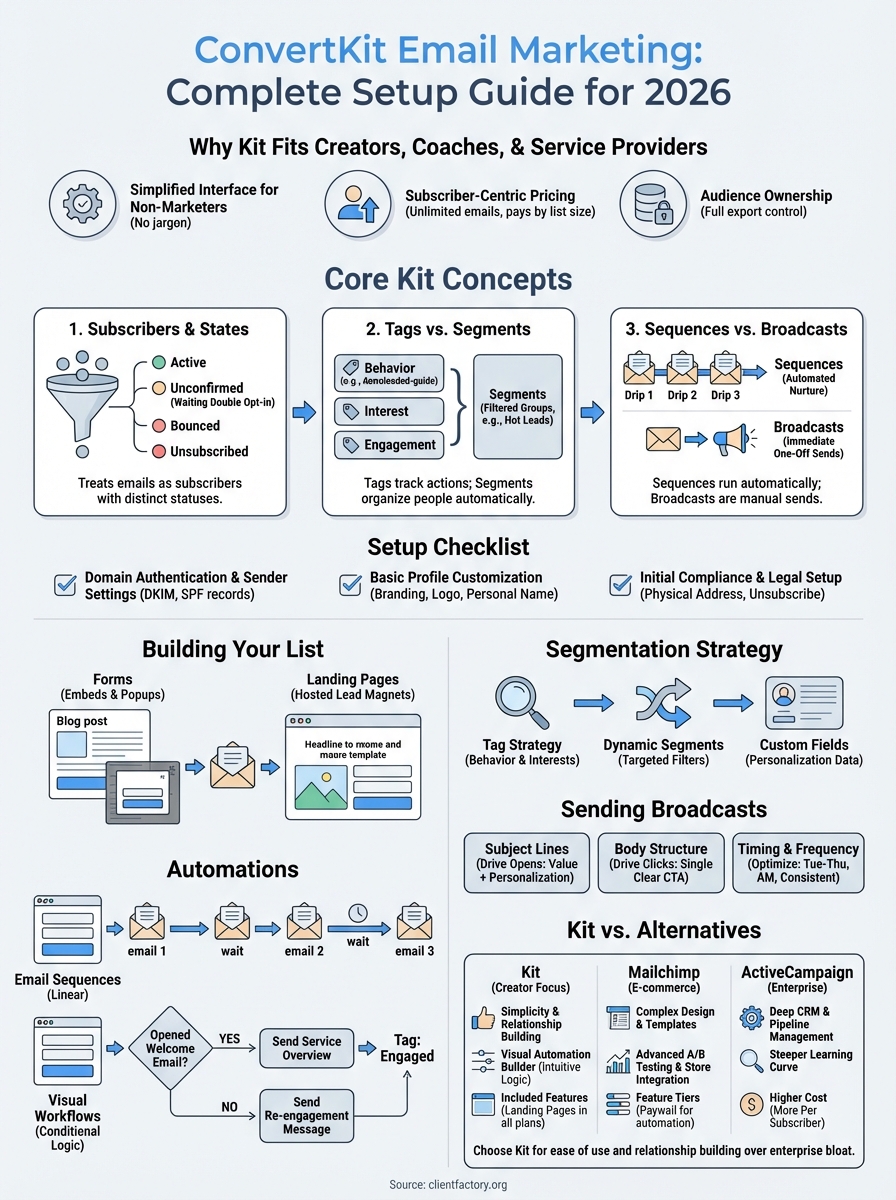
Most email platforms started as corporate tools and added creator features later. Kit (formerly ConvertKit) took the opposite approach. The platform was built from day one for creators, coaches, and service providers who need email marketing without the enterprise bloat. You won’t find a dozen tabs for A/B testing multivariate campaigns or complex CRM integrations you’ll never use. Instead, Kit focuses on the core actions that grow your audience and convert subscribers into customers.
Service businesses and law firms often fall into the same trap as solo creators. You’re experts in your field, but you’re not professional email marketers. Kit recognizes this reality. The interface prioritizes landing pages, automated sequences, and simple broadcasts over feature overload. When you log in, you see exactly what matters: your subscriber growth, your most recent broadcasts, and your active automation sequences. This design philosophy saves you hours each week that would otherwise go toward learning unnecessary complexity.
Simplified interface designed for non-marketers
You don’t need a marketing degree to run effective convertkit email marketing campaigns. Kit stripped away the features that confuse service business owners and kept the tools that actually drive client acquisition. The visual automation builder uses plain English labels instead of marketing jargon, so you can map out a welcome sequence or nurture campaign in minutes, not days.
Building a form takes three clicks. Sending a broadcast requires one screen. You won’t spend hours hunting through nested menus for basic functions. The dashboard shows your subscriber count, recent form submissions, and automation performance at a glance. For busy business owners juggling client work and marketing, this simplicity becomes a competitive advantage. You spend less time managing your email platform and more time closing deals.
"The best marketing tool is the one you’ll actually use consistently, not the one with the most features you’ll ignore."
Subscriber-centric pricing that scales with growth
Kit charges based on total subscribers, not email volume. You can send unlimited emails to your list without worrying about per-message costs eating into your profit margins. A law firm with 2,000 prospects can send daily check-ins, weekly newsletters, and automated follow-ups without additional fees. This pricing structure encourages frequent communication with your audience, which directly improves conversion rates.
Competitors often nickel-and-dime you for basic features. Kit includes landing pages, automation workflows, and unlimited broadcasts in every plan, including the free tier. You won’t hit a paywall when you try to build a simple lead magnet funnel. The platform grows with your business naturally. Start on the free plan while testing your messaging, then upgrade as your list expands past 1,000 subscribers.
Built for audience ownership, not rented traffic
Kit operates on one core principle: you own your subscriber list, not the platform. You can export your entire contact database at any time with full email addresses and custom field data. This ownership matters when you’re building a client acquisition system that compounds over time. Social media algorithms change overnight and ad costs fluctuate, but your email list remains a stable asset you control completely.
The platform makes it easy to collect subscribers through embedded forms, hosted landing pages, and commerce integrations. Unlike platforms that lock you into their ecosystem, Kit encourages you to build multiple entry points. You can run Facebook ads to a Kit landing page, embed a form on your website footer, and offer a lead magnet through a popup, all feeding into the same automated nurture sequence. This flexibility lets service businesses meet prospects wherever they are in the buying journey.
Core Kit concepts you need to understand
Before you build your first email campaign, you need to grasp how Kit organizes your audience differently than traditional email platforms. The system uses three core building blocks: subscribers, tags, and automation types. Understanding these concepts upfront prevents confusion when you’re setting up your first nurture sequence or segmenting your list. Most service businesses make mistakes here because they assume Kit works like every other email tool. It doesn’t, and that difference becomes your advantage once you understand the logic.
Subscribers and their states
Kit treats every email address as a subscriber with one of four states: active, unconfirmed, bounced, or unsubscribed. Active subscribers receive your emails and count toward your billing. Unconfirmed subscribers signed up but haven’t clicked your confirmation email yet, so Kit won’t send them broadcasts until they verify. This double opt-in process protects your deliverability and keeps your list clean from the start.
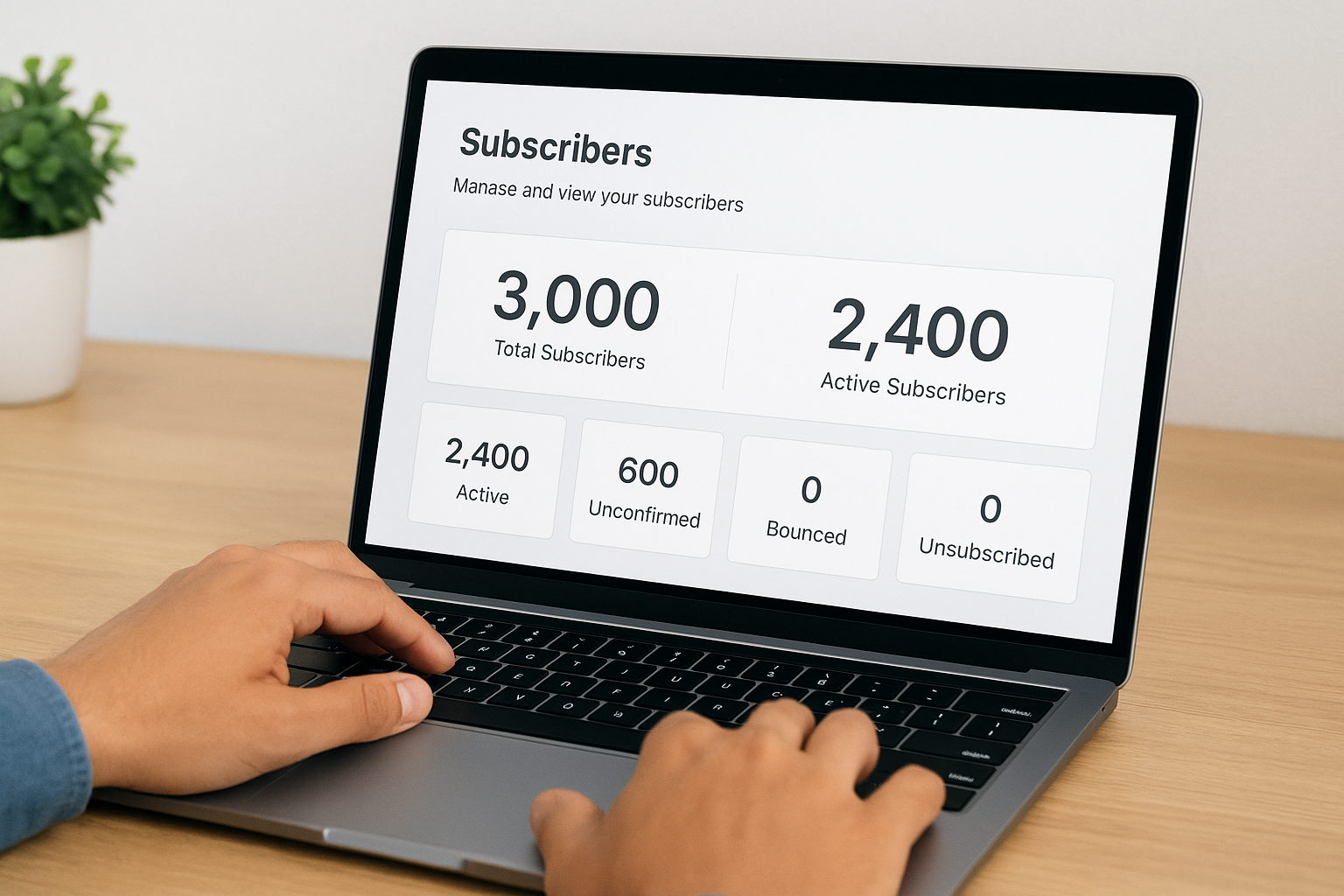
You’ll see both numbers in your dashboard: total subscribers and active subscribers. The active count matters for billing and campaign planning. A law firm might have 3,000 total subscribers but only 2,400 active ones. Those 600 unconfirmed addresses won’t receive your convertkit email marketing campaigns until they complete verification. This system prevents spam complaints and maintains your sender reputation automatically.
Tags versus segments
Tags label individual subscribers based on behavior or interests. When someone downloads your free consultation guide, you apply a "consultation-interest" tag to their profile. Tags stack, so one subscriber might have tags for "attended-webinar," "clicked-pricing-page," and "service-inquiry." You control which tags get added through forms, automations, or manual application.
Segments combine multiple tags into filtered groups. You might create a segment called "Hot Leads" that includes anyone tagged with both "consultation-interest" and "clicked-pricing-page" but excludes anyone tagged "already-client." Segments update automatically as subscriber behavior changes. When you send a broadcast, you choose which segments receive it, giving you precise targeting without maintaining separate lists.
"Tags track actions, segments organize people, and automations connect both to revenue."
Sequences versus broadcasts
Sequences run automatically when triggered by specific actions. A new subscriber joins your list through a landing page, and Kit sends them emails 1, 3, and 7 days later without any manual work. Sequences handle welcome series, educational nurture campaigns, and evergreen follow-ups. You build them once and they convert subscribers into clients on autopilot.
Broadcasts go out immediately to your chosen audience. You write an email about your new service offering and send it to your entire list or a specific segment. Broadcasts work for time-sensitive announcements, weekly newsletters, and one-off promotions. Unlike sequences, broadcasts require manual sending each time, but they let you respond to current events and opportunities quickly.
Kit setup checklist for a new account
Your first 20 minutes inside Kit determine how smoothly your convertkit email marketing campaigns will run for months to come. Service businesses often skip critical setup steps in their rush to start sending emails, then wonder why messages land in spam folders or subscribers don’t receive confirmation emails. The platform walks you through basic configuration during signup, but you need to complete several technical and strategic tasks before launching your first campaign.
Domain authentication and sender settings
Kit requires you to authenticate your sending domain through DNS records before your emails reach subscriber inboxes reliably. This process proves to email providers like Gmail and Outlook that you actually control the domain you’re sending from. Without authentication, your messages compete with spam for inbox placement, killing your open rates before anyone reads your content.
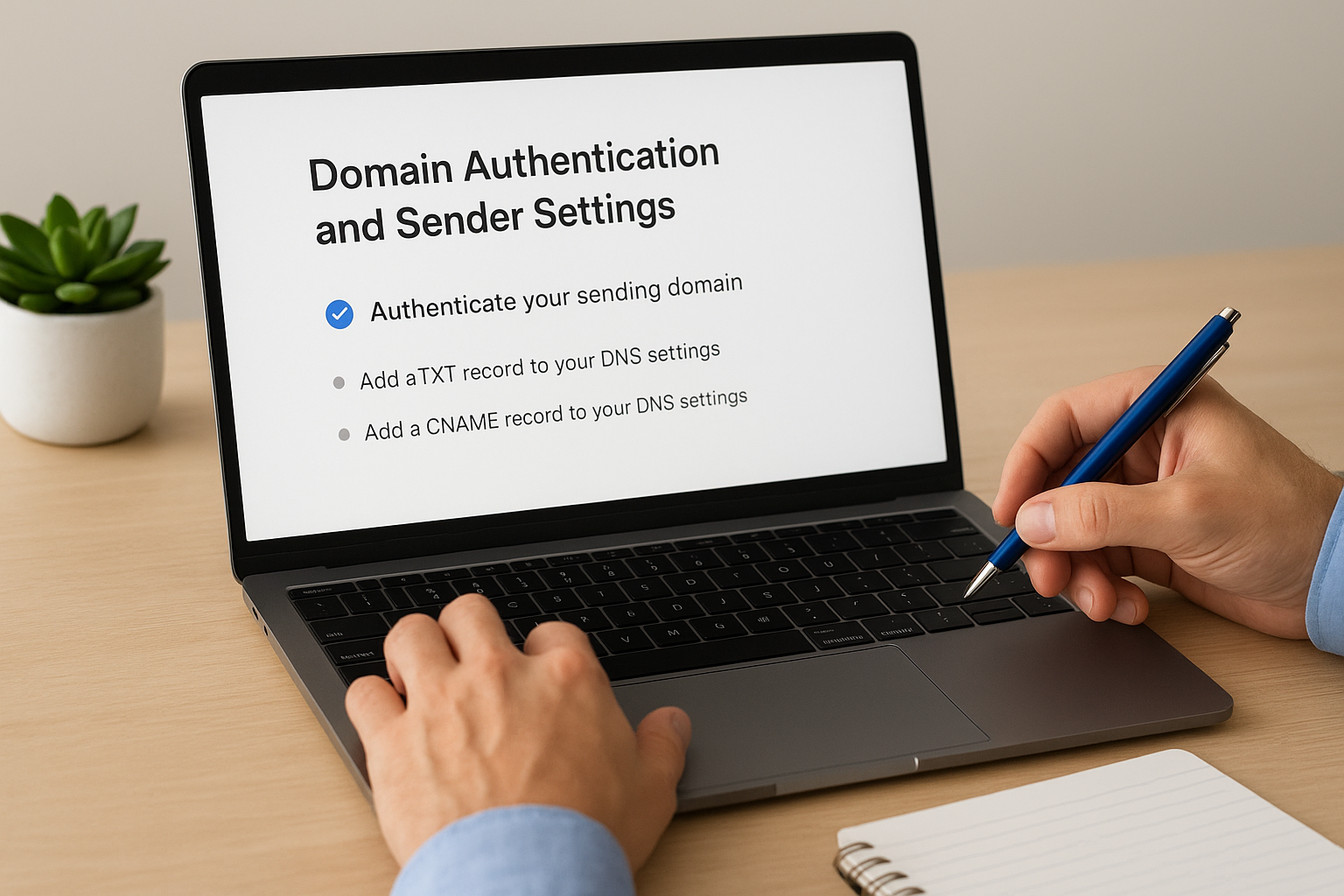
Navigate to your account settings and locate the sender information section. Add your business domain and follow the instructions to add DKIM and SPF records to your DNS settings. Most domain hosts provide one-click buttons for these records now. If you’re using a website builder that manages your domain, you’ll find these settings in their DNS management area. Complete this step before sending any emails, even test broadcasts to yourself. Authentication takes 24-48 hours to fully propagate across email networks.
"Authenticated domains see 30-50% higher open rates compared to generic Kit sending addresses because email providers trust verified senders."
Basic profile customization
Your sender name and default email address appear in every subscriber’s inbox. Law firms should use partner names or firm names rather than generic addresses like "info@" or "contact@". A personal sender name builds trust faster than corporate branding. Test both options with small segments if you’re unsure which converts better for your audience.
Upload your business logo and set your brand colors in the customization settings. These elements appear on your hosted landing pages and forms automatically. Consistency across touchpoints matters when you’re building trust with prospects who found you through paid ads or organic search. Kit applies your branding to every subscriber-facing element without requiring design work on each piece.
Initial compliance and legal setup
Every email you send needs an unsubscribe link and physical mailing address under CAN-SPAM regulations. Kit adds the unsubscribe link automatically, but you must provide your business address in the account settings. Use your actual office location, not a PO box, to maintain compliance and build credibility.
Configure your default "unsubscribe" and "confirm subscription" page messaging to match your brand voice. The standard Kit templates work fine, but customizing these pages reinforces your professional positioning. Add a sentence explaining what types of emails subscribers will receive and how often. This transparency reduces complaints and improves long-term engagement with your list.
Building your list with forms and landing pages
Kit provides two primary tools for capturing email addresses: forms you embed on existing pages and standalone landing pages you host through Kit itself. Both options serve different stages of your client acquisition funnel. Forms work best when you already have website traffic and want to convert visitors without sending them away from your content. Landing pages excel when you’re running paid ads or need a dedicated destination for a specific lead magnet or offer.
Form types and when to use each
Kit offers three form formats: inline forms, slide-in forms, and modal popups. Inline forms sit directly in your page content, making them perfect for blog post sidebars or below service descriptions. They don’t interrupt the reading experience but rely on visitors scrolling past them. Slide-in forms appear from the corner of your screen after a visitor spends time on your page, capturing attention without blocking content. Modal popups overlay your entire page and demand immediate action, converting aggressively but potentially annoying visitors if overused.
Service businesses get the best results by matching form type to visitor intent. Use inline forms on service pages where prospects actively research solutions. Deploy slide-ins on blog posts after readers demonstrate interest by scrolling 50% down the page. Reserve modal popups for exit-intent triggers when visitors move to close the tab, offering one final chance to capture the email before they leave your site completely.
Landing page setup for lead magnets
Kit’s landing page builder lets you create subscriber capture pages without touching code or hiring a designer. Each template includes headline, description, form, and optional image sections you customize through a visual editor. Build a page for your free consultation offer in under 10 minutes, then connect it to an automated welcome sequence that nurtures prospects toward booking.
The platform hosts these pages on Kit’s servers with your custom subdomain, so you don’t need separate hosting. A law firm might use leads.yourfirmname.com for all lead magnet pages. This setup tracks conversions automatically and feeds new subscribers directly into your convertkit email marketing automation workflows without manual data transfers.
"Landing pages that focus on one clear offer convert 3-5 times better than generic newsletter signup forms."
Embed options for your website
Kit generates HTML embed codes and WordPress plugins for adding forms to your existing website. Copy the embed code from any form and paste it into your website builder’s HTML block. WordPress users install the official Kit plugin and insert forms using shortcodes or Gutenberg blocks. Both methods sync new subscribers to your account instantly, maintaining your list across multiple collection points without duplicate management work.
Segmenting with tags, segments, and custom fields
Your subscriber list becomes more valuable when you group people by their interests, behaviors, and stage in your buying journey. Kit’s segmentation system lets you send the right message to the right person without managing multiple separate lists. Service businesses often blast the same email to everyone, wondering why engagement drops over time. Smart segmentation fixes this problem by treating different prospects differently based on what they’ve told you through their actions.
Tag strategy for subscriber behavior
You apply tags to track specific actions subscribers take inside and outside your emails. When someone clicks your pricing page link, you add a "pricing-interest" tag. When they download your service guide, you add "guide-downloaded." These behavioral tags accumulate on each subscriber’s profile, creating a detailed picture of their journey from cold prospect to hot lead.
Start with five core tag categories: lead source, interest area, engagement level, purchase stage, and objection type. A law firm might tag subscribers with "webinar-attendee," "family-law-interest," "highly-engaged," "consultation-ready," and "price-concerned." This structure lets you craft targeted convertkit email marketing messages that address exactly where each prospect sits in your funnel. Tags work best when they answer the question: what do I need to know about this person to serve them better?
"Subscribers with three or more behavioral tags convert at double the rate of untagged contacts because you’re speaking directly to their demonstrated interests."
Building dynamic segments for targeting
Segments combine multiple tags into reusable audience filters you can target with broadcasts or automation. You might create a "Hot Leads" segment that includes anyone tagged with both "pricing-interest" and "case-study-downloaded" but excludes "already-client." These segments update automatically as subscriber behavior changes, keeping your targeting accurate without manual list management.
Build segments around campaign objectives rather than demographic categories. Instead of "Small Business Owners," create "Ready for Consultation" based on engagement signals. Kit’s segment builder uses AND/OR logic, letting you construct complex filters like "attended webinar OR downloaded guide AND clicked pricing link BUT NOT unsubscribed." This precision prevents message fatigue by excluding people who’ve already taken your desired action.
Custom fields for personalization data
Custom fields store additional information about each subscriber beyond their email address. Collect business type, company size, or specific pain points through your signup forms, then reference these fields in your email copy using merge tags. An email subject line becomes "3 ways [business type] owners land more clients" instead of generic messaging that ignores what you know about the recipient.
Limit yourself to three to five custom fields maximum when starting out. Too many fields complicate your forms and reduce conversion rates. Focus on data that changes how you communicate: industry, role, or primary challenge. You can always add more fields later as your segmentation strategy matures and you identify gaps in your targeting capabilities.
Automations with sequences and visual workflows
Kit gives you two automation tools that work together to nurture prospects without manual intervention. Sequences deliver pre-written emails in a fixed order, perfect for welcome series and educational content that introduces your services over time. Visual automation workflows handle conditional logic, letting you branch subscribers down different paths based on their behavior. Most service businesses start with simple sequences and layer in visual workflows once they understand how their audience responds to different messaging approaches.
Email sequences for automated nurture
Sequences operate like a drip campaign that starts the moment someone triggers the entry condition. You write five emails explaining your service process, set day delays between each message, and connect the sequence to a signup form. When a prospect downloads your guide, Kit sends email one immediately, email two after three days, email three after two more days, and continues through your predetermined schedule without requiring your attention.
Build your first sequence around the questions prospects ask most frequently during sales calls. A law firm might create a five-email sequence covering consultation process, typical case timelines, pricing structure, client success stories, and next steps to schedule. Each email ends with a clear call to action that moves recipients closer to booking. Kit tracks who opens and clicks within the sequence, automatically applying tags you use for follow-up segmentation in your convertkit email marketing strategy.
"Automated sequences convert 40% more prospects than manual follow-up because consistency beats perfection when nurturing leads over weeks."
Visual automation builder workflows
The visual builder adds if/then logic that simple sequences can’t handle. You create automation maps showing multiple paths subscribers take based on their engagement. Someone clicks your pricing link and moves to the "hot lead" path receiving case studies. Another subscriber ignores three emails and shifts to a "re-engagement" path with different messaging designed to recapture attention.
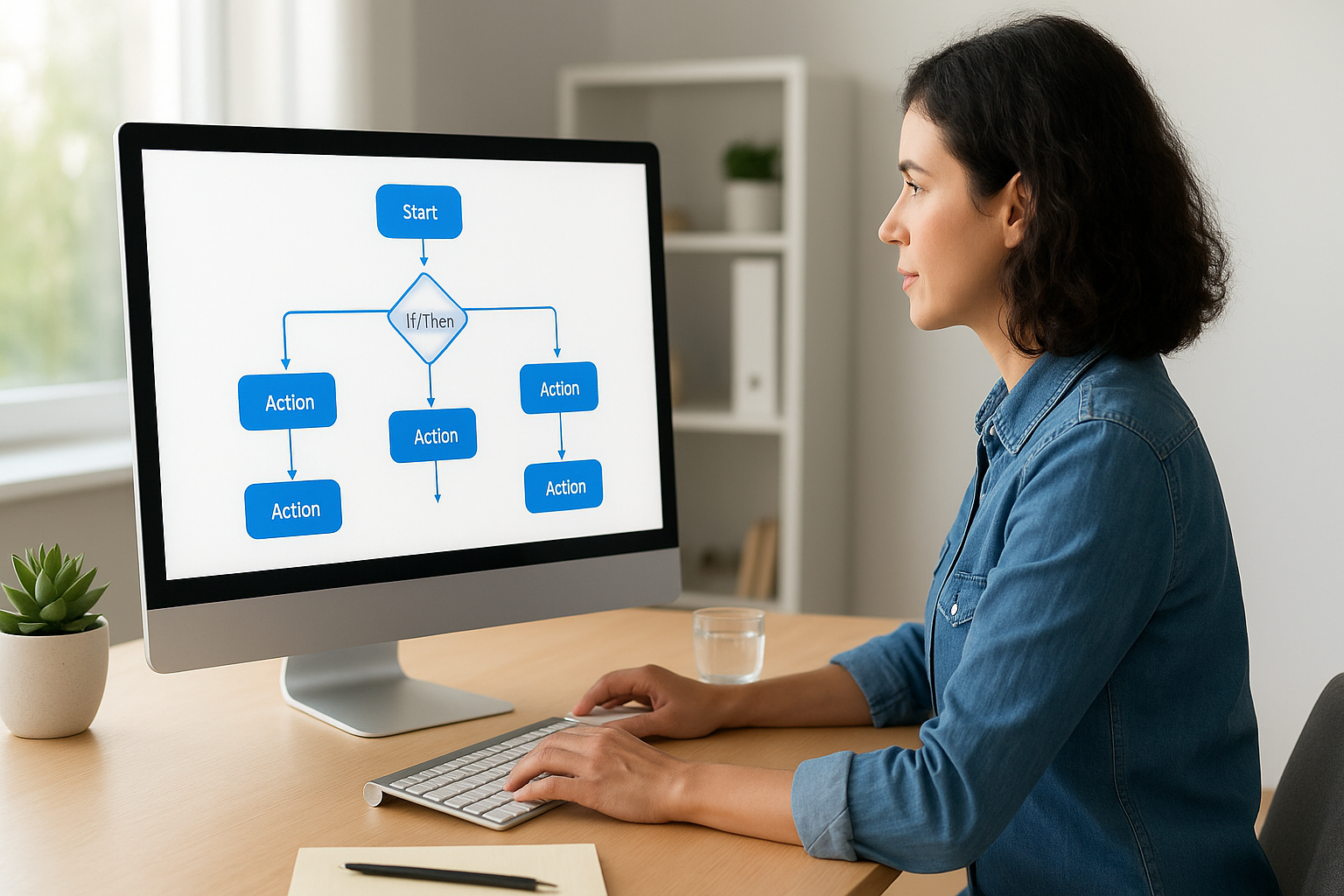
Workflows become powerful when you combine multiple triggers, conditions, and actions in one automation. Start with a form submission trigger, add a three-day wait, check if the subscriber opened your welcome email, then branch into two paths: engaged recipients get your service overview while non-openers receive a shorter reintroduction message. You build these visual maps by dragging blocks onto a canvas and connecting them with conditional logic that Kit executes automatically.
Trigger options and timing rules
Kit offers seven trigger types including form submissions, tag additions, product purchases, and date-based events. Service businesses rely most heavily on form and tag triggers because these fire when prospects demonstrate interest through specific actions. Set up a workflow triggered by the "consultation-request" tag that immediately sends booking details and adds the subscriber to your CRM for follow-up calls.
Timing rules prevent automation overload by spacing messages appropriately and respecting subscriber preferences. Add wait steps between emails ranging from hours to weeks, ensuring you don’t bombard people with daily messages when weekly check-ins convert better. Configure "do not send" windows during weekends or holidays when your audience ignores business emails, improving open rates by delivering content when recipients actually engage with their inbox.
Sending broadcasts and newsletters that convert
Broadcasts serve a different purpose than automated sequences in your convertkit email marketing system. You send them manually to announce time-sensitive offers, share weekly insights, or update your audience on business changes. Unlike sequences that guide subscribers through a predetermined journey, broadcasts let you respond to current events and opportunities while maintaining direct contact with your list. Service businesses that neglect broadcasts miss chances to stay top-of-mind with prospects who aren’t ready to buy today but will need your services months from now.
Subject line strategies that drive opens
Your subject line determines whether subscribers open your message or scroll past it. Skip clever wordplay and state exactly what value recipients get by opening. A law firm broadcasting about a new service area writes "We now handle estate planning in [County]" instead of "Exciting news inside." Specificity beats mystery when professionals scan crowded inboxes looking for relevant information.
Test personalization tokens and urgency elements without creating false scarcity. Subject lines including the recipient’s first name or company name lift open rates by 15-20% because they signal tailored content rather than mass blasts. Phrases like "ending Friday" or "limited spots" work when genuinely true but destroy trust when overused. Kit tracks your open rates by subject line type, showing you which approaches resonate with your specific audience over time.
"Subject lines under 50 characters maintain readability on mobile devices where 85% of professionals check email first thing each morning."
Email body structure for clicks
Start every broadcast with one sentence explaining why you’re emailing today. Busy readers decide within three seconds whether to keep reading or delete your message. Open with "I’m sharing three client acquisition mistakes we’re seeing this quarter" rather than lengthy introductions about your credentials or company history.
Structure your body copy around a single call to action that moves subscribers toward becoming clients. Service businesses often stuff broadcasts with multiple links, diluting focus and reducing conversion rates. Choose whether this broadcast drives consultation bookings, case study downloads, or pricing page visits, then design every paragraph to support that one goal. Kit’s link tracking shows you exactly which calls to action generate clicks, helping you refine your messaging with each send.
Timing and frequency optimization
Send broadcasts when your audience actually reads email rather than when it’s convenient for you. Professional service subscribers engage most Tuesday through Thursday between 8-10 AM in their local timezone. Kit doesn’t automatically adjust for timezones, so segment your list geographically if you serve clients across multiple regions and send the same broadcast at optimal times for each group.
Consistency matters more than frequency when building trust through regular communication. Weekly broadcasts keep you top-of-mind without overwhelming subscribers, while monthly sends risk being forgotten between messages. Test your cadence by monitoring unsubscribe rates and engagement metrics over 90 days, adjusting based on actual behavior rather than assumptions about what your audience wants.
Kit vs Mailchimp and other alternatives
You need to understand how Kit compares to established email platforms before committing your business to one system. Mailchimp dominates market share but serves a different user profile than Kit targets. While Mailchimp started as a newsletter tool for bloggers and small businesses, Kit built its platform specifically for creators and service providers who monetize through email relationships rather than just sharing content. This foundational difference affects every feature decision and pricing structure between the two platforms.
Mailchimp comparison: features and philosophy
Mailchimp offers more design templates and e-commerce integrations than Kit provides out of the box. You get sophisticated A/B testing across multiple variables, advanced segmentation based on purchase history, and detailed analytics dashboards tracking subscriber lifetime value. These features matter if you run a product-based business with complex inventory and need tight integration between your store and email campaigns.
Kit strips away this complexity and focuses on subscriber relationships over transaction management. The visual automation builder handles conditional logic more intuitively than Mailchimp’s customer journey mapper. You build nurture sequences faster because Kit doesn’t bury essential features behind enterprise paywalls the way Mailchimp does with automation and advanced segmentation. Pricing also differs fundamentally: Mailchimp charges based on contact count with feature tiers, while Kit includes landing pages and automation in every paid plan.
"Choose your email platform based on whether you’re selling products or selling services, because that decision determines which features actually drive revenue for your business."
ActiveCampaign and enterprise alternatives
ActiveCampaign sits between Kit and full CRM systems like HubSpot. You get deeper automation logic and built-in CRM functionality that Kit lacks, but you pay significantly more per subscriber and face a steeper learning curve. Service businesses outgrowing Kit usually migrate to ActiveCampaign when they need sales pipeline management integrated with email nurturing, tracking deals and contacts in one system rather than connecting separate tools.
Platforms like Constant Contact and AWeber compete at Kit’s price point but haven’t kept pace with modern convertkit email marketing automation capabilities. Both offer reliable delivery and simple broadcast sending but lack the visual workflow builder and tag-based segmentation that make Kit powerful for complex nurture campaigns.
When to choose Kit over competitors
Pick Kit when you prioritize ease of use and subscriber relationship building over enterprise features. Law firms and service businesses converting leads through educational content and consultation funnels benefit most from Kit’s focused approach. You avoid paying for CRM features you’ll duplicate in your practice management software while gaining automation tools specifically designed for moving prospects through service-based buying journeys.
Switch to alternatives when your business model changes. Product sellers need Mailchimp’s e-commerce depth. Enterprise operations require ActiveCampaign’s CRM integration. But for service providers building audiences through content and converting through consultation calls, Kit delivers exactly what you need without the bloat that slows down your marketing execution.
Next steps
You’ve learned the core mechanics of convertkit email marketing and how to build automated systems that convert subscribers into clients. The platform’s simplicity becomes your competitive advantage when you implement what this guide covered: proper domain authentication, strategic segmentation with tags, automated nurture sequences, and targeted broadcasts that drive consultation bookings.
Your next move depends on where you are in your client acquisition journey. If you’re just starting with Kit, set up your account authentication and build one simple welcome sequence this week. Already running email campaigns? Audit your current automation workflows and add behavioral tags that segment prospects by engagement level and buying stage.
Most service businesses struggle with the gap between email platform setup and actual client conversions. Your funnel might capture leads effectively while your follow-up sequences fail to book consultations. We help service businesses and law firms fix these conversion breakdowns through data-driven funnel audits. Schedule a free conversion audit and we’ll identify exactly where your Kit setup is losing qualified prospects.
