

Email marketing drives more revenue per dollar spent than almost any other digital channel. But sending emails isn’t the same as converting subscribers into paying clients. That’s where ActiveCampaign email marketing comes in, a platform built for businesses that need more than basic newsletters and blast campaigns.
At Client Factory, we’ve tested dozens of email platforms while building client acquisition funnels for service businesses and law firms. ActiveCampaign consistently stands out for its automation capabilities and CRM integration, making it a serious contender for businesses focused on turning leads into clients.
But is it the right fit for your business? This article breaks down ActiveCampaign’s core features, pricing structure, and real-world performance. You’ll learn what sets it apart from competitors, where it falls short, and whether it’s worth the investment for your specific needs.
What ActiveCampaign email marketing is
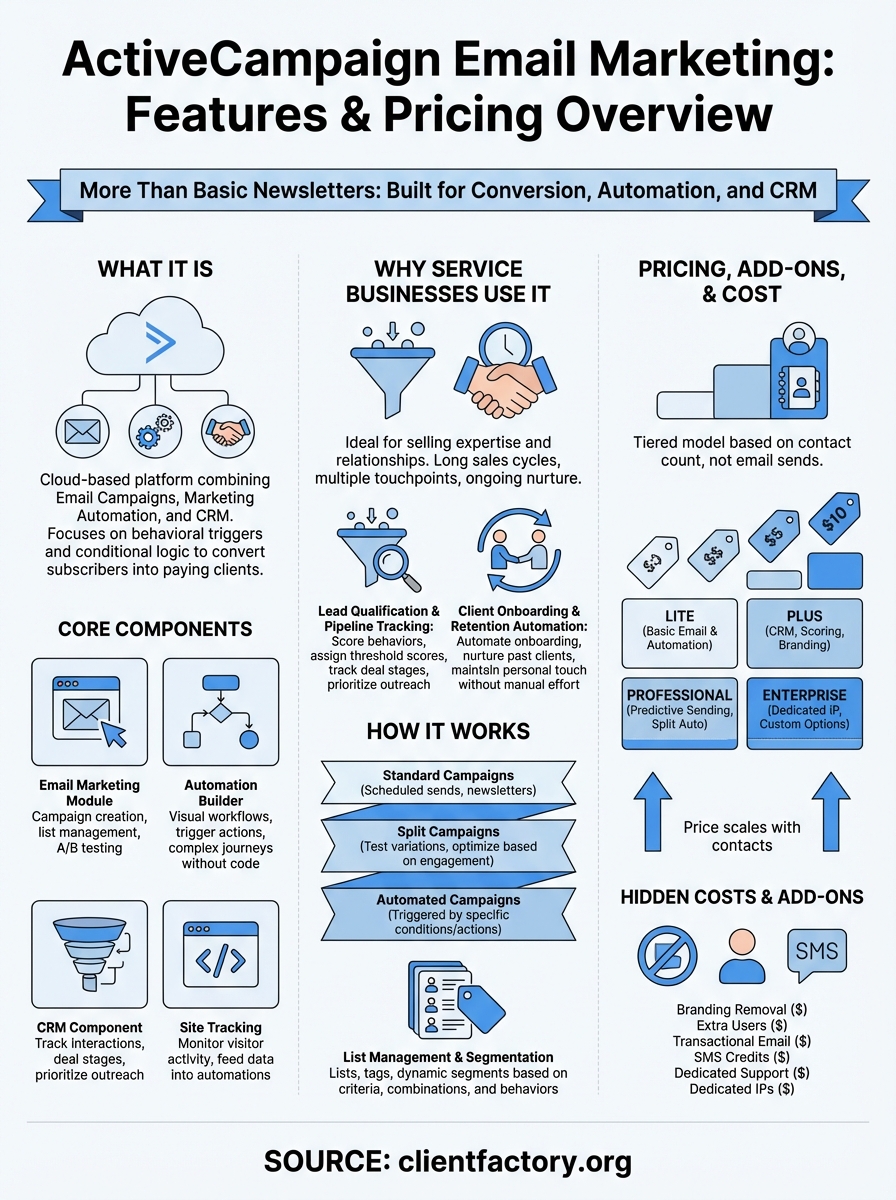
ActiveCampaign email marketing is a cloud-based platform that combines email campaigns, marketing automation, and customer relationship management (CRM) into one system. Unlike basic email tools that simply send newsletters, ActiveCampaign focuses on behavioral triggers and conditional logic that respond to how your subscribers interact with your business. You can send targeted messages based on what pages someone visits, which emails they open, or where they are in your sales pipeline.
The platform serves over 185,000 businesses across 170 countries, from solo consultants to mid-market companies with dedicated marketing teams. ActiveCampaign positions itself between simple tools like Mailchimp and enterprise systems like Salesforce, offering advanced automation without the steep learning curve or six-figure price tag.
Platform core components
ActiveCampaign operates through four main modules that work together. The email marketing module handles campaign creation, list management, and A/B testing with a drag-and-drop builder. You design emails using pre-built templates or custom HTML, segment your audience based on dozens of criteria, and schedule sends for optimal timing.

The automation builder is where the platform shows its strength. You create visual workflows that trigger specific actions when contacts meet certain conditions. For example, you can automatically send a follow-up sequence when someone downloads a guide, tag them based on which links they click, and move them to different lists depending on their engagement level.
ActiveCampaign’s automation logic lets you build complex customer journeys without writing a single line of code.
The CRM component tracks every interaction a contact has with your business. You see email opens, website visits, form submissions, and deal stages in one unified timeline. Sales teams use this data to prioritize outreach and personalize conversations based on actual behavior rather than guessing what prospects care about.
Finally, the site tracking feature monitors visitor activity on your website. When you install a small code snippet, ActiveCampaign records which pages each contact views, how long they stay, and what actions they take. This data feeds directly into your automation workflows, letting you send targeted emails based on specific page visits or shopping cart abandonment.
What sets it apart from basic platforms
Most email tools treat subscribers as static contacts in a database. ActiveCampaign treats them as individuals moving through different stages of awareness and intent. The platform updates contact records automatically based on their behavior, adjusting your messaging to match where they are in the buying process.
You also get predictive sending, which uses machine learning to determine the best time to email each subscriber based on their historical open patterns. Instead of sending your entire list at 10 AM on Tuesday, the system delivers messages when each person is most likely to engage. This feature alone can lift open rates by 7-12% compared to standard scheduled sends.
The platform includes conditional content blocks that display different text, images, or offers within the same email based on subscriber attributes. One campaign can show different case studies to lawyers versus accountants, or highlight different services based on which lead magnet someone downloaded. You maintain fewer campaigns while delivering more relevant messages to each segment.
Why service businesses use ActiveCampaign
Service businesses face different challenges than e-commerce stores or SaaS companies. You’re selling expertise and relationships, not products with add-to-cart buttons. Your sales cycles stretch longer, your deals require multiple touchpoints, and your clients need ongoing nurture even after they sign. ActiveCampaign email marketing addresses these specific needs through automation that mirrors how service businesses actually sell.
Unlike retail-focused platforms that prioritize discount codes and abandoned cart recovery, ActiveCampaign built its system around lead qualification and relationship management. You track which prospects engage with your content, score them based on behavior signals, and route hot leads to your sales team while warming up cold contacts through automated sequences. This approach matches the consultative selling process that law firms, agencies, and professional services rely on.
Lead qualification and pipeline tracking
Service businesses typically work with fewer clients at higher price points, which means you can’t afford to waste time on unqualified leads. ActiveCampaign lets you assign point values to specific behaviors, like attending a webinar or visiting your pricing page three times. When a contact hits your threshold score, the system automatically notifies your sales team or triggers an outreach sequence.
The CRM tracks where each prospect sits in your pipeline across multiple stages. You see which leads are stuck in the proposal phase, who’s ready for a follow-up call, and which contacts went cold after an initial consultation. This visibility helps you prioritize your limited sales capacity on the opportunities most likely to close.
Service businesses convert more leads when they focus on behavior-driven outreach instead of sending the same message to everyone.
Client onboarding and retention automation
Once someone becomes a client, ActiveCampaign shifts from acquisition to retention. You automate onboarding sequences that explain your process, introduce key team members, and set expectations for the first 30 days. These workflows reduce the manual effort required to bring new clients up to speed while maintaining a personal touch.
The platform also manages post-project nurture campaigns that keep former clients engaged long after their initial engagement ends. You send relevant content, request referrals at strategic intervals, and remind past clients about additional services they haven’t purchased yet. This automated relationship maintenance turns one-time projects into ongoing partnerships without constant manual follow-up from your team.
How email campaigns work in ActiveCampaign
ActiveCampaign email marketing lets you build campaigns through a visual editor that requires no coding knowledge. You start by choosing a campaign type, selecting your audience, designing your message, and scheduling your send. The platform gives you full control over who receives your emails and when they arrive, but it also automates the technical details like managing unsubscribes, handling bounces, and tracking engagement metrics across your entire list.
The campaign creation process takes less than 10 minutes for simple newsletters and up to an hour for complex segmented sends with multiple conditional blocks. You access all your campaign tools from a single dashboard where you can duplicate previous sends, preview how your message looks on different devices, and run split tests to optimize your subject lines or content variations.
Campaign types and builders
You choose between three main campaign types when creating a new send. Standard campaigns go to your entire list or a specific segment at a scheduled time, perfect for [newsletters](https://clientfactory.org/constant-contact-email-marketing/) or announcements. Split campaigns test up to five variations of your message against each other, automatically sending the winning version to your remaining subscribers based on open rates or click rates.
Automated campaigns trigger based on specific conditions like subscribing to a list, reaching a certain lead score, or completing a form. These work differently than the automation builder because they’re one-off sends tied to single triggers, not multi-step sequences. You use them when you want a single email to fire automatically without building an entire workflow.
Standard campaigns handle scheduled sends while automated campaigns respond to subscriber actions in real time.
The drag-and-drop builder includes over 250 templates organized by industry and use case. You add content blocks for text, images, buttons, videos, and social links by dragging them into your layout. Each block has its own styling options for fonts, colors, spacing, and alignment. If you prefer coding your own designs, you can switch to HTML mode and write custom templates that still pull in dynamic content from your contact database.
List management and segmentation
ActiveCampaign organizes contacts into lists and tags that serve different purposes. Lists represent broad categories like newsletter subscribers or webinar attendees, while tags mark specific interests, behaviors, or stages in your funnel. You assign multiple tags to a single contact, letting you segment based on combinations of criteria rather than forcing people into single buckets.
When you create a campaign, you select which lists receive it and then apply additional filters to narrow your audience. You can exclude contacts who opened your last three emails, target only those who visited your pricing page, or send specifically to people in certain states or industries. These dynamic segments update automatically as contact behavior changes, ensuring your campaigns always reach the most relevant audience.
How automations and CRM work together
ActiveCampaign email marketing combines automation workflows and CRM data into a single system that updates contact records based on behavior and adjusts messaging based on deal stages. When a contact takes an action like opening an email or visiting a pricing page, the automation triggers and the CRM records the interaction. This two-way connection means your sales team sees marketing engagement inside deal records while your marketing automation responds to sales pipeline changes.
The integration eliminates the disconnection most businesses face between marketing and sales. You don’t export lists from your CRM to send emails or manually update contact stages after someone responds to a campaign. Instead, the system handles these updates automatically, keeping your contact data and outreach sequences synchronized without manual intervention.
Automation triggers based on deal stages
You build workflows that respond to specific CRM events like when a deal moves to a new stage, when a contact is assigned to a sales rep, or when a deal sits inactive for a set number of days. For example, you can automatically send a case study email when a prospect advances to the consideration stage, or trigger a re-engagement sequence when a deal stays in the proposal phase for longer than two weeks.
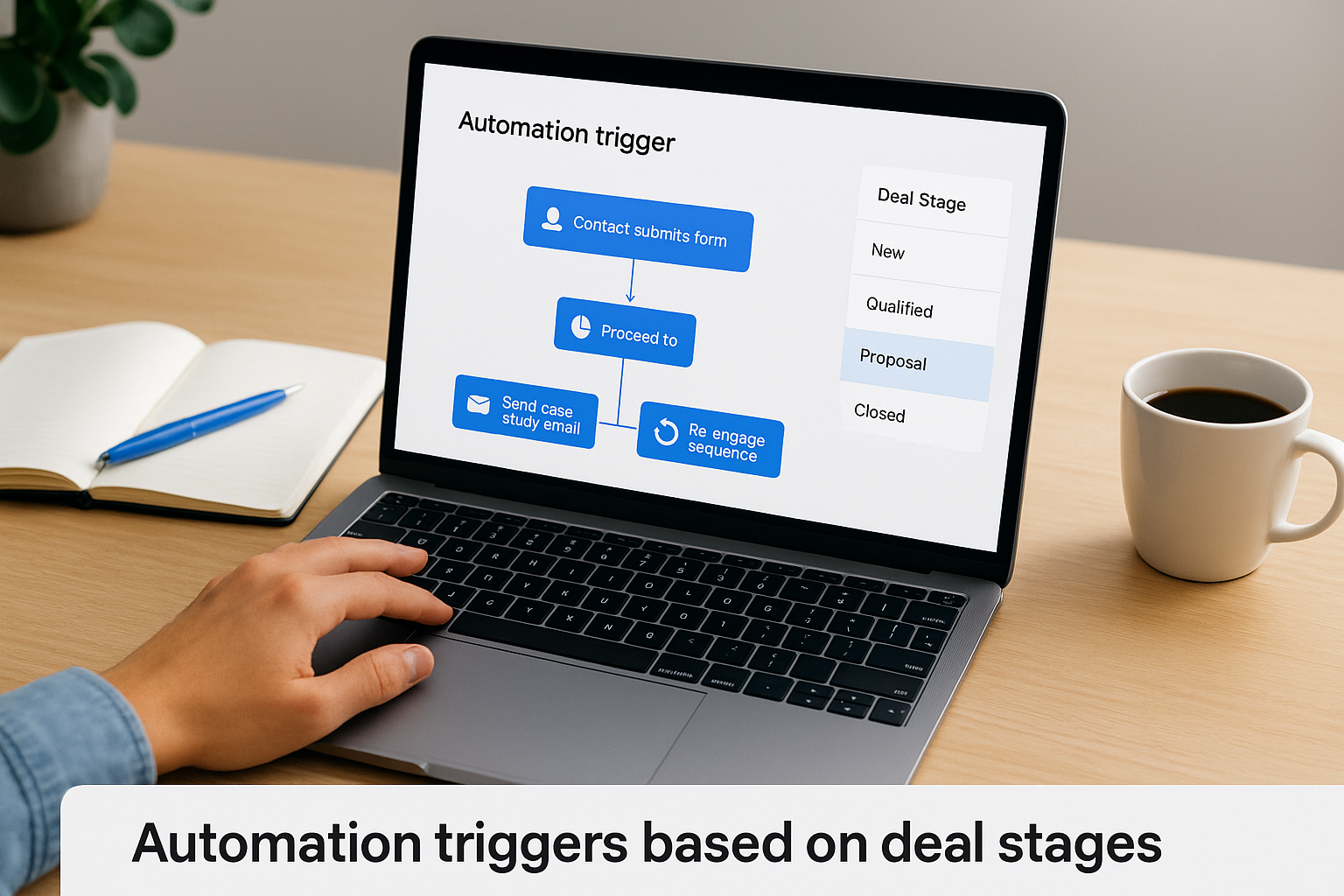
These deal-based automations let you nurture leads differently depending on where they sit in your pipeline. Cold prospects receive educational content, warm leads get comparison guides and pricing information, and stalled opportunities receive personalized outreach that addresses common objections. Your messaging stays relevant to each prospect’s current situation instead of treating everyone the same regardless of their buying stage.
Deal stage automations ensure your marketing messages match where prospects actually are in your sales process.
Contact scoring and sales notifications
ActiveCampaign assigns points to contacts based on behaviors you define, like attending a webinar or downloading a service guide. When someone reaches your threshold score, the automation notifies your sales team through email, Slack, or direct task assignment inside the CRM. You prioritize outreach on engaged prospects instead of cold calling your entire database.
The scoring system also triggers pipeline actions automatically. High-value contacts move into your sales pipeline as new deals, assign to specific team members based on territory or specialty, and update their deal value based on the services they’ve shown interest in. Your CRM stays current without manual data entry, and your sales team focuses their limited time on prospects most likely to convert.
Deliverability, tracking, and integrations
ActiveCampaign email marketing handles the technical infrastructure that determines whether your messages reach inboxes or land in spam folders. The platform maintains sender reputation through dedicated IP addresses for higher-tier plans and shared IPs for starter accounts, while monitoring bounce rates and spam complaints to protect your deliverability. You also get detailed tracking on every campaign and automation, plus connections to hundreds of third-party tools that extend the platform’s capabilities.
Email deliverability and inbox placement
ActiveCampaign maintains relationships with major inbox providers like Gmail, Outlook, and Yahoo to ensure your emails pass authentication checks. The platform automatically configures SPF, DKIM, and DMARC records when you connect your sending domain, protecting your messages from being flagged as spoofed or fraudulent. You verify your domain through a simple DNS update that takes most businesses less than 15 minutes to complete.
The system monitors your sender reputation in real time and alerts you when metrics drop below acceptable thresholds. You see your bounce rate, spam complaint rate, and unsubscribe rate for each campaign and automation. When issues arise, the platform suggests specific fixes like cleaning inactive contacts or adjusting your sending frequency to protect your long-term deliverability.
Your sender reputation determines whether prospects see your emails or never know you reached out.
Performance tracking across campaigns
ActiveCampaign tracks opens, clicks, unsubscribes, and bounces for every message you send. The dashboard shows these metrics in aggregate across all campaigns or broken down by individual sends, letting you identify trends over time. You drill into specific campaigns to see which links got the most clicks, what time zones showed the highest engagement, and how mobile opens compared to desktop.
Each contact record displays their complete interaction history, including which campaigns they opened, which links they clicked, and when they last engaged with your emails. You use this data to segment your list based on engagement levels, removing inactive contacts or sending re-engagement campaigns to subscribers who haven’t opened in 90 days.
Third-party connections and API
The platform includes native integrations with over 870 apps including WordPress, Shopify, Salesforce, and Zapier. You connect these tools without writing code, syncing contact data and triggering automations based on actions in other systems. For example, you automatically add new Stripe customers to specific email sequences or create CRM deals when someone completes a Calendly booking.
Developers access ActiveCampaign’s REST API to build custom integrations that match your specific workflow. You push contact data from proprietary systems, trigger automations from internal apps, or pull campaign metrics into custom dashboards.
Pricing, add-ons, and total cost
ActiveCampaign email marketing operates on a tiered pricing model that scales with your contact count and feature requirements. The platform charges based on how many contacts you store in your database, not how many emails you send. You pay more as your list grows, with price jumps at 500, 1,000, 2,500, 5,000, and 10,000 contacts. Four main plans (Lite, Plus, Professional, and Enterprise) offer different automation capabilities and user limits at each contact tier.
Base plan structures and features
The Lite plan starts at $29 per month for 1,000 contacts and includes email marketing, basic automation, and chat support. You get the drag-and-drop builder and site tracking but lack advanced features like predictive sending or lead scoring. This tier works for businesses testing the platform or running simple email sequences without complex CRM needs.
Plus plans begin at $49 monthly for 1,000 contacts and add the full CRM, lead scoring, and custom branding options. Professional plans start at $149 per month and include predictive sending, split automations, and attribution reporting. Enterprise pricing requires custom quotes and adds dedicated IP addresses, custom reporting, and unlimited email testing. Most service businesses need at least the Plus plan to access meaningful automation features that justify switching from basic platforms.
Your actual monthly cost depends on contact count more than which plan tier you choose.
Hidden costs and add-ons
ActiveCampaign charges extra for features that competitors include in base pricing. You pay $45 monthly to remove the ActiveCampaign branding from your emails, $15 per additional user beyond your plan’s included seats, and $29 monthly for transactional email capabilities. These add-ons increase your effective cost by 30-50% above the advertised plan price for most businesses.
SMS messaging requires separate credits purchased in bundles, with costs varying by country. You also pay for dedicated support through the premium support add-on at $100 per month, which includes priority response times and a dedicated account strategist. Businesses sending high volumes often need dedicated IPs, which cost an additional $125-$250 monthly depending on your sending patterns.
Real-world total investment
A service business with 5,000 contacts typically pays $187 monthly for the Plus plan, plus $45 for white labeling and $30 for two additional users, totaling $262 before taxes. Professional plans at the same contact level run $279 base, reaching $354 with common add-ons. You should budget 20-30% above the base plan price to cover the features most businesses actually need for complete functionality.
Where to go from here
ActiveCampaign email marketing delivers powerful automation capabilities that most service businesses underutilize. You now understand the platform’s core features, pricing structure, and how it differs from basic email tools. The question isn’t whether ActiveCampaign works, but whether you have the strategy and implementation expertise to extract its full value for your specific business model.
Most businesses struggle with the technical setup, audience segmentation logic, and conversion optimization required to turn email subscribers into paying clients. You can spend months learning the platform through trial and error, or you can work with specialists who have already built successful client acquisition funnels across dozens of service businesses and law firms.
If you’re ready to convert more leads without the learning curve, Client Factory helps service businesses implement data-driven marketing strategies that actually generate clients. We handle the technical execution while you focus on serving your clients.
