

Your landing page gets traffic but conversions fall short. You spent hours perfecting the headline, chose what you thought was the perfect call-to-action button, and yet visitors keep bouncing. The problem is you’re making decisions based on assumptions rather than data about what actually works for your audience.
A/B testing landing pages gives you the answer. Instead of guessing which version performs better, you split your traffic between two variants and let real visitor behavior tell you what converts. One test can reveal whether your new headline outperforms the old one by 30% or if that green button you loved actually kills conversions.
This guide walks you through the complete process from setting clear goals to analyzing results and scaling winners. You’ll learn what elements to test first, which tools make setup simple, how to avoid the mistakes that skew your data, and how to turn one successful test into a repeatable system for improving conversions. Whether you’re running your first test or your fiftieth, you’ll find the step-by-step framework you need to make confident, data-driven decisions.
What is A/B testing for landing pages
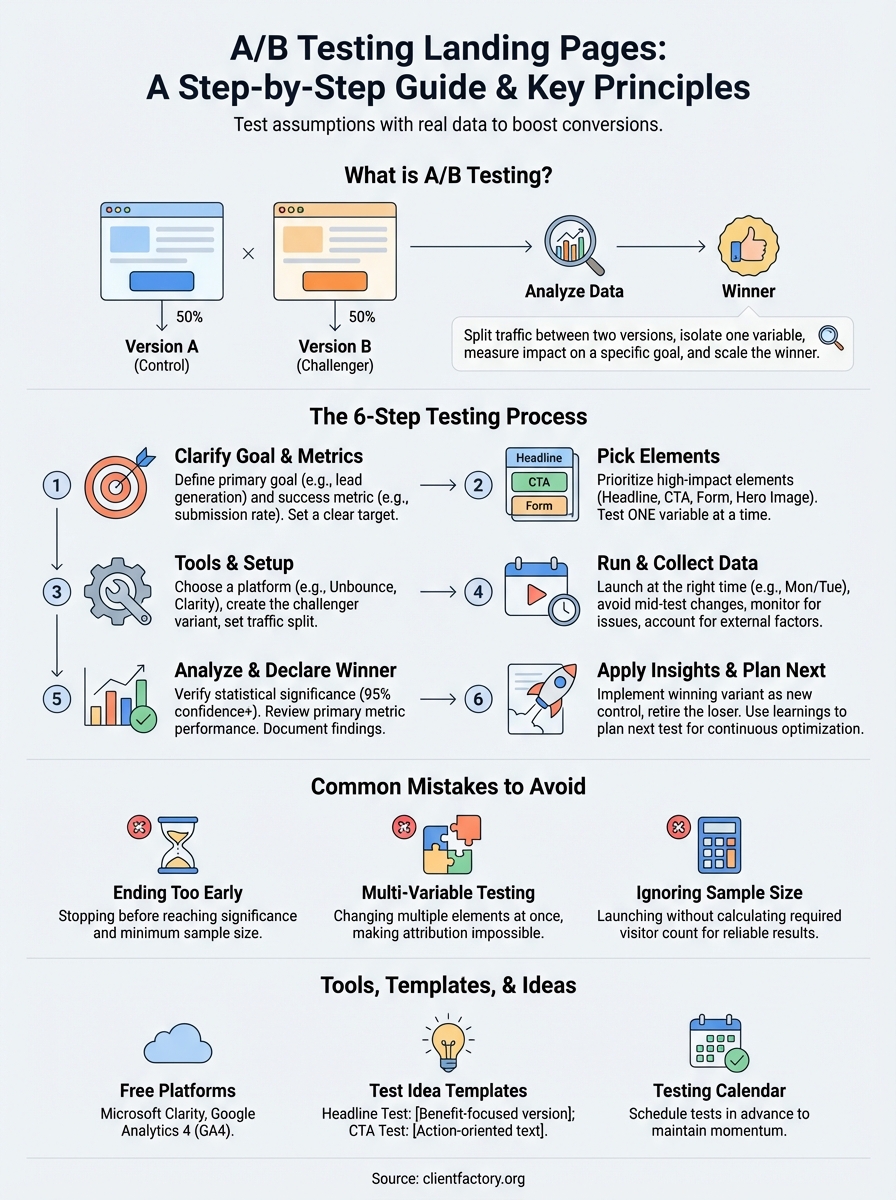
A/B testing for landing pages means you create two versions of the same page and split your incoming traffic between them to see which one performs better. Version A might have a blue call-to-action button while Version B uses orange. You send 50% of visitors to each variant, measure specific metrics like conversion rate or form submissions, and let the data tell you which version wins.
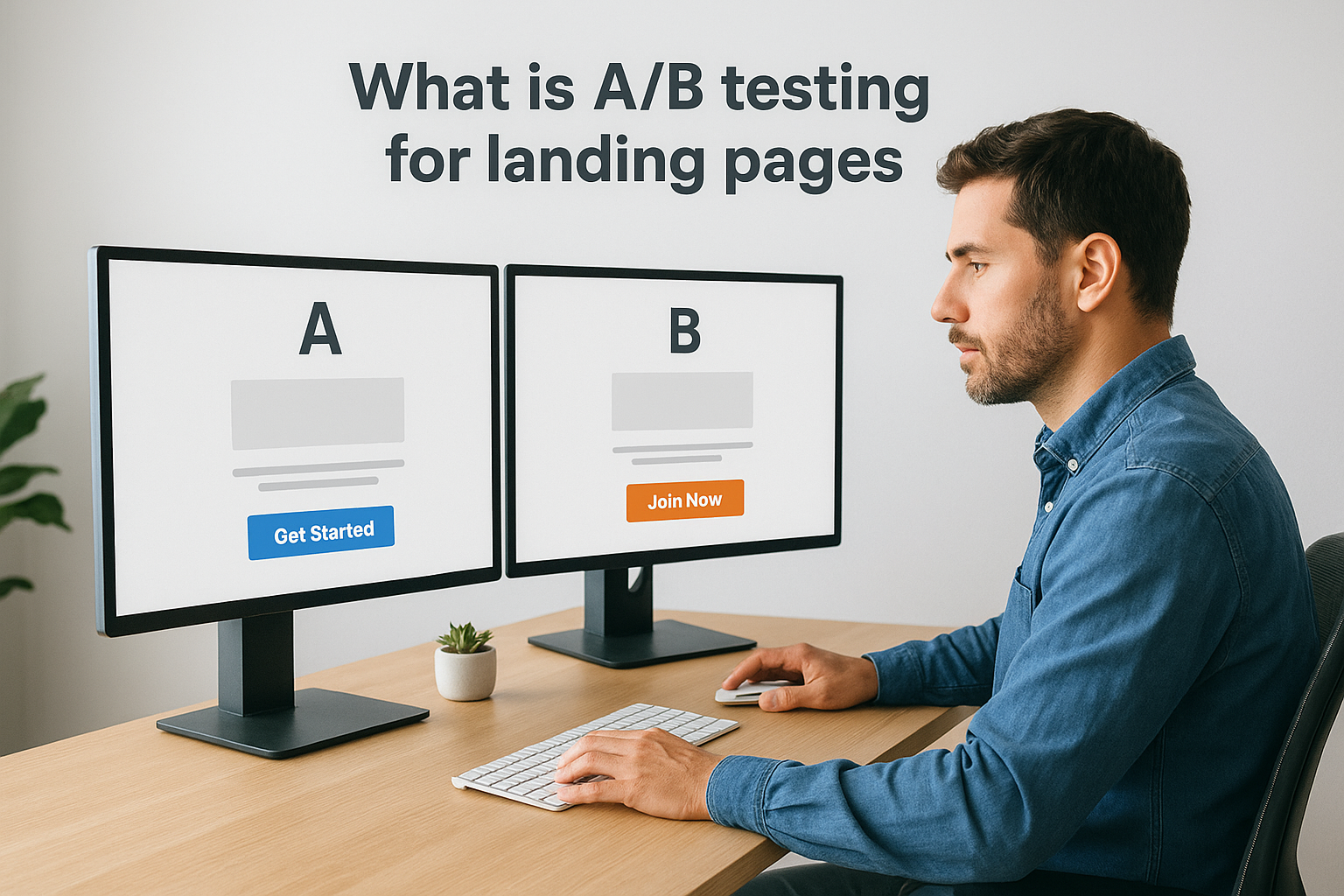
The test isolates one or more variables so you can measure their impact directly. When you change your headline from "Get Started Today" to "Join 10,000+ Happy Customers," you’re testing whether social proof outperforms urgency. The winning variant becomes your new control page, and you run another test to keep improving. This cycle of testing, learning, and optimizing turns guesswork into a systematic process for higher conversions.
How the testing process works
You start by deciding what success looks like. If your goal is more email signups, that’s your primary metric. Next, you create a challenger variant that changes one element like the hero image, form length, or value proposition. Your testing tool randomly assigns visitors to either the control or challenger page and tracks their behavior.
Each visitor sees the same version throughout their session to maintain data integrity.
Most platforms need a minimum sample size before results become statistically significant. That typically means hundreds or thousands of visitors depending on your current conversion rate. Once you reach significance, usually 95% confidence or higher, you can trust that the winning variant truly performs better and wasn’t just a lucky streak.
What sets it apart from other methods
A/B testing differs from multivariate testing because you change fewer elements at once. Multivariate tests modify multiple page components simultaneously, which requires far more traffic to produce reliable results. Split testing (another name for A/B testing) keeps experiments simple so you can identify exactly what drives the change in performance.
This method also beats the "redesign and hope" approach. Instead of launching a complete page overhaul and praying it works, you validate each change with real user data before committing. The result is continuous, measurable improvement rather than big gambles that might tank your conversion rate overnight.
Step 1. Clarify your goal and success metrics
Your test needs a clear finish line before you launch. Without defining what success looks like, you’ll collect data but lack the framework to interpret it or make confident decisions. Start by identifying the single most important action you want visitors to take on your landing page, whether that’s submitting a lead form, clicking through to checkout, or signing up for your free trial.
Define your primary conversion goal
You must pick one primary goal that aligns with your business objectives. If your page exists to capture email addresses for your newsletter, that’s your conversion goal. Track form submissions as your main success metric rather than splitting focus between multiple actions like social shares or time on page.
Common conversion goals include:
- Lead generation: Form submissions, contact requests, or consultation bookings
- Sales: Product purchases, checkout completions, or add-to-cart actions
- Engagement: Demo requests, free trial signups, or content downloads
- Appointment scheduling: Calendar bookings, phone call requests, or meeting confirmations
Your goal determines everything else about the test. A lead generation page needs different optimization strategies than a direct sales page, so clarity here prevents wasted effort testing elements that don’t drive your actual business outcome.
Choose your success metrics
Match your metrics to your conversion goal so you measure what actually matters. If email signups are your goal, track the submission rate (completed forms divided by total visitors). Secondary metrics like bounce rate or time on page provide context but shouldn’t override your primary measure when analyzing results.
Track metrics that directly connect to revenue or qualified leads rather than vanity numbers that look good but don’t move your business forward.
Your metrics should be:
| Metric Type | Purpose | Example |
|---|---|---|
| Primary | Measures your main goal | Conversion rate, form submissions |
| Secondary | Provides context | Bounce rate, scroll depth, time on page |
| Segment-specific | Shows performance by group | Mobile vs desktop, traffic source |
Set your baseline and targets
Document your current conversion rate before you start testing. If your page converts at 2.8% right now, that’s your baseline. Your challenger variant needs to beat this number with statistical significance before you can confidently declare a winner.
Set a realistic improvement target based on your baseline and traffic volume. A page converting at 3% might aim for 3.5% or higher (a 16% relative lift) rather than expecting to double overnight. Higher volume pages can detect smaller improvements while low-traffic pages need larger differences to reach significance within a reasonable timeframe.
Calculate the minimum sample size you need using an online calculator before you launch. You’ll typically need at least 100 conversions per variant to trust your results, though this varies based on your baseline rate and the effect size you’re trying to detect.
Step 2. Pick the right elements to test first
You can’t test everything at once, so prioritize elements that drive the biggest conversion impact. The wrong choice wastes weeks of traffic on changes that barely move the needle, while the right element can deliver double-digit conversion lifts in your first test. Focus on the components your visitors interact with most and the changes that align directly with your conversion goal.
Start with high-impact elements
Your headline and call-to-action typically produce the strongest results when you’re new to a/b testing landing pages. These elements sit at critical decision points where visitors either commit or bounce. A headline that clarifies your value proposition or a CTA button that reduces friction can shift conversion rates by 20% or more.

Test these high-impact elements first:
- Headline: Your main value proposition and the first message visitors see
- CTA button: Button text, color, size, and placement
- Hero image: The primary visual that supports or illustrates your offer
- Form fields: Number of fields, labels, and required versus optional inputs
- Social proof: Testimonials, logos, statistics, or trust badges
- Value proposition: The core benefit statement that explains why someone should convert
Each element directly influences whether visitors take action, so changes here produce measurable results faster than tweaking footer copy or adjusting page margins.
Test one element at a time
Changing multiple elements simultaneously ruins your ability to understand what actually worked. If you modify your headline, CTA button, and form length in the same test, you won’t know which change drove the 15% conversion increase. That winning combination might hide the fact that your new headline actually hurt performance while the shorter form carried the entire lift.
Isolate one variable per test so you can confidently attribute results to specific changes and apply those insights to other pages.
Single-variable testing builds a knowledge base of proven tactics you can replicate across your marketing. When you discover that changing "Submit" to "Get My Free Guide" increases conversions by 22%, you can apply that insight to every lead generation page you create.
Consider your traffic volume
Low-traffic pages need bigger, bolder changes to reach statistical significance within a reasonable timeframe. If your page gets 100 visitors per week, testing subtle headline tweaks will take months to produce reliable results. Focus on major differences like completely rewriting your value proposition or testing a long-form page against a short version.
High-traffic pages let you test smaller refinements. A page with 10,000 weekly visitors can detect a 5% conversion lift in days rather than months, so you can afford to test button colors or minor copy adjustments that might seem trivial on lower-volume pages.
Step 3. Choose tools and set up your variants
The right testing platform makes setup simple and data collection reliable, while the wrong choice creates technical headaches that delay your results. Your tool needs to integrate with your existing landing page builder, handle traffic splitting automatically, and calculate statistical significance without forcing you to do manual math. Most importantly, it should let you create and launch variants without writing code or waiting for developer support.
Select a testing platform that fits your setup
Your platform choice depends on how you currently host landing pages and your technical comfort level. If you built your page in WordPress, tools like Google Optimize (now deprecated) or Nelio A/B Testing integrate directly with your site. Landing page builders like Unbounce, Leadpages, or Instapage include native testing capabilities that work without plugins or external scripts.
Consider these factors when choosing:
| Factor | Why It Matters |
|---|---|
| Integration | Must work with your current page builder or CMS |
| Traffic splitting | Should automatically divide visitors randomly |
| Statistical calculator | Built-in significance testing saves time |
| Setup complexity | Non-technical users need drag-and-drop interfaces |
| Reporting depth | Must track your chosen success metrics clearly |
Free options like Microsoft Clarity provide basic testing functionality, though you’ll need to manually calculate significance or use separate calculators. Paid platforms typically include automated winner detection and more sophisticated segmentation, which justifies the cost if you run frequent tests.
Create your challenger variant
Start by duplicating your control page so you maintain the exact same structure and content except for the single element you’re testing. If you’re testing a headline change, copy every other component pixel-for-pixel, from button placement to form fields to footer links. This isolation ensures any performance difference comes from your test variable alone rather than accidental changes elsewhere.
Your challenger should differ from the control in exactly one measurable way so you can confidently attribute any conversion change to that specific modification.
Document what you changed and why before you launch. Write down your hypothesis: "Changing the headline from ‘Start Your Free Trial’ to ‘Join 10,000+ Happy Customers’ will increase conversions by highlighting social proof instead of urgency." This record helps you build pattern recognition across multiple tests and prevents you from testing the same idea twice.
Configure your test parameters
Set your traffic split percentage based on your confidence level and traffic volume. Most tests use a 50/50 split to reach statistical significance fastest, but you can weight traffic 75/25 toward your control if you want to minimize risk while gathering data on a bold new approach.
Define your test duration or sample size target before you start. Calculate the minimum visitors you need per variant using an online calculator, entering your baseline conversion rate and the improvement you want to detect. A page converting at 3% needs roughly 1,000 visitors per variant to reliably detect a 20% relative improvement with 95% confidence.
Enable conversion tracking for a/b testing landing pages by connecting your analytics platform or using your testing tool’s built-in tracking. Verify both variants fire tracking events correctly by submitting test conversions yourself before sending real traffic to either page.
Step 4. Run the test and collect clean data
Launching your test marks the beginning of data collection, not the end of your preparation work. Clean data requires you to maintain strict testing conditions from start to finish, avoiding the temptation to peek at results early or make adjustments that corrupt your findings. The quality of your data determines whether you can trust your conclusions, so treat this phase with the same care you put into setting up your variants.
Launch at the right time
Timing affects your results more than you might expect. Start your test on a Monday or Tuesday so you capture complete weeks of traffic patterns rather than launching mid-week and mixing partial weeks into your data. Business-to-business pages perform differently on weekdays versus weekends, while consumer-focused pages might see opposite patterns.
Avoid launching during unusual traffic periods like major holidays, sales events, or product launches that create temporary spikes. These anomalies skew your baseline behavior and make it impossible to distinguish between your test variable’s impact and external factors driving conversions. Wait until traffic returns to normal levels before you collect data for a/b testing landing pages.
Launch when your traffic follows predictable patterns so you measure the effect of your changes rather than external events.
Avoid making changes mid-test
Your variants must remain completely frozen from launch to conclusion. Changing your control page’s headline halfway through because you spotted a typo invalidates everything you collected before the fix. The same applies to adjusting your challenger variant after reviewing early results, even if performance looks disappointing.
External changes to elements outside your test can also corrupt data. Updating your site’s navigation menu, changing ad copy that drives traffic to your test pages, or modifying your offer pricing all introduce variables that make it impossible to attribute performance changes to your test element alone.
Monitor for technical issues
Check both variants within the first hour after launch to verify tracking fires correctly. Submit test conversions yourself on desktop and mobile to confirm your analytics platform records both variants properly. Missing conversion data from one variant creates the false impression that the other won when really you just failed to measure half your traffic.
Watch for these common technical problems:
- Split errors: Traffic not dividing evenly between variants
- Cookie issues: Visitors seeing different variants across sessions
- Form breaks: Submission buttons or validation failing on one variant
- Page load problems: One variant loading significantly slower
- Tracking failures: Conversion events not firing on mobile or specific browsers
Run daily checks during the first three days to catch issues before they waste significant traffic. After that, weekly monitoring suffices unless you notice unexpected changes in conversion patterns that suggest something broke.
Account for external factors
Document any external events that occur during your test period so you can assess their impact later. A competitor launching a major promotion, news coverage mentioning your industry, or technical outages affecting your site all create noise in your data that might explain unusual performance swings.
Segment your results by traffic source, device type, and new versus returning visitors to identify whether external factors affected specific groups differently. This granular view helps you separate true test effects from temporary market conditions when you analyze your final results.
Step 5. Analyze results and declare a winner
Your test collected data from hundreds or thousands of visitors, but raw numbers mean nothing without proper analysis. You need to verify statistical significance, review how each variant performed against your primary goal, and make a confident decision about which version wins. Rushing to conclusions based on early results or incomplete data turns a/b testing landing pages into guesswork rather than science.
Check for statistical significance
Statistical significance tells you whether your results reflect a real performance difference or just random chance. Most testing platforms display a confidence percentage, and you need 95% or higher before declaring a winner. Anything below this threshold means you don’t have enough data yet, so you must continue running the test or collect more traffic.

Your platform should show a p-value (probability value) alongside the confidence percentage. A p-value of 0.05 or lower indicates 95% confidence that your results aren’t due to random variation. If your tool doesn’t calculate this automatically, use an online A/B test significance calculator and input your conversion counts and visitor numbers from each variant.
Never call a winner before reaching 95% confidence, no matter how compelling the early data looks or how much pressure you feel to end the test.
Watch for sample size requirements that might affect your timeline. A page with 1,000 visitors per variant showing a 10% conversion lift might reach significance quickly, while detecting a 3% improvement could require 5,000 visitors per variant. Low-traffic pages testing subtle changes need longer run times than high-traffic pages testing dramatic differences.
Review your primary metric
Compare conversion rates between variants using the exact metric you defined in step one. If your goal was form submissions, calculate the submission rate by dividing completed forms by total visitors for each variant. Your challenger needs to outperform the control with statistical significance to win, not just show a slight numerical advantage.
Look beyond the primary metric to understand why the winner performed better. Check secondary metrics like bounce rate, time on page, or scroll depth to identify behavior patterns that explain the conversion difference. A variant with higher engagement metrics alongside higher conversions confirms visitors found your changes compelling rather than confusing.
Declare your winner and document findings
Once you confirm statistical significance and review your metrics, declare the winning variant and record your findings in detail. Document the original hypothesis, what you changed, the exact conversion rates for both variants, and the confidence level you achieved. This record becomes crucial reference material when you plan future tests.
Note any unexpected patterns in your data that might inform next steps. If your challenger won on desktop but lost on mobile, you discovered a device-specific insight worth exploring. If certain traffic sources converted better with one variant, you found a segmentation opportunity for future optimization work.
Step 6. Apply insights and plan your next tests
Your test concluded with a clear winner, but the real value comes from what you do next. Implementing your winning variant is just the first step in a continuous optimization process that compounds results over time. You need to document what you learned, apply those insights across other pages, and immediately plan your next test to maintain momentum.
Implement your winner and retire the loser
Replace your control page with the winning variant as soon as you confirm statistical significance. Update all traffic sources pointing to the original URL so every visitor sees the higher-converting version from this moment forward. If you ran the test using a dedicated tool that splits traffic, disable the test and set the winner as your permanent page to avoid any performance overhead from running unnecessary split logic.
Archive your losing variant with complete documentation rather than deleting it. Save screenshots of both versions, record the exact conversion metrics, and note any technical specifications like button colors, headline copy, or form field counts. This archive prevents you from accidentally testing the same failed approach months later when team members forget previous experiments.
Your winning variant becomes the new control for your next test, creating a baseline you’ll try to beat with your next challenger.
Build your testing knowledge base
Create a centralized document or spreadsheet where you track every test you run for a/b testing landing pages. Record the hypothesis, variants tested, conversion rates, confidence level, winning version, and key learnings for each experiment. This knowledge base reveals patterns across multiple tests, like discovering that social proof consistently outperforms urgency messaging for your audience.
Structure your documentation using this template:
| Test Date | Page | Hypothesis | Control Rate | Challenger Rate | Winner | Confidence | Key Insight |
|---|---|---|---|---|---|---|---|
| 2026-01-15 | Product Demo | Social proof headline will increase trust | 3.2% | 4.1% | Challenger | 97% | Customer count drives conversions |
Identify your next test opportunity
Review your secondary metrics from the completed test to find your next high-impact element to optimize. If your winning headline variant showed increased scroll depth but form submissions still lag behind industry benchmarks, test your form next. Look for the biggest remaining gap between your performance and your conversion goal.
Prioritize tests that build on your previous learnings rather than jumping to unrelated elements. If social proof in your headline won, try adding customer testimonials or trust badges to reinforce that same psychological trigger. Sequential tests that layer complementary changes typically produce stronger cumulative results than random experiments across disconnected page elements.
Start building your next challenger variant immediately so you maintain testing momentum. Continuous optimization through regular testing beats sporadic experiments separated by months of inactivity, helping you compound small wins into significant conversion improvements over time.
Common mistakes to avoid
Most tests fail because of preventable errors that compromise your data before you collect a single conversion. These mistakes range from ending experiments prematurely to testing changes that don’t align with your business goals. Understanding where others go wrong helps you sidestep the pitfalls that waste traffic and delay results when a/b testing landing pages.
Ending your test too early
You spot your challenger variant ahead by 15% after two days and immediately declare victory. This premature celebration ignores the fact that conversion rates fluctuate naturally, especially with small sample sizes. Early data often shows dramatic differences that disappear as more visitors arrive, a phenomenon statisticians call regression to the mean.
Wait until you reach your calculated minimum sample size and achieve 95% confidence before stopping any test. A page that looks like a winner on Tuesday might become a loser by Friday once weekend traffic arrives with different behavior patterns. Patience protects you from implementing changes that hurt long-term performance based on incomplete evidence.
Changing multiple elements simultaneously
Testing your headline, button color, and form length in one experiment saves time but destroys your ability to understand what worked. Your challenger converts 25% better than your control, but you can’t determine whether the new headline drove the lift or if the shorter form carried all the improvement while the headline actually hurt conversions.
Isolate one variable per test so you build a library of proven tactics you can confidently replicate across other pages.
Stick to single-variable testing even when it feels slow. The knowledge you gain from attributing results to specific changes compounds over multiple experiments, while multi-variable tests leave you guessing about which elements truly matter to your audience.
Ignoring your sample size requirements
Launching a test without calculating your required visitor count leads to inconclusive results that waste weeks of traffic. A page receiving 200 weekly visitors needs months to detect a 10% conversion improvement with statistical confidence, while you might expect reliable results in days.
Calculate your minimum sample size using an online calculator before you launch. Input your baseline conversion rate and the improvement you want to detect, then multiply the per-variant number by two to get your total traffic requirement. Low-traffic pages should test bold, dramatic changes that create larger performance gaps you can measure faster.
Tools, templates and ideas to get started
You don’t need expensive enterprise software to begin a/b testing landing pages effectively. Multiple free and low-cost platforms provide the functionality you need to run valid experiments, while simple templates help you organize your testing pipeline from day one. Starting with the right combination of tools and structured planning accelerates your first wins and builds momentum for continuous optimization.
Free testing platforms worth using
Microsoft Clarity offers completely free testing capabilities with unlimited traffic and no hidden paywalls. You install a tracking script on your landing pages, set up experiments through their dashboard, and collect conversion data without paying a subscription fee. The platform includes heatmaps and session recordings alongside your split test results, giving you qualitative context that explains why one variant outperformed another.
Google Analytics 4 lets you run experiments through its built-in testing framework if you already use the platform for analytics. The setup requires creating different page URLs for each variant and configuring objectives to track conversions. While less intuitive than dedicated testing tools, it integrates directly with your existing analytics data and costs nothing beyond your current GA4 implementation.
Landing page builders like Unbounce, Leadpages, and Instapage include native testing features in their paid plans that eliminate technical setup entirely. You duplicate a page, make your changes in the drag-and-drop editor, and launch your test with a few clicks. These platforms handle traffic splitting and statistical calculations automatically, though the monthly subscription cost makes them better suited for businesses running frequent tests.
Test idea templates you can copy
Use these templates to structure your next five experiments and avoid staring at blank pages when planning tests:
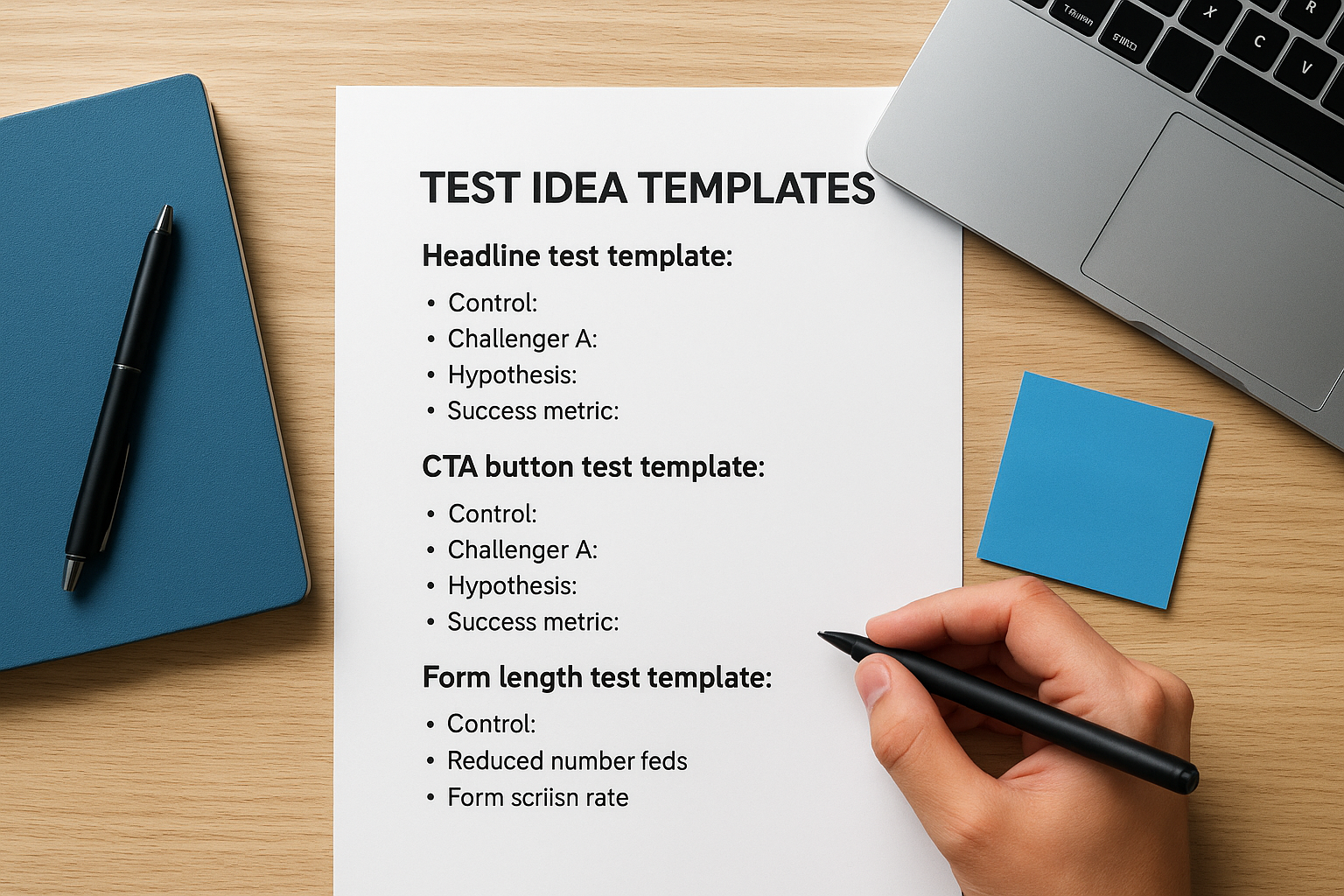
Headline test template:
- Control: [Current headline]
- Challenger A: [Benefit-focused version]
- Hypothesis: Emphasizing the specific benefit will increase conversions by [X%] because [reason]
- Success metric: Form submission rate
CTA button test template:
- Control: "[Current button text]" in [color]
- Challenger A: "[Action-oriented text]" in [contrasting color]
- Hypothesis: More specific action language will reduce friction and increase clicks by [X%]
- Success metric: Button click-through rate
Form length test template:
- Control: [Number] fields including [list fields]
- Challenger A: [Reduced number] fields, removing [specific fields]
- Hypothesis: Shorter form will increase completion rate by [X%] despite collecting less initial data
- Success metric: Form submission rate
Document your hypothesis before each test so you build a knowledge base of what works rather than running random experiments.
Organize with a testing calendar
Create a simple spreadsheet to schedule your tests and prevent gaps between experiments. Set up columns for test name, start date, estimated end date, status, and priority level. Block out at least four weeks ahead with specific tests you plan to run, leaving flexibility to insert high-priority experiments if business needs change suddenly.
Your calendar prevents the common mistake of completing one test, celebrating the win, then waiting weeks before launching the next experiment. Continuous testing compounds small improvements into major conversion gains, but only if you maintain consistent momentum throughout the year.
Wrap up and next steps
You now have the complete framework for a/b testing landing pages from setting clear goals to analyzing results and scaling what works. Every test you run builds knowledge about your audience, revealing which headlines resonate, which CTAs drive action, and which page elements create friction versus flow. The difference between businesses that guess and businesses that grow often comes down to this systematic testing approach.
Start your first test this week by picking your highest-traffic landing page and testing one element that directly impacts conversions. Choose your headline, CTA button, or form length based on where you see the biggest opportunity gap. Launch the test, let it run to statistical significance, then immediately plan your next experiment to maintain momentum.
Testing reveals what works, but building high-converting funnels requires expertise in conversion optimization, traffic strategy, and data analysis. If you want professional support turning your landing pages into client generation machines, explore how Client Factory helps businesses optimize their entire acquisition funnel with data-driven strategies that scale.
