

You spent $5,000 on ads last month and got 23 leads. This month you pause the budget and those leads drop to zero. The cycle repeats and your customer acquisition costs keep climbing. You need a better way to fill your pipeline without paying for every single click.
SEO solves this by turning your website into a lead generation machine that works around the clock. When you rank for the right searches, potential clients find you when they need your services most. You stop renting traffic and start owning it. The leads keep coming whether you spend more money or not.
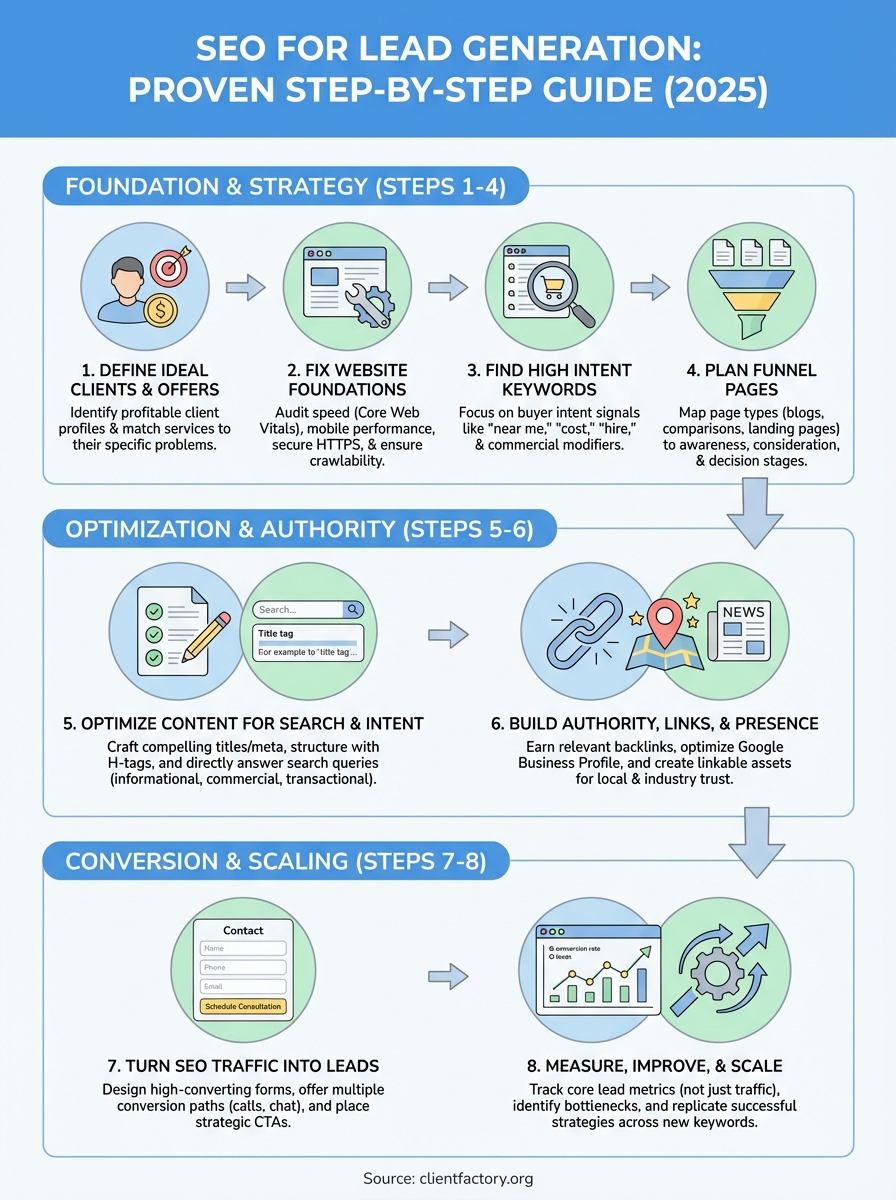
This guide walks you through eight practical steps to build an SEO system that generates qualified leads for your business. You’ll learn how to find keywords with real buyer intent, create content that converts visitors into contacts, and build authority that makes you the obvious choice in your market. Each step includes specific actions you can implement right away. By the end, you’ll have a clear roadmap to reduce your dependence on paid ads and create a steady stream of inbound leads.
What is SEO lead generation
SEO lead generation combines search engine optimization with conversion tactics to attract potential clients who actively search for your services. You optimize your website to rank for terms that prospects use when they need help, then capture their contact information through strategic calls-to-action. The goal shifts from traffic to qualified leads who fit your ideal client profile and show clear purchase intent.
How SEO lead generation works
Your website becomes visible when prospects search for solutions you provide. Search engines display your pages because you’ve optimized content around specific problems and questions your ideal clients ask. When visitors land on your site, you guide them toward conversion actions like filling out contact forms, booking consultations, or requesting quotes. This approach targets bottom-of-funnel searches where people are ready to hire someone, not just browsing for general information.
The process differs from traditional SEO that focuses purely on rankings and traffic numbers. You prioritize keywords that indicate buying intent over high search volume, create content that addresses specific pain points, and design pages that convert visitors into contacts. Each piece of content serves a dual purpose: it ranks in search results and moves prospects toward becoming leads.
Why businesses choose SEO for lead generation
Paid advertising stops working the moment you stop paying. SEO builds an asset that generates leads continuously without ongoing ad spend for every click. You invest upfront in optimization and content, then benefit from consistent traffic and leads that compound over time. The cost per lead decreases as your rankings improve and more prospects find you organically.
SEO lead generation creates a sustainable pipeline that works while you sleep, reducing your dependence on paid channels and giving you more control over your customer acquisition costs.
Your competitors who rely solely on ads face rising costs and constant budget pressure. You build authority that makes prospects choose you before they ever see a competitor.
Step 1. Define your ideal clients and offers
You can’t optimize for every possible search term that relates to your business. Successful SEO for lead generation starts with clarity about who you serve and what problems you solve. When you define your ideal clients first, you focus your optimization efforts on keywords and content that attract prospects who actually convert into paying customers. This targeting prevents wasted effort on traffic that never turns into revenue.
Identify your ideal client profile
Create a detailed profile of the clients who bring you the most value and satisfaction. Look at your best existing customers and identify patterns in their industry, company size, location, budget, and specific challenges. You need specifics like "manufacturing companies with 50-200 employees in the Midwest facing equipment downtime issues" instead of vague descriptions like "businesses that need help."
Use this template to document your ideal client:
Client Profile Template:
- Industry or niche: [specific sector]
- Company size: [employee count or revenue range]
- Geographic location: [city, region, or service area]
- Budget range: [realistic spending capacity]
- Primary pain point: [specific problem they face]
- Decision maker role: [who signs the contract]
- Search behavior: [how they look for solutions]
Your ideal client profile becomes the filter for every keyword, content piece, and optimization decision you make throughout your SEO strategy.
Map your service offerings to client needs
List every service you provide and match each one to specific problems your ideal clients experience. A personal injury lawyer might offer "car accident representation," but clients search for "what to do after rear-end collision" or "medical bills after accident lawyer." The gap between your service names and client language creates opportunities for targeted content.
Document this mapping in a simple format:
Service to Search Mapping:
- Your service: Car accident representation
- Client searches: "hit by uninsured driver what now," "car accident lawyer free consultation," "accident injury claim help"
- Your service: Workers compensation claims
- Client searches: "hurt at work can I sue," "workplace injury denied benefits," "workers comp attorney near me"
This mapping reveals the exact terms you need to target and shows you which service pages to create first. You’ll discover search opportunities that competitors miss because they only optimize for their own terminology instead of how prospects actually describe their needs.
Step 2. Fix your website foundations
Your website needs solid technical foundations before you invest time in content and keywords. Search engines can’t rank pages they can’t crawl, and visitors won’t become leads if your site loads slowly or breaks on mobile devices. These technical issues sabotage even the best content strategy. You need to fix the foundation first so every optimization effort you make later actually produces results.
Audit your site speed and mobile performance
Page speed directly impacts both rankings and conversion rates. Google uses Core Web Vitals as ranking factors, which measure how quickly your pages load and respond to user interactions. Slow sites frustrate visitors who leave before they ever see your content or contact forms. Test your site speed immediately using Google PageSpeed Insights and aim for scores above 90 on mobile.

Focus on these specific metrics and targets:
Core Web Vitals Targets:
- Largest Contentful Paint (LCP): under 2.5 seconds
- First Input Delay (FID): under 100 milliseconds
- Cumulative Layout Shift (CLS): under 0.1
Common fixes include compressing images to WebP format, enabling browser caching, minifying CSS and JavaScript files, and upgrading to faster hosting. Mobile responsiveness matters just as much because most searches now happen on phones. Your site must adapt perfectly to every screen size without horizontal scrolling or tiny text that users need to pinch and zoom.
Technical performance creates the foundation for effective SEO for lead generation by ensuring prospects can actually use your site when they find it in search results.
Fix crawlability and indexing issues
Search engines discover your pages by following links and reading your sitemap. Broken internal links and missing sitemaps prevent pages from getting indexed, which means they never appear in search results no matter how well optimized they are. Check Google Search Console for crawl errors and coverage issues that block your pages from ranking.
Create and submit an XML sitemap that lists all important pages. Your robots.txt file needs proper configuration to allow search engines access while blocking admin areas and duplicate content. Fix any redirect chains where one URL redirects to another that redirects again, creating unnecessary delays. Remove or update 404 errors that frustrate both users and search engines.
Secure your site and improve trust signals
HTTPS encryption became a ranking factor years ago and prospects expect secure connections. Install an SSL certificate immediately if your site still uses HTTP. This small technical change protects user data and displays the padlock icon in browsers that signals trustworthiness. Security affects conversion rates because prospects won’t submit contact information through insecure forms.
Add trust signals throughout your site including your physical address, phone number, and professional credentials. Display security badges near contact forms and payment areas. Keep your site updated with current copyright dates and fresh content dates so prospects know you’re actively maintaining it.
Step 3. Find high intent keywords
You need keywords that indicate someone is ready to hire, not just researching. High intent keywords reveal purchase signals like "near me," "cost," "hire," "consultation," or "best" combined with your service terms. These searches come from prospects who have moved past information gathering and now compare providers or look for immediate help. Target these conversion-focused terms instead of chasing high-volume educational keywords that attract researchers who never become leads.
Understand buyer intent signals
Different keyword modifiers reveal where prospects are in their buying journey. Location modifiers like "near me" or city names show local intent and readiness to contact someone today. Commercial modifiers including "best," "top," "review," and "vs" indicate comparison shopping between providers. Transactional terms such as "hire," "cost," "price," "consultation," and "appointment" signal imminent purchase decisions. You want these modifier patterns in your keyword targets because they filter for qualified prospects.
Study how your ideal clients actually search when they need your services. Look at your existing client intake forms and note the exact phrases they use to describe their problems. Check your current search console data for queries that already generate leads. These real patterns from paying clients guide your keyword research better than any tool’s suggestions.
Research keywords with commercial intent
Start your research by listing your core services and adding buyer intent modifiers to each one. A personal injury lawyer targeting "car accident lawyer" expands this into "car accident lawyer free consultation Atlanta," "best car accident attorney near me," and "car accident lawyer cost." Use Google’s autocomplete by typing your service and location, then noting the suggestions that appear. These predictions show you actual searches people make.
Check the "People Also Ask" boxes and "Related Searches" at the bottom of Google results pages. These sections reveal question-based keywords that prospects ask right before they hire someone. Search your main service terms and document every related query that shows commercial intent.
Keyword Research Template:
Service: [your core service]
Location: [your target area]

High Intent Patterns:
- [service] + near me
- [service] + [city name]
- [service] + free consultation
- [service] + cost
- [service] + attorney/lawyer/expert
- best [service] + [location]
- [service] + reviews + [location]
- hire [service] + [location]
Evaluate and prioritize your keyword list
Organize your keywords by commercial value instead of search volume. A term with 50 monthly searches but clear buyer intent beats a 5,000 search term that attracts researchers who never convert. Rate each keyword on three factors: relevance to your services, evidence of purchase intent, and your realistic ability to rank for it. Prioritize keywords where all three factors score high even when search volume seems low.
Focus your SEO for lead generation on keywords that bring fewer visitors who actually convert rather than high-traffic terms that generate clicks without leads.
Create separate lists for different service areas and client types. Geographic keywords need dedicated landing pages while question-based keywords work better in blog content. This organization helps you map keywords to specific pages in the next step.
Step 4. Plan pages for every stage of the funnel
Your prospects move through distinct stages before they become leads. Each stage requires different content types that match where people are in their decision process. Awareness stage visitors need educational content that identifies their problem. Consideration stage prospects compare different solutions and providers. Decision stage searches come from people ready to contact you right now. You need dedicated pages for each stage because a single page type can’t serve all these different needs effectively.
Map your funnel stages to page types
Match specific page formats to each stage of the buyer journey. Educational blog posts and guides work for awareness when prospects just discovered they have a problem. Comparison pages and service breakdowns fit consideration stage searches where people evaluate options. Location-specific landing pages and service request pages convert decision stage visitors who need help immediately. Create this mapping before you write any content so you know exactly what pages your site needs.
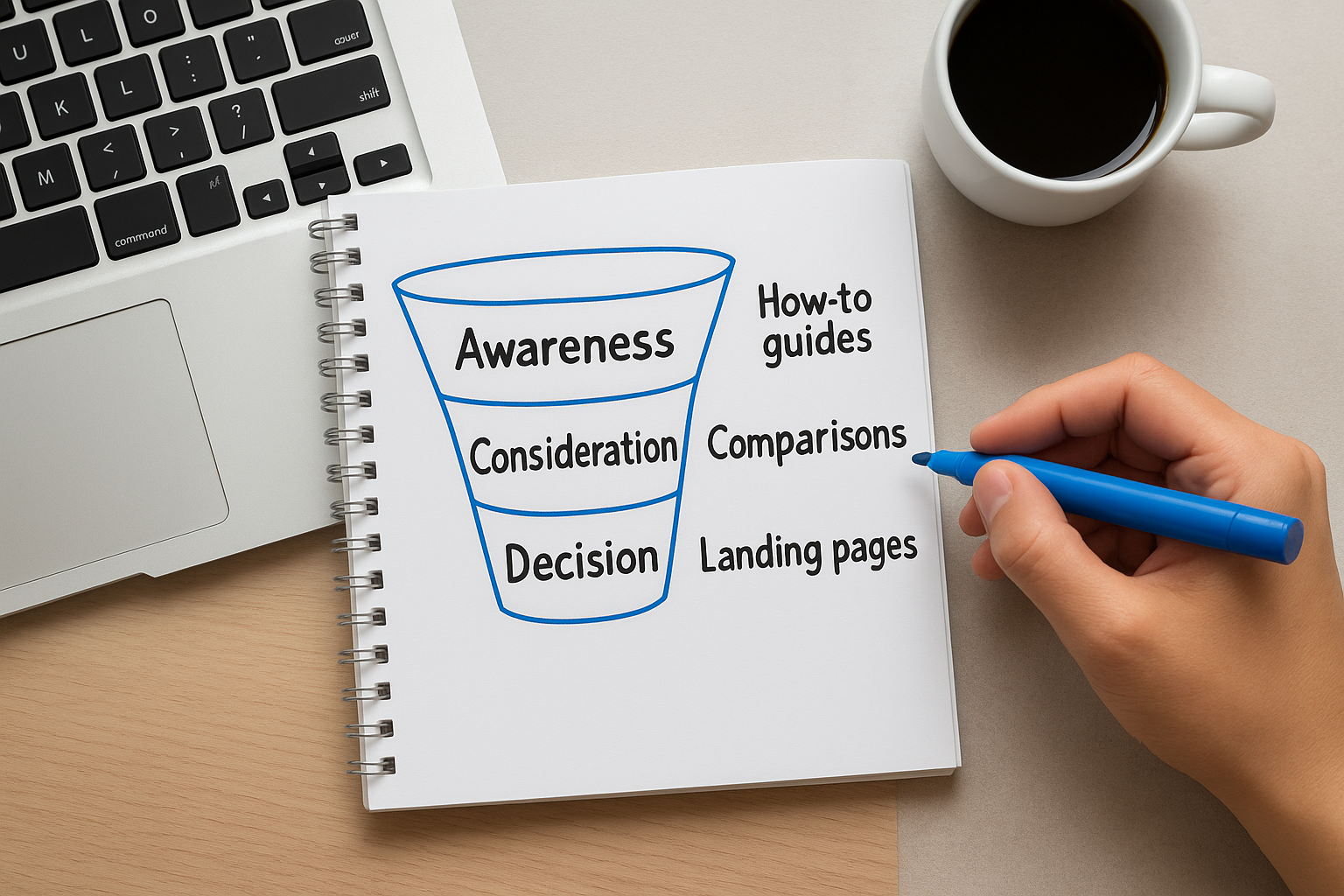
Funnel Stage Mapping Template:
Awareness Stage:
- Page Type: How-to guides, problem identification content
- Keywords: "what is [problem]", "signs of [issue]", "[problem] explained"
- Example: "What to do after a car accident checklist"

Consideration Stage:
- Page Type: Service descriptions, provider comparisons
- Keywords: "types of [service]", "[service] vs [service]", "benefits of [solution]"
- Example: "Personal injury lawyer vs general attorney"

Decision Stage:
- Page Type: Location landing pages, contact-optimized service pages
- Keywords: "[service] near me", "[service] [city]", "[service] free consultation"
- Example: "Atlanta car accident lawyer free consultation"
Create awareness stage pages
Build educational content that ranks for problem-related searches and introduces your services naturally. Prospects in this stage don’t know they need your specific solution yet, so hard sales approaches fail. Instead, you educate them about their situation and position your services as the logical next step. These pages generate top-of-funnel traffic that you nurture through internal links to consideration and decision stage content.
Write comprehensive guides that answer complete questions about problems you solve. Include internal links to your service pages where relevant. Add subtle calls-to-action like "Need help with this? Our team specializes in…" rather than aggressive "Contact us now" buttons that feel premature.
Build consideration and comparison pages
Design pages that help prospects evaluate different approaches and providers. Comparison content works exceptionally well for SEO for lead generation because people actively search for "X vs Y" and "best X for Y" when they’re close to hiring someone. Create honest comparisons that acknowledge different solutions while highlighting why your approach fits specific situations best.
Service category pages belong in this stage too. Break down what each service includes, who benefits most, typical timelines, and what makes your delivery different. Use clear section headers, bullet points for features, and specific examples from past client work.
Design decision stage landing pages
Create location-specific pages and service request pages optimized for immediate conversion. These pages target bottom-funnel keywords with clear buyer intent and need streamlined paths to contact forms or phone calls. Remove navigation distractions, lead with the specific service and location in your headline, and make the contact form immediately visible above the fold.
Decision Stage Page Elements:
- Headline: [Service] in [Location] – Free Consultation
- Subheadline: Specific benefit or unique selling point
- Trust signals: Years in business, credentials, case results
- Simple contact form: Name, phone, email, brief message only
- Click-to-call phone number
- Service overview: 3-4 key points maximum
- Social proof: Client testimonial or review snippet
Each landing page should target one specific keyword and geographic area. Build separate pages for each service-location combination rather than trying to rank one page for multiple terms.
Map every keyword from your research to a specific funnel stage and page type before you create any content to ensure you build exactly what converts visitors into leads.
Step 5. Optimize content for search and intent
You’ve planned your pages and identified your keywords. Now you need to optimize each piece of content so search engines understand what you offer and visitors immediately see you can solve their problem. On-page optimization combines technical elements like title tags with content structure that matches what prospects actually need when they land on your page. This dual focus on rankings and conversions separates effective SEO for lead generation from content that just attracts clicks without producing leads.
Craft titles and meta descriptions that convert
Your title tag tells both search engines and prospects what your page offers. Write titles that include your target keyword near the beginning and add modifiers that trigger clicks from qualified prospects. Generic titles like "Personal Injury Services" lose to specific ones like "Atlanta Car Accident Lawyer | Free Consultation | Smith & Associates." Keep titles between 50-60 characters so they don’t get cut off in search results.
Meta descriptions don’t directly impact rankings but they absolutely affect click-through rates. Write compelling 150-160 character descriptions that promise the specific outcome prospects want. Include your primary keyword naturally and add a clear call-to-action that tells people what happens when they click.
Title and Description Template:
Title Tag Formula:
[Primary Keyword] | [Benefit/Modifier] | [Brand Name]
Example: Workers Comp Lawyer Atlanta | Free Case Review | Smith Law

Meta Description Formula:
[Problem acknowledgment] + [Your solution] + [Specific benefit] + [Call-to-action]
Example: Injured at work and claim denied? Our Atlanta workers comp attorneys fight for your benefits. Free consultation. Call (404) 555-0100 today.
Structure content for scanning and engagement
Prospects scan pages before they read them. Break your content into clear sections with descriptive H2 and H3 headers that tell people exactly what each section covers. Headers should include semantic variations of your target keyword rather than repeating the exact phrase. Use your main keyword in the first paragraph and sprinkle variations throughout the content naturally.
Format your text for easy consumption. Keep paragraphs to 2-3 sentences maximum and use bullet points to list features, benefits, or process steps. Bold important phrases that help scanners grasp key points. Add white space between sections so the page doesn’t feel overwhelming. Include relevant images with descriptive alt text that reinforces your keyword while making the page visually engaging.
Optimize every content element for both search engine algorithms and the human prospects who need to quickly understand how you solve their specific problem.
Match your content to search intent
Each keyword represents a different question or need. Your content must directly answer that specific query in the first 100 words or visitors bounce back to search results. Someone searching "car accident lawyer near me" wants contact information and credentials, not a 2,000-word guide about accident law. Deliver the exact information the search term promises before expanding into related details.
Structure your content to match the intent type. Informational searches need comprehensive explanations with examples and step-by-step guidance. Commercial searches require comparisons between options with clear recommendations. Transactional searches demand immediate paths to conversion with prominent contact forms and phone numbers. Analyze the top-ranking pages for your target keyword to understand what format and depth Google rewards for that specific search.
Content-Intent Matching Guide:
Informational Intent ("how to file workers comp claim"):
- Start with direct answer or overview
- Include step-by-step instructions
- Add FAQ section
- Soft CTA to service pages

Commercial Intent ("best personal injury lawyer atlanta"):
- Lead with credentials and differentiators
- Include comparison points
- Feature case results or testimonials
- Multiple contact options

Transactional Intent ("hire workers comp attorney atlanta"):
- Lead with service and location
- Immediate contact form above fold
- Trust signals and credentials
- Clear next steps
Apply these optimization techniques to every page you create. Test different title variations and content structures to see what produces the highest conversion rates from organic traffic.
Step 6. Build authority, links, and local presence
Your optimized content won’t rank without authority signals that tell search engines you’re trustworthy. Backlinks from relevant websites act as votes of confidence that boost your rankings for competitive keywords. Local citations and Google Business Profile optimization help service businesses appear in map results where prospects search for nearby providers. Authority building takes consistent effort but delivers compounding returns as each new link and citation strengthens your entire domain.
Earn backlinks from relevant sources
You need links from websites that share your audience and topic relevance. Local business directories, industry associations, and chamber of commerce listings provide foundational citations that build credibility. Guest contributions to industry publications and local news outlets earn higher-value links that significantly impact rankings. Target publications where your ideal clients already spend time rather than chasing links from unrelated high-authority sites.
Start by claiming your profiles on major business directories. Complete every field in your listings with consistent NAP (Name, Address, Phone) information across all platforms. Inconsistent business details confuse search engines and weaken your local SEO for lead generation efforts.
Outreach Email Template for Guest Contributions:
Subject: [Specific Topic] Article for [Publication Name]

Hi [Editor Name],

I noticed your recent article on [related topic]. I'm [Your Name], [Your Credential] specializing in [your niche] in [location].

I'd like to contribute an article on [specific topic] that would help your readers with [specific benefit]. The piece would include:
- [Specific point 1]
- [Specific point 2]
- [Specific point 3]

Would this fit your editorial calendar? I can send an outline or draft this week.

Thanks,
[Your Name]
[Your Title]
[Phone]
Optimize your Google Business Profile
Your Google Business Profile determines whether you appear in the local 3-pack map results that dominate mobile searches. Complete every section including business hours, services, attributes, and photos because Google rewards thorough profiles with better visibility. Upload at least 10 high-quality photos showing your team, office, and work examples to increase engagement and trust signals.

Post weekly updates about recent cases, client wins (with permission), or helpful tips. These posts signal active management and give Google fresh content to display in your profile. Respond to every review within 24-48 hours, both positive and negative, because engagement rates affect local rankings.
Google Business Profile Optimization Checklist:
- Primary category matches your main service
- Secondary categories cover additional services
- Service areas clearly defined
- Business description includes target keywords naturally
- Questions and answers section actively managed
- Booking links or appointment URLs added
- Products/services detailed with descriptions and pricing
Create linkable assets that earn natural mentions
Build resources that other websites naturally want to reference. Local market reports, industry salary surveys, or comprehensive guides attract links because they provide unique data other publishers can cite. Original research about your industry or service area positions you as an authority while generating backlinks automatically as others reference your findings.
Creating one high-quality linkable asset generates more sustainable authority than dozens of low-value directory listings because it earns ongoing links over time.
Promote your linkable content directly to relevant publishers. Email local business journalists, industry bloggers, and association newsletters with a brief note about your research and how it helps their audience. Include the most interesting finding in your subject line to increase open rates.
Step 7. Turn SEO traffic into leads
Traffic without conversions wastes all your optimization work. You need strategic conversion points throughout your site that capture visitor information at exactly the right moment. Place contact forms on service pages, embed consultation schedulers in blog posts, and add chat widgets that engage prospects when they show buying signals. Each conversion opportunity must match the visitor’s intent and stage in the funnel. Someone reading an awareness stage blog post needs a soft offer like a downloadable checklist, while decision stage landing page visitors need immediate contact forms above the fold.
Design high-converting contact forms
Keep your forms simple and friction-free to maximize completions. Request only essential information like name, email, phone number, and a brief message about their needs. Every additional field you add decreases conversion rates because prospects abandon lengthy forms. Place your primary form above the fold on decision stage pages where it’s visible immediately without scrolling. Use action-oriented button text like "Get Your Free Consultation" instead of generic "Submit" buttons that don’t promise clear next steps.
Add trust signals directly next to your forms to reduce hesitation. Display security badges, privacy statements, and response time promises like "We respond within 1 hour during business hours." Include a brief testimonial snippet or case result near the form that reinforces why prospects should contact you right now.
Optimized Contact Form Template:
<form>
  <label>Your Name*</label>
  <input type="text" required>

  <label>Phone Number*</label>
  <input type="tel" required>

  <label>Email Address*</label>
  <input type="email" required>

  <label>How can we help you?*</label>
  <textarea rows="3" required></textarea>

  <button type="submit">Schedule Your Free Consultation</button>

  <p class="privacy">We protect your privacy. No spam, ever.</p>
</form>
Add multiple conversion paths for different preferences
Some prospects want to call immediately while others prefer forms or chat. Provide click-to-call phone numbers prominently in your header and on every service page because mobile users often prefer calling over form filling. Implement live chat or chatbots that ask qualifying questions and route serious prospects to your team while filtering out casual browsers.
Create secondary offers for visitors who aren’t ready for direct contact. Download guides, checklists, or case study PDFs in exchange for email addresses give you leads to nurture through email sequences. These soft conversions work particularly well on awareness and consideration stage content where hard sales tactics fail.
Strategic placement of varied conversion options throughout your site ensures you capture leads at every stage of their decision journey, maximizing the return on your SEO for lead generation efforts.
Test different form placements, button colors, and copy variations to find what converts best for your specific audience. Track form completion rates separately for each page type so you know which templates and positions produce the most qualified leads from organic traffic.
Step 8. Measure, improve, and scale
You can’t optimize what you don’t measure. Tracking the right metrics shows you which pages generate qualified leads and which optimization tactics actually move the needle. Set up conversion tracking in Google Analytics 4 to see exactly which organic keywords and landing pages produce the most form submissions, calls, and consultation requests. Most businesses track rankings and traffic but miss the crucial connection between specific pages and actual lead generation. This data gap prevents you from doubling down on what works and cutting what wastes your time.
Track your core SEO lead metrics
Focus your measurement on metrics that directly connect to revenue. Organic conversion rate matters more than traffic volume because 100 visitors who convert at 5% beat 1,000 visitors who convert at 0.5%. Track leads by landing page, keyword, and content type so you know which optimization efforts produce actual business results. Export this data monthly and compare performance trends quarter over quarter to spot improvement opportunities.
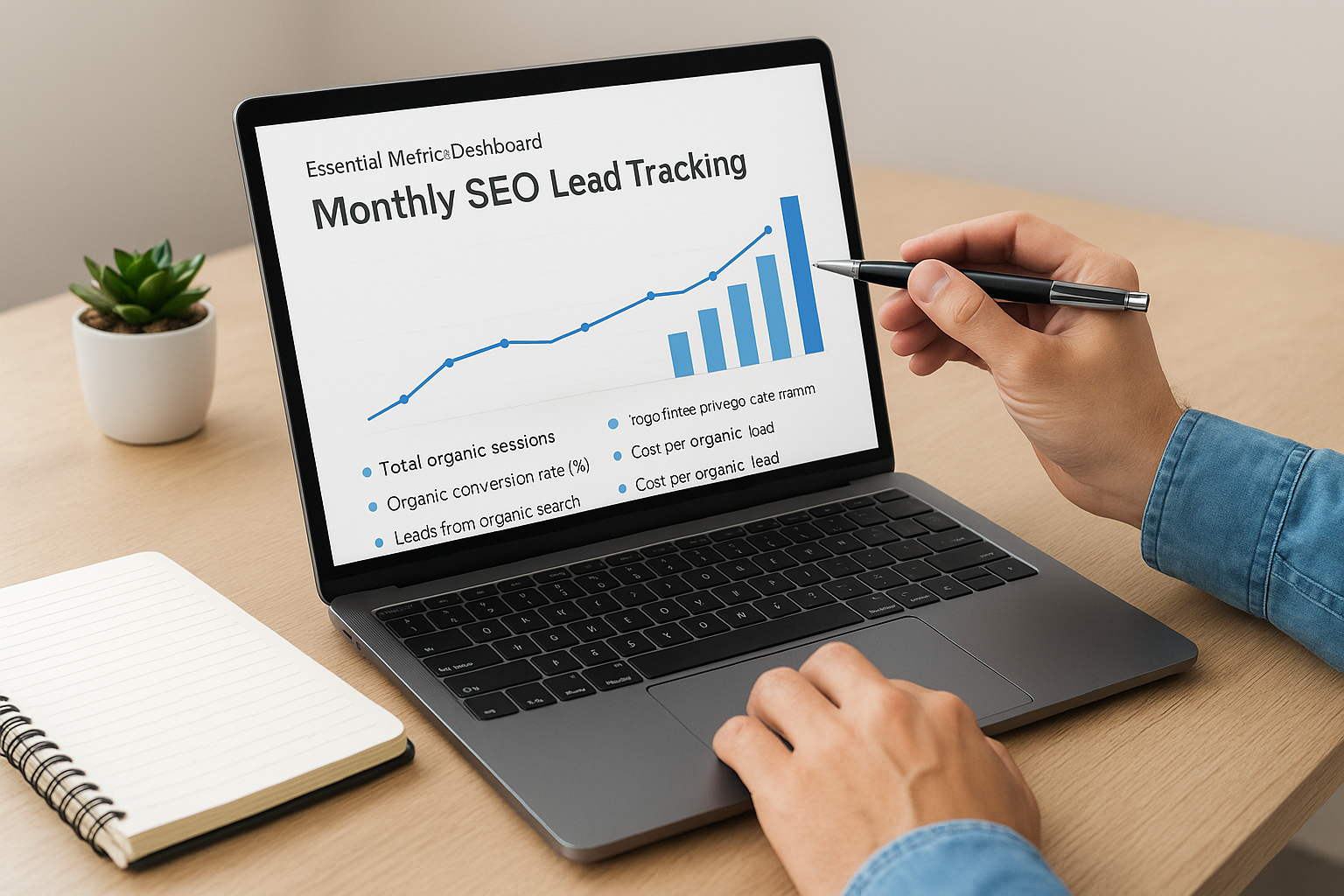
Essential Metrics Dashboard:
Monthly SEO Lead Tracking:
- Total organic sessions
- Organic conversion rate (%)
- Leads from organic search
- Cost per organic lead
- Revenue from organic leads
- Average ranking position for target keywords
- Pages ranking in top 3 positions
- New ranking keywords gained
- Form submissions by landing page
- Phone calls from organic traffic
Set up goal tracking in Google Analytics 4 for every conversion action including form submissions, phone clicks, chat initiations, and PDF downloads. Configure event tracking with proper parameters so you can segment organic traffic performance separately from other channels.
Identify and fix conversion bottlenecks
Analyze your data to find pages that rank well but convert poorly. High traffic with low conversions signals a mismatch between what the page promises in search results and what it delivers when visitors arrive. Check pages with above-average bounce rates and below-average time on page because these metrics indicate content that fails to engage prospects. Test different headline variations, form placements, and calls-to-action on underperforming pages before creating entirely new content.
Use Google Analytics behavior flow reports to see where visitors drop off in your conversion funnel. Pages with high exit rates need immediate attention. Review session recordings from tools like Microsoft Clarity to watch how real visitors interact with your forms and content. You’ll spot usability issues that data alone never reveals.
Regular analysis of your SEO for lead generation performance reveals exactly which pages and tactics deserve more investment and which ones waste resources without producing qualified prospects.
Scale what works across more keywords
Once you identify pages that consistently generate leads, replicate their format and optimization approach. Create similar landing pages for related keywords in nearby locations or adjacent service variations. Your top-performing blog posts show you which topics resonate most with prospects, giving you a content roadmap for expansion. Build out topic clusters around your winners by creating supporting articles that link to your proven conversion pages.
Expand successful pages with additional keyword variations. Update high-performing content every quarter with fresh examples and current information to maintain rankings while targeting new long-tail variations. Identify quick-win keywords where you rank positions 4-10 and optimize those pages to break into the top three spots where click-through rates multiply.
Next steps for your SEO leads
You now have a complete framework for building sustainable lead generation through organic search. Start with your website foundations and keyword research before you create new content, because optimization on a broken site produces no results. Pick three high-intent keywords from your research and create one piece of content for each funnel stage this month. Track your conversions from day one so you know which pages actually generate qualified prospects.
Most businesses try to optimize everything at once and end up with mediocre results across the board. Focus your efforts on one service area or location first, prove your system works, then replicate it for other offerings. The compound effect of SEO for lead generation takes three to six months to show significant traction, but the leads keep coming without ongoing ad spend.
Need help implementing these strategies for your business? Client Factory builds custom SEO systems that turn search traffic into qualified leads for service businesses and law firms. We handle the technical optimization, content creation, and conversion strategy while you focus on serving clients.
