


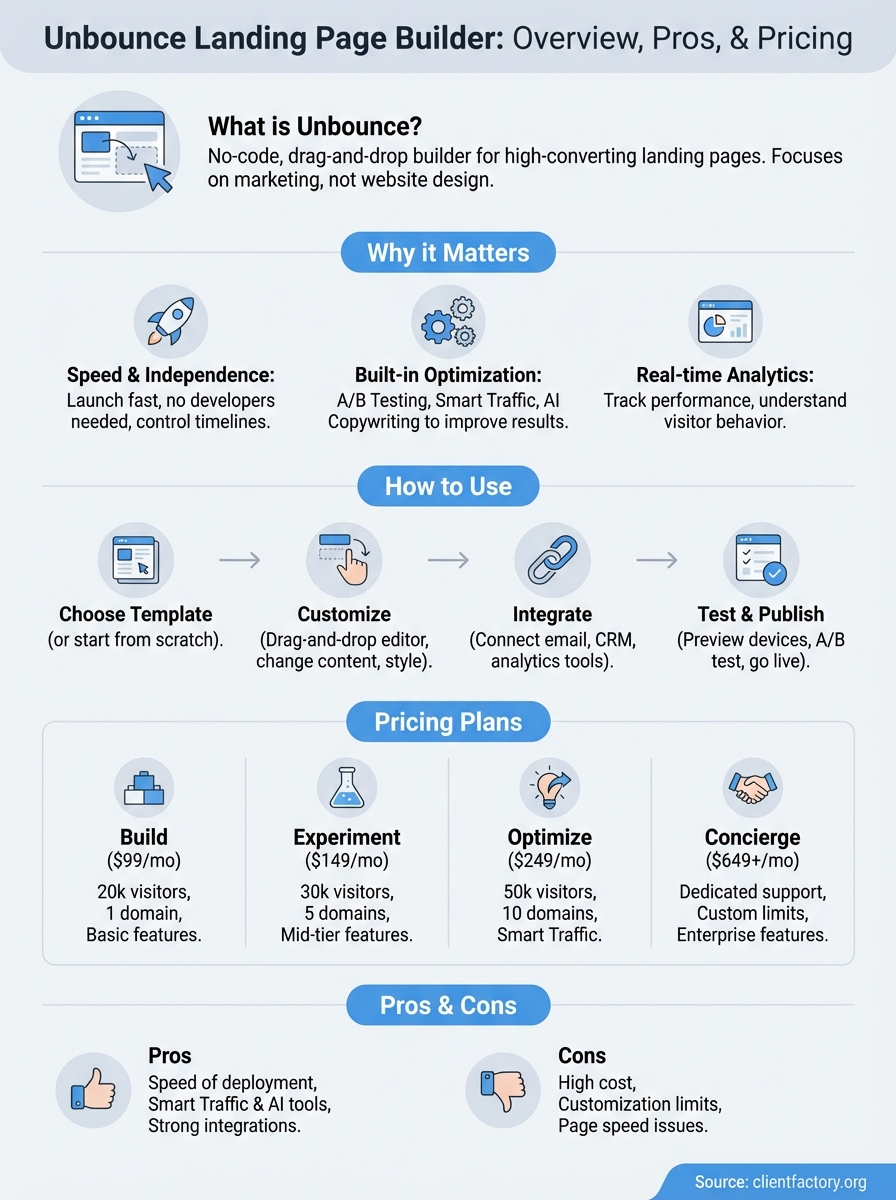
Unbounce is a drag and drop landing page builder that lets you create, publish, and test landing pages without writing code. You design pages using a visual editor, connect them to your marketing campaigns, and use built-in tools to optimize conversions. Unlike traditional website builders, Unbounce focuses specifically on creating high-converting landing pages for ads, email campaigns, and other marketing activities.
This guide walks you through everything you need to know about Unbounce. You’ll learn how the platform works, what features you get at each pricing tier, and how it stacks up against competitors. We’ll show you the actual process of building a landing page, explain the pros and cons based on real usage, and help you decide if it’s the right tool for your business. Whether you’re evaluating Unbounce for the first time or comparing it to other options, you’ll have a clear picture of what to expect.
Why the Unbounce landing page builder matters
You lose potential clients every day when your landing pages fail to convert. Traditional website builders force you to compromise between design flexibility and conversion optimization, while hiring developers for every campaign change burns time and budget. The Unbounce landing page builder solves this problem by giving you a platform built specifically for creating pages that turn visitors into leads and customers.

Speed and independence for marketing teams
Your marketing campaigns move fast, and you need landing pages that keep pace. Unbounce eliminates the developer bottleneck by letting you build and launch pages in hours instead of weeks. You can test new offers, adjust messaging based on performance data, and respond to market changes without submitting IT tickets or waiting for development sprints. This independence means you control your campaign timeline and can capitalize on opportunities before they expire.
Marketing teams that control their own landing page creation launch campaigns 3-5x faster than those dependent on developers.
Built-in optimization that improves results
Standard page builders give you design tools and nothing more. Unbounce includes conversion tools like A/B testing, Smart Traffic, and AI copywriting that help you improve performance after launch. You get real-time analytics that show exactly how visitors interact with your pages, which elements drive conversions, and where people drop off. This data helps you make informed decisions about what changes will actually move the needle on your conversion rates.
How to use Unbounce to build landing pages
Building a landing page in Unbounce follows a straightforward process that takes you from template selection to published page in under an hour. You start by choosing a template (or building from scratch), customize the design using the drag and drop editor, connect your marketing tools, and then publish directly to your domain. The platform guides you through each step with clear options and preview modes that show exactly how your page will look on desktop, tablet, and mobile devices.
Choose a template or start from scratch
Your first decision is whether to use one of Unbounce’s pre-built templates or create a page from scratch. Templates give you a proven starting point designed for specific goals like lead generation, webinar signups, or product launches. Each template includes conversion-focused layouts, placeholder content, and design elements you can customize. Browse templates by industry, conversion goal, or visual style to find one that matches your campaign needs.
Starting from scratch gives you complete creative control but requires more time and design knowledge. You work with a blank canvas and add sections, forms, images, and text boxes as needed. This approach works best when you have specific brand guidelines or need a layout that doesn’t fit standard templates. Most users save time by starting with a template and heavily customizing it rather than building from zero.
Customize your page with the drag and drop editor
The Unbounce editor lets you click any element on your page to modify it. You can change text content, colors, fonts, and spacing without touching code. Drag elements around the page to reposition them, resize images by pulling their corners, and duplicate sections when you need similar layouts. The left sidebar shows all available elements you can add, including buttons, forms, countdown timers, and video embeds.
Smart sections help maintain consistent spacing and alignment as you build. When you move an element, the editor shows alignment guides that snap it into place relative to other content. You can also adjust padding and margins using visual controls or by entering specific pixel values. The style panel gives you access to advanced options like custom CSS, dynamic text replacement, and mobile-specific designs that differ from your desktop layout.
The drag and drop interface means you make changes in real time and see exactly what visitors will experience before you publish.
Set up conversion tracking and integrations
Your landing page needs to track conversions and send data to your marketing tools. Click the conversion goals button to define what counts as a conversion on your page. Options include form submissions, button clicks, or visitors reaching a specific section. Unbounce automatically tracks these events and displays conversion rates in your dashboard.
Connect your email service, CRM, or analytics platform through the integrations panel. Popular connections include Mailchimp, HubSpot, Salesforce, and Google Analytics. Most integrations require you to authenticate your account and map form fields to the correct fields in your connected tool. Webhooks let you send data to custom endpoints when someone converts, giving you flexibility for advanced marketing automation.
Test and publish your landing page
Before publishing, preview your page on different devices using the preview modes. The Unbounce landing page builder shows you exactly how the page renders on phones, tablets, and desktop screens. Check that all buttons work, forms submit correctly, and images load properly. You can also send preview links to colleagues for feedback without publishing the page publicly.
Publishing takes two approaches: you can either host the page on an Unbounce subdomain or publish it to your own custom domain. Custom domains require you to update DNS settings or install a WordPress plugin if you use that platform. After publishing, the A/B testing feature lets you create variants of your page and automatically split traffic between them to find which version converts better.
Unbounce pricing plans and what you get
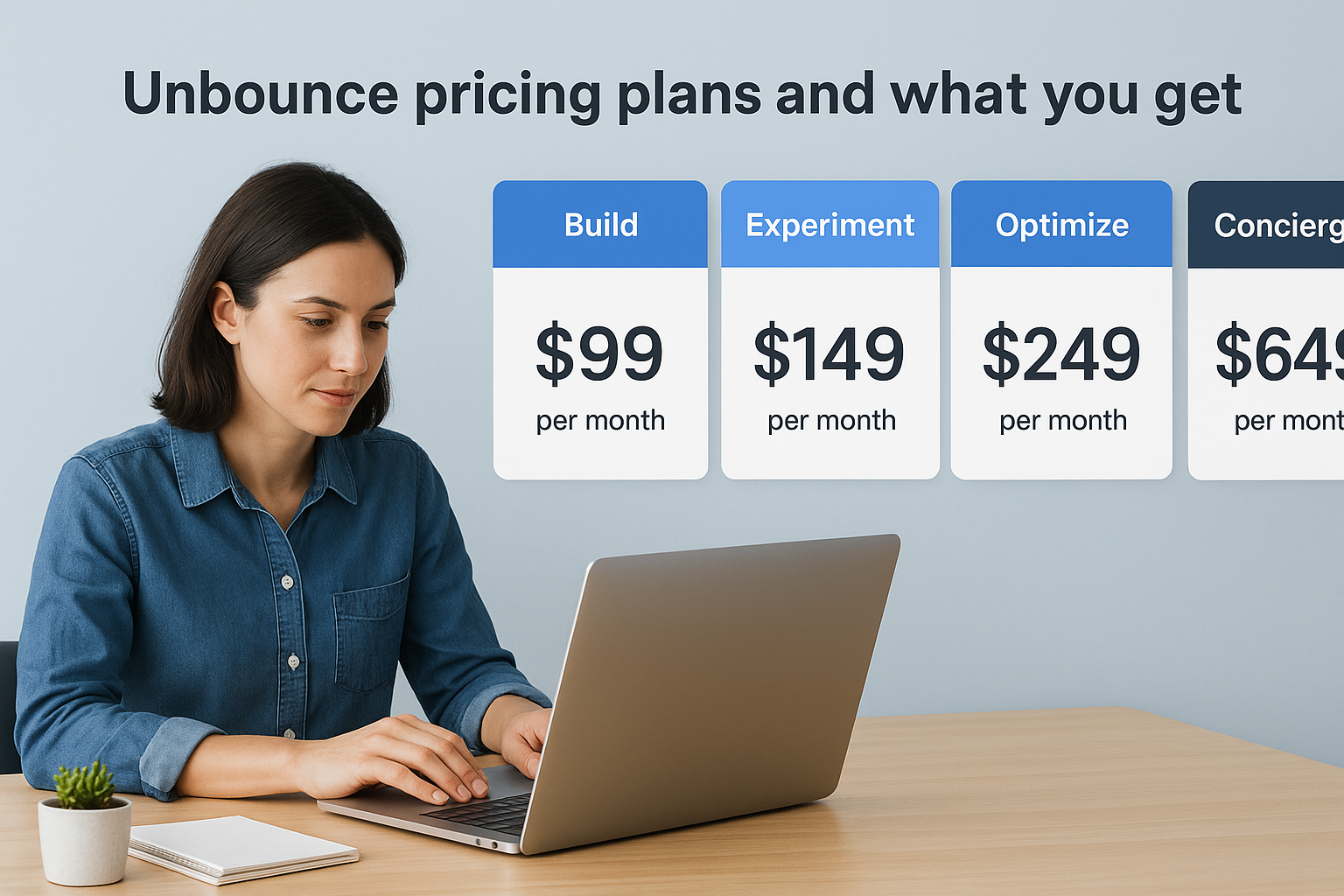
Unbounce offers four pricing tiers that scale based on your traffic volume, number of domains, and access to advanced features. Each plan includes unlimited landing pages, popups, and sticky bars, but the key differences come down to visitor limits, Smart Traffic availability, and support levels. You pay less when you commit to annual billing, with discounts up to 25% compared to monthly payments.
Build plan: Starting point for basic campaigns
The Build plan starts at $99 per month ($74 annually) and gives you everything needed to launch your first campaigns. You get up to 20,000 visitors per month on a single domain with access to the drag and drop builder, AI copywriting, and basic analytics. This plan works well when you run focused campaigns on one website and need reliable page creation tools without advanced optimization features.
Your Build plan includes unlimited conversions and unlimited pages, meaning you pay the same flat rate regardless of how many leads you generate. The platform gives you access to all templates, integrations with major marketing tools, and the ability to run basic A/B tests. However, you won’t get Smart Traffic, which automatically routes visitors to the best-performing page variant.
Experiment and Optimize plans: Mid-tier options
The Experiment plan costs $149 monthly ($112 annually) and increases your visitor limit to 30,000 while supporting up to five domains. You gain the same core features as the Build plan but with higher traffic capacity for growing businesses running multiple campaigns. This tier makes sense when you manage campaigns across several websites or need room to scale beyond 20,000 monthly visitors.
Optimize plan pricing starts at $249 per month ($187 annually) and includes Smart Traffic, the AI-powered routing system that maximizes conversions. You get 50,000 monthly visitors across 10 domains, plus priority support and advanced reporting features. Smart Traffic uses machine learning to analyze visitor behavior and automatically sends each person to the landing page variant where they’re most likely to convert.
Smart Traffic can increase conversion rates by 30% or more by matching visitors with the best-performing page variant based on their characteristics.
Concierge plan: Enterprise support and unlimited scale
The Concierge plan starts at $649 per month and removes most limits on visitor traffic and domains. You work directly with a dedicated success manager who helps you optimize campaigns, troubleshoot issues, and implement advanced strategies. This plan includes everything from lower tiers plus white-glove onboarding, strategic consulting, and priority access to new features.
Enterprise customers get flexible pricing based on their specific needs, including custom visitor limits and specialized integrations. The unbounce landing page builder at this level supports high-volume marketing operations that need reliability, advanced reporting, and direct access to experts who understand your business goals.
Pros and cons of the Unbounce landing page builder
Every landing page tool comes with trade-offs between features, cost, and usability. The Unbounce landing page builder delivers strong conversion optimization tools and independence from developers, but you pay premium prices and face some workflow limitations. Understanding these strengths and weaknesses helps you decide if the platform matches your specific marketing needs and budget constraints.
Main advantages you get with Unbounce
Speed stands out as Unbounce’s biggest advantage for marketing teams that need to launch campaigns quickly. You create, test, and publish pages without waiting for IT resources or external contractors. The drag and drop interface reduces the time from concept to live page from weeks to hours, letting you capitalize on time-sensitive opportunities and test new offers faster than competitors still dependent on developers.
Smart Traffic and built-in optimization tools separate Unbounce from basic page builders that stop at design. The AI-powered routing system learns which page variants convert best for different visitor types and automatically directs traffic accordingly. You also get A/B testing built directly into your workflow, dynamic text replacement that personalizes headlines based on search terms, and AI copywriting assistance that suggests content improvements. These features help you improve conversion rates after launch instead of guessing what might work.
Integration options give you flexibility to connect Unbounce with your existing marketing stack. You can sync form submissions directly to your CRM, email platform, and analytics tools without custom coding or middleware services. The platform supports direct connections to hundreds of tools, including major platforms like Salesforce, HubSpot, Mailchimp, and Google Analytics.
Marketing teams using Smart Traffic typically see conversion rate improvements of 20-30% compared to manual traffic splitting.
Limitations and drawbacks to consider
Pricing creates a barrier for small businesses and agencies managing multiple client domains. The monthly costs climb quickly when you need more domains or higher visitor limits, and the Concierge plan required for enterprise features starts at $649 monthly. Agencies often find themselves paying substantially more than competitors charge for similar visitor volumes, especially when managing campaigns across dozens of client websites.
Template customization has boundaries that force workarounds for complex designs. You can’t create global content blocks that update across multiple pages, meaning you manually change identical elements on every landing page when branding or messaging shifts. The mobile responsiveness works well but locks you into desktop and mobile views without tablet-specific layouts. Advanced users sometimes hit walls where they need custom code to achieve specific design effects.
Page speed occasionally suffers when you add extensive custom scripts or complex animations. Your landing pages may load slower than hand-coded alternatives, particularly on mobile devices with limited bandwidth. The platform also lacks advanced collaboration features like inline commenting or version control that agencies need when multiple team members review and edit pages simultaneously.
Unbounce vs other landing page tools
Choosing the right landing page platform depends on your budget, technical skills, and specific marketing needs. The Unbounce landing page builder competes directly with tools like Instapage, Leadpages, and WordPress page builders, each offering different trade-offs between features, pricing, and ease of use. Understanding these differences helps you pick the platform that aligns with your conversion goals and workflow requirements rather than defaulting to the most popular option.
Instapage: Closest direct competitor
Instapage targets the same market as Unbounce with similar pricing and feature sets. You get advanced collaboration tools and detailed heatmaps that show exactly where visitors click and scroll on your pages. Instapage excels at team workflows with features like inline commenting, real-time editing for multiple users, and approval systems that prevent unauthorized page changes.
Unbounce wins on AI features and template variety with Smart Traffic, AI copywriting, and a larger template library. Instapage charges comparable prices but lacks the machine learning optimization that automatically improves conversion rates over time. Your choice comes down to whether you value collaboration features or AI-powered optimization more for your specific campaigns.
Leadpages: Budget-friendly alternative
Leadpages starts at $37 monthly, making it substantially cheaper than Unbounce’s $99 entry point. You sacrifice advanced features but gain affordability and simplicity that works well for solo entrepreneurs and small businesses with straightforward needs. The platform includes basic A/B testing, email integration, and mobile-responsive templates without the complexity of enterprise tools.
Unbounce delivers better optimization tools and flexibility that justify the higher price for serious marketers. Leadpages works when you need simple pages fast, but you’ll miss Smart Traffic, dynamic text replacement, and the robust analytics that help you improve performance systematically.
Budget constraints matter, but paying less for limited features costs you more in lost conversions when your pages underperform.
WordPress page builders: Different approach
WordPress builders like Elementor and Beaver Builder give you page creation inside your existing website. You avoid separate hosting costs and keep all content under one platform, which simplifies management and maintains consistent branding across your site. These tools cost less upfront and provide extreme design flexibility through custom code and thousands of plugins.
Unbounce specializes exclusively in conversion-focused landing pages with features WordPress builders don’t prioritize. You get dedicated optimization tools, faster time-to-market for campaigns, and built-in conversion tracking that WordPress requires plugin combinations to match. WordPress works better for integrated website content, while Unbounce excels at standalone campaign pages optimized purely for conversions.
Next steps
You now understand what the Unbounce landing page builder offers, how much it costs, and whether it fits your marketing needs. Your next move depends on your specific situation: businesses with simple landing page needs might start with the Build plan, while companies running multiple campaigns should evaluate the Optimize tier. Consider your monthly visitor volume when choosing a plan to avoid paying for unused capacity or hitting limits.
Test the platform yourself with Unbounce’s 14-day free trial to see if the drag and drop editor matches your workflow. Build a real landing page for an active campaign, run it against your current pages, and measure the conversion difference to make an informed decision.
Landing pages only succeed when they connect to a complete client acquisition strategy. If you need help building conversion funnels that turn visitors into paying clients, Client Factory specializes in data-driven client acquisition systems for service businesses. We optimize every step from ad click to signed contract, ensuring your pages deliver qualified leads.
